muratartim/eclipsetactics_game_server
Game engine server for the online strategy game 'Eclipse Tactics'.
500K+
muratartim/eclipsetactics_game_server repository overview
EclipseTacticsServer



TCP/IP game server of the online strategy game 'Eclipse Tactics'. Eclipse Tactics is a multiplayer, turn-based, online strategy game in a sci-fi theme. Create your own special teams from a large number of fully customizable units. Deploy your base and units, and destroy your opponent! Check out the game at http://www.eclipsetactics.com
How to run the project
To run the project, you first need to run the database server. You can run the database server in a Docker container as explained below. After that, you would need to specify VM arguments and environment variables in order to run the application in development environment.
Running the database server
- Download sample data for SQL server: sample data
- Create directory 'backups' and copy the downloaded 'sql_data.tar' file into the directory.
- Create a named volume by executing the following command outside of 'backups' directory:
docker container run --rm -v eclipsetactics_sql_data:/dbdata -v $(pwd)/backups:/backup ubuntu bash -c "cd /dbdata && tar xvf /backup/sql_data.tar --strip 1"
- Create & start the database server from where the docker-compose.yml file is located:
docker-compose up
- Stop & remove the database server container from where the docker-compose.yml file is located:
docker-compose down
Main class
server.GameServer
VM arguments
-Xms128m -Xmx512m -XX:+UseStringDeduplication -Xverify:none -server -XX:+UseParallelGC
Environment variables
- databaseHostname=localhost
- databasePort=1527
- databasePath=/dbs
- databaseUsername=aurora
- databasePassword=17891917
How to build & run the project in a Docker container
EclipseTacticsServer is also available as a container image in Docker Hub. The container can be run as follows:
- Run the database server as explained in 'Running the database server'.
- Pull the image from Docker Hub:
docker image pull muratartim/eclipsetactics_game_server:latest
- Create & run the container:
docker container run -e databaseHostname=eclipsetactics_sql_server -e databasePort=1527 -e databasePath=/dbs -e databaseUsername=aurora -e databasePassword=17891917 -p 1234:1234 -d --name eclipsetactics_game_server --network eclipsetactics_network muratartim/eclipsetactics_game_server
How to run the platform using Docker Compose
- Download sample data for SQL server: sample data
- Create directory 'backups' and copy the downloaded 'sql_data.tar' file into the directory.
- Create a named volume by executing the following command outside of 'backups' directory:
docker container run --rm -v eclipsetactics_sql_data:/dbdata -v $(pwd)/backups:/backup ubuntu bash -c "cd /dbdata && tar xvf /backup/sql_data.tar --strip 1"
- Create & start the whole platform from where the docker-compose.yml file is located:
docker-compose up
- Stop & remove the platform from where the docker-compose.yml file is located:
docker-compose down
How to deploy the platform on AWS with single EC2 instance
- Download the Deployment Template File One-Instance-Arch-CloudFormation.yml.
- Validate the template by running the following command (from where the Deployment Template File is located):
aws cloudformation validate-template --template-body file://./One-Instance-Arch-CloudFormation.yml
- Create an AWS CloudFormation Stack using the following command (from where the Deployment Template File is located). Note that, this command will deploy the platform using the default parameters (which are valid for the 'eu-central-1' AWS Region).
aws cloudformation create-stack --stack-name eclipsetactics --template-body file://./One-Instance-Arch-CloudFormation.yml
- Delete & rollback the stack as follows:
aws cloudformation delete-stack --stack-name eclipsetactics
This will deploy the platform on AWS utilizing the following architecture:
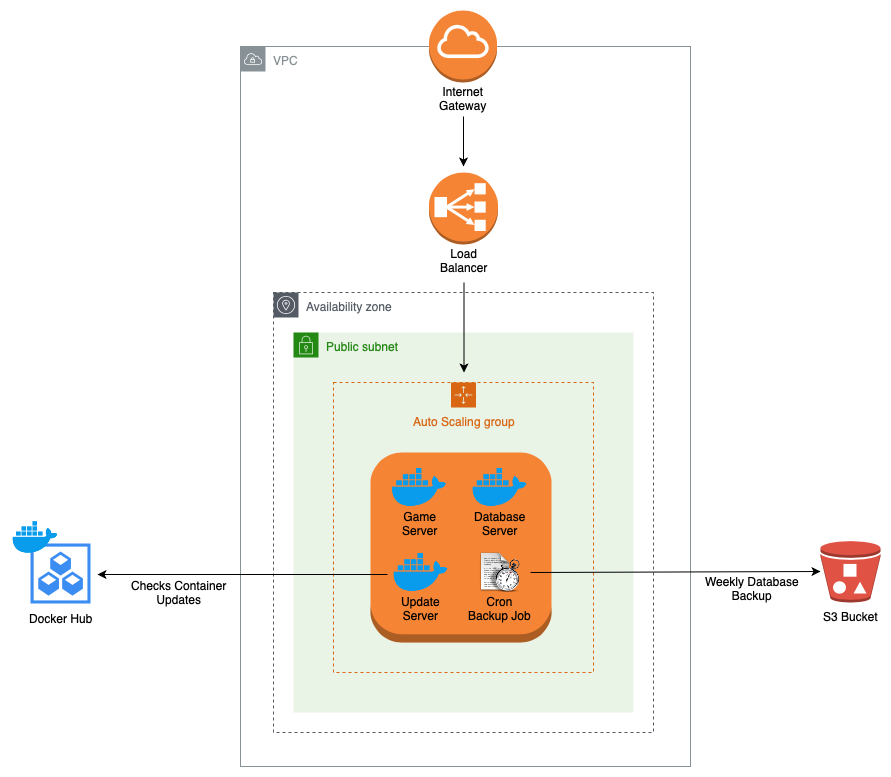
Full stack deployment on AWS
- Download the Deployment Template File Full-Stack-High-Availability-Arch-CloudFormation.yml.
- Validate the template by running the following command (from where the Deployment Template File is located):
aws cloudformation validate-template --template-body file://./Full-Stack-High-Availability-Arch-CloudFormation.yml
- Create an AWS CloudFormation Stack using the following command (from where the Deployment Template File is located). Note that, this command will deploy the platform using the default parameters (which are valid for the 'eu-central-1' AWS Region).
aws cloudformation create-stack --stack-name eclipsetactics --template-body file://./Full-Stack-High-Availability-Arch-CloudFormation.yml
- Delete & rollback the stack as follows:
aws cloudformation delete-stack --stack-name eclipsetactics
This will deploy the platform on AWS utilizing the following architecture:
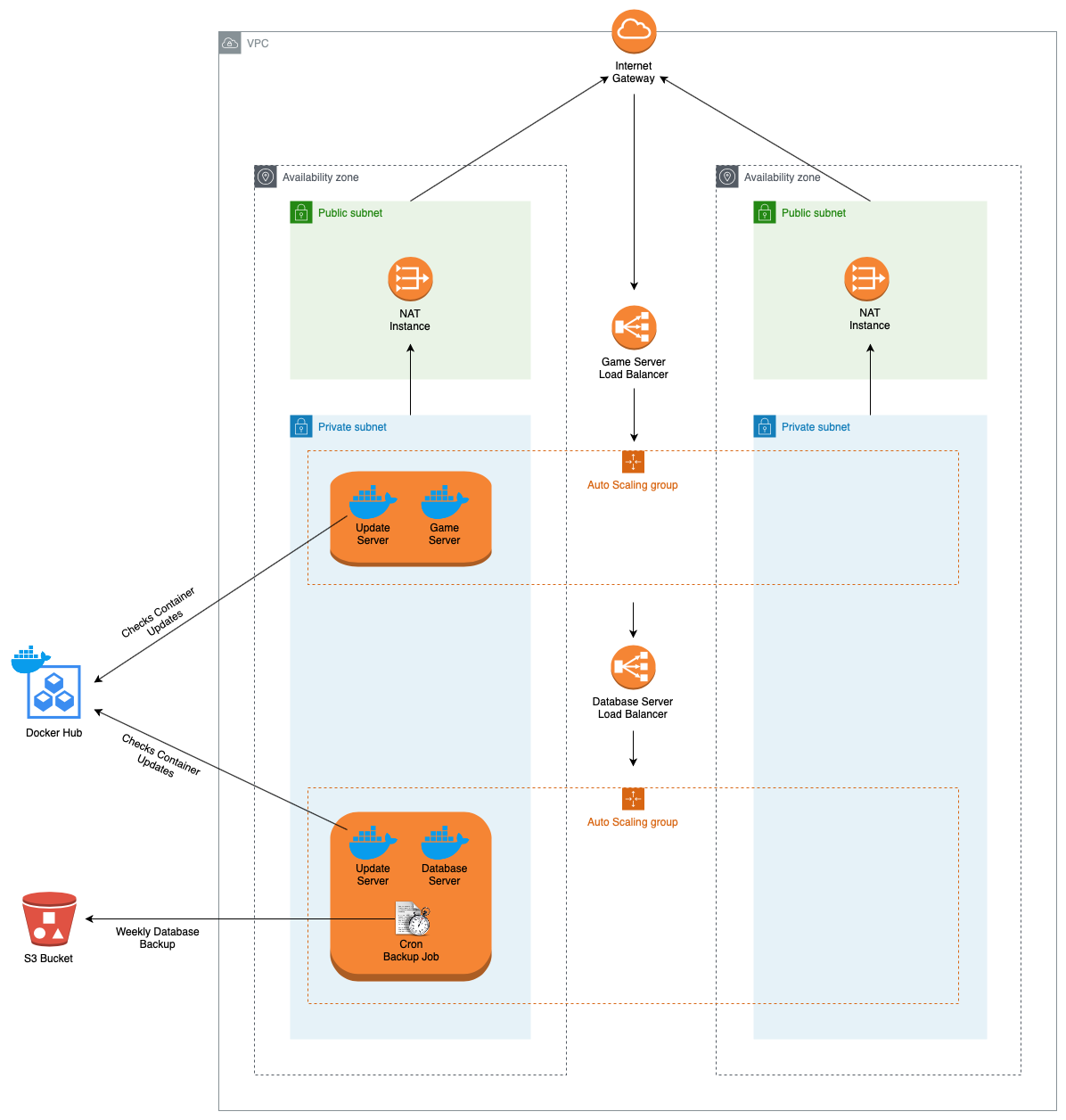
Tag summary
Content type
Image
Digest
Size
262.9 MB
Last updated
about 6 years ago
docker pull muratartim/eclipsetactics_game_server