n1try/wakapi
A minimalist, self-hosted WakaTime-compatible backend for coding statistics
500K+
n1try/wakapi repository overview
📊 Wakapi


A minimalist, self-hosted WakaTime-compatible backend for coding statistics.
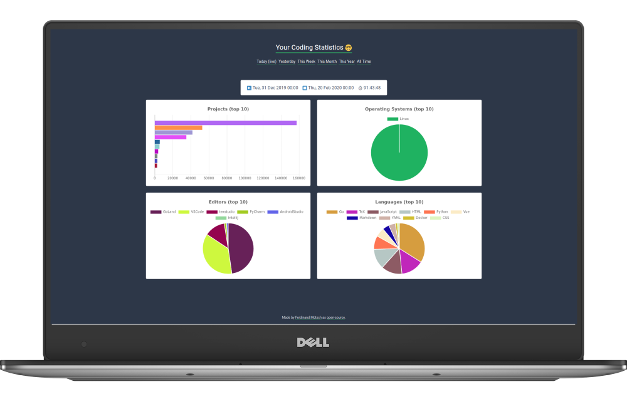
Table of Contents
- User Survey
- Features
- How to use
- Configuration Options
- API Endpoints
- Prometheus Export
- Best Practices
- Developer Notes
- Support
- FAQs
📬 User Survey
I'd love to get some community feedback from active Wakapi users. If you want, please participate in the recent user survey. Thanks a lot!
🚀 Features
- ✅ 100 % free and open-source
- ✅ Built by developers for developers
- ✅ Statistics for projects, languages, editors, hosts and operating systems
- ✅ Badges
- ✅ REST API
- ✅ Partially compatible with WakaTime
- ✅ WakaTime relay to use both
- ✅ Support for Prometheus exports
- ✅ Self-hosted
⌨️ How to use?
There are different options for how to use Wakapi, ranging from out hosted cloud service to self-hosting it. Regardless of which option choose, you will always have to do the client setup in addition.
☁️ Option 1: Use wakapi.dev
If you want to you out free, hosted cloud service, all you need to do is create an account and the set up your client-side tooling (see below).
However, we do not guarantee data persistence, so you might potentially lose your data if the service is taken down some day ❕
🐳 Option 2: Use Docker
# Create a persistent volume
$ docker volume create wakapi-data

# Run the container
$ docker run -d \
  -p 3000:3000 \
  -e "WAKAPI_PASSWORD_SALT=$(cat /dev/urandom | tr -dc 'a-zA-Z0-9' | fold -w ${1:-32} | head -n 1)" \
  -v wakapi-data:/data \
  --name wakapi n1try/wakapi
Note: By default, SQLite is used as a database. To run Wakapi in Docker with MySQL or Postgres, see Dockerfile and config.default.yml for further options.
📦 Option 3: Run a release
# Download the release and unpack it
$ wget https://github.com/muety/wakapi/releases/download/1.20.2/wakapi_linux_amd64.zip
$ unzip wakapi_linux_amd64.zip

# Optionally adapt config to your needs
$ vi config.yml

# Run it
$ ./wakapi
🧑💻 Option 4: Run from source
Prerequisites
- Go >= 1.13 (with
$GOPATHproperly set) - gcc (to compile go-sqlite3)
- Fedora / RHEL:
dnf install @development-tools - Ubuntu / Debian:
apt install build-essential - Windows: See here
- Fedora / RHEL:
Compile & Run
# Adapt config to your needs
$ cp config.default.yml config.yml
$ vi config.yml

# Install packaging tool
$ export GO111MODULE=on
$ go get github.com/markbates/pkger/cmd/pkger

# Build the executable
$ go generate
$ go build -o wakapi

# Run it
$ ./wakapi
Note: By default, the application is running in dev mode. However, it is recommended to set ENV=production for enhanced performance and security. To still be able to log in when using production mode, you either have to run Wakapi behind a reverse proxy, that enables for HTTPS encryption (see best practices) or set security.insecure_cookies = true in config.yml.
💻 Client Setup
Wakapi relies on the open-source WakaTime client tools. In order to collect statistics to Wakapi, you need to set them up.
- Set up WakaTime for your specific IDE or editor. Please refer to the respective plugin guide
- Editing your local
~/.wakatime.cfgfile as follows
[settings]

# Your Wakapi server URL or 'https://wakapi.dev/api/heartbeat' when using the cloud server
api_url = http://localhost:3000/api/heartbeat

# Your Wakapi API key (get it from the web interface after having created an account)
api_key = 406fe41f-6d69-4183-a4cc-121e0c524c2b
Optionally, you can set up a client-side proxy in addition.
🔧 Configuration Options
You can specify configuration options either via a config file (default: config.yml, customziable through the -c argument) or via environment variables. Here is an overview of all options.
| YAML Key | Environment Variable | Default | Description |
|---|---|---|---|
env | ENVIRONMENT | dev | Whether to use development- or production settings |
app.custom_languages | - | - | Map from file endings to language names |
server.port | WAKAPI_PORT | 3000 | Port to listen on |
server.listen_ipv4 | WAKAPI_LISTEN_IPV4 | 127.0.0.1 | IPv4 network address to listen on (leave blank to disable IPv4) |
server.listen_ipv6 | WAKAPI_LISTEN_IPV6 | ::1 | IPv6 network address to listen on (leave blank to disable IPv6) |
server.tls_cert_path | WAKAPI_TLS_CERT_PATH | - | Path of SSL server certificate (leave blank to not use HTTPS) |
server.tls_key_path | WAKAPI_TLS_KEY_PATH | - | Path of SSL server private key (leave blank to not use HTTPS) |
server.base_path | WAKAPI_BASE_PATH | / | Web base path (change when running behind a proxy under a sub-path) |
security.password_salt | WAKAPI_PASSWORD_SALT | - | Pepper to use for password hashing |
security.insecure_cookies | WAKAPI_INSECURE_COOKIES | false | Whether or not to allow cookies over HTTP |
security.cookie_max_age | WAKAPI_COOKIE_MAX_AGE | 172800 | Lifetime of authentication cookies in seconds or 0 to use Session cookies |
db.host | WAKAPI_DB_HOST | - | Database host |
db.port | WAKAPI_DB_PORT | - | Database port |
db.user | WAKAPI_DB_USER | - | Database user |
db.password | WAKAPI_DB_PASSWORD | - | Database password |
db.name | WAKAPI_DB_NAME | wakapi_db.db | Database name |
db.dialect | WAKAPI_DB_TYPE | sqlite3 | Database type (one of sqlite3, mysql, postgres, cockroach) |
db.max_conn | WAKAPI_DB_MAX_CONNECTIONS | 2 | Maximum number of database connections |
db.ssl | WAKAPI_DB_SSL | false | Whether to use TLS encryption for database connection (Postgres and CockroachDB only) |
Supported databases
Wakapi uses GORM as an ORM. As a consequence, a set of different relational databases is supported.
- SQLite (default, easy setup)
- MySQL (recommended, because most extensively tested)
- MariaDB (open-source MySQL alternative)
- Postgres (open-source as well)
- CockroachDB (cloud-native, distributed, Postgres-compatible API)
Client-side proxy (optional)
See the advanced setup instructions.
🔧 API Endpoints
The following API endpoints are available. A more detailed Swagger documentation is about to come (#40).
POST /api/heartbeatGET /api/summarystringparameterinterval: One oftoday,day,week,month,year,any
GET /api/compat/wakatime/v1/users/current/all_time_since_today(see Wakatime API docs)GET /api/compat/wakatime/v1/users/current/summaries(see Wakatime API docs)GET /api/health
⤴️ Prometheus Export
If you want to export your Wakapi statistics to Prometheus to view them in a Grafana dashboard or so please refer to an excellent tool called wakatime_exporter.
It is a standalone webserver that connects to your Wakapi instance and exposes the data as Prometheus metrics. Although originally developed to scrape data from WakaTime, it will mostly for with Wakapi as well, as the APIs are partially compatible.
Simply configure the exporter with WAKA_SCRAPE_URI to equal "https://wakapi.your-server.com/api/compat/wakatime/v1" and set your API key accordingly.
👍 Best Practices
It is recommended to use wakapi behind a reverse proxy, like Caddy or nginx to enable TLS encryption (HTTPS).
However, if you want to expose your wakapi instance to the public anyway, you need to set server.listen_ipv4 to 0.0.0.0 in config.yml
🤓 Developer Notes
Running tests
CGO_FLAGS="-g -O2 -Wno-return-local-addr" go test -json -coverprofile=coverage/coverage.out ./... -run ./...
🙏 Support
If you like this project, please consider supporting it 🙂. You can donate either through buying me a coffee or becoming a GitHub sponsor. Every little donation is highly appreciated and boosts the developers' motivation to keep improving Wakapi!
❔ FAQs
Since Wakapi heavily relies on the concepts provided by WakaTime, their FAQs apply to Wakapi for large parts as well. You might find answers there.
What data is sent to Wakapi?
- File names
- Project names
- Editor names
- You computer's host name
- Timestamps for every action you take in your editor
- ...
See the related WakaTime FAQ section for details.
If you host Wakapi yourself, you have control over all your data. However, if you use our webservice and are concerned about privacy, you can also exclude or obfuscate certain file- or project names.
What happens if I'm offline?
All data is cached locally on your machine and sent in batches once you're online again.
How did Wakapi come about?
Wakapi was started when I was a student, who wanted to track detailed statistics about my coding time. Although I'm a big fan of WakaTime I didn't want to pay 9 $ a month back then. Luckily, most parts of WakaTime are open source!
How does Wakapi compare to WakaTime?
Wakapi is a small subset of WakaTime and has a lot less features. Cool WakaTime features, that are missing Wakapi, include:
- Leaderboards
- Embeddable Charts
- Personal Goals
- Team- / Organization Support
- Integrations (with GitLab, etc.)
- Richer API
WakaTime is worth the price. However, if you only want basic statistics and keep sovereignty over your data, you might want to go with Wakapi.
How are durations calculated?
Inferring a measure for your coding time from heartbeats works a bit different than in WakaTime. While WakaTime has timeout intervals, Wakapi essentially just pads every heartbeat, that occurs after a longer pause, with 2 extra minutes.
Here is an example (circles are heartbeats):
|---o---o--------------o---o---|
|   |10s|      3m      |10s|   |
It is unclear how to handle the three minutes in between. Did the developer do a 3-minute break or were just no heartbeats being sent, e.g. because the developer was starring at the screen find a solution, but not actually typing code.
- WakaTime (with 5 min timeout): 3 min 20 sec
- WakaTime (with 2 min timeout): 20 sec
- Wakapi: 10 sec + 2 min + 10 sec = 2 min 20 sec
Wakapi adds a "padding" of two minutes before the third heartbeat. This is why total times will slightly vary between Wakapi and WakaTime.
🙏 Thanks
I highly appreciate the efforts of @alanhamlett and the WakaTime team and am thankful for their software being open source.
📓 License
GPL-v3 @ Ferdinand Mütsch
Tag summary
Content type
Image
Digest
sha256:7a14217db…
Size
18.1 MB
Last updated
14 days ago
docker pull n1try/wakapi