neurodata/fsl_1604
Ubuntu 16.04 container with FSL.
2.3K
neurodata/fsl_1604 repository overview
Documentation
The software contained in this docker container is the FSL 5.0.7 installation built from debian. For details on FSL, please see the FSL website. For the installed FSL package, please see debian FSL.
Acknowledgments
When using this software, please find the respective package you are using from the FSL wiki, and use the appropriate citation recommended by the FSL team.
Instructions
In your terminal window, type:
$ docker pull neurodata/fsl_1604
Like a normal docker container, we can start our container with a single line. We can start the container by typing:
$ docker run -ti --entrypoint /bin/bash -v <desired-host-path>:<desired-docker-path> neurodata/fsl_1604
# <desired-host-path>: the path to a local directory you want to process data on
# <desired-docker-path>: the path in which your local data will be accessible
You can then use all of the standard FSL functions from inside of the container.
Example
In this example, we will demonstrate a simple use of the FSL utilities on a single brain. To accomplish this, we will download a single anatomical image, skullstrip it, and then look at the result. To verify that FSL worked properly, you can install the mricron nifti viewer, or use your favorite nifti image viewer.
First, switch to your local downloads folder, and obtain the following T1w anatomical image:
cd ~/Downloads
wget http://openconnecto.me/mrdata/share/demo_data/sub-0025864_ses-1_T1w.nii.gz
This image can be visualized as follows:
mricron sub-0025864_ses-1_T1w.nii.gz
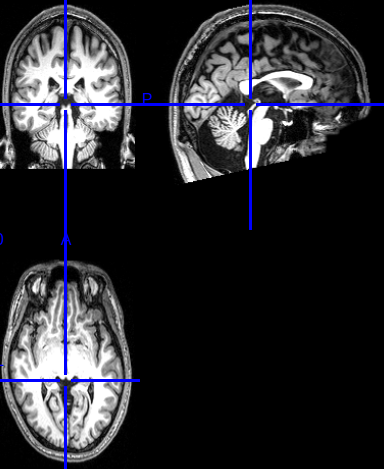
As we can see, the image is a high-resolution anatomical T1w scan, with a skull-on.
Next, pull the FSL 16.04 image locally:
docker pull neurodata/fsl_1604
Once the pull completes, enter the container and pass the appropriate directory:
docker run -ti --entrypoint /bin/bash -v ~/Downloads:/data neurodata/fsl_1604
Finally, run the algorithm:
bet /data/sub-0025864_ses-1_T1w.nii.gz /data/sub-0025864_ses-1_T1w_brain.nii.gz
Locally, navigate back to your downloads folder, and you should see the produced image, and be able to visualize it:
cd ~/Downloads
mricron sub-0025864_ses-1_T1w_brain.nii.gz
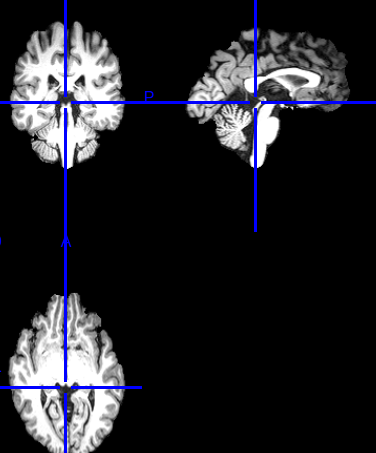
Note that the image has had its skull removed compared to what we previously visualized.
Error Reporting
If you find any errors with this docker container or have any questions, feel free to open an issue.
Tag summary
Content type
Image
Digest
Size
381.7 MB
Last updated
over 9 years ago
docker pull neurodata/fsl_1604