
nightdragon1/rconductor-agent
RCONductor agent – runs game containers for the panel.
2.2K
nightdragon1/rconductor-agent repository overview
RCONductor agent





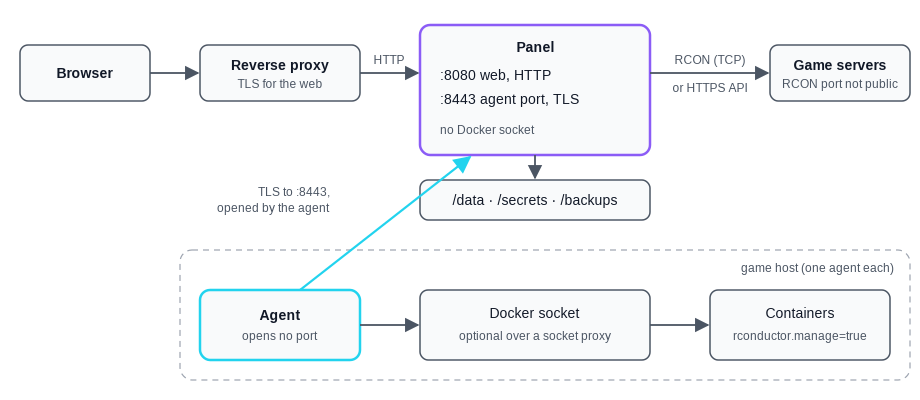
The agent of RCONductor, the self-hosted web panel for RCON-capable game
servers (image nightdragon1/rconductor-panel). One agent runs on each game
host: it reads the Docker socket, reports the containers labelled
rconductor.manage=true with state, logs and usage to the panel, and starts,
stops or restarts them on the panel's order. It opens no port; it connects
out to the panel's agent port over TLS with pinned keys.
Run the panel only in your LAN or behind a VPN, and never publish the RCON port of a game server. The agent needs the Docker socket; give it only to this container.
Tags: 1 (newest 1.x) and the exact version such as 1.3. Use the same
major version as the panel, and update the panel first.
Quick start
Make the pairing token in the panel under Agents → Pair an agent →
Make token. Until it has a token the agent waits and says so in its log.
The image is also on ghcr.io: use ghcr.io/nightdragon1/ instead of
docker.io/nightdragon1/.
How to run – A: docker run
docker run -d --name rconductor-agent --restart unless-stopped \
  --read-only --cap-drop ALL --security-opt no-new-privileges:true \
  --memory 1g --pids-limit 256 \
  --group-add "$(stat -c %g /var/run/docker.sock)" \
  -e RCD_PAIRING_TOKEN=rcd1.... \
  -v /var/run/docker.sock:/var/run/docker.sock -v rconductor-agent-secrets:/secrets \
  docker.io/nightdragon1/rconductor-agent:1.3
How to run – B: Docker Compose
compose.yaml:
services:
  agent:
    image: docker.io/nightdragon1/rconductor-agent:1.3
    restart: unless-stopped
    read_only: true
    mem_limit: 1g
    pids_limit: 256
    cap_drop: [ALL]
    security_opt: ["no-new-privileges:true"]
    group_add: ["${DOCKER_GID:-999}"]
    environment:
      RCD_PAIRING_TOKEN: "${RCD_PAIRING_TOKEN:-}"
    volumes:
      - /var/run/docker.sock:/var/run/docker.sock
      - agent-secrets:/secrets
volumes:
  agent-secrets:
echo "DOCKER_GID=$(stat -c %g /var/run/docker.sock)" > .env
echo 'RCD_PAIRING_TOKEN=rcd1....' >> .env
docker compose up -d
First steps
- Make the token in the panel and start the agent with it.
- Give your game containers the label
rconductor.manage=true. - In the panel, give a server its agent and container.
For panel and agent on one host, see the panel image.
Important variables
| Variable | Default | Purpose |
|---|---|---|
DOCKER_GID | 999 | group of /var/run/docker.sock in the Compose file; lets the agent reach the socket |
RCD_PAIRING_TOKEN | empty | pairing token, made in the panel; ignored after the pairing |
RCD_PANEL_ADDR | empty | host:port of the panel's agent port, for pairing by fingerprint or to override the token's address |
RCD_AGENT_NAME | host name | name shown in the panel |
RCD_HOST_IP | empty | address of the game host the RCON admin sees |
RCD_DOCKER_HOST | unix:///var/run/docker.sock | Docker API, also a socket proxy such as tcp://socket-proxy:2375 |
All variables: https://github.com/NightDragon1/rconductor/blob/main/docs/user/configuration.md
Links
- Source and known issues: https://github.com/NightDragon1/rconductor
- Agent on another host, with pairing by fingerprint: https://github.com/NightDragon1/rconductor/wiki/Agent-on-another-host
- Wiki with examples: https://github.com/NightDragon1/rconductor/wiki
- Releases: https://github.com/NightDragon1/rconductor/releases
Tag summary
Content type
Image
Digest
sha256:817e1c928…
Size
4.3 MB
Last updated
4 days ago
docker pull nightdragon1/rconductor-agent:1