
nightdragon1/rconductor-panel
RCONductor panel – web panel for RCON game servers.
1.9K
nightdragon1/rconductor-panel repository overview
RCONductor panel





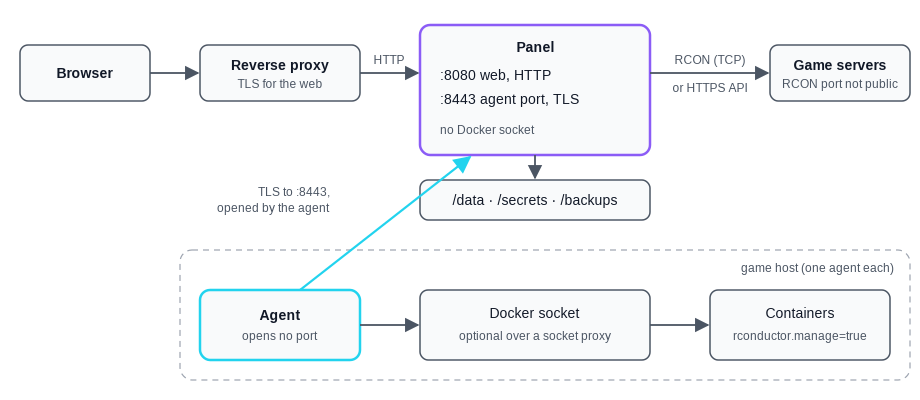
Self-hosted web panel for RCON-capable game servers, with roles and
permissions. Containers are controlled by a small agent per game host
(image nightdragon1/rconductor-agent); the panel never touches the Docker
socket.
Run it only in your LAN or behind a VPN. The web port speaks plain HTTP; TLS is the job of a reverse proxy. Never publish the RCON port of a game server.
Tags: 1 (newest 1.x) and the exact version such as 1.3. There is no latest; use :1.
Quick start
Images: docker.io/nightdragon1/rconductor-panel and rconductor-agent, for amd64
and arm64. The same images are on ghcr.io: use ghcr.io/nightdragon1/ instead.
Use the exact version such as 1.3, or 1 for the newest 1.x.
How to run – A: docker run
Panel:
docker network create rconductor
docker run -d --name rconductor-panel --network rconductor --restart unless-stopped \
  --read-only --cap-drop ALL --security-opt no-new-privileges:true \
  --memory 1g --pids-limit 256 \
  -p 8080:8080 -e RCD_AGENT_PUBLIC_ADDR=rconductor-panel:8443 \
  -v rconductor-data:/data -v rconductor-secrets:/secrets -v rconductor-backups:/backups \
  docker.io/nightdragon1/rconductor-panel:1.3
until docker logs rconductor-panel 2>&1 | grep password:; do sleep 1; done
Agent, with the pairing token from the panel (see first steps):
docker run -d --name rconductor-agent --network rconductor --restart unless-stopped \
  --read-only --cap-drop ALL --security-opt no-new-privileges:true \
  --memory 1g --pids-limit 256 \
  --group-add "$(stat -c %g /var/run/docker.sock)" \
  -e RCD_PAIRING_TOKEN=rcd1.... \
  -v /var/run/docker.sock:/var/run/docker.sock -v rconductor-agent-secrets:/secrets \
  docker.io/nightdragon1/rconductor-agent:1.3
The agent runs as a non-root user and reaches the Docker socket through the
socket's group (--group-add). The memory limit also sets the panel's Go
memory limit; raise it together with RCD_MAX_CONNECTIONS.
How to run – B: Docker Compose
compose.yaml:
services:
  panel:
    image: ${RCD_IMAGE_REPO:-docker.io/nightdragon1}/rconductor-panel:1.3
    restart: unless-stopped
    read_only: true
    mem_limit: 1g
    pids_limit: 256
    cap_drop: [ALL]
    security_opt: ["no-new-privileges:true"]
    ports:
      - "8080:8080"
    environment:
      # Agents reach the panel over the Compose network; 8443 stays unpublished.
      RCD_AGENT_PUBLIC_ADDR: panel:8443
      RCD_IMAGE_REPO: "${RCD_IMAGE_REPO:-docker.io/nightdragon1}"
    volumes:
      - data:/data
      - secrets:/secrets
      - backups:/backups
  agent:
    image: ${RCD_IMAGE_REPO:-docker.io/nightdragon1}/rconductor-agent:1.3
    restart: unless-stopped
    read_only: true
    mem_limit: 1g
    pids_limit: 256
    cap_drop: [ALL]
    security_opt: ["no-new-privileges:true"]
    group_add: ["${DOCKER_GID:-999}"]
    environment:
      RCD_PAIRING_TOKEN: "${RCD_PAIRING_TOKEN:-}"
    volumes:
      - /var/run/docker.sock:/var/run/docker.sock
      - agent-secrets:/secrets
volumes:
  data:
  secrets:
  backups:
  agent-secrets:
echo "DOCKER_GID=$(stat -c %g /var/run/docker.sock)" > .env
docker compose up -d
until docker compose logs panel | grep password:; do sleep 1; done
echo 'RCD_PAIRING_TOKEN=rcd1....' >> .env    # token from the panel, see first steps
docker compose up -d agent
Ready-made Compose files for panel and agent on separate hosts, or both on
one, are in deploy/compose (panel.yaml, agent.yaml,
all-in-one.yaml).
First steps
- Open
http://<host>:8080, sign in asadminwith the password from the log and set a new one. - Under Agents, Pair an agent, Make token; give the token to the agent and start it.
- Give your game containers the label
rconductor.manage=true; the agent manages only those. - Under Servers, tab Manage servers and server groups, New server: name, game profile, host, RCON port and password.
Important variables
Panel
| Variable | Default | Purpose |
|---|---|---|
RCD_AGENT_PUBLIC_ADDR | empty | host:port under which agents reach the panel's agent port 8443 |
RCD_PUBLIC_URL | empty | public URL of the panel, such as https://rcon.example.org, behind a reverse proxy |
RCD_TRUSTED_PROXIES | empty | addresses of your reverse proxy; only from those X-Forwarded-For and X-Forwarded-Proto count |
RCD_IMAGE_REPO | docker.io/nightdragon1 | registry the pairing dialog names and, in the Compose example, of the images; ghcr.io/nightdragon1 selects ghcr.io |
Agent
| Variable | Default | Purpose |
|---|---|---|
DOCKER_GID | 999 | group of /var/run/docker.sock in the Compose file; lets the agent reach the socket |
RCD_PAIRING_TOKEN | empty | pairing token, made in the panel; ignored after the pairing |
RCD_PANEL_ADDR | empty | host:port of the panel's agent port, for pairing by fingerprint or to override the token's address |
RCD_AGENT_NAME | host name | name shown in the panel |
RCD_HOST_IP | empty | address of the game host the RCON admin sees |
RCD_DOCKER_HOST | unix:///var/run/docker.sock | Docker API, also a socket proxy such as tcp://socket-proxy:2375 |
All variables and settings: configuration.
Links
- Source and known issues: https://github.com/NightDragon1/rconductor
- Documentation: https://github.com/NightDragon1/rconductor/tree/main/docs/user
- Wiki with examples: https://github.com/NightDragon1/rconductor/wiki
- Releases: https://github.com/NightDragon1/rconductor/releases
Tag summary
Content type
Image
Digest
sha256:a653c2d41…
Size
8 MB
Last updated
4 days ago
docker pull nightdragon1/rconductor-panel:1