nitramlegov/cncjs repository overview
Why This Fork?
This is a fork of CNCjs in order to be able to adjust the workspace settings. It was made especially for the CoMakingSpace. The changes compared to master are:
- The implementation of pull request 380
- Changes in src/web/store/defaultState.js in order to have modified default workspace settings. This is related to Issue 57 of the CoMakingSpace.
This fork will not be needed anymore once Issue 359 of CNCjs got implemented.
Installation
Ubuntu on WSL
I got it to build and run on Ubuntu using WSL with the following environment:
node -v && npm -v
v8.11.4
5.6.0
First, get the repository and navigate into it:
git clone https://github.com/comakingspace/cncjs
cd cncjs
npm install
npm run build
Raspberry Pi
On a raspberry pi, things seem to be different. Here are the steps that worked on a pi 3 (tests on a pi 2 pending...):
- Install NodeJS using the following:
sudo apt-get -qq update
wget https://raw.githubusercontent.com/sdesalas/node-pi-zero/master/install-node-v.lts.sh
chmod +x install-node-v.lts.sh
./install-node-v.lts.sh
- Downgrade npm to 5.6.0:
npm install -g [email protected]
Note: not sure if this step is really needed, but I wanted to have a system as close to the working ubuntu system as possible
- Enlarge the Swap File Edit /etc/dphys-swapfile and set CONF_SWAPSIZE=2048 Note: It seems that 1024 was not enough swap space on the pi 3. On the pi 2, it might be a good idea to use even more swap since it has fewer memory.
- Install
npm install --build-from-source
Please make sure to let npm finish all tasks without you pressing a button. Note: Not sure if --build-from-source was really needed - but it seems to have worked. I did run another npm install and npm run prepare afterwards - but actually I do not think it was really needed.
Afterwards you can use ./bin/cnc in order to run it.
CNCjs 


CNCjs is a full-featured web-based interface for CNC controllers running Grbl, Marlin, Smoothieware, or TinyG.
For a more complete introduction, see the Introduction section of the wiki page.

Features
- Supported controllers
- Desktop App for Linux, Mac OS X, and Windows
- 6-axis digital readout (DRO)
- Tool path 3D visualization
- Simultaneously communicate with multiple clients
- Responsive view for small screen display with device width less than 720px
- Customizable workspace
- Custom widget (since 1.9.10)
- Custom MDI (Multiple Document Interface) command buttons (since 1.9.13)
- My Account
- Commands
- Events
- Keyboard Shortcuts
- Contour ShuttleXpress
- Multi-Language Support
- Watch Directory
- Tool Change (since 1.9.11)
- Z-Probe
Custom Widgets
- cncjs-widget-boilerplate - Creating custom widgets for CNCjs.
Pendants
Boilerplate Code
- cncjs-pendant-boilerplate - A bare minimum example to develop a cncjs pendant.
Existing Pendants
- cncjs-pendant-keyboard - A simple pendant (using wireless keyboard or usb) to CNCJS.
- cncjs-pendant-lcd - CNCjs Web Kiosk for Raspberry Pi Touch Displays.
- cncjs-pendant-ps3 - Dual Shock / PS3 Bluetooth Remote Pendant for CNCjs.
- cncjs-pendant-raspi-gpio - Simple Raspberry Pi GPIO Pendant control for CNCjs.
Tablet UI
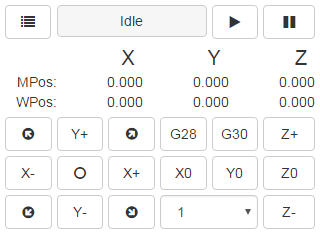
- cncjs-pendant-tinyweb - A tiny web console for small 320x240 LCD display.
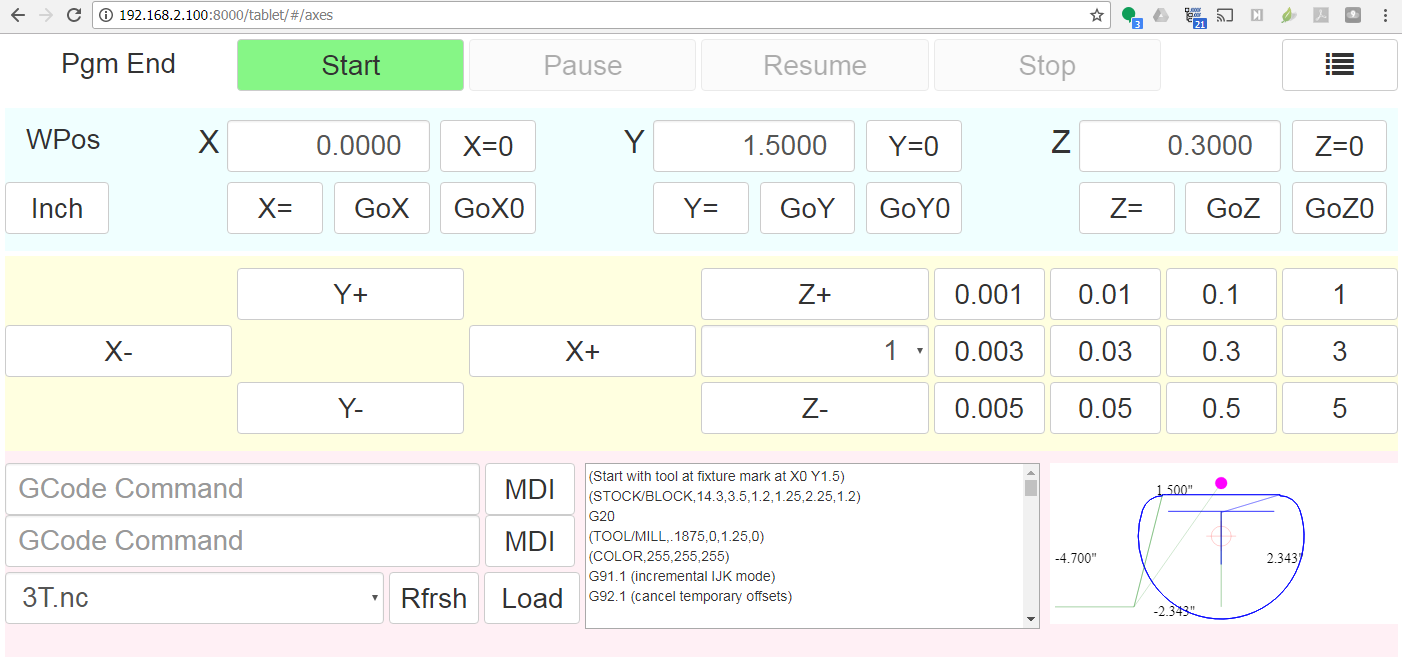
- cncjs-shopfloor-tablet - A simplified UI for cncjs optimized for tablet computers in a production (shop floor) environment.
Browser Support
 Chrome |  Edge |  Firefox |  IE |  Opera |  Safari |
|---|---|---|---|---|---|
| Yes | Yes | Yes | Not supported | Yes | Yes |
Supported Node.js Versions
| Version | Supported Level |
|---|---|
| 4 | Dropped support |
| 6 | Supported |
| 8 | Supported |
| 10 | Supported |
Getting Started
Node.js Installation
Node.js 6 or higher is recommended. You can install Node Version Manager to manage multiple Node.js versions. If you have git installed, just clone the nvm repo, and check out the latest version:
git clone https://github.com/creationix/nvm.git ~/.nvm
cd ~/.nvm
git checkout `git describe --abbrev=0 --tags`
cd ..
. ~/.nvm/nvm.sh
Add these lines to your ~/.bash_profile, ~/.bashrc, or ~/.profile file to have it automatically sourced upon login:
export NVM_DIR="$HOME/.nvm"
[ -s "$NVM_DIR/nvm.sh" ] && . "$NVM_DIR/nvm.sh" # This loads nvm
Once installed, you can select Node.js versions with:
nvm install 10
nvm use 10
It's also recommended that you upgrade npm to the latest version. To upgrade, run:
npm install npm@latest -g
Installation
Install cncjs as a non-root user, or the serialport module may not install correctly on some platforms like Raspberry Pi.
npm install -g cncjs
If you're going to use sudo or root to install cncjs, you need to specify the --unsafe-perm option to run npm as the root account.
sudo npm install --unsafe-perm -g cncjs
Check out https://github.com/cncjs/cncjs/wiki/Installation for other installation methods.
Upgrade
Run npm install -g cncjs@latest to install the latest version. To determine the version, use cncjs -V.
Usage
Run cncjs to start the server, and visit http://yourhostname:8000/ to view the web interface. Pass --help to cncjs for more options.
pi@rpi3$ cncjs -h

  Usage: cncjs [options]


  Options:

    -V, --version                       output the version number
    -p, --port <port>                   Set listen port (default: 8000)
    -H, --host <host>                   Set listen address or hostname (default: 0.0.0.0)
    -b, --backlog <backlog>             Set listen backlog (default: 511)
    -c, --config <filename>             Set config file (default: ~/.cncrc)
    -v, --verbose                       Increase the verbosity level (-v, -vv, -vvv)
    -m, --mount <route-path>:<target>   Add a mount point for serving static files
    -w, --watch-directory <path>        Watch a directory for changes
    --access-token-lifetime <lifetime>  Access token lifetime in seconds or a time span string (default: 30d)
    --allow-remote-access               Allow remote access to the server (default: false)
    --controller <type>                 Specify CNC controller: Grbl|Marlin|Smoothie|TinyG|g2core (default: '')
    -h, --help                          output usage information

  Examples:

    $ cncjs -vv
    $ cncjs --mount /pendant:/home/pi/tinyweb
    $ cncjs --mount /widget:~+/widget --mount /pendant:~/pendant
    $ cncjs --mount /widget:https://cncjs.github.io/cncjs-widget-boilerplate/v1/
    $ cncjs --watch-directory /home/pi/watch
    $ cncjs --access-token-lifetime 60d  # e.g. 3600, 30m, 12h, 30d
    $ cncjs --allow-remote-access
    $ cncjs --controller Grbl
Instead of passing command line options for --watch-directory, --access-token-lifetime, --allow-remote-access, and --controller, you can create a ~/.cncrc file that contains the following configuration in JSON format:
{
    "mountPoints": [
        {
            "route": "/pendant",
            "target": "/home/pi/tinyweb"
        },
        {
            "route": "/widget",
            "target": "https://cncjs.github.io/cncjs-widget-boilerplate/v1/"
        }
    ],
    "watchDirectory": "/path/to/dir",
    "accessTokenLifetime": "30d",
    "allowRemoteAccess": false,
    "controller": ""
}
To troubleshoot issues, run:
cncjs -vvv
Configuration File
The configuration file .cncrc contains settings that are equivalent to the cncjs command-line options. The configuration file is stored in user's home directory. To find out the actual location of the home directory, do the following:
-
Linux/Mac
echo $HOME -
Windows
echo %USERPROFILE%
Check out an example configuration file here.
File Format
See https://github.com/cncjs/cncjs/issues/242#issuecomment-352294549 for a detailed explanation.
{
  "ports": [
     {
       "comName": "/dev/ttyAMA0",
       "manufacturer": ""
     }
  ],
  "baudrates": [115200, 250000],
  "mountPoints": [
    {
      "route": "/widget",
      "target": "https://cncjs.github.io/cncjs-widget-boilerplate/v1/"
    }
  ],
  "watchDirectory": "/path/to/dir",
  "accessTokenLifetime": "30d",
  "allowRemoteAccess": false,
  "controller": "",
  "state": {
    "checkForUpdates": true,
    "controller": {
      "exception": {
        "ignoreErrors": false
      }
    }
  },
  "commands": [
    {
      "title": "Update (root user)",
      "commands": "sudo npm install -g cncjs@latest --unsafe-perm; pkill -a -f cncjs"
    },
    {
      "title": "Update (non-root user)",
      "commands": "npm install -g cncjs@latest; pkill -a -f cncjs"
    },
    {
      "title": "Reboot",
      "commands": "sudo /sbin/reboot"
    },
    {
      "title": "Shutdown",
      "commands": "sudo /sbin/shutdown"
    }
  ],
  "events": [],
  "macros": [],
  "users": []
}
Documentation
Examples
There are several *.gcode files in the examples directory. You can use the GCode widget to load a GCode file and make a trial run.
If you don't have a CAM software, try using jscut to create G-Code from *.svg. It's a simple CAM package that runs in the browser.
Check out a live demo at http://jscut.org/jscut.html.
Contributions
Use GitHub issues for requests.
Pull requests welcome! Learn how to contribute.
Localization
You can help translate resource files in both of app and web directories from English to other languages. Check out Localization guide to learn how to get started. If you are not familiar with GitHub development, you can open an issue or send your translations to [email protected].
| Locale | Language | Status | Contributors |
|---|---|---|---|
| cs | Čeština (Czech) | ✔ | Miroslav Zuzelka |
| de | Deutsch (German) | ✔ | Thorsten Godau, Max B. |
| es | Español (Spanish) | ✔ | Juan Biondi |
| fr | Français (French) | ✔ | Simon Maillard, CorentinBrulé |
| hu | Magyar (Hungarian) | ✔ | Sipos Péter |
| it | Italiano (Italian) | ✔ | vince87 |
| ja | 日本語 (Japanese) | ✔ | Naoki Okamoto |
| nl | Nederlands (Netherlands) | ✔ | dutchpatriot |
| pt-br | Português (Brasil) | ✔ | cmsteinBR |
| ru | Ру́сский (Russian) | ✔ | Denis Yusupov |
| tr | Türkçe (Turkish) | ✔ | Ali GÜNDOĞDU |
| zh-cn | 简体中文 (Simplified Chinese) | ✔ | Mandy Chien, Terry Lee |
| zh-tw | 繁體中文 (Traditional Chinese) | ✔ | Cheton Wu |
Donate
If you would like to support this project, you can make a donation using PayPal. Thank you!

Contributors
This project exists thanks to all the people who contribute. [Contribute].

Backers
Thank you to all our backers! 🙏 [Become a backer]

Sponsors
Support this project by becoming a sponsor. Your logo will show up here with a link to your website. [Become a sponsor]


License
Licensed under the MIT License.
Tag summary
Content type
Image
Digest
Size
629 MB
Last updated
about 6 years ago
docker pull nitramlegov/cncjs