nopp/eks-simple-panel repository overview
k8s Simple Panel

Features
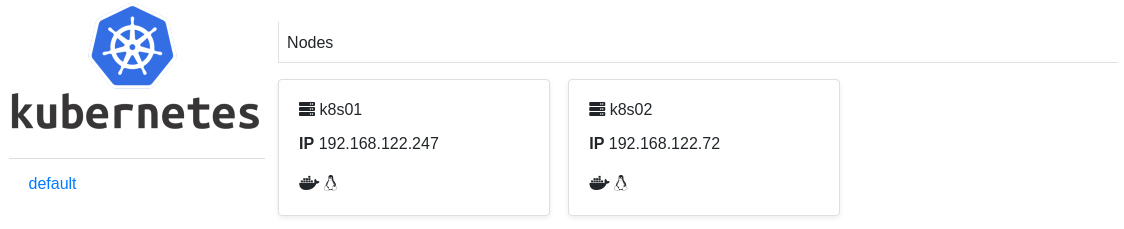
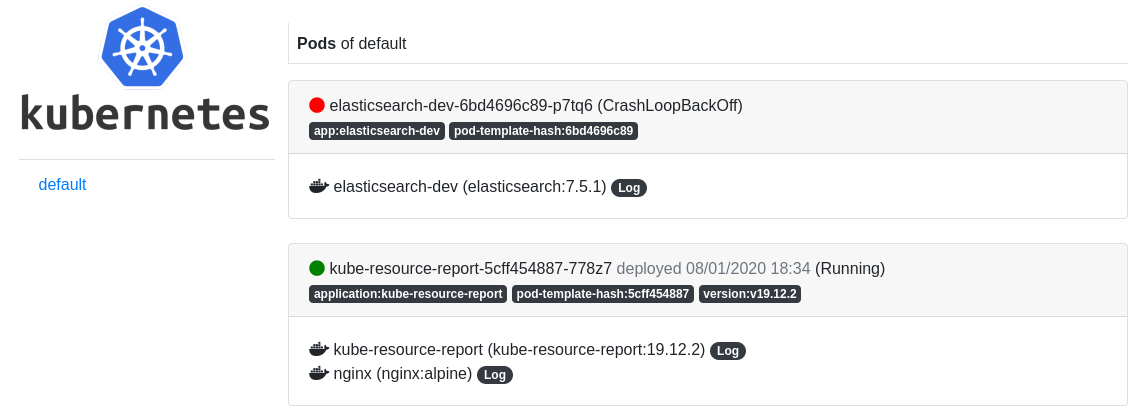
- List namespaces (with option to hide namespaces)
- List pods
- List containers
TO RUN ON AWS EKS
1)CONFIGURING K8S USER
1.1) Create IAM user(ex: eks-readonly) with this policy:
{
    "Version": "2012-10-17",
    "Statement": {
        "Sid": "45345354354",
        "Effect": "Allow",
        "Action": [
            "eks:DescribeCluster",
            "eks:ListCluster"
        ],
        "Resource": "*"
    }
}
1.2) Edit aws-auth
kubectl edit cm -n kube-system aws-auth
1.3) Add information below inside mapUsers, ex:
mapUsers: |
    - userarn: arn:aws:iam::xxx:user/eks-readonly
        username: eks-readonly
1.4) Create cluster role
apiVersion: rbac.authorization.k8s.io/v1
kind: ClusterRole
metadata:
  name: eks-readonly
rules:
- apiGroups:
  - ""
  resources:
  - '*'
  verbs:
  - get
  - list
  - watch
- apiGroups:
  - extensions
  resources:
  - '*'
  verbs:
  - get
  - list
  - watch
- apiGroups:
  - apps
  resources:
  - '*'
  verbs:
  - get
  - list
  - watch
1.5) Create cluster role binding
apiVersion: rbac.authorization.k8s.io/v1
kind: ClusterRoleBinding
metadata:
  name: eks-readonly
roleRef:
  apiGroup: rbac.authorization.k8s.io
  kind: ClusterRole
  name: eks-readonly
subjects:
- apiGroup: rbac.authorization.k8s.io
  kind: User
  name: eks-readonly
2)RUNNING ON DOCKER
# docker container run -d -e CLUSTER_NAME="clusterName" -e AWS_ACCESS_KEY_ID="yourAccessKey" -e AWS_SECRET_ACCESS_KEY="yourSecretKey" -p 9191:9191 nopp/eks-simple-panel:1.0
RUNNING ON SEVER
# git clone https://github.com/nopp/k8spanel.git
# cd k8spanel
# python main.py
Screenshot
Tag summary
Content type
Image
Digest
Size
72.4 MB
Last updated
almost 7 years ago
docker pull nopp/eks-simple-panel:1.8