numaxcz/napicublehub
A Bluetooth Low Energy (BLE) Device Debugging and Testing Tool for Developers
1.2K
numaxcz/napicublehub repository overview
NapicuBLEHub [Beta]
A Bluetooth Low Energy (BLE) Device Debugging and Testing Tool for Developers
This project is a debugging, analysis, and testing tool designed specifically for Bluetooth Low Energy (BLE) devices, primarily aimed at developers. It is built using NextJS and the @abandonware/noble library to interact with BLE devices.
Features
-
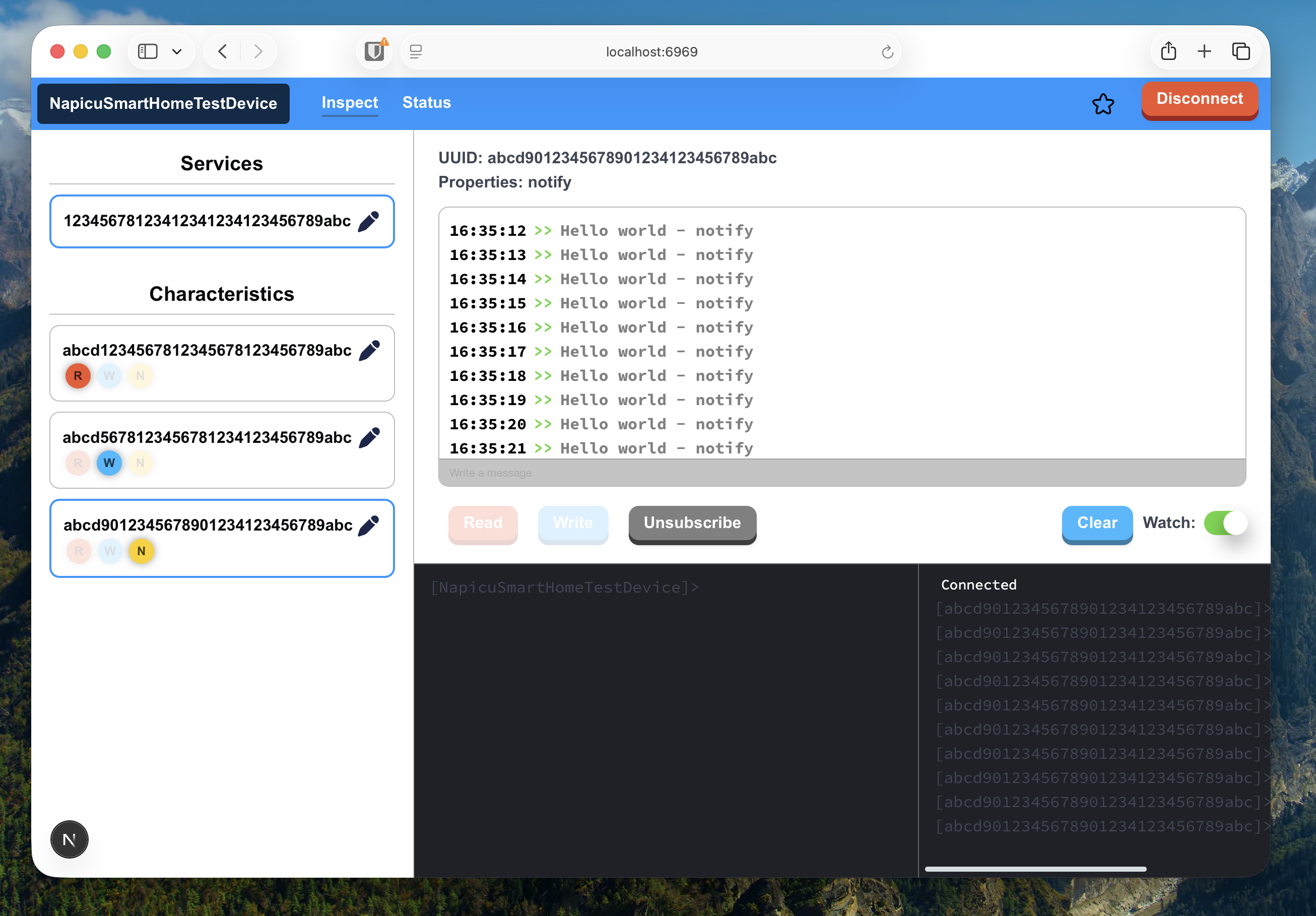
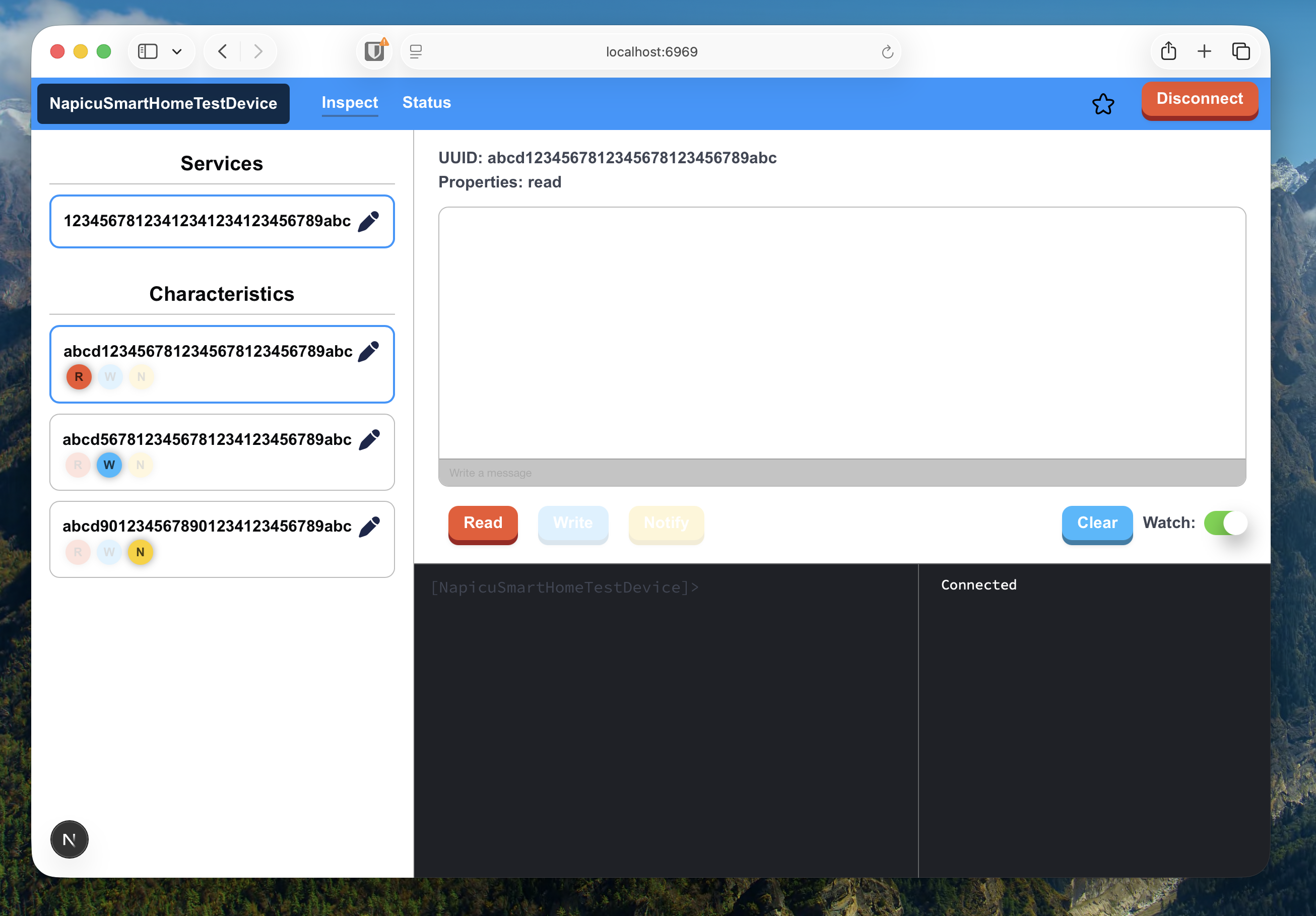
Bluetooth Low Energy (BLE) Device Interaction: The tool allows developers to:
- Write data to BLE devices
- Read data from BLE devices
- Subscribe to BLE device notifications
-
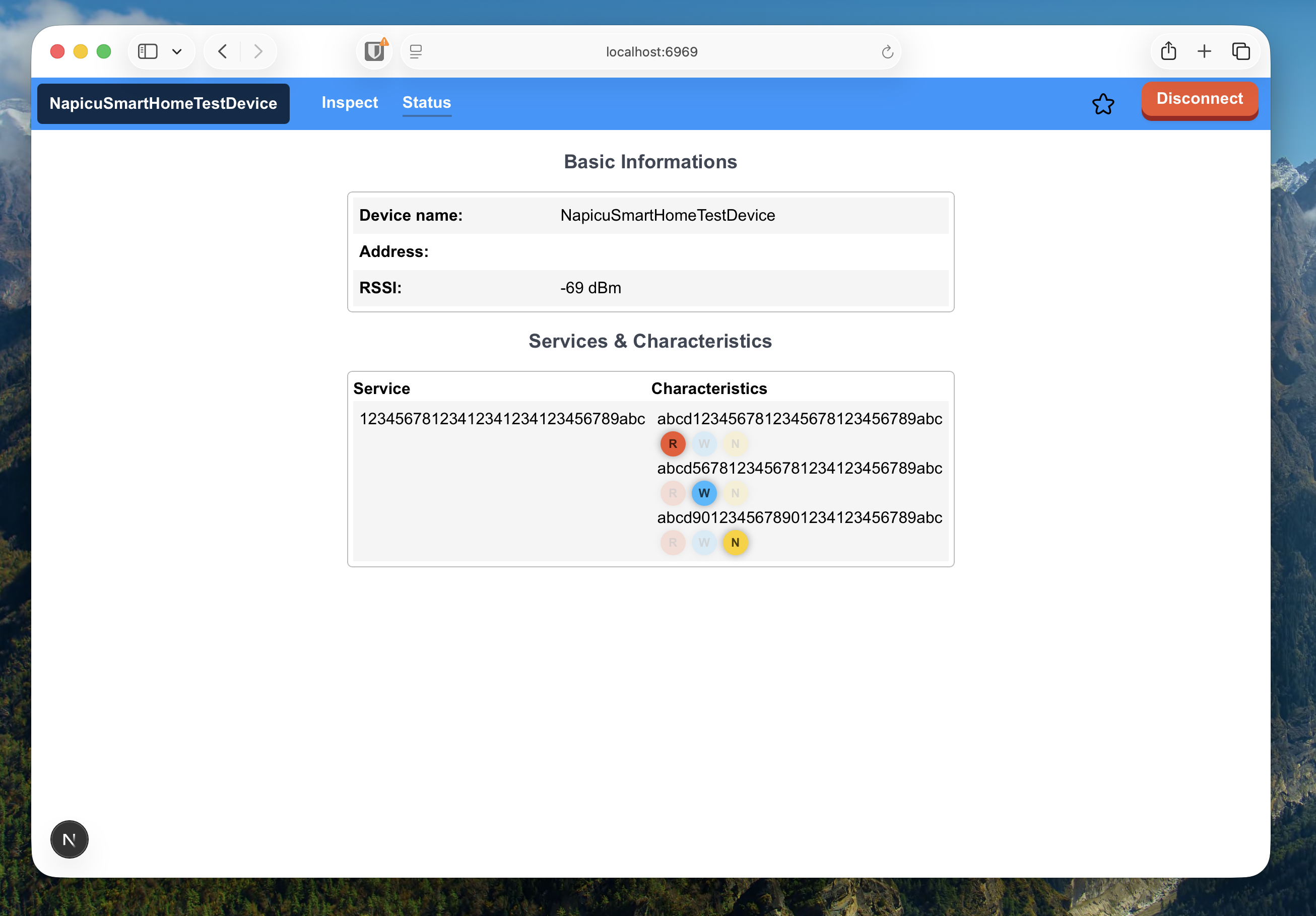
Intuitive Web-based UI: The tool provides an easy-to-use web interface for interacting with BLE devices. The UI is designed to be straightforward, enabling efficient debugging and testing. It offers a clickable interface for those who prefer a graphical way to interact with devices.
-
Web-based Terminal: In addition to the clickable UI, the tool also supports commands via a web terminal, allowing users to interact with BLE devices through a command-line interface. This offers more flexibility for advanced users who prefer working with commands.
-
Device Connection: The BLE device connects directly to the machine where the program is running. This means that the tool operates as a local interface for managing BLE connections, and the connected device will be mirrored across all web clients accessing the program via the same network.
-
Web Server Access: The program runs as a web application accessible at the IP address where the tool is hosted. This allows easy access to the tool from any device on the same network.
-
Cross-Platform Support: The tool supports Linux and macOS, and while it is designed for these platforms, Windows support has not been tested yet.
-
Single Connection Support: The tool supports only one BLE device connection at a time. Once a device is connected, it is mirrored on the web interface. This means that the same connected device will be displayed across all instances of the web page that are opened on other devices. This is useful for monitoring and debugging the same BLE device across multiple devices.
🧪 Tested Platforms
The application has been tested on the following operating systems and kernel versions.
| Operating System | Version / Kernel | Status |
|---|---|---|
| macOS | macOS 26.5 | ✅ Tested |
| Fedora Linux | Linux Kernel 6.19 | ✅ Tested |
| Debian 13 (Trixie) | Linux Kernel 6.12.88 | ✅ Tested |
| Windows | Not tested yet | ⚠️ Unknown |
⚠️ Linux is currently the recommended and most reliable platform for BLE functionality.
🧠 Docker BLE support was primarily tested on Linux systems using the BlueZ Bluetooth stack.
Installation
Source: @abandonware/noble
Prerequisites
By default, the Bluetooth adapter is selected as hci0.
To change the adapter, check the multiple adapters section.
macOS
- Install Xcode.
- In newer macOS, allow Bluetooth access:
- Navigate to "System Preferences" → "Security & Privacy" → "Bluetooth".
- Add the terminal app (see Sandboxed terminal).
Linux
- Kernel version 3.6 or above.
libbluetooth-devmust be installed. Instructions for specific distributions are below.- To set the necessary privileges to run without sudo, see this section. This is required for all distributions (Raspbian, Ubuntu, Fedora, etc). You will not get any errors if running without sudo, but nothing will happen.
Ubuntu, Debian, Raspbian
Refer to generic Linux notes above.
sudo apt-get install bluetooth bluez libbluetooth-dev libudev-dev
Make sure node is on your PATH. If it's not, some options:
If you are having trouble connecting to BLE devices on a Raspberry Pi, you should disable the pnat plugin. Add the
following line at the bottom of /etc/bluetooth/main.conf:
DisablePlugins=pnat
Then restart the system.
See Issue #425 · OpenWonderLabs/homebridge-switchbot.
Fedora and RPM-based Distributions
Refer to generic Linux notes above.
sudo dnf install bluez bluez-libs bluez-libs-devel systemd-devel
Intel Edison
See the generic Linux notes above first.
For reference: Configuring Intel Edison for BLE Development.
FreeBSD
Make sure you have GNU Make:
sudo pkg install gmake
Disable the default Bluetooth stack:
- Add no-ubt.conf to
/usr/local/etc/devd/no-ubt.conf. - Restart devd with
sudo service devd restart.
Unload ng_ubt kernel module if already loaded:
sudo kldunload ng_ubt
Make sure you have read and write permissions on the /dev/usb/* device that corresponds to your Bluetooth adapter.
Multiple Bluetooth Adapters (Linux)
Default Adapter: hci0
hci0 is used by default.
To override, set the NOBLE_HCI_DEVICE_ID environment variable to the interface number.
For example, to specify hci1:
sudo NOBLE_HCI_DEVICE_ID=1 node <your file>.js
Reporting all HCI events (Linux-specific)
By default, noble waits for both the advertisement data and scan response data for each Bluetooth address. If your
device does not use scan response, the NOBLE_REPORT_ALL_HCI_EVENTS environment variable can be used to bypass it.
sudo NOBLE_REPORT_ALL_HCI_EVENTS=1 node <your file>.js
bleno compatibility (Linux-specific)
By default, noble will respond with an error whenever a GATT request message is received. If your intention is to use
bleno in tandem with noble, the NOBLE_MULTI_ROLE environment variable can be used to bypass this behaviour.
Note: this requires a Bluetooth 4.1 adapter.
sudo NOBLE_MULTI_ROLE=1 node <your file>.js
Development & Deployment
Available scripts are listed in package.json.
Start Application - Production mode
sudo npm run start
Start Application - Development mode
sudo npm run dev
Application build
sudo npm run build
CLI Guide
For more commands and options, refer to the official documentation: Next.js CLI Reference.
"dev": "NOBLE_HCI_DEVICE_ID=0 NAPICU_SERVER_LOG_LEVEL=2 next dev -p 6969 -H 0.0.0.0",
"build": "NOBLE_HCI_DEVICE_ID=0 NAPICU_SERVER_LOG_LEVEL=2 next build",
"start": "next start -H 0.0.0.0"
NOBLE_HCI_DEVICE_ID=0
This parameter specifies the Bluetooth adapter to be used. NOBLE_HCI_DEVICE_ID=0 means that the adapter with ID 0 will be selected. This adapter is used for communication with Bluetooth Low Energy (BLE) devices.
NAPICU_SERVER_LOG_LEVEL=2
This parameter defines the log level for console output:
-1- Disables all logs (no logs will be shown).1- Only error logs will be shown.2- Shows error, success, and informational logs.
🐳 Docker Setup
The application can also be run using Docker, which provides a simple and consistent deployment environment for the BLE backend server and Next.js application.
⚠️ This setup relies on direct access to the host machine’s Bluetooth stack and is therefore recommended for Linux systems only.
⚠️ Requirements (IMPORTANT)
For Bluetooth Low Energy (BLE) to work inside Docker, the following is required on the host machine (NOT inside the container)
Ubuntu / Debian
Install required Bluetooth system dependencies:
sudo apt-get update
sudo apt-get install bluetooth bluez libbluetooth-dev libudev-dev
These packages provide the BlueZ Bluetooth stack, which is required by @abandonware/noble.
Fedora / RPM-based distributions
Install required Bluetooth system dependencies:
sudo dnf install bluez bluez-libs bluez-libs-devel systemd-devel
❗ Important Notes
- Docker does NOT provide Bluetooth hardware access by itself
- The container relies on the host system’s Bluetooth adapter
- BLE will NOT work on Windows or macOS Docker Desktop reliably
- Linux is the only fully supported environment
📦 Run via Docker (Recommended)
▶️ Pull prebuilt image (GitHub Container Registry)
docker pull ghcr.io/numax-cz/napicublehub:latest
🚀 Run container (default configuration)
docker run \
  -p 6969:6969 \
  --net=host \
  --privileged \
  ghcr.io/numax-cz/napicublehub:latest
Default values:
- PORT: 6969
- BLE HCI device: 0
- Log level: 2
⚙️ Run container with custom configuration
You can override default settings using environment variables:
docker run \
  -p 8080:8080 \
  --net=host \
  --privileged \
  -e PORT=8080 \
  -e NOBLE_HCI_DEVICE_ID=1 \
  -e NAPICU_SERVER_LOG_LEVEL=1 \
  ghcr.io/numax-cz/napicublehub:latest
🛠️ Build Docker image locally
If you want to build the project yourself:
docker build -t napicublehub .
▶️ Run locally built image
docker run \
  -p 6969:6969 \
  --net=host \
  --privileged \
  napicublehub
🔧 Docker Flags Explained
--privileged
Grants the container elevated permissions.
This is required for BLE functionality because it allows:
- Access to /dev/hci0
- Direct communication with Bluetooth hardware
- Interaction with the host’s BlueZ stack
⚠️ Without this flag, BLE scanning and device communication will NOT work.
--net=host (Linux only)
This makes the container share the host network stack.
Benefits:
- Improved BLE stability
- Direct access to host Bluetooth interfaces
- No NAT/network isolation issues
👉 Recommended for production Linux deployments.
🚀 Docker summary
- Docker provides a convenient deployment method
- BLE access depends on the host system (not Docker itself)
- Linux is strongly recommended and fully supported
- Proper permissions (--privileged) are required for BLE functionality
💻 Console / Terminal Commands
The application includes a built-in web-based console (terminal) that allows direct interaction with BLE devices.
This console provides a simple command interface for reading, writing, and managing BLE characteristics in real time.
📡 subscribe (alias: sub)
Subscribe to notifications from a BLE characteristic.
subscribe <uuid>
uuid - The characteristic UUID to subscribe to
📡 unsubscribe (alias: un)
Unsubscribe from notifications of a BLE characteristic.
unsubscribe <uuid>
uuid - The characteristic UUID to unsubscribe from
✍️ write
Write data to a BLE characteristic.
write <uuid> <message>
uuid - The characteristic UUID to write to
message - Data to send to the characteristic
📖 read
Read data from a BLE characteristic.
read <uuid>
uuid - The characteristic UUID to read from
🧹 clear (alias: cl)
Clears the console output.
clear
🗑️ delete (alias: dl)
Removes stored application settings.
delete <option>
| Option | Description |
|---|---|
| aliases | Removes all aliases for services and characteristics |
| sizes | Removes saved window layout settings |
| all | Removes all user settings |
🧠 Notes
- UUID must match a valid BLE characteristic on the connected device
- Write operations depend on characteristic permissions
- Subscribe enables real-time notifications from BLE devices
- All commands are executed against the currently connected device
🚀 Example usage
subscribe 12345678-1234-1234-1234-123456789abc
read 12345678-1234-1234-1234-123456789abc
write 12345678-1234-1234-1234-123456789abc hello
clear
🔗 Source Code
GitHub repository: https://github.com/Numax-cz/NapicuBLEHub
🐛 Bug Reports
If you encounter any issues or bugs, please report them here:
https://github.com/Numax-cz/NapicuBLEHub/issues
Make sure to include as much detail as possible (steps to reproduce, expected behavior, and screenshots if applicable). This helps improve the project significantly 👍
Tag summary
Content type
Image
Digest
sha256:edffe59c0…
Size
865.1 MB
Last updated
4 months ago
docker pull numaxcz/napicublehub