o2rproject/o2r-badger
Badges for computational geoscience containers
1.9K
o2rproject/o2r-badger repository overview
o2r badger

API for retrieving scalable badges for scientific publications. Used by the o2r-extender, which is a Chrome extension that integrates these badges into several research aggregators.
Based on the Badges for computational geoscience containers study project at ifgi. We thank the project team for their contributions for this project.
Badges
executable: Information about executability and reproducibility of a publication.licence: The license type.spatial: Where research took place.releasetime: The publication date.peerreview: If and by which process the publication was peer reviewed.
Services and what they are used for:
Note that the badger will only find results if the respective service has the publication listed.
Requirements
- Node.js
>= 6.2and npm (optional; for development) - Docker
- Access to the following services:
- o2r API (https://o2r.uni-muenster.de)
- Crossref API (https://www.crossref.org/)
- DOAJ API (https://doaj.org/)
- GeoNames API (http://geonames.org)
Installation
There are three options to get the badger running on your system.
1) with Docker, via Docker Hub
docker pull o2rproject/o2r-badger

# Start the badger:
docker run -it -e DEBUG=* -p 8089:8089 o2rproject/o2r-badger
2) with Docker, locally build image
First, clone the repository: git clone https://github.com/o2r-project/o2r-badger
This project includes a Dockerfile which can be built with:
docker build -t badger -f Dockerfile.local .

## Start the badger:
docker run -it -e DEBUG=* -p 8089:8089 badger
3) with Node.js
git clone https://github.com/o2r-project/o2r-badger
cd o2r-badger
npm install --production

# Start the badger:
DEBUG=* npm start
The badger is running and can be accessed via http://localhost:8089/. To display badges for common research aggregators, install the o2r-extender, a chrome extension. More info here
Examples
- GET (peer review badge, small):
curl http://localhost:8089/api/1.0/badge/peerreview/10.5194%2Fgmdd-8-3905-2015
Returns a small badge for the DOI 10.5194/gmdd-8-3905-2015:

- POST (license badge, extended):
curl -o output.svg -H "Content-Type: application/json" --data '{
   "id":"opxYU",
   "created":"2016-08-19T13:59:13.134Z",
   "metadata":{
      "licence":{
         "data":"Against-DRM",
         "text":"CC-BY-4.0",
         "code":"AAL"
      }
   }
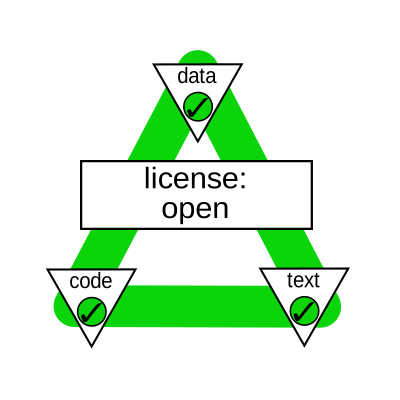
}' http://localhost:8089/api/1.0/badge/licence/extended
Will return a big badge for the license data contained in the json document (o2r compendium):
API Documentation (Version 0.2)
Small badges:
GET /api/1.0/badge/:type/:doi
The badger can also create a badge for information that is sent via a POST request (see the example above):
POST /api/1.0/badge/:type
Extended badges:
GET /api/1.0/badge/:type/:doi/extended
POST /api/1.0/badge/:type/extended
Path paramters
:type: Badge type, one ofexecutable,spatial,licence,releasetimeorpeerreview:doi: A DOI to identify the publication, in the form10.999/test
The DOI must be URL encoded!
Body parameters (for extended badges only)
format- The image format for extended badges. May besvgorpngwidth- The image width for extended badges
Error responses
If the badger finds no data for a given DOI a grey "n/a" badge is returned:

If there is an unexpected error during execution, or if the services are not accessbile, an error will be returned:
404 Not found
{"error":"error accessing crossref API"}
Configuration
Most relevant configuration can be done via the following environment variables when starting the service.
They are picked up in the file config/config.js where all configuration settings can be changed.
BADGER_PORTDefines the port the badger is listening to. Defaults to8089.BADGER_O2R_HOSTThe address used to query the o2r API . Defaults tohttps://o2r.uni-muenster.de.BADGER_TEST_ENDPOINTThe address used for tests. Defaults tohttp://localhostDISABLE_TRACKINGDisables Piwik API tracking when set totrue. Defaults tofalse.PIWIK_TOKENThe secret piwik token used to access the Piwik tracking server.
Other settings in config.js without corresponding environment variable:
c.net.proxyProxy used for all outgoing requests (o2r, crossref, doaj). Not tested.c.ext.crossrefCrossref API endpoint.c.ext.o2ro2r endpoint. Can be modified viaBADGER_O2R_HOST.c.ext.doajArticlesandc.ext.doajJournalsDOAJ search endpoint for articles and journals.
Additional Piwik API tracking settings:
c.tracking.piwikURLPiwik server address.c.tracking.piwikBaseURLPiwik base URL which is prepended to all API routes.c.tracking.piwikSiteIDPiwik site ID. Can be found in the piwik tracking code.
Piwik
The badger tracks API requests using Piwik except for requests with a "do not track" header.
A (local) piwik server can be set up manually or using Docker Compose.
Development
First install the badger locally:
npm install
Then start it with npm start or in your development environment.
For tests run npm test.
Study project documentation (shortened)
This work is based on the study project "Badges for computational geoscience containers", see here and the original code repos. We thank the valuable contributions of the students in this project.
1 Scalable badges (geocontainer-badges/scalability)
This project provides an API for retrieving a scalable badge as svg or png.
2 Spatial information badges (geocontainer-badges/spatial-information)
This badge will provide the user information about where a research took place. The base for receiving those information is a bounding box in json format. For the small badge, the mean center of the bounding box is calculated and sended via reverse geocoding to the geocoding service geonames.org. This service sends back the country and if available also the district. For the extended badge, the spatial information can be requested via the o2r API /spatial/o2r/:id/extended. When requesting the API, the user receives a Leaflet Map where the bounding box of the research location is highlighted.
3 Executability badges (geocontainer-badges/executable-code)
The project developed an API for retrieving information on the executability of compendia. It was established in the context of the o2r project. The information about the executablility of a compendia are requested from the o2r API.
4 License badges (geocontainer-badges/licencing)
The project's aim is to provide an API, which gives information about the licencing of a research compendium.
The API is specified as: /api/1.0/badge/licence/:id/:extended?. With :id specifying the ID of the research compendium and :extended is optional. If extended is given in the URL, the big badges are sent to the client. Otherwise, small badges from shields.io are the response.
For licences of code (software) the list of licences available at Open Definition Licenses Service
with this json file is provided.
For licences of data and text of the research compendia the licences from Open Definition is used
with the list in this json file.
5 Release date badges (geocontainer-badges/release)
In this project we developed an API for retrieving badges which provide information about the release date of a compendium.
API to receive a release-badge for a compendium with a specific DOI (testing locally): http://localhost:8089/api/1.0/badge/releasetime/:id/
with id being an URL-encoded DOI of an published compendium. To receive a "big badge" for a paper page, "extended" has to be added at the end of the API.
The information about the release date are requested through the crossref API.
6 Peer-review badges (geocontainer-badges/peer-review)
Our Task
Creating badges to check if a journel is peer reviewed or not.
Components of our task:
- Application Sever (Badge API)
- API for DOAJ (Directory of Open Access Journals)
- API for Shields.io (A platform that serves fast and scalable information images a s badges)
- Web Client
- Docker Container
Usage
The following API calls are supported (localhost might need to be replaced by a custom host name or IP address):
- Get a list of supported services: http://localhost:8089/api/1.0/badge/
- Get a badge for the service $SERVICE with the identifier $ID: http://localhost:8089/api/1.0/badge/peerreview/$ID
As you will notice currently the only service supported is DOAJ, with a DOI as identifier. An example request would be:
Known issues and limitations
- There are only 'peer-reviewed' journals in the DOAJ so we just get a green badge in return having no case of 'non peer-reviewed'.
Contributors
- Antonia van Eek
- Clara Rendel
- Lasse Einfeldt
- Laura Meierkort
- Marlena Götza
- Salman Khalid
- Shahzeib Tariq Jaswal
- Nimrod Gavish
- Matthias Mohr
- Daniel Nüst
- Lukas Lohoff
Licence
This project is licensed under Apache License 2.0.
Tag summary
Content type
Image
Digest
Size
74.3 MB
Last updated
about 9 years ago
docker pull o2rproject/o2r-badger