olofvndrhr/flox-dockerized
Docker container for flox
2.5K
olofvndrhr/flox-dockerized repository overview
flox-dockerized

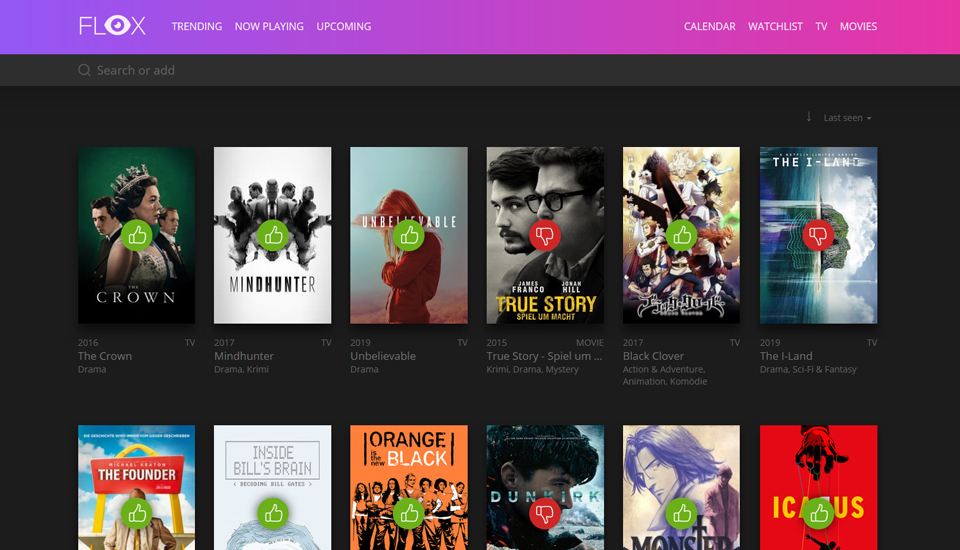
This is a docker container for the flox watchlist. Be sure to check out the original project: https://github.com/devfake/flox
Flox is a self hosted Movie, Series and Animes watch list. It's build on top of Laravel and Vue.js and uses The Movie Database API. The rating based on an 3-Point system for
good,mediumandbad.
Try live demo and login with
demo / demoto add new stuff or change ratings.
Running the container
This image is available for arm64 and amd64. The right version for you system will automatically be pulled.
This container only exposes port 80/tcp. It is advised to run this configuration through a reverse proxy providing SSL if the service will be exposed over the internet. Data
is saved in the container at /flox.
To use the container you will need to set the env variable tmdb_api_key with your own TheMovieDatabase API key. It is also recommended that you set flox_admin_pass. On first startup you also need to set flox_db_init to true.
An minimal configuration example would be:
# with docker run
cd <project_root>
docker run -p '80:80' --volume '/<data-directory>/:/flox/' -e tmdb_api_key=<key> -e flox_db_init=true --name flox olofvndrhr/flox-dockerized:latest
# with docker-compose (be sure to check all environment variables and change when neccesary)
cd <project_root>
nano docker-compose.yml # set tmdb_api_key & flox_init
docker-compose pull
docker-compose up -d
In order to create an admin user you will need to run an initialization. This can be done by running the container once with the environment variable flox_init=true.
If the env variables flox_username and flox_password are not set, the default login is: admin:admin.
You can then connect to http://localhost to access the application. If you mounted the data directory, all changes will be saved through container recreation.
In the data directory is a file called .lock. This file controls whether or not to "reset" all application data. So don't remove the file unless you want to reset you installation.
The removed data will still be available in the running container in the directory /tmp/flox until you remove the container. After a reset you need to start the container with flox_init=true again.
Supportet environment variables
| Name | Value | Description |
|---|---|---|
| tmdb_api_key | str | (required) The TMDB API key to use - required for startup (https://developers.themoviedb.org/3/getting-started/introduction) |
| flox_init | bool | (required) Run db initialization at container startup (default: false) |
| flox_https | bool | If flox should use https. Mostly used for reverse proxys with ssl termination (default: false) |
| flox_app_url | str | The url you will be hosting the app on (default: http://localhost) |
| flox_username | str | Inital username. Will not be overwritten after the initialization |
| flox_password | str | Initial password. Will not be overwritten after the initialization |
| flox_client_uri | str | The relative path you are hosting on (default: /) |
| flox_timezone | str | The timezone flox is running in (default: UTC) |
| flox_daily_reminder_time | str/int | The daily reminder time (default: 10:00) |
| flox_weekly_reminder_time | str/int | The weekly reminder time (default: 20:00) |
| puid | int | Unix user id to run the container as (default 4444) |
| pgid | int | Unix group id to run the container as (default 4444) |
| flox_mail_driver | str | Mail driver (most likely smtp) |
| flox_mail_host | str | Hostname of the mail server |
| flox_mail_port | int | Port of the mail server (smtp port) |
| flox_mail_from | str | Email address from which flox sends the mails |
| flox_mail_username | str | User name on the mail server |
| flox_mail_password | str | User password |
| flox_mail_encryption | str | Encryption type (tls,ssl,none) |
Contribution
Like this project? Want to contribute? Awesome! Feel free to open some pull requests or just open an issue.
Changelogs
Changelogs can be found here. But they may be not fully detailled.
License
Flox is published under the MIT license. See LICENSE for more information. All credits to devfake
Tag summary
Content type
Image
Digest
Size
136.5 MB
Last updated
over 4 years ago
docker pull olofvndrhr/flox-dockerized