oneyx/rust-wrangler
🤠 wrangle your cloudflare workers https://workers.cloudflare.com
273
oneyx/rust-wrangler repository overview
🤠 wrangler
wrangler is a CLI tool designed for folks who are interested in using Cloudflare Workers.
Installation
You have many options to install wrangler!
Install with npm
npm i @cloudflare/wrangler -g
Install with cargo
cargo install wrangler
If you don't have cargo or npm installed, you will need to follow these additional instructions
For more information on installation, click here.
Updating
For information regarding updating Wrangler, click here.
Additional Documentation
General documentation surrounding workers development and using wrangler can be found here. This documentation will be highly valuable to you when developing with wrangler.
🎙️ Commands
-
👯
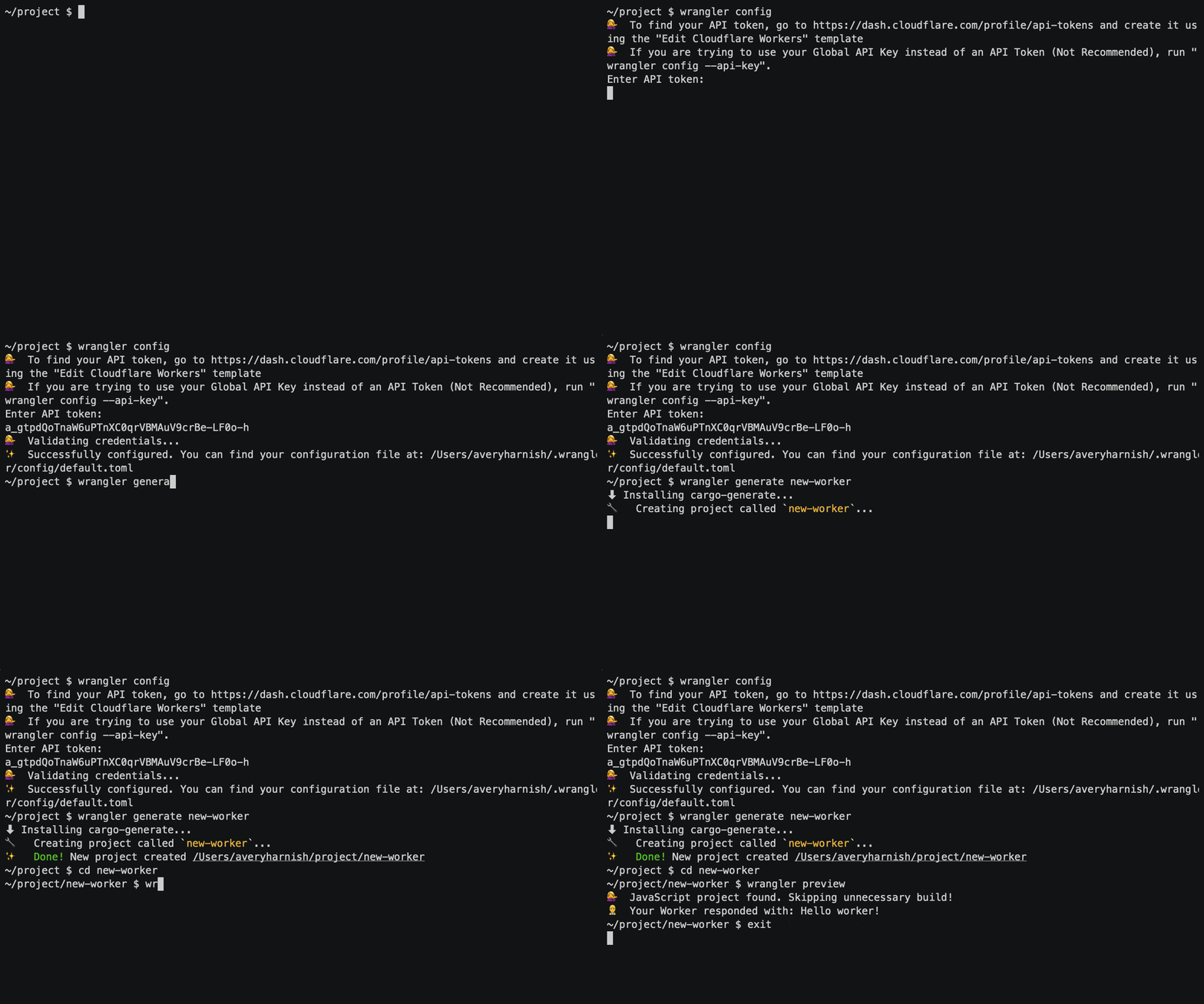
generateScaffold a project, including boilerplate for a Rust library and a Cloudflare Worker. You can pass a name and template to this command optionally.
wrangler generate <name> <template> --type=["webpack", "javascript", "rust"]All of the arguments and flags to this command are optional: -
name: defaults toworker-template: defaults to thehttps://github.com/cloudflare/worker-template -type: defaults to "webpack" -
🦀⚙️
buildBuild your project. This command looks at your
wrangler.tomlfile and runs the build steps associated with the"type"declared there. -
🔧
configConfigure your global Cloudflare user. This is an interactive command that will prompt you for your email and API key:
wrangler config Enter email: [email protected] Enter api key: ...You can also use environment variables to configure these values.
-
☁️ 🆙
publishPublish your Worker to Cloudflare. This uses several keys in your
wrangler.tomldepending on whether you are publishing to a workers.dev subdomain or your own domain, registered with Cloudflare.wrangler publishBy default,
publishwill make your worker available at<project-name>.<subdomain>.workers.dev. To disable publishing to your workers.dev subdomain, setprivate = truein yourwrangler.toml. This setting prevents thepublishcommand from making your worker publicly available. To explicitly enable deployment to<project-name>.<subdomain>.workers.dev, you can setprivate = false.To use this command, you'll need to have the following keys in your
wrangler.toml:nametypeaccount_id
You'll also need to have a workers.dev subdomain registered. You can register a subdomain by using:
wrangler subdomain <name>A
--releasecan be optionally passed to publish your worker to a domain you have registered with Cloudflare. To use--releaseyourwrangler.tomlmust include:nametypeaccount_idzone_idroute
-
🔬
previewPreview your project using the Cloudflare Workers preview service.
By default,
wrangler previewwill only bundle your project a single time. To enable live preview, where Wrangler will continually update the preview service with the newest version of your project, pass the--watchflag:wrangler preview --watchYou can optionally pass
getorpostand abodyto this command. This will send a request to your worker on the preview service and return the response in your terminal. For example:GET requests can be sent with
wrangler previewor
wrangler preview getPOST requests can be sent with
wrangler preview post hello=hello
🔩 Configuration
There are two types of configuration that wrangler uses: global user and per project.
-
Global User
In Cloudflare's system, you have a User that can have multiple Accounts and Zones. As a result, your User is configured globally on your machine. Your Account(s) and Zone(s) will be configured per project, but will use your User credentials to authenticate all API calls. This config file is created in a
.wranglerdirectory in your computer's home directory.To set up
wranglerto work with your Cloudflare user, use the following commands:- 🔧
config: a command that prompts you to enter youremailandapikey. - 🕵️♀️
whoami: run this command to confirm that your configuration is appropriately set up. When successful, this command will print out your user information, including the type of plan you are currently on.
- 🔧
-
Using environment variables
You can also configure your global user with environment variables. This is the preferred method for using Wrangler in CI:
# e.g. CF_API_KEY=superlongapikey [email protected] wrangler publish --release # where # $CF_API_KEY -> your Cloudflare API key # $CF_EMAIL -> your Cloudflare account email -
Per Project
Your project will need to have several things configured before you can publish your worker. These values are stored in a
wrangler.tomlfile thatwrangler generatewill make for you. You will need to manually edit this file to add these values before you can publish.-
name: This is the name of your project. It will be the name of your script. -
private: This is a boolean. If set totrue, when usingwrangler publish, it will push your script but not make it publically available. This does not affect publishing in--releasemode to a registered domain. Those pushes are always public. If this is not in yourwrangler.tomlit is assumed your project is public. -
type: This key tellswrangler buildhow to build your project. There are currently 3 options, but we expect there to be more as the community grows.javascript: This project contains a single JavaScript file, defined inpackage.json'smainkey.rust: This project contains a Rust crate that useswasm-bindgen. It will be built withwasm-pack.webpack: This project contains any number of JavaScript files or Rust/C/C++ files that compile to WebAssembly. Rust files will be built withwasm-pack. This project type uses webpack and webpack plugins in the background to build your worker.
-
zone_id: This is the ID of the "zone" or domain you want to run your script on. This is optional if you are using a workers.dev subdomain and is only reuqired forpublish --release. -
account_id: This is the ID of the account associated with your zone. You might have more than one account, so make sure to use the ID of the account associated with thezone_idyou provide, if you provide one. -
route: This is the route you'd like to use your worker on. You need to include the hostname. Examples:*example.com/*http://example.com/hello
This key is optional if you are using a workers.dev subdomain and is only required for
publish --release. -
webpack_config: This is the path to the webpack configuration file for your worker. This is optional and defaults towebpack.config.js -
[[kv-namespaces]]: These specify any Workers KV namespaces you want to access from inside your Worker. Each namespace you include should have an entry in your wrangler.toml that includes:binding: the name you want to bind to in your scriptid: the namespace_id assigned to your kv namespace upon creation. e.g. (per namespace):
[[kv-namespaces]] binding = "FOO" id = "0f2ac74b498b48028cb68387c421e279"Note: Creating your KV Namespaces should be handled either via the api or via your Cloudflare dashboard.
-
Additional Installation Instructions
Wrangler can be installed both through npm and through Rust's package manager, Cargo.
Using npm
-
If you don't already have npm on your machine, install it using npm's recommended method, a node.js version manager.
If you have already installed npm with a package manager, it is possible you will run into an
EACCESerror while installing wrangler. This is related to how many system packagers install npm. You can either uninstall npm and reinstall using the npm recommended install method (a version manager), or use one of our other install methods. -
Install Wrangler by running:
npm i @cloudflare/wrangler -g
Using cargo
-
Install
cargo:Rustup, a tool for installing Rust, will also install Cargo. On Linux and macOS systems,
rustupcan be installed as follows:curl https://sh.rustup.rs -sSf | shAdditional installation methods are available here.
-
Install
wrangler:cargo install wranglerInstalling wrangler on linux requires some OpenSSL-related packages to be installed. If you don't want to deal with this, you can use vendored OpenSSL.
cargo install wrangler --features vendored-openssl
Manual Install
-
Download the binary tarball for your platform from our releases page. You don't need to download wranglerjs, wrangler will install that for you.
-
Unpack the tarball and place the binary
wranglersomewhere on yourPATH, preferably/usr/local/binfor linux/macOS orProgram Filesfor windows.
Tag summary
Content type
Image
Digest
Size
664.7 MB
Last updated
about 7 years ago
docker pull oneyx/rust-wrangler