opcache/docker-nginx-http3 repository overview
docker-nginx-http3






Alpine Linux image with nginx with HTTP/3 (QUIC), TLSv1.3, 0-RTT, brotli, NJS, Cookie-Flag support. All built on the bleeding edge. Built on the edge, for the edge.
HTTP/3 support provided from the smart people at CloudFlare with the cloudflare/quiche project.
Images for this are available on Docker Hub.
Latest (nginx 1.16.1): docker pull ranadeeppolavarapu/nginx-http3
Edge (nginx 1.19.2): docker pull ranadeeppolavarapu/nginx-http3:edge
Usage
This is a base image like the default nginx image. It is meant to be used as a drop-in replacement for the nginx base image.
Best practice example Nginx configs are available in this repo. See nginx.conf and h3.nginx.conf.
Example:
# Base Nginx HTTP/3 Image
FROM ranadeeppolavarapu/nginx-http3:latest

# Copy your certs.
COPY localhost.key /etc/ssl/private/
COPY localhost.pem /etc/ssl/

# Copy your configs.
COPY nginx.conf /etc/nginx/
COPY h3.nginx.conf /etc/nginx/conf.d/
H3 runs over UDP so, you will need to port map both TCP and UDP. Ex: docker run -p 80:80 -p 443:443/tcp -p 443:443/udp ...
NOTE: Please note that you need a valid CA signed certificate for the client to upgrade you to HTTP/3. Let's Encrypt is a option for getting a free valid CA signed certificate.
Contributing
Contributions are welcome. Please feel free to contribute 😊.
Features
- HTTP/3 (QUIC) via CloudFlare's quiche
- HTTP/2 (with Server Push)
- HTTP/2
- BoringSSL (Google's flavor of OpenSSL)
- TLS 1.3 with 0-RTT support
- Brotli compression
- headers-more-nginx-module
- NJS
- nginx_cookie_flag_module
- PCRE latest with JIT compilation enabled
- zlib latest
- Alpine Linux (total size of 10 MB compressed)
Future Additions
Possible additions in the future pending IETF spec approvals.
HTTP/3 ENABLED!
Using Chrome Canary with the following CLI flags:
--flag-switches-begin --enable-quic --quic-version=h3-28 --enable-features=EnableTLS13EarlyData --flag-switches-end
Run on Mac OS (darwin):
"/Applications/Google Chrome Canary.app Contents/MacOS/Google Chrome Canary" \
  --flag-switches-begin \
  --enable-quic \
  --quic-version=h3-23 \
  --enable-features=EnableTLS13EarlyData \
  --flag-switches-end
Windows:

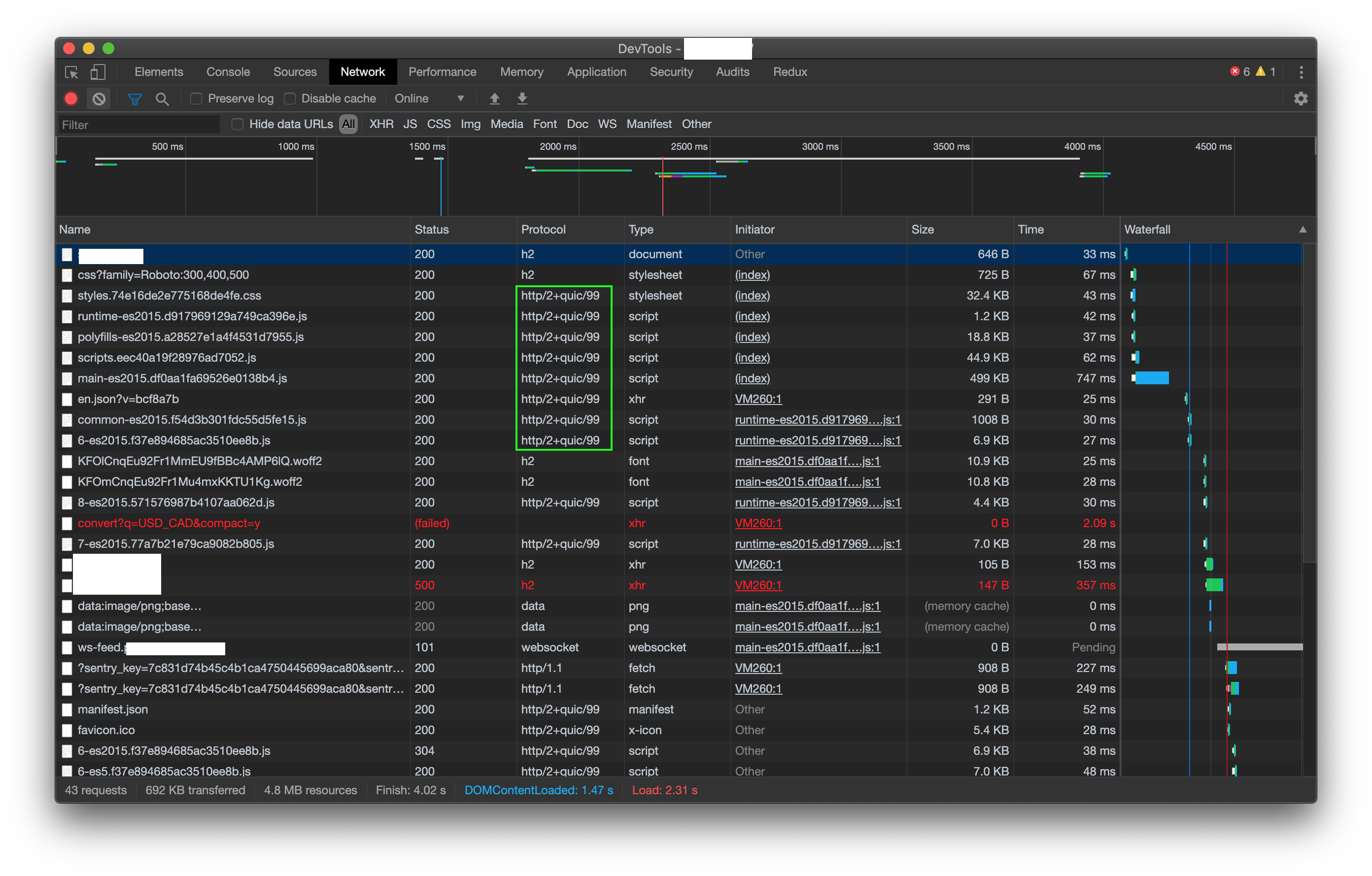
HTTP/3 (QUIC) Proof
Since HTTP/3 is experimental, we have to be sensible with it. Therefore, below is HTTP/3 in production on one of my web apps 🙃.
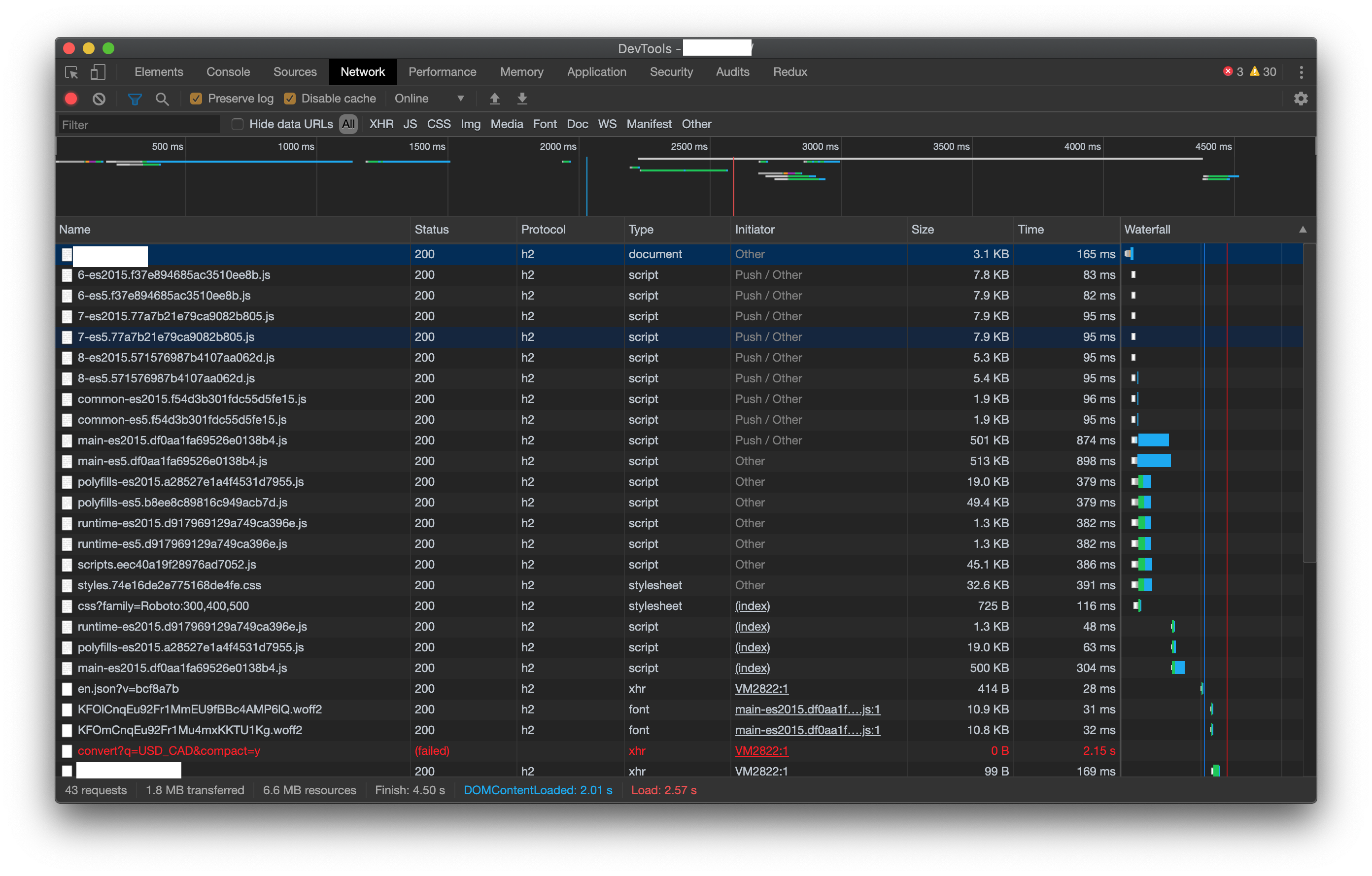
HTTP/2 with Server Push
TLS v1.3

0-RTT Proof
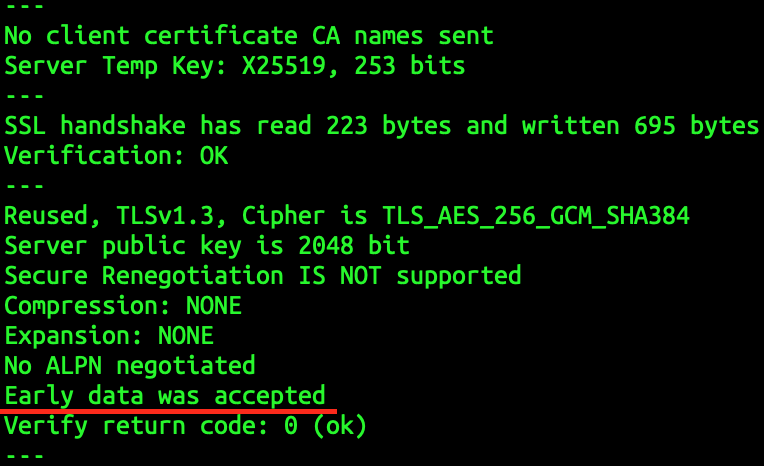
Testing 0-RTT
host=domain.example.com # Replace your domain.
echo -e "GET / HTTP/1.1\r\nHost: $host\r\nConnection: close\r\n\r\n" > request.txt
openssl s_client -connect $host:443 -tls1_3 -sess_out session.pem -ign_eof < request.txt
openssl s_client -connect $host:443 -tls1_3 -sess_in session.pem -early_data request.txt
Tag summary
Content type
Image
Digest
Size
10.1 MB
Last updated
over 6 years ago
docker pull opcache/docker-nginx-http3