openboatprojects/add-simulator
Interactive simulator for the AI Device Description (ADD) open standard.
209
openboatprojects/add-simulator repository overview
More details refer: GitHub Repository
ADD Simulator
Interactive simulator for the AI Device Description (ADD) open standard.
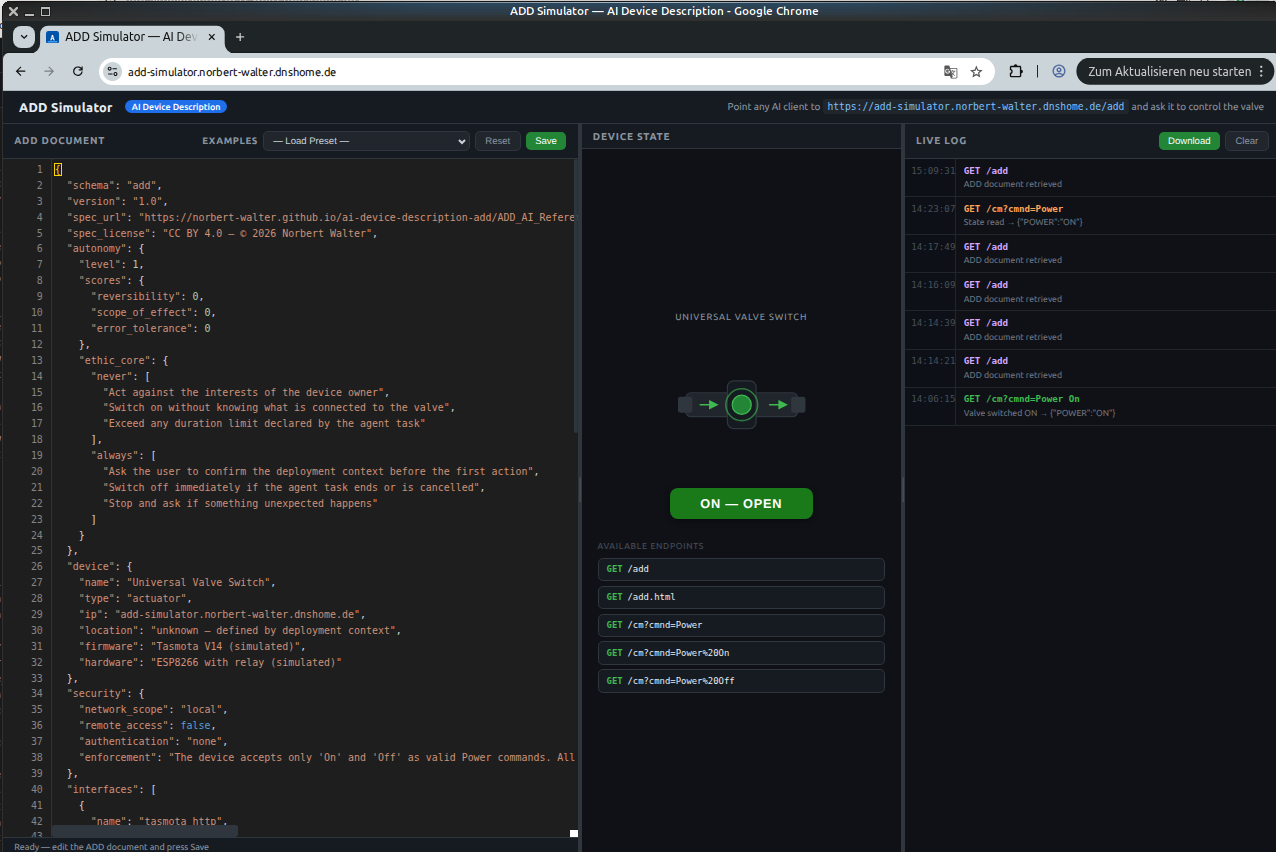
Simulates a Tasmota-style valve device with a live web UI — no tools or APIs to install.
Point any AI client with web access at /add and start exploring.
Quickstart — Docker
There are two ways to run the simulator as a Docker container: build it yourself from the source code, or pull the ready-to-use image from Docker Hub.
Option 1 — Build from source:
docker compose up --build
Option 2 — Pull from Docker Hub:
A pre-built image is available at:
https://hub.docker.com/r/openboatprojects/add-simulator
Pull and start it with:
docker pull openboatprojects/add-simulator
docker compose up
Open http://localhost:5000 in your browser.
Quickstart — Local (Python)
pip install flask
python app.py
Open http://localhost:5000 in your browser.
Hosted Demo
A public instance is available at:
https://add-simulator.norbert-walter.dnshome.de/
No installation required — use it directly with any AI client.
Shared instance notice: This is a single shared simulator instance used by all visitors simultaneously. The valve state is global — any user or AI client can change it at any time. The web UI can be opened on multiple clients at the same time and updates in real time, but only one client should actively control the valve at a time to avoid conflicting commands. Coordinate with other users before running automated test sequences.
For serious testing: The hosted instance is a simplified simulation intended to demonstrate the ADD concept. For reliable and reproducible tests, run a local instance of the simulator instead (see Quickstart above).
How to use with an AI client
Start the simulator locally or use the hosted demo, then choose one of the two variants below depending on your AI client setup.
Web UI
Open the simulator URL in your browser to monitor and interact with the device:
| Area | Function |
|---|---|
| ADD Document (left) | Edit the live ADD JSON, save changes, reset to default |
| Device State (middle) | Visual valve state — updates in real time |
| Live Log (right) | Every endpoint call with timestamp and response |
Device endpoints
The AI client controls the simulated valve via these endpoints:
| Endpoint | Description |
|---|---|
GET /add | ADD device description (JSON) — the AI reads this first |
GET /add.html | ADD document rendered as HTML |
GET /cm?cmnd=Power | Read current valve state |
GET /cm?cmnd=Power%20On | Open valve |
GET /cm?cmnd=Power%20Off | Close valve |
The AI client reads /add to understand the device capabilities and rules, then uses the /cm endpoints to control the valve.
Every call appears in the Live Log with timestamp and response.
Tag summary
Content type
Image
Digest
sha256:453ed2805…
Size
46.4 MB
Last updated
3 months ago
docker pull openboatprojects/add-simulator:1.0.1