orochibraru/nuvio-web
Unofficial Nuvio Web client.
2.3K
orochibraru/nuvio-web repository overview
Nuvio Web
Unofficial implementation of the Nuvio API in a web UI (since there is none, yet).
Sign in with the Nuvio account you already use on mobile and you get the same profiles, addons, library and watch progress in a browser : plus a player that streams in the tab, casts to a TV, or hands the link off to a native app.



Disclaimer
Nuvio Web hosts no media. All catalogs, metadata, streams and subtitles come from addons (the Stremio addon protocol) which you install and are responsible for. The app is a shell around whatever those addons return; it does not endorse, index, or verify any addon or its content. Use only addons you have the right to use in your jurisdiction. Not affiliated with or endorsed by Nuvio.
What it looks like
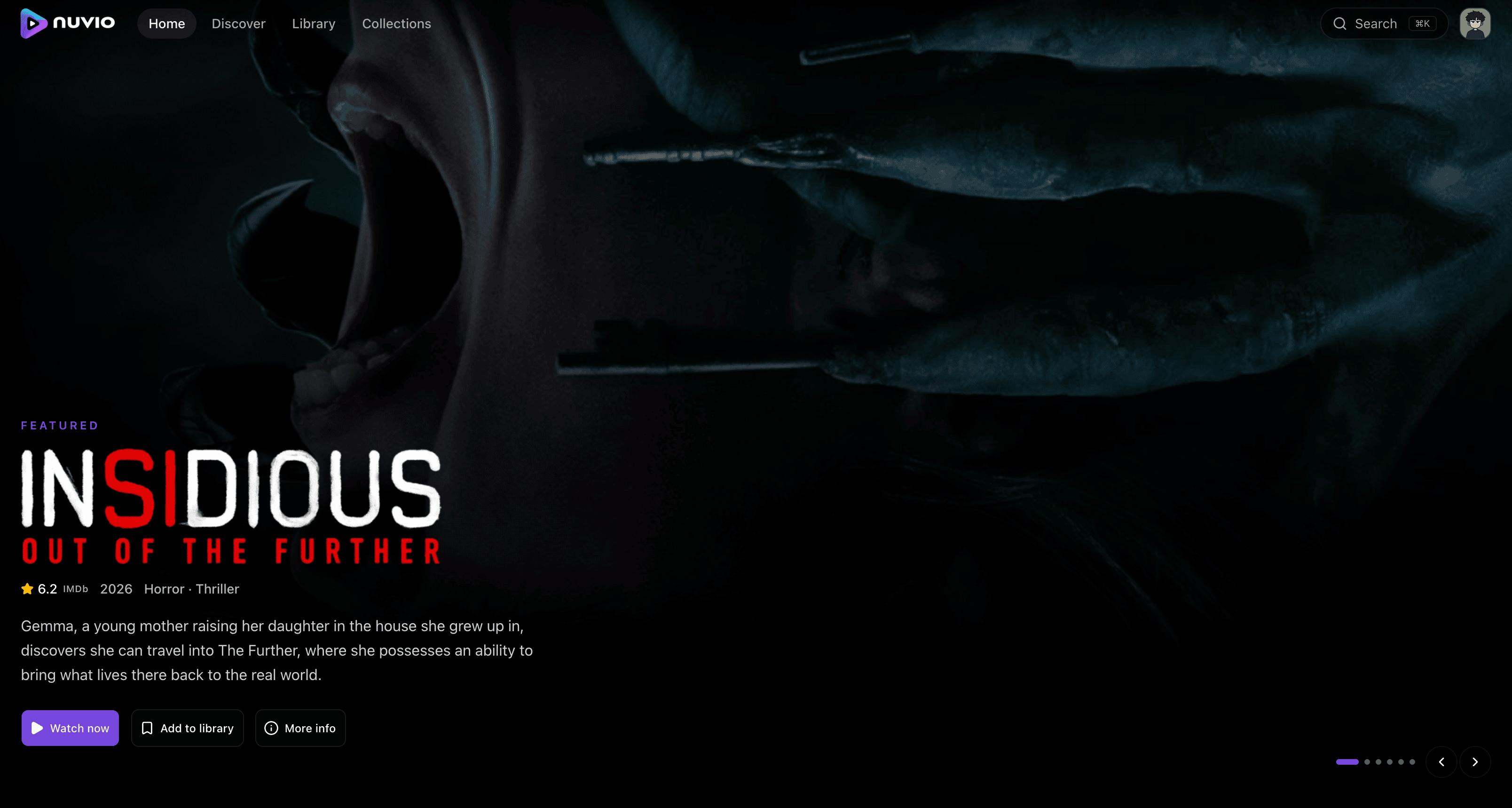
Features
Browse
- Home : a rotating hero spotlight, continue watching, your library, and a row per catalog your addons expose.
- Discover : the full catalog browser: any catalog from any installed addon, filtered by genre, paginated.
- Search : fans out across every addon that serves a search catalog, and remembers your recent queries.
- Detail pages : synopsis, cast, IMDb rating, trailer, season and episode carousel, and a where to watch row (JustWatch) listing the official streaming, rent and buy options for your region.
- Command palette :
⌘K/Ctrl-Kfrom anywhere to jump to a screen or start a search.
Watch
- Source picker with quality, codec, size and release details parsed out of each addon's stream label, and an auto-pick that honours your preferred resolution.
- HLS and direct playback :
hls.jsfor.m3u8, the element's ownsrcfor everything else, with audio-track switching on either. - Subtitles from addons : SRT converted to WebVTT in the browser, so a subtitle file never touches the server : with size, colour, background plate and an auto-selected preferred language.
- Skip intro / outro via TheIntroDB. The keyless public tier works out of the box; add your own API key in Settings to raise the limits.
- Auto-play next episode, with an end-of-episode panel.
- Cast to a TV with no third-party SDK: the standard Remote Playback API (Chromecast on Chrome/Edge), falling back to WebKit's AirPlay hooks in Safari.
- Play in an external player : an Intent chooser on Android, VLC's
x-callback on iOS, the raw
magnet:for a P2P source, and copy-to-clipboard on desktop. - Playback diagnostics : the codec is probed before the stream is handed to
<video>, and playback that decodes no frames (unsupported HEVC/AV1) or no audio (Dolby Digital / DTS / Atmos) raises a dismissible banner instead of a black screen with no explanation. - Keyboard shortcuts : see below.
Library and sync
- Library, continue watching and history, kept per profile.
- Collections : your own folders of titles, separate from the library.
- Local-first sync store : an IndexedDB mirror with an optimistic write
queue and a background delta pull, so a bookmark or a progress save lands
instantly and reconciles later. Open tabs stay in step over
BroadcastChannel. - Watch stats and a full, editable history under Account.
Make it yours
- Profiles, with avatars, as on mobile.
- Themes : light / dark / system, a dim or AMOLED dark style, and seven accent colours.
- Settings for appearance, playback, sync, addons and integrations, stored on your Nuvio account so they follow you between devices.
- Accessible by default : every route is checked against WCAG 2 A/AA in CI (axe), including skip links and focus management.
Getting Started
You need a Nuvio account (you can create one from the app's sign-up screen) and at least one addon. Addons installed on your account — mobile or web : show up everywhere.
The docker image is available
at Docker Hub, for
linux/amd64 and linux/arm64.
Docker run
docker run -p 3000:3000 -e ORIGIN=http://localhost:3000 \
  orochibraru/nuvio-web:latest
Docker Compose
services:
  nuvio:
    image: orochibraru/nuvio-web:latest
    restart: unless-stopped
    ports:
      - 3000:3000
    environment:
      # The URL you actually browse to : see Configuration below.
      ORIGIN: http://localhost:3000
    healthcheck:
      interval: 30s
      retries: 3
      start_period: 5s
      test: ["CMD", "/app/dist/healthcheck"]
      timeout: 30s
Then open http://localhost:3000, sign in, pick a profile, and add an addon from Settings → Addons if your account has none yet.
Configuration
There is no database and no volume : every piece of state : account, profiles,
addons, library, settings : lives on your Nuvio account. The container serves
the app on port 3000, and /app/dist/healthcheck is a self-contained binary
suitable for HEALTHCHECK and for orchestrator probes.
One environment variable matters: ORIGIN, the URL you actually browse to.
| Variable | Default | When you need it |
|---|---|---|
ORIGIN | (unset) | Always, unless the proxy headers below cover it |
PROTOCOL_HEADER | assumes https | Behind a reverse proxy |
HOST_HEADER | the Host header | Behind a proxy that rewrites it |
PORT | 3000 | To listen on another port |
Without ORIGIN the server reconstructs its own origin from the request's
Host header and assumes https://. Browse to a plain-HTTP address and
that guess disagrees with the browser's Origin header, so SvelteKit's
cross-site check rejects every write the app makes with
403 Cross-site remote requests are forbidden. Only non-GET requests are
checked, so the app still renders and reads fine : but nothing saves. Settings
snap back, library toggles revert, progress never sticks. Set ORIGIN to
exactly what's in the address bar (scheme, host and port, no trailing slash) and
it goes away.
Behind a reverse proxy, either set ORIGIN to the public URL or let the proxy's
headers speak for it:
docker run -p 3000:3000 \
  -e PROTOCOL_HEADER=x-forwarded-proto \
  -e HOST_HEADER=x-forwarded-host \
  orochibraru/nuvio-web:latest
Serving over HTTPS on the default port needs none of this : the assumed
https:// already matches.
Running it on the public internet is on you: put it behind HTTPS and whatever access control you would give any other self-hosted app.
Keyboard shortcuts
In the player:
| Key | Action |
|---|---|
Space / K | Play / pause |
← / J and → / L | Seek 10s back / forward |
↑ / ↓ | Volume |
M | Mute |
F | Fullscreen |
C | Cycle subtitle track |
I | Info overlay |
N | Next episode |
E | Episode list |
Esc | Close the open panel |
Anywhere in the app, ⌘K / Ctrl-K opens the command palette.
How it works
- SvelteKit 3 / Svelte 5 (runes,
experimental.async), Tailwind 4 and shadcn-svelte components. - Streamed loads.
+page.server.tsreturns promises rather than awaiting them, so navigation completes on the page shell and each row fills in behind its own skeleton. Everything a page needs for its URL is fetched by the load — addon fan-out included : instead of costing an extra round trip after hydration. - Addon fan-out on the server, pooled rather than
Promise.all-ed (bounded concurrency, a per-request timeout, and a failed addon degrading to an empty row) so one slow addon can't hold a page hostage. Outbound addon fetches go through an SSRF guard that refuses private and link-local address ranges. - Remote functions are reserved for client-initiated work : a button, a right-click action, "load more".
- One binary in the image. The built app, Bun runtime embedded, is compiled
by
svelte-smol into a self-contained server binary, so the runtime layer isdebian:slimplus that binary : no Bun, nonode_modules. - Tested at three levels : Vitest for the framework-agnostic logic (reconcile, stream parsing, codec probes, external-player URLs), Playwright for the flows, and axe for accessibility. Specs assert a clean console: an uncaught exception fails the run.
Development
See contributing.md.
bun install
bun run dev          # dev server on :5173
bun run check        # svelte-check + tsc
bun run lint         # biome + tailwind class lint
bun run test:unit    # vitest
bun run test:e2e     # playwright (needs a test account, see .env.example)
Roadmap
Tracked in TODO.md
License
AGPL-3.0-or-later. If you run a modified version as a network service, you must offer its source to your users.
Tag summary
Content type
Image
Digest
sha256:874cad855…
Size
103.9 MB
Last updated
about 17 hours ago
docker pull orochibraru/nuvio-web