
otsobide/git-runner-swarm
Web panel to create and manage self-hosted GitHub Actions runners as Docker containers.
360
otsobide/git-runner-swarm repository overview
git-runner-swarm
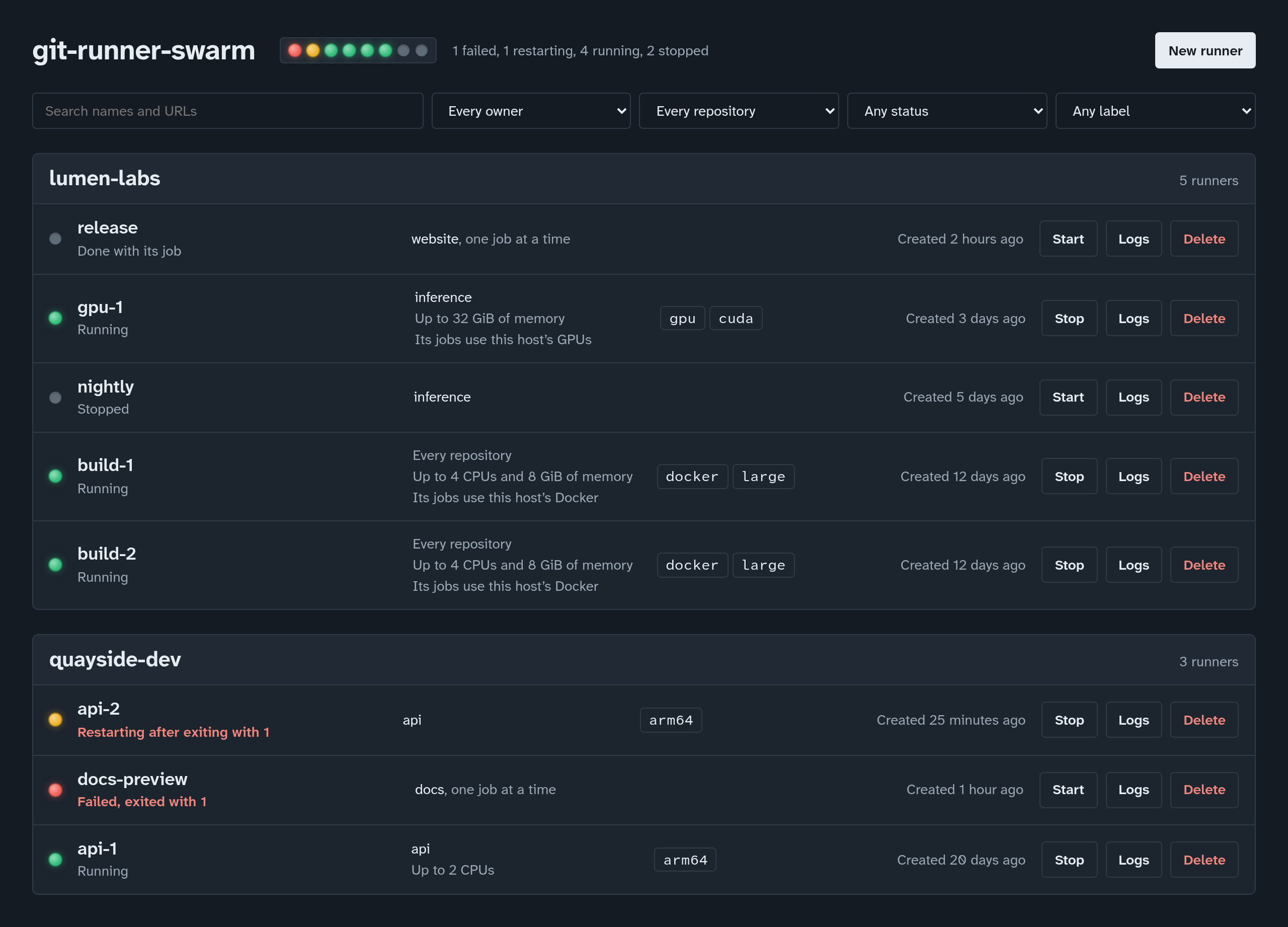
A web panel for self-hosted GitHub Actions runners. Each runner is a Docker container running GitHub's official runner image: create runners from a registration token, see at a glance which are running and which are failing, read their logs, and start, stop or delete them.
Getting started
On a Linux host with Docker, amd64 or arm64:
docker run -d --name git-runner-swarm --restart unless-stopped \
  -p 127.0.0.1:8080:8080 \
  -v /var/run/docker.sock:/var/run/docker.sock \
  otsobide/git-runner-swarm
Or with Compose, in a compose.yaml, then docker compose up -d:
services:
  panel:
    image: otsobide/git-runner-swarm:latest
    restart: unless-stopped
    ports:
      - "127.0.0.1:8080:8080"
    volumes:
      - /var/run/docker.sock:/var/run/docker.sock
Open http://localhost:8080. Then, for each runner:
- On GitHub, open the repository's Settings › Actions › Runners ›
New self-hosted runner (or the organization's), and copy the token
from the
./config.sh --url … --token …command shown there. It is valid for an hour. - In the panel, choose New runner, paste the repository's URL and the token, give the runner a name, and choose Create runner.
- In a workflow, pick it with
runs-on: self-hosted, or by its labels.
The panel pulls GitHub's runner image the first time it is needed, and the runner registers with GitHub as its container starts.
What it does
- Creates runners for a repository, or for every repository of an organization, with labels, taking job after job or a single job each.
- Shows every runner, grouped by organization or user, each with a status lamp: running, restarting, failed, stopped.
- Shows each runner's logs, kept current, so a runner that fails says why.
- Limits the CPU and memory each runner may use, and, only when asked, gives a runner's jobs the host's Docker to build images with, or the host's GPUs (AMD, Intel or NVIDIA) to render and compute on.
- Stores nothing but Docker: a runner is a container, with its definition in the container's labels. The panel can be stopped or upgraded while the runners carry on.
Tags
latest: the latest release.X.Y, such as0.2: the latest release of that minor version.X.Y.Z, such as0.2.2: one release, never moved.
Every tag is built for linux/amd64 and linux/arm64. To upgrade:
docker pull, then recreate the container (docker compose pull && docker compose up -d). Runners keep running while the panel is
replaced.
Configuration
Environment variables, each optional:
| Variable | Default | What it is |
|---|---|---|
GRS_GITHUB_IMAGE | ghcr.io/actions/actions-runner:latest | The image GitHub runners run: a pinned tag, a mirror, your own. |
GRS_STOP_TIMEOUT | 30 | Seconds a runner is given to stop cleanly before it is killed. |
GRS_RUNNER_DOCKER_SOCKET | /var/run/docker.sock | Docker's socket on the host, for runners given Docker. |
GRS_RUNNER_GPUS | /dev/dri | The GPUs runners given the host's get: device paths, nvidia. |
GRS_LISTEN | 0.0.0.0:8080 | The address the panel listens on, in its container. |
RUST_LOG | info | How much the panel logs. |
Every setting, with recipes, is in the configuration guide.
Before you expose it
Whoever can reach the panel controls the host's Docker, which is root on
the host, and the panel has no login yet. Publish its port on
127.0.0.1 only, as above, and reach it through an SSH tunnel, or put
it behind a proxy that authenticates. The jobs of a runner given the
host's Docker are as much root on the host. See the
security guide.
More
- Source, issues and documentation: github.com/otsobide/git-runner-swarm
- Usage guide: creating and managing runners in depth, statuses, troubleshooting.
- API: the JSON API the panel is built on, for scripts.
- Changelog
Tag summary
Content type
Image
Digest
sha256:3d7aee7ff…
Size
12.9 MB
Last updated
6 days ago
docker pull otsobide/git-runner-swarm