ownjooorg/mock-kdc
MIT Kerberos KDC for SMB/CIFS integration testing — no Windows DC required
1.0K
ownjooorg/mock-kdc repository overview
smb-mock





A self-contained Docker stack — real MIT Kerberos KDC + real Samba file server — purpose-built for integration-testing SMB/CIFS clients without a Windows domain controller.
Contents
- Quick start
- Architecture
- Containers
- Authentication methods
- Configuration
- KDC keytab HTTP API
- Running tests
- Security
- Supply chain security
- Cross-realm trust
- License
Quick start
docker compose up
Both containers start, the KDC initialises its database, exports the keytab, and Samba waits for the KDC healthcheck before binding port 445. The stack is ready when docker compose up returns.
Default credentials: testuser / testpass
Default shares: testshare (read-write) · readonly (read-only)
Windows note: Port 445 is owned by Windows. Use
SMB_PORT=4450and add127.0.0.1 smbserver.smbtest.localtoC:\Windows\System32\drivers\etc\hosts.
Architecture
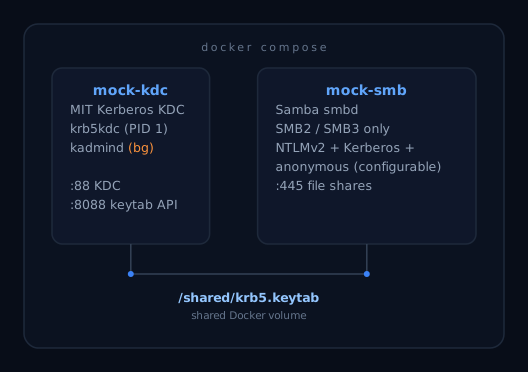
Both containers write/read /shared/krb5.keytab via a shared Docker volume — the KDC exports it at startup, Samba waits for it before binding port 445.
Both containers are built on Chainguard Wolfi — a minimal, purpose-built container OS with daily CVE patches and a near-zero known-vulnerability footprint.
Containers
| Container | Image | Role | Ports |
|---|---|---|---|
mock-kdc | ownjooorg/mock-kdc | MIT Kerberos KDC — issues tickets, writes keytab | 88/tcp+udp, 8088/tcp |
mock-smb | ownjooorg/mock-smb | Samba smbd — serves SMB2/3 shares | 445/tcp |
Samba waits for the KDC healthcheck (GET /healthz) before starting. Port 749 (kadmind) is not exposed on the host — it stays inside the Docker network.
Authentication methods
All methods are independently toggled via environment variables:
| Method | Env var | Default |
|---|---|---|
| Anonymous / guest | SMB_ENABLE_ANONYMOUS | true |
| NTLMv2 | SMB_ENABLE_NTLM | true |
| Kerberos / SPNEGO | SMB_ENABLE_KERBEROS | true |
SMBv1 is disabled. SMBv2 and SMBv3 are enforced. NTLMv1 is disabled; NTLMv2 only.
Configuration
All configuration flows in via environment variables — in a .env file, passed to docker compose, or set in your CI environment.
Users
SMB_USER_0=alice:s3cret
SMB_USER_1=bob:s3cret2
Supports UPN format (alice@REALM) for both Kerberos and NTLM.
Shares
SMB_SHARE_0=docs:/smb-data/docs:rw
SMB_SHARE_1=archive:/smb-data/archive:ro
Format: name:path-in-container:rw|ro
Identity
SMB_HOSTNAME=smbserver.smbtest.local
SMB_WORKGROUP=SMBTEST
KRB5_REALM=SMBTEST.LOCAL
KRB5_ADMIN_PASSWORD=adminpass
Ports
SMB_PORT=445        # host port → container 445
KDC_PORT=88         # host port → container 88 (tcp+udp)
KDC_HTTP_PORT=8088  # KDC keytab HTTP API
SMB protocol tuning
SMB_MIN_PROTOCOL=SMB2        # default SMB2
SMB_MAX_PROTOCOL=SMB3        # default SMB3
SMB_SERVER_SIGNING=mandatory # auto | mandatory | disabled
SMB_NTLM_AUTH=ntlmv2-only   # ntlmv2-only | yes | no
SMB_LOG_LEVEL=0              # 0–10
SMB_MAX_LOG_SIZE=50          # KB
KDC tuning
KDC_MAX_LIFE=10h 0m 0s
KDC_MAX_RENEWABLE_LIFE=7d 0h 0m 0s
KDC_SUPPORTED_ENCTYPES=aes256-cts:normal aes128-cts:normal
KDC_KEYTAB_PATH=/shared/krb5.keytab
Wizards
CLI wizard — generates .env, docker run script, or compose override:
pip install -e ".[cli]"
smb-mock-wizard
HTML wizard — open wizard.html in a browser (no server required). Output updates live; download or copy the generated config.
KDC keytab HTTP API
The KDC container exposes a lightweight HTTP server on port 8088:
GET http://<kdc-host>:8088/keytab   →  raw keytab bytes (application/octet-stream)
GET http://<kdc-host>:8088/healthz  →  200 ok once keytab is ready
The keytab is also emitted as a base64-encoded line to container stdout at startup:
KEYTAB_B64:<base64-encoded-keytab>
Consumers that cannot reach the HTTP endpoint can parse docker logs instead.
Securing the keytab endpoint
By default /keytab requires no authentication. To require a bearer token:
KDC_HTTP_TOKEN=mysecrettoken
Requests to /keytab must then include:
Authorization: Bearer mysecrettoken
Requests without a valid token receive 401 Unauthorized. /healthz is always unauthenticated — Docker's HEALTHCHECK depends on it.
CI note: The integration tests in this repo retrieve the keytab via
docker exec, not the HTTP endpoint, soKDC_HTTP_TOKENhas no effect on the built-in test suite.
Running tests
pip install -r requirements-test.txt

# Unit tests only — no Docker required, runs in ~0.1 s
pytest tests/unit/ -q

# Single test
pytest tests/unit/test_samba_config.py::test_username_map_script_always_present -q

# Integration tests — Docker must be running
# On Windows, use a non-privileged port and add the hosts entry first
SMB_PORT=4450 KDC_PORT=8800 docker compose up -d
SMB_SKIP_COMPOSE=1 SMB_PORT=4450 KDC_PORT=8800 pytest tests/integration/ -v

# Kerberos requirement: the SMB hostname must resolve locally
echo "127.0.0.1  smbserver.smbtest.local" >> /etc/hosts
Security
Hardening applied
| Area | What's done |
|---|---|
| Base image | Chainguard Wolfi — daily CVE patches, minimal attack surface, near-zero known CVEs |
| SMB protocol | SMBv1 disabled; SMBv2 minimum enforced |
| NTLM | NTLMv1 disabled; NTLMv2 only |
| Server signing | mandatory when anonymous access is disabled; auto otherwise (guest sessions cannot sign) |
| Anonymous restrictions | restrict anonymous = 2 when anonymous disabled — blocks unauthenticated info queries |
| Valid users | Enforced per share when anonymous is disabled |
| Fingerprinting | server string is blank; browseable shares hidden |
| Setuid/setgid | All setuid/setgid bits stripped at image build time (chmod a-s) |
| Capabilities | cap_drop: ALL + selective cap_add (only what each daemon strictly needs) |
| Privilege escalation | no-new-privileges: true on both containers |
| Process limits | pids_limit: 100 (KDC) / 200 (Samba) |
| Resource limits | CPU and memory limits set in compose |
| KDC admin port | Port 749 (kadmind) not exposed on the host — internal Docker network only |
| Keytab auth | Optional bearer token for the /keytab HTTP endpoint (KDC_HTTP_TOKEN) |
| Multi-arch | linux/amd64 and linux/arm64 — no emulation layers in production |
Automated CI security checks
The following checks run automatically on every push and pull request, and on a weekly schedule:
| Check | Tool | What it catches |
|---|---|---|
| Python SAST | CodeQL | Injection, path traversal, insecure deserialization, and other CWE-class bugs |
| Python security linter | Bandit | Hardcoded secrets, shell injection, insecure subprocess use, weak crypto |
| Container CVE scan | Trivy | Known CVEs (CRITICAL/HIGH) in base image and packages; results in GitHub Security tab |
| Dockerfile linting | Hadolint | Dockerfile best-practice violations and shell mistakes in RUN instructions |
| IaC security scan | Checkov | Misconfigurations in Dockerfile and docker-compose |
| CIS Docker Benchmark | Dockle | CIS benchmark violations in built images |
| Supply chain health | OSSF Scorecard | Branch protection, dependency pinning, CI security, signed releases |
| Dependency updates | Dependabot | Automated PRs for pip packages, Docker base images, and GitHub Actions |
What automated testing does NOT cover
Automated scanning does not replace a full security assessment. The following are explicitly out of scope for the built-in CI:
- Runtime / dynamic analysis (DAST) — no fuzzing, no traffic interception, no active exploitation attempts against a live container.
- SMB protocol-level attack simulation — NTLM relay, Pass-the-Hash, Kerberoasting, AS-REP roasting, and similar attack paths are not tested.
- Network-layer hardening — firewall rules, TLS termination, and host-level access controls are your responsibility.
- Secrets management — credentials passed via environment variables are visible via
docker inspect. This project does not enforce Docker secrets or a secrets manager; that is your operational responsibility. - Penetration testing — no automated pen-test runs against the deployed stack.
- Compliance auditing — no CIS benchmark, SOC 2, PCI-DSS, or similar compliance checks.
- Seccomp / AppArmor profiles — no custom syscall filtering beyond
no-new-privilegesand capability drops.
Warning
### Your security responsibilityThis is a developer test tool. It is not hardened for production.
Before deploying
smb-mockin any shared, networked, or production-adjacent environment:
- Engage your application security team to review the configuration and deployment context.
- Engage your red team to evaluate the running stack against your threat model — including SMB relay attacks, credential exposure via
docker inspect, and network reachability of the KDC and SMB ports.- Change all default passwords (
testpass,adminpass) via env vars.- Disable anonymous access (
SMB_ENABLE_ANONYMOUS=false) unless required for your test scenario.- Do not expose port 445 or 88 to the public internet with default credentials under any circumstances.
- Pin to a specific image tag rather than
latestin any non-ephemeral environment.No automated scan, no static analysis tool, and no CI badge is a substitute for human security review of your specific deployment. The maintainers accept no liability for any security incident, data loss, or unauthorized access arising from use of this software. See the MIT License for the complete disclaimer.
Supply chain security
All published images are signed and carry an attached SBOM and build provenance attestation.
Verify image signature (cosign)
cosign verify \
  --certificate-identity-regexp="https://github.com/ownjoo/smb-mock" \
  --certificate-oidc-issuer="https://token.actions.githubusercontent.com" \
  ownjooorg/mock-kdc:latest
Verify build provenance (GitHub)
gh attestation verify oci://ownjooorg/mock-kdc:latest \
  --owner ownjoo
Fetch the SBOM
cosign download sbom ownjooorg/mock-kdc:latest
SBOM files (SPDX JSON) are also attached to every GitHub release.
GitHub Actions pinning
All GitHub Actions in this repository are pinned to immutable SHA hashes rather than mutable tags. Dependabot automatically opens PRs to keep pins current.
Cross-realm trust (v1.1)
Trust relationship configuration is schema-complete and the env var contract is defined:
SMB_TRUST_0=CORP.EXAMPLE.COM:kdc.corp.example.com:sharedsecret:one-way
Full implementation (krbtgt principal creation, capaths, username mapping) is tracked for v1.1. Integration tests exist as xfail stubs.
License
Tag summary
Content type
Image
Digest
sha256:311db484c…
Size
27.4 MB
Last updated
3 months ago
docker pull ownjooorg/mock-kdc