ozlerhakan/rapid
🐳 A light-weight Docker Developer Interface for Docker Remote API
500K+
ozlerhakan/rapid repository overview

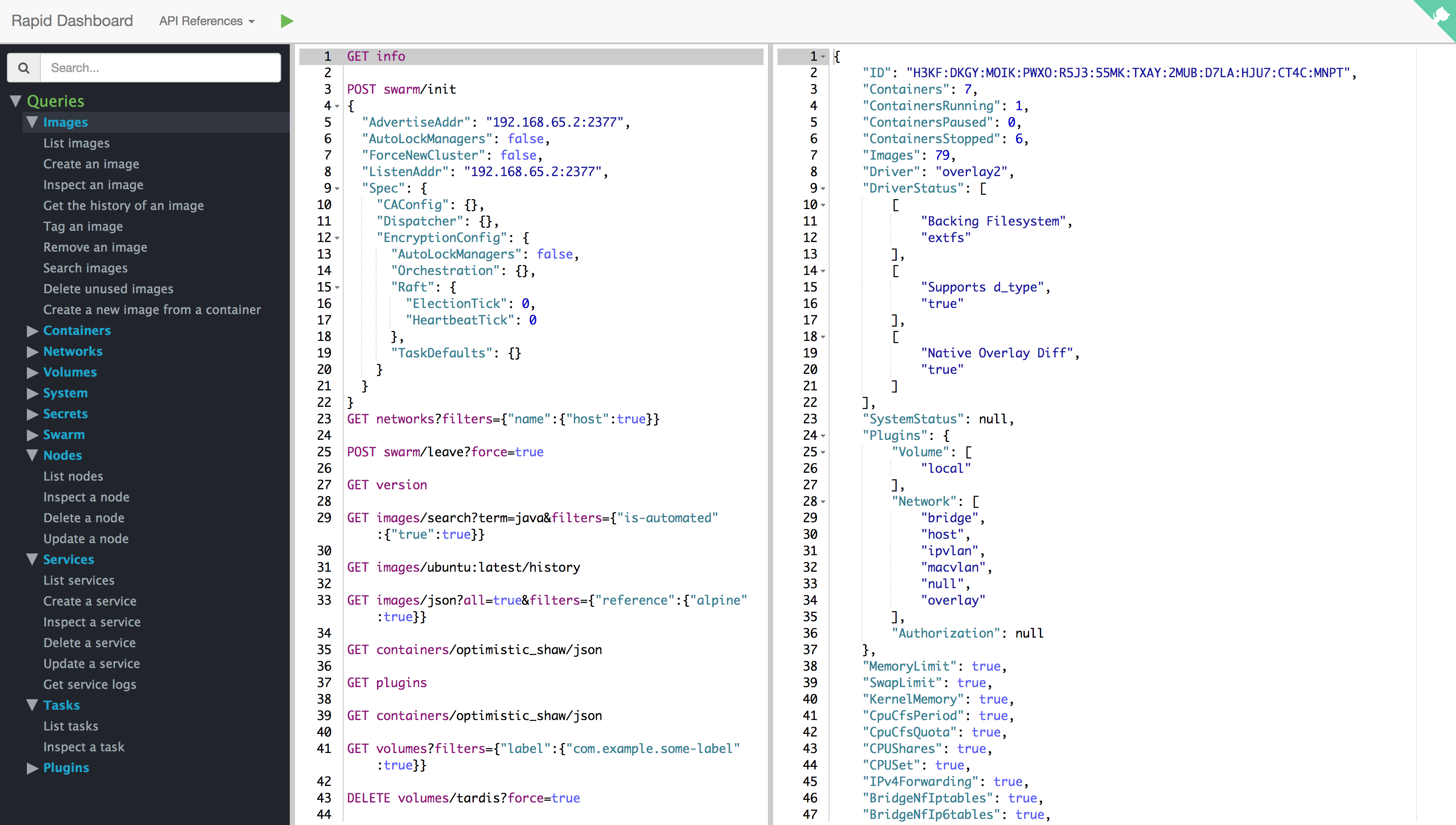




Rapid Docker Interface provides a connection between Docker queries and your Docker Host. Rapid changes the way of using Docker Engine API with ease. The Command Editor is your new Docker client communicating with the Engine. You can easily request supported Docker queries of Docker Remote API. Rapid Dashboard was distinguished as a Duke’s Choice Award 2017 Winner in October at JavaOne. The award is one of nine awards issued for the innovative application of Java in 2017.
Installation
Supported tags:
The command below will pull the latest image of Rapid into your local docker host and start a container as daemon listening internally on port 8080:
$ docker run -d --name rapid  \
 -v /var/run/docker.sock:/var/run/docker.sock \
 -p <PORT>:8080 \
 ozlerhakan/rapid
If your docker host runs via docker machine, go into it using $docker-machine ssh and run the command.
then open your browser to http://localhost:<PORT> or http://<docker-host-vm-ip>:<PORT> , have fun!
In Docker Swarm World, you can run the rapid as a service like below:
$ docker service create --name rapid \
    --mount="type=bind,source=/var/run/docker.sock,target=/var/run/docker.sock" \
    --constraint "node.role == manager" \
    -p 8080:8080 \
    ozlerhakan/rapid
Demo

Notes
- Header Parameters (X-Registry-Auth) are not supported.
- Tags ending with arm should work on supported versions of the Raspberry Pi models.
Versions
| Docker Version | API & Tag Version | Changes |
|---|---|---|
| 17.06.x | 1.30, latest | API changes |
| 17.05.x | 1.29 | API changes |
| 17.03.1 | 1.27 | API changes |
Editor Shortcuts
Rapid containers the following shortcuts. Any other shortcut suggestions are always welcome.
| Windows | Mac | Detail |
|---|---|---|
| Ctrl+D | ⌘+D | Duplicate line |
| Ctrl+Shift+C | ⌘+⇧+C | Copy the selection as cURL |
| Ctrl+X | ⌘+X | Remove current line |
| Shift+Enter | ⇧+⏎ | Start new line |
| Alt+Shift+Up | ⌥+⇧+Up | Move line up |
| Alt+Shift+Down | ⌥+⇧+Down | Move line down |
| Ctrl+Mouse_Scroll_Up | ⌃+Mouse_Scroll_Up | Zoom in |
| Ctrl+Mouse_Scroll_Down | ⌃+Mouse_Scroll_Down | Zoom out |
| Ctrl+Alt+H | ⌘+⌥+H | Show shortcuts |
| Ctrl+Shift+R | ⌘+⇧+R | Clear editor |
| Ctrl+/ | ⌘+/ | Comment/Uncomment with line comment |
cURL Details
The following cURL commands are all valid so as to paste them into the command editor. When you paste a valid command, Rapid converts it to a corresponding valid Docker remote query.
curl --unix-socket /var/run/docker.sock \
 -H "Content-Type: application/json" \
 -X POST http:/v1.26/containers/create \
 -d '
 {"Image": "alpine", "Cmd": ["echo", "hello world"]}
 '

curl --unix-socket /var/run/docker.sock -H "Content-Type: application/json" \
  -X POST http:/v1.26/containers/create \
  -d '{"Image": "alpine", "Cmd": ["echo", "hello world"]}'

curl --unix-socket /var/run/docker.sock \
 -H "Content-Type: application/json" \
 -X POST http:/v1.26/containers/create \
 -d '{"Image": "alpine", "Cmd": ["echo", "hello world"]}'

curl --unix-socket /var/run/docker.sock -X GET http:/v1.26/containers/json

curl --unix-socket /var/run/docker.sock -X GET http:/v1.26/images/json

curl --unix-socket /var/run/docker.sock -XGET http:/v1.26/containers/json

curl --unix-socket /var/run/docker.sock -XGET "http:/v1.26/containers/1c6594faf5/logs?stdout=1"

curl --unix-socket /var/run/docker.sock  -H "Content-Type: application/json"  -X POST http:/v1.26/containers/create -d'
 {"Image": "alpine", "Cmd": ["echo", "hello world"]}
 '

curl --unix-socket /var/run/docker.sock  -H "Content-Type: application/json"  -XPOST http:/v1.26/containers/create -d' {"Image": "alpine", "Cmd": ["echo", "hello world"]}'

curl --unix-socket /var/run/docker.sock\
  -X POST "http:/v1.26/commit?container=0888269a9d&repo=helloworld"
The ⌘+⇧+C shortcut enables you to convert the selection to the equivalent cURL command and copy it to clipboard.
A selected query from the command editor
POST containers/create?name=mycontainer
{
    "Image": "alpine",
    "Cmd": [
        "echo",
        "hello world"
    ]
}
The equivalent cURL command of the query above
curl --unix-socket /var/run/docker.sock -XPOST "http:/v1.26/containers/create?name=mycontainer" -H "Content-Type: application/json" -d'
{
    "Image": "alpine",
    "Cmd": [
        "echo",
        "hello world"
    ]
}'
Contributing
Any comments/issues/PRs are always welcome!
License
Rapid is released under MIT.
Tag summary
Content type
Image
Digest
Size
72.4 MB
Last updated
almost 9 years ago
docker pull ozlerhakan/rapid