palleri/dockcheck-web
A script checking updates for docker images without the need of pulling
100K+
palleri/dockcheck-web repository overview
DCW (dockcheck-web) with exporters
A webpage showing available image updates for your running containers.
Checking for new images at startup, once a day and via the button "Check for updates".
If dont want gui, just ignore publishing ports.
working on a non-gui version.
Exporter (multiple hosts)
Based on mag37/dockcheck
A script checking updates for docker images without the need of pulling - then having the option to auto-update.
All cred goes to Mag37 making this amazing script!
This image use dockcheck provided by Mag37.
Dependencies:
regclient/regctl (Licensed under Apache-2.0 License)
inotify-tools (Licensed under GPL-2.0 License)
APPRISE (Licensed under BSD 3-Clause License)
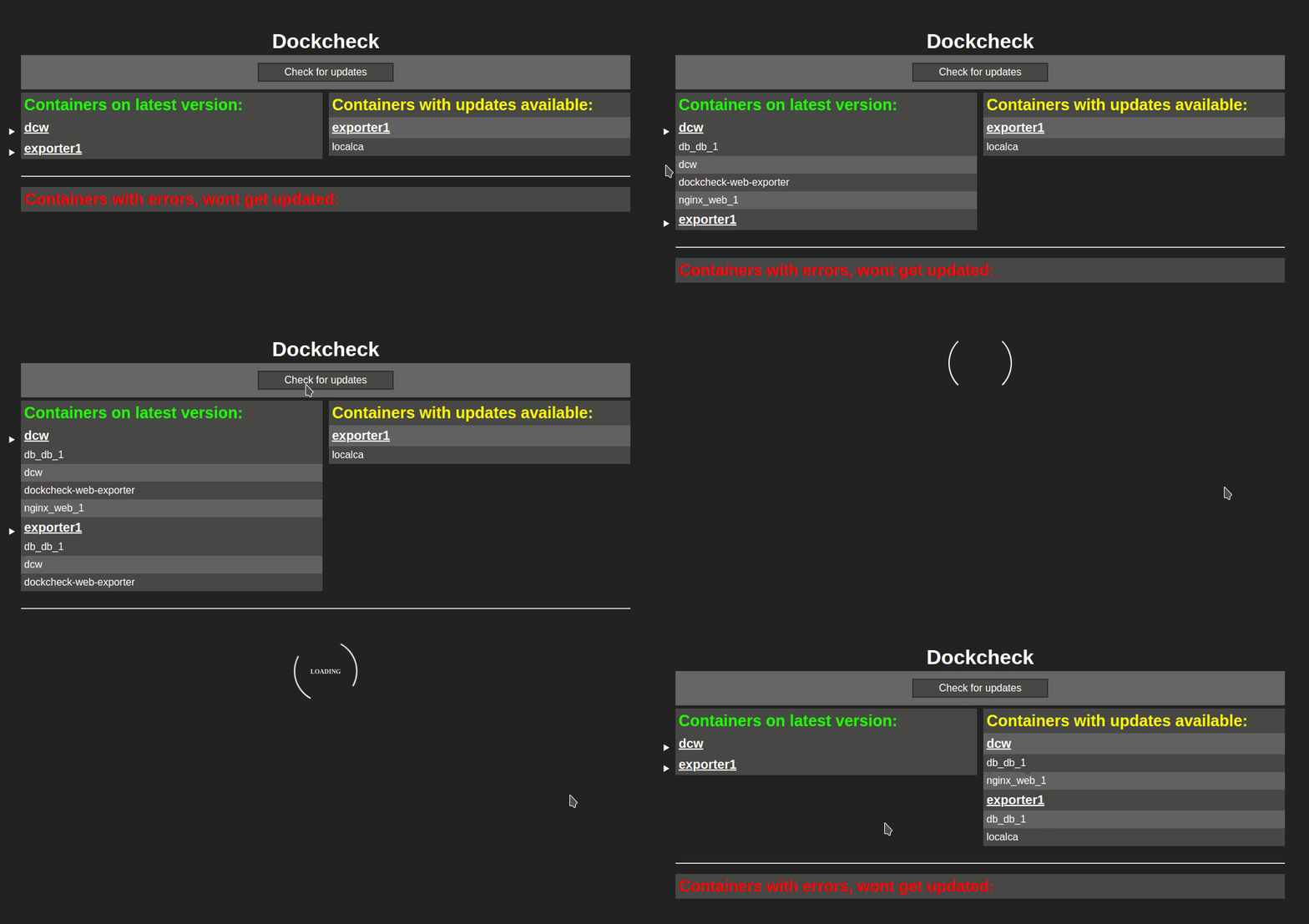
docker-compose.yml
version: '3.2'
services:
  dcw:
    container_name: dcw
    image: 'palleri/dcw:latest'
    restart: unless-stopped
    ports:
      - '80:80'
      - '5432:5432' # only required with exporters // communication between DCW and exporters
    volumes:
      - ./data:/var/www/html
      - /var/run/docker.sock:/var/run/docker.sock:ro
      - /etc/localtime:/etc/localtime:ro
    environment:
      TOKEN: superSecretPassw0rd                        # required // Also used by the exporter
      NOTIFY: "true"                                    # optional
      NOTIFY_URLS: "discord://Dockcheck@xxxxx/xxxxxx"   # optional
      NOTIFY_DEBUG: true                                # optional
      HTTP_PROXY: "http://proxy.homelab.net:3128"       # optional
      HTTPS_PROXY: "http://proxy.homelab.net:3128"      # optional
      EXCLUDE: "nginx,plex,prowlarr"                    # optional // Exclude containers from being checked for updates
      CRON_TIME: "12:56"                                # optional
The container and exporter are communicating via port tcp/5432
Security concern
For more security add the :ro to volumes docker.sock
Use with care, make sure you keep this container safe and do not publish on the internet.
Notifications
This image use apprise for notifications
Environment variables
Set NOTIFY: true to enable notifications
Set NOTIFY_DEBUG: true to enable DEBUG mode. Be carefull, your tokens and passwords might be visible in docker logs
Set NOTIFY_URLS: "tgram://0123456789:RandomLettersAndNumbers-2morestuff-123456789"
Set EXCLUDE: "nginx,plex,prowlarr" if you want to exclude containers from being checked for updates
Use the name on each container in comma separated variable
Setup Example for Telegram 
Start a chat with @BotFather and follow the guided steps.
Create a new bot: /newbot
Nickname: PumpkinsInShorts Username: CuriousPlumber
Note down the token replied: Use this token to access the HTTP API:
0123456789:RandomLettersAndNumbers-2morestuff
Now create a new group in Telegram, invite the bot with it's username @CuriousPlumber
When in the group, note down the end of the url, eg web.telegram.org/z/#-123456789 -> -123456789
If only using the phone app, invite @RawDataBot to the group and it'll post the id.
Then finally combine the token + the ID of the chatgroup, in this example:
0123456789:RandomLettersAndNumbers-2morestuff-123456789
Add that row to the docker-compose.yml
version: '3.2'
services:
  ...
    environment:
      NOTIFY: "true"
      NOTIFY_URLS: "tgram://0123456789:RandomLettersAndNumbers-2morestuff-123456789"
  ...
Setup Example for Discord 
Remove the api/webhook from https://discord.com/api/webhooks/xxxxx/xxxxxx
To this discord://xxxxx/xxxxxx
Or use it as it is https://discord.com/api/webhooks/xxxxx/xxxxxx
version: '3.2'
services:
  ...
    environment:
      NOTIFY: "true"
      NOTIFY_URLS: "discord://Dockcheck-web@xxxxx/xxxxxx"
  ...
Example for multiple urls
version: '3.2'
services:
  ...
    environment:
      NOTIFY: "true"
      NOTIFY_URLS: "discord://Dockcheck-web@xxxxx/xxxxxx tgram://0123456789:RandomLettersAndNumbers-2morestuff-123456789"
  ...
Tested
| Service | Tested | Result |
|---|---|---|
| Discord | 2023-02-24 | :heavy_check_mark: |
| 2023-02-24 | :heavy_check_mark: | |
| Telegram | 2023-02-24 | :heavy_check_mark: |
| Gotify | 2023-02-25 | :heavy_check_mark: |
| Matrix | 2023-02-26 | :heavy_check_mark: |
| HomeAssistant | 2023-02-26 | :heavy_check_mark: |
| Notification Service | Service ID | Default Port | Example Syntax |
|---|---|---|---|
| Apprise API | apprise:// or apprises:// | (TCP) 80 or 443 | apprise://hostname/Token |
| AWS SES | ses:// | (TCP) 443 | ses://user@domain/AccessKeyID/AccessSecretKey/RegionName ses://user@domain/AccessKeyID/AccessSecretKey/RegionName/email1/email2/emailN |
| Bark | bark:// | (TCP) 80 or 443 | bark://hostname bark://hostname/device_key bark://hostname/device_key1/device_key2/device_keyN |
| Boxcar | boxcar:// | (TCP) 443 | boxcar://hostname boxcar://hostname/@tag boxcar://hostname/device_token boxcar://hostname/device_token1/device_token2/device_tokenN boxcar://hostname/@tag/@tag2/device_token |
| Discord | discord:// | (TCP) 443 | discord://webhook_id/webhook_token discord://avatar@webhook_id/webhook_token |
| Emby | emby:// or embys:// | (TCP) 8096 | emby://user@hostname/ emby://user:password@hostname |
| Enigma2 | enigma2:// or enigma2s:// | (TCP) 80 or 443 | enigma2://hostname |
| Faast | faast:// | (TCP) 443 | faast://authorizationtoken |
| FCM | fcm:// | (TCP) 443 | fcm://project@apikey/DEVICE_ID fcm://project@apikey/#TOPIC fcm://project@apikey/DEVICE_ID1/#topic1/#topic2/DEVICE_ID2/ |
| Flock | flock:// | (TCP) 443 | flock://token flock://botname@token flock://app_token/u:userid flock://app_token/g:channel_id flock://app_token/u:userid/g:channel_id |
| Gitter | gitter:// | (TCP) 443 | gitter://token/room gitter://token/room1/room2/roomN |
| Google Chat | gchat:// | (TCP) 443 | gchat://workspace/key/token |
| Gotify | gotify:// or gotifys:// | (TCP) 80 or 443 | gotify://hostname/token gotifys://hostname/token?priority=high |
| Growl | growl:// | (UDP) 23053 | growl://hostname growl://hostname:portno growl://password@hostname growl://password@hostname:port Note: you can also use the get parameter version which can allow the growl request to behave using the older v1.x protocol. An example would look like: growl://hostname?version=1 |
| Guilded | guilded:// | (TCP) 443 | guilded://webhook_id/webhook_token guilded://avatar@webhook_id/webhook_token |
| Home Assistant | hassio:// or hassios:// | (TCP) 8123 or 443 | hassio://hostname/accesstoken hassio://user@hostname/accesstoken hassio://user:password@hostname:port/accesstoken hassio://hostname/optional/path/accesstoken |
| IFTTT | ifttt:// | (TCP) 443 | ifttt://webhooksID/Event ifttt://webhooksID/Event1/Event2/EventN ifttt://webhooksID/Event1/?+Key=Value ifttt://webhooksID/Event1/?-Key=value1 |
| Join | join:// | (TCP) 443 | join://apikey/device join://apikey/device1/device2/deviceN/ join://apikey/group join://apikey/groupA/groupB/groupN join://apikey/DeviceA/groupA/groupN/DeviceN/ |
| KODI | kodi:// or kodis:// | (TCP) 8080 or 443 | kodi://hostname kodi://user@hostname kodi://user:password@hostname:port |
| Kumulos | kumulos:// | (TCP) 443 | kumulos://apikey/serverkey |
| LaMetric Time | lametric:// | (TCP) 443 | lametric://apikey@device_ipaddr lametric://apikey@hostname:port lametric://client_id@client_secret |
| Line | line:// | (TCP) 443 | line://Token@User line://Token/User1/User2/UserN |
| Mailgun | mailgun:// | (TCP) 443 | mailgun://user@hostname/apikey mailgun://user@hostname/apikey/email mailgun://user@hostname/apikey/email1/email2/emailN mailgun://user@hostname/apikey/?name="From%20User" |
| Mastodon | mastodon:// or mastodons:// | (TCP) 80 or 443 | mastodon://access_key@hostname mastodon://access_key@hostname/@user mastodon://access_key@hostname/@user1/@user2/@userN |
| Matrix | matrix:// or matrixs:// | (TCP) 80 or 443 | matrix://hostname matrix://user@hostname matrixs://user:pass@hostname:port/#room_alias matrixs://user:pass@hostname:port/!room_id matrixs://user:pass@hostname:port/#room_alias/!room_id/#room2 matrixs://token@hostname:port/?webhook=matrix matrix://user:token@hostname/?webhook=slack&format=markdown |
| Mattermost | mmost:// or mmosts:// | (TCP) 8065 | mmost://hostname/authkey mmost://hostname:80/authkey mmost://user@hostname:80/authkey mmost://hostname/authkey?channel=channel mmosts://hostname/authkey mmosts://user@hostname/authkey |
| Microsoft Teams | msteams:// | (TCP) 443 | msteams://TokenA/TokenB/TokenC/ |
| Misskey | misskey:// or misskeys:// | (TCP) 80 or 443 | misskey://access_token@hostname |
| MQTT | mqtt:// or mqtts:// | (TCP) 1883 or 8883 | mqtt://hostname/topic mqtt://user@hostname/topic mqtts://user:pass@hostname:9883/topic |
| Nextcloud | ncloud:// or nclouds:// | (TCP) 80 or 443 | ncloud://adminuser:pass@host/User nclouds://adminuser:pass@host/User1/User2/UserN |
| NextcloudTalk | nctalk:// or nctalks:// | (TCP) 80 or 443 | nctalk://user:pass@host/RoomId nctalks://user:pass@host/RoomId1/RoomId2/RoomIdN |
| Notica | notica:// | (TCP) 443 | notica://Token/ |
| Notifico | notifico:// | (TCP) 443 | notifico://ProjectID/MessageHook/ |
| ntfy | ntfy:// | (TCP) 80 or 443 | ntfy://topic/ ntfys://topic/ |
| Office 365 | o365:// | (TCP) 443 | o365://TenantID:AccountEmail/ClientID/ClientSecret o365://TenantID:AccountEmail/ClientID/ClientSecret/TargetEmail o365://TenantID:AccountEmail/ClientID/ClientSecret/TargetEmail1/TargetEmail2/TargetEmailN |
| OneSignal | onesignal:// | (TCP) 443 | onesignal://AppID@APIKey/PlayerID onesignal://TemplateID:AppID@APIKey/UserID onesignal://AppID@APIKey/#IncludeSegment onesignal://AppID@APIKey/Email |
| Opsgenie | opsgenie:// | (TCP) 443 | opsgenie://APIKey opsgenie://APIKey/UserID opsgenie://APIKey/#Team opsgenie://APIKey/*Schedule opsgenie://APIKey/^Escalation |
| PagerDuty | pagerduty:// | (TCP) 443 | pagerduty://IntegrationKey@ApiKey pagerduty://IntegrationKey@ApiKey/Source/Component |
| PagerTree | pagertree:// | (TCP) 443 | pagertree://integration_id |
| ParsePlatform | parsep:// or parseps:// | (TCP) 80 or 443 | parsep://AppID:MasterKey@Hostname parseps://AppID:MasterKey@Hostname |
| PopcornNotify | popcorn:// | (TCP) 443 | popcorn://ApiKey/ToPhoneNo popcorn://ApiKey/ToPhoneNo1/ToPhoneNo2/ToPhoneNoN/ popcorn://ApiKey/ToEmail popcorn://ApiKey/ToEmail1/ToEmail2/ToEmailN/ popcorn://ApiKey/ToPhoneNo1/ToEmail1/ToPhoneNoN/ToEmailN |
| Prowl | prowl:// | (TCP) 443 | prowl://apikey prowl://apikey/providerkey |
| PushBullet | pbul:// | (TCP) 443 | pbul://accesstoken pbul://accesstoken/#channel pbul://accesstoken/A_DEVICE_ID pbul://accesstoken/[email protected] pbul://accesstoken/#channel/#channel2/[email protected]/DEVICE |
| Pushjet | pjet:// or pjets:// | (TCP) 80 or 443 | pjet://hostname/secret pjet://hostname:port/secret pjets://secret@hostname/secret pjets://hostname:port/secret |
| Push (Techulus) | push:// | (TCP) 443 | push://apikey/ |
| Pushed | pushed:// | (TCP) 443 | pushed://appkey/appsecret/ pushed://appkey/appsecret/#ChannelAlias pushed://appkey/appsecret/#ChannelAlias1/#ChannelAlias2/#ChannelAliasN pushed://appkey/appsecret/@UserPushedID pushed://appkey/appsecret/@UserPushedID1/@UserPushedID2/@UserPushedIDN |
| Pushover | pover:// | (TCP) 443 | pover://user@token pover://user@token/DEVICE pover://user@token/DEVICE1/DEVICE2/DEVICEN Note: you must specify both your user_id and token |
| PushSafer | psafer:// or psafers:// | (TCP) 80 or 443 | psafer://privatekey psafers://privatekey/DEVICE psafer://privatekey/DEVICE1/DEVICE2/DEVICEN |
| Reddit | reddit:// | (TCP) 443 | reddit://user:password@app_id/app_secret/subreddit reddit://user:password@app_id/app_secret/sub1/sub2/subN |
| Rocket.Chat | rocket:// or rockets:// | (TCP) 80 or 443 | rocket://user:password@hostname/RoomID/Channel rockets://user:password@hostname:443/#Channel1/#Channel1/RoomID rocket://user:password@hostname/#Channel rocket://webhook@hostname rockets://webhook@hostname/@User/#Channel |
| Ryver | ryver:// | (TCP) 443 | ryver://Organization/Token ryver://botname@Organization/Token |
| SendGrid | sendgrid:// | (TCP) 443 | sendgrid://APIToken:FromEmail/ sendgrid://APIToken:FromEmail/ToEmail sendgrid://APIToken:FromEmail/ToEmail1/ToEmail2/ToEmailN/ |
| ServerChan | schan:// | (TCP) 443 | schan://sendkey/ |
| Signal API | signal:// or signals:// | (TCP) 80 or 443 | signal://hostname:port/FromPhoneNo signal://hostname:port/FromPhoneNo/ToPhoneNo signal://hostname:port/FromPhoneNo/ToPhoneNo1/ToPhoneNo2/ToPhoneNoN/ |
| SimplePush | spush:// | (TCP) 443 | spush://apikey spush://salt:password@apikey spush://apikey?event=Apprise |
| Slack | slack:// | (TCP) 443 | slack://TokenA/TokenB/TokenC/ slack://TokenA/TokenB/TokenC/Channel slack://botname@TokenA/TokenB/TokenC/Channel slack://user@TokenA/TokenB/TokenC/Channel1/Channel2/ChannelN |
| SMTP2Go | smtp2go:// | (TCP) 443 | smtp2go://user@hostname/apikey smtp2go://user@hostname/apikey/email smtp2go://user@hostname/apikey/email1/email2/emailN smtp2go://user@hostname/apikey/?name="From%20User" |
| Streamlabs | strmlabs:// | (TCP) 443 | strmlabs://AccessToken/ strmlabs://AccessToken/?name=name&identifier=identifier&amount=0¤cy=USD |
| SparkPost | sparkpost:// | (TCP) 443 | sparkpost://user@hostname/apikey sparkpost://user@hostname/apikey/email sparkpost://user@hostname/apikey/email1/email2/emailN sparkpost://user@hostname/apikey/?name="From%20User" |
| Spontit | spontit:// | (TCP) 443 | spontit://UserID@APIKey/ spontit://UserID@APIKey/Channel spontit://UserID@APIKey/Channel1/Channel2/ChannelN |
| Syslog | syslog:// | (UDP) 514 (if hostname specified) | syslog:// syslog://Facility syslog://hostname syslog://hostname/Facility |
| Telegram | tgram:// | (TCP) 443 | tgram://bottoken/ChatID tgram://bottoken/ChatID1/ChatID2/ChatIDN |
| Twitter | twitter:// | (TCP) 443 | twitter://CKey/CSecret/AKey/ASecret twitter://user@CKey/CSecret/AKey/ASecret twitter://CKey/CSecret/AKey/ASecret/User1/User2/User2 twitter://CKey/CSecret/AKey/ASecret?mode=tweet |
| Twist | twist:// | (TCP) 443 | twist://pasword:login twist://password:login/#channel twist://password:login/#team:channel twist://password:login/#team:channel1/channel2/#team3:channel |
| XBMC | xbmc:// or xbmcs:// | (TCP) 8080 or 443 | xbmc://hostname xbmc://user@hostname xbmc://user:password@hostname:port |
| Webex Teams (Cisco) | wxteams:// | (TCP) 443 | wxteams://Token |
| Zulip Chat | zulip:// | (TCP) 443 | zulip://botname@Organization/Token zulip://botname@Organization/Token/Stream zulip://botname@Organization/Token/Email |
This is what worked for me
- NOTIFY_URL: "mailtos://mail.server.com/?user=[email protected]&pass=xxxx"
TODO List
| TODO | Tested | Result | Implemented |
|---|---|---|---|
| ARM64 and AMD64 Support | 2023-02-23 | :heavy_check_mark: | 2023-02-23 |
| Slim version without webgui (Only notifications) | 2023-02-24 | :heavy_check_mark: | 2023-02-26 |
Future ideas
| Feature | Timeline | Stage |
|---|---|---|
| Update via webgui | Unknown (Need Help) | |
| Multiple hosts one gui | 2023-03-* | Alpha |
- Update via webui
- Need help with how to make docker.sock recreate docker-compose without the need for docker-compose.yml
- Docker remote API good or bad?
- Need help with how to make docker.sock recreate docker-compose without the need for docker-compose.yml
Bugs and fixes
| Description | Date | Status |
|---|---|---|
Cronjob not working properly | 2023-01-28 | :heavy_check_mark: |
Script not running correctly | 2023-01-29 | :heavy_check_mark: |
Hanging processes | 2023-01-29 | :heavy_check_mark: |
Not displaying in ascending order | 2023-01-29 | :heavy_check_mark: |
Blank/error text on index while script is running | 2023-01-29 | :heavy_check_mark: |
Redirect error while checking for update | 2023-01-31 | :heavy_check_mark: |
Tag summary
Content type
Image
Digest
sha256:78bbb48d6…
Size
297.2 MB
Last updated
over 3 years ago
docker pull palleri/dockcheck-web