parana/trusty-php
Docker image to run PHP applications on Apache @ Ubuntu 14.04
624
parana/trusty-php repository overview
trusty-php
Docker image to run PHP applications with Apache Web Server on a Ubuntu 14.04 box
Easy Way - Also Known As Executive Summary
- Push
my-appto your github account - Install Docker
- Run
docker run -d --name trusty-php-app -p 80:80 parana/trusty-php /run.sh your_github_account/your-app destination, for example you can use my test app:joao-parana/test-phpappandtestwithdestination. In this case the full command is:docker run -d --name trusty-php-app -p 80:80 parana/trusty-php /run.sh joao-parana/test-phpapp test - Run
docker logs trusty-php-app - Run
open http://$(docker-ip)/testif you is using my PHP test applicationjoao-parana/test-phpappas explained bellow. O functiondocker-ipreturns the result offdocker-machine ip defaultorboot2docker iporlocalhost, in case of you is using Linux.
If you need stop and remove the container use: docker stop trusty-php-app && docker rm trusty-php-app
That's All !
Dependencies Diagram
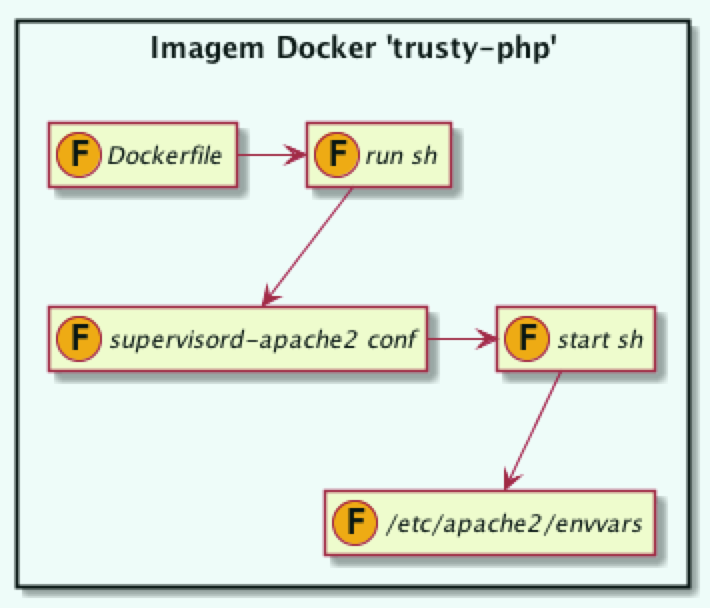
Files
/etc/apache2/envvars
cat /etc/apache2/envvars
# envvars - default environment variables for apache2ctl
unset HOME
if [ "${APACHE_CONFDIR##/etc/apache2-}" != "${APACHE_CONFDIR}" ] ; then
  SUFFIX="-${APACHE_CONFDIR##/etc/apache2-}"
else
  SUFFIX=
fi
export APACHE_RUN_USER=www-data
export APACHE_RUN_GROUP=www-data
export APACHE_PID_FILE=/var/run/apache2/apache2$SUFFIX.pid
export APACHE_RUN_DIR=/var/run/apache2$SUFFIX
export APACHE_LOCK_DIR=/var/lock/apache2$SUFFIX
export APACHE_LOG_DIR=/var/log/apache2$SUFFIX
# The locale used by some modules like mod_dav
export LANG=C
export LANG
start.sh
cat start.sh
#!/bin/bash
source /etc/apache2/envvars
exec apache2 -D FOREGROUND
supervisord-apache2.conf
cat supervisord-apache2.conf
[program:apache2]
command=/start.sh
numprocs=1
autostart=true
autorestart=true
run.sh
cat run.sh
#!/bin/bash
APP_SRC=$1
# Doing git clone when requested
if [ -z "$APP_SRC" ]; then
  echo "••• `date` - APP_SRC : $APP_SRC "
else
  echo "••• `date` - APP_SRC : $APP_SRC "
  echo "••• `date` - Current Directory: `pwd` "
  GITHUB_URL="https://github.com/$APP_SRC.git"
  echo "••• `date` - GITHUB_URL : $GITHUB_URL"
  echo "••• `date` - Local Destination path : `pwd`/$2"
  git clone $GITHUB_URL $2
fi
echo "••• `date` - Iniciando aplicação PHP sob o Apache no Ubuntu 14.04 •••"
exec supervisord -n
Dockerfile
FROM ubuntu:14.04
MAINTAINER João Antonio Ferreira "[email protected]"
#
# Esta imagem contém supervisor, apache, PHP, git e Composer
#
# Install packages
RUN apt-get update && \
 DEBIAN_FRONTEND=noninteractive apt-get -y upgrade && \
 DEBIAN_FRONTEND=noninteractive apt-get -y install supervisor pwgen && \
 apt-get -y install git apache2 libapache2-mod-php5 php5-mysql php5-pgsql php5-gd php-pear php-apc curl && \
 curl -sS https://getcomposer.org/installer | php -- --install-dir=/usr/local/bin && \
 mv /usr/local/bin/composer.phar /usr/local/bin/composer
# Override default apache conf
ADD apache.conf /etc/apache2/sites-enabled/000-default.conf
# Enable apache rewrite module
RUN a2enmod rewrite
# Add image configuration and scripts
ADD start.sh /start.sh
ADD run.sh /run.sh
RUN chmod 755 /*.sh
ADD supervisord-apache2.conf /etc/supervisor/conf.d/supervisord-apache2.conf
# Configure /app folder
RUN mkdir -p /app && rm -fr /var/www/html && ln -s /app /var/www/html
EXPOSE 80
WORKDIR /app
CMD ["/run.sh"]
Build the image
cd ~/Desktop/Dev
git clone [email protected]:joao-parana/trusty-php.git
./build-trusty-php
Showing Docker image details
docker images parana/trusty-php
docker history  parana/trusty-php
You will see something like this:
IMAGE               CREATED             CREATED BY                                      SIZE                COMMENT
4afafc2a1b69        3 minutes ago       /bin/sh -c #(nop) CMD ["/run.sh"]               0 B
d76ceda5eb04        3 minutes ago       /bin/sh -c #(nop) WORKDIR /app                  0 B
11ff8e42b114        3 minutes ago       /bin/sh -c #(nop) EXPOSE 80/tcp                 0 B
f31419122bd5        3 minutes ago       /bin/sh -c mkdir -p /app && rm -fr /var/www/h   4 B
43a88285ac9d        3 minutes ago       /bin/sh -c #(nop) ADD file:1cdca4074d5c89d1fa   79 B
0a55b160a7e1        3 minutes ago       /bin/sh -c chmod 755 /*.sh                      194 B
42e7a6bd9e46        3 minutes ago       /bin/sh -c #(nop) ADD file:c029b0fc110388bdc5   125 B
f0f13cb42fd8        3 minutes ago       /bin/sh -c #(nop) ADD file:5bf808f83a6ffeb51b   69 B
1e25263e63ef        3 minutes ago       /bin/sh -c a2enmod rewrite                      30 B
e1ded839fa80        3 minutes ago       /bin/sh -c #(nop) ADD file:2adea1c29131373858   403 B
c19ea99d9b0a        3 minutes ago       /bin/sh -c apt-get update &&  DEBIAN_FRONTEND   133.9 MB
ab74e0d9dae7        3 days ago          /bin/sh -c #(nop) MAINTAINER João Antonio Fe    0 B
6cc0fc2a5ee3        8 days ago          /bin/sh -c #(nop) CMD ["/bin/bash"]             0 B
f80999a1f330        8 days ago          /bin/sh -c sed -i 's/^#\s*\(deb.*universe\)$/   1.895 kB
2ef91804894a        8 days ago          /bin/sh -c echo '#!/bin/sh' > /usr/sbin/polic   194.5 kB
92ec6d044cb3        8 days ago          /bin/sh -c #(nop) ADD file:7ce20ce3daa6af21db   187.7 MB
The original Dockerfile for Ubuntu Trusty is something like this:
FROM scratch
ADD ubuntu-trusty-core-cloudimg-amd64-root.tar.gz ...
RUN echo '#!/bin/sh' > /usr/sbin/policy-rc.d ...
RUN sed -i 's/^#\s*\(deb.*universe\)$/\1/g' /etc/apt/sources.list
CMD ["/bin/bash"]
As you see, this appear at the bottom of docker history output (latest 4 lines).
Now I can delete the Ubuntu Image and Dangling images
docker rmi ubuntu:14.04
echo "Removing dangling images ..."
docker rmi $(docker images -f dangling=true -q)
And list the images in your host computer
docker images
Installing your PHP application
To install your application, you can create another Dockerfile and
you can copy your code inside the image in /app, for example, using git.
Another approach can be more convenient. You can use this image and commit it with the app inside. See how to do tht bellow:
docker run -d --name trusty-php-app parana/trusty-php bash

# Inside the Container you can run this commands bellow
git clone https://github.com/joao-parana/test-phpapp.git /app
supervisord -n
# to verify use another Terminal Window / Tab
docker logs trusty-php-app
To create an image from that, execute:
docker commit -p -m "Adding test-phpapp" \
       -a "João Antonio Ferreira <[email protected]>" \
       trusty-php-app parana/trusty-php:v1
You can view both images, with and without test-phpapp
docker images parana/trusty-php
And verify its layers
docker history parana/trusty-php:v1 | head
You have commited the image with app inside, so you can remove the temporary container
docker rm trusty-php-app
And you can inspect the new image, running ls -lat /app inside it using a bash shell
docker run -i -t --rm --name trusty-php-app \
           -p 80:80 parana/trusty-php:v1 ls -lat /app
And you can play around using a bash shell too.
docker run -i -t --rm --name trusty-php-app \
           -p 80:80 parana/trusty-php:v1 bash
You can now push your changes to the registry, like in this example:
docker push parana/trusty-php:v1
Please use your Docker Hub account instead.
Running your PHP application
Pull your image, if it's not yet on your local docker machine:
docker pull parana/trusty-php:v1
You can run the Test Application, exit and remove the container, to see if the image is OK.
docker run -i -t --name trusty-php-app --rm \
           --link some-mysql-server:mysql \
           -e DB_USER="root" \
           -e DB_PASSWORD="xpto" \
           -e DB_NAME="test" \
           parana/trusty-php:v1 \
           php /app/testecli.php
Oh, you need to start some-mysql-server if it's not yet started.
Run the /run.sh script to start apache (via supervisor) on
Container in Daemon mode:
docker run -d --name trusty-php-app -p 80:80 parana/trusty-php:v1 /run.sh
To test your deployment you can execute:
curl http://dockerhost.local
I supose you have an entry on /etc/hosts for dockerhost.local point to boot2docker, docker-machine or localhost (Linux)
To view phpinfo you can execute:
open http://dockerhost.local/phpinfo.php
Tag summary
Content type
Image
Digest
Size
123.6 MB
Last updated
almost 11 years ago
docker pull parana/trusty-php