paredero/iot-simulator
Configurable IoT device simulator (MQTT/Kafka/HTTP/AMQP/CoAP) with a real-time web UI
171
paredero/iot-simulator repository overview
IoT Device Simulator



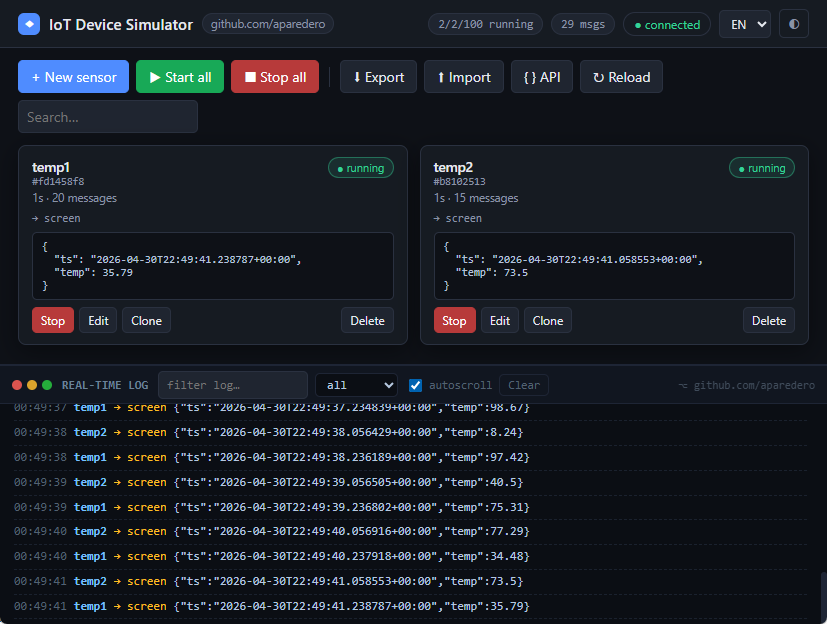
A configurable IoT device simulator with a real-time web UI. Define virtual devices, generate realistic telemetry, and stream it to multiple targets — screen, MQTT, Kafka, TCP/JSON, file, HTTP, AMQP and CoAP — with optional payload encryption. The UI is available in English and Spanish.
Default communication ports are listed in docs/PORTS.md.
Features
- Up to 100 devices, each with its own interval and optional jitter.
- Rich field generators: timestamp, fixed/random number, gaussian, random walk, sine wave, fixed/random/pattern string, boolean, weighted enum, UUID, geo-point (GPS jitter) and file-driven values.
- Multiple outputs per device, combined freely: screen, MQTT (TLS/QoS/ retain/auth), Kafka, TCP/JSON, file, HTTP webhook, AMQP (RabbitMQ), CoAP.
- Optional AES-256-GCM payload encryption per output.
- Anomaly injection to test alerting pipelines.
- Bundled example scenarios loadable in one click from the UI.
- JSON / YAML import & export of the full configuration.
- Real-time WebSocket log, dark/light themes.
Quick start
Docker
docker run --rm -p 8000:8000 -p 5050:5050 -p 5683:5683/udp paredero/iot-simulator:latest
# full lab (MQTT, Kafka, RabbitMQ + simulator):
docker compose up --build
Local
Requires Python 3.14 or 3.15 (see docs/DEVELOPMENT.md).
python3.14 -m venv .venv && source .venv/bin/activate
pip install -r requirements.txt
uvicorn app.main:app --host 0.0.0.0 --port 8000
Then open http://localhost:8000.
Usage
- Click New sensor, give it a name, add fields and outputs, and save.
- Or click Examples to load a ready-made scenario (smart building, GPS fleet, industrial machine, energy meter, air quality).
- Select a device in the left list. Use the detail pane to start, stop, clone, edit or delete it. Watch payloads in the bottom log.
- Use Export / Import to save and restore configurations (JSON or YAML).
The REST API and WebSocket are documented in-app via the API button, and at
/docs (Swagger UI).
Configuration
Environment variables:
| Variable | Default | Description |
|---|---|---|
LISTEN_HOST | 0.0.0.0 | Bind host for TCP/JSON and CoAP listeners. |
LISTEN_PORT | 5050 | TCP/JSON listener (0 disables). |
COAP_LISTEN_PORT | 5683 | CoAP UDP listener (0 disables). |
LOG_LEVEL | INFO | Python logging level. |
IOTSIM_MQTT_HOST | localhost | Default MQTT host in the UI. |
IOTSIM_KAFKA_BOOTSTRAP | localhost:9092 | Default Kafka bootstrap. |
IOTSIM_AMQP_URL | amqp://iot:iot@localhost:5672/ | Default AMQP URL. |
IOTSIM_HTTP_INGEST_URL | http://127.0.0.1:8000/api/ingest | Default HTTP output URL. |
IOTSIM_REWRITE_EXAMPLE_HOSTS | 0 | Set 1 in Compose so examples use lab brokers. |
IOTSIM_FILE_FIELD_ROOT | sample_data/ | Sandbox root for file field paths. |
IOTSIM_FILE_OUTPUT_ROOT | output/ | Sandbox root for file_output paths. |
The full port map is in docs/PORTS.md. GET /api/runtime returns the same map from a running instance.
Documentation
| Guide | Description |
|---|---|
| docs/INDEX.md | Documentation index |
| docs/USAGE.md | User guide: fields, outputs, encryption, examples |
| docs/API.md | REST + WebSocket reference |
| docs/PORTS.md | Communication port standard |
| docs/CONFIG_SCHEMA.md | Sensor / field / output / encryption schema |
| examples/ | Ready-to-import scenarios |
A Helm chart for Kubernetes is available in helm/iot-simulator/.
License
MIT © 2026 IoT Device Simulator contributors.
Tag summary
Content type
Image
Digest
sha256:b22b21a01…
Size
46.1 MB
Last updated
6 days ago
docker pull paredero/iot-simulator