pedrule/cliops repository overview
Cliops: A Cli dedicated to making DevOps and microservices easily.
Caution: This is a Beta project
Presentation
Cliops is a dedicated cli to developers to painlessly create and manage a full-stack of microservices.
Cliops is strongly coupled with Vscode.
With Cliops,
- you can manage your architecture of microservice and micro frontend.
- you can easily create multi repo applications.
- you can create your scaffolding.
- you can easily be doing dev in container
- you can easily be doing dev in a remote container.
- you have a ready-to-use cluster deployment solution.
- you have a ready-to-use node + typescript + PostgreSQL + mocha backend micro-services
- you have a ready-to-use react + React frontend service
- you have a ready-to-use angular frontend service (coming soon)
- you have a ready-to-use open-wc + typescript + mocha + es-dev-server + chrome-headless micro-frontend service.
With Cliops, you don't have to install anything on your local environment.
Requirement
you only need to have on your local computer
- VScode ide with official Microsoft Remote - Containers extension installed
- Docker
Installation
Cliops has been designed to be a fully agnostic tool.
Our goal is to avoid complicated onboarding processes when developper want to use it.
So, you have not any installation requirement, you only have to launch a new container based on pedrule/cliops image and open vscode server in it.
to do it:
- open a terminal bash terminal and type:
docker run --name "cliops" -w "$PWD" -v "$PWD:$PWD" -v "/var/run/docker.sock:/var/run/docker.sock" pedrule/cliops
in a windows environnement you'll have to indicate your PWD manually by converting your directory path: *C:* becomes //C/
docker run --name "cliops" -w "//C/<my directory>" -v "//C/<my directory>://C/<my directory>" -v "/var/run/docker.sock:/var/run/docker.sock" pedrule/cliops
once your container cliops is running, open your vscode IDE and
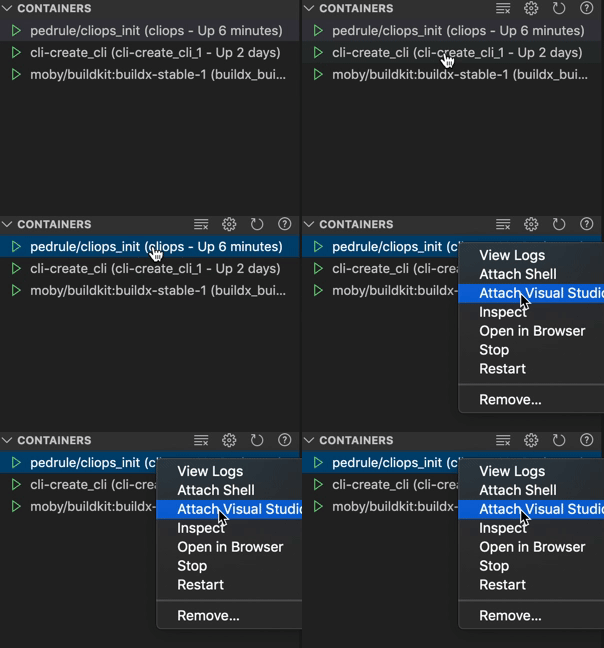
it will open a new vscode window inside of running cliops container. Open a new integrated terminal and run create
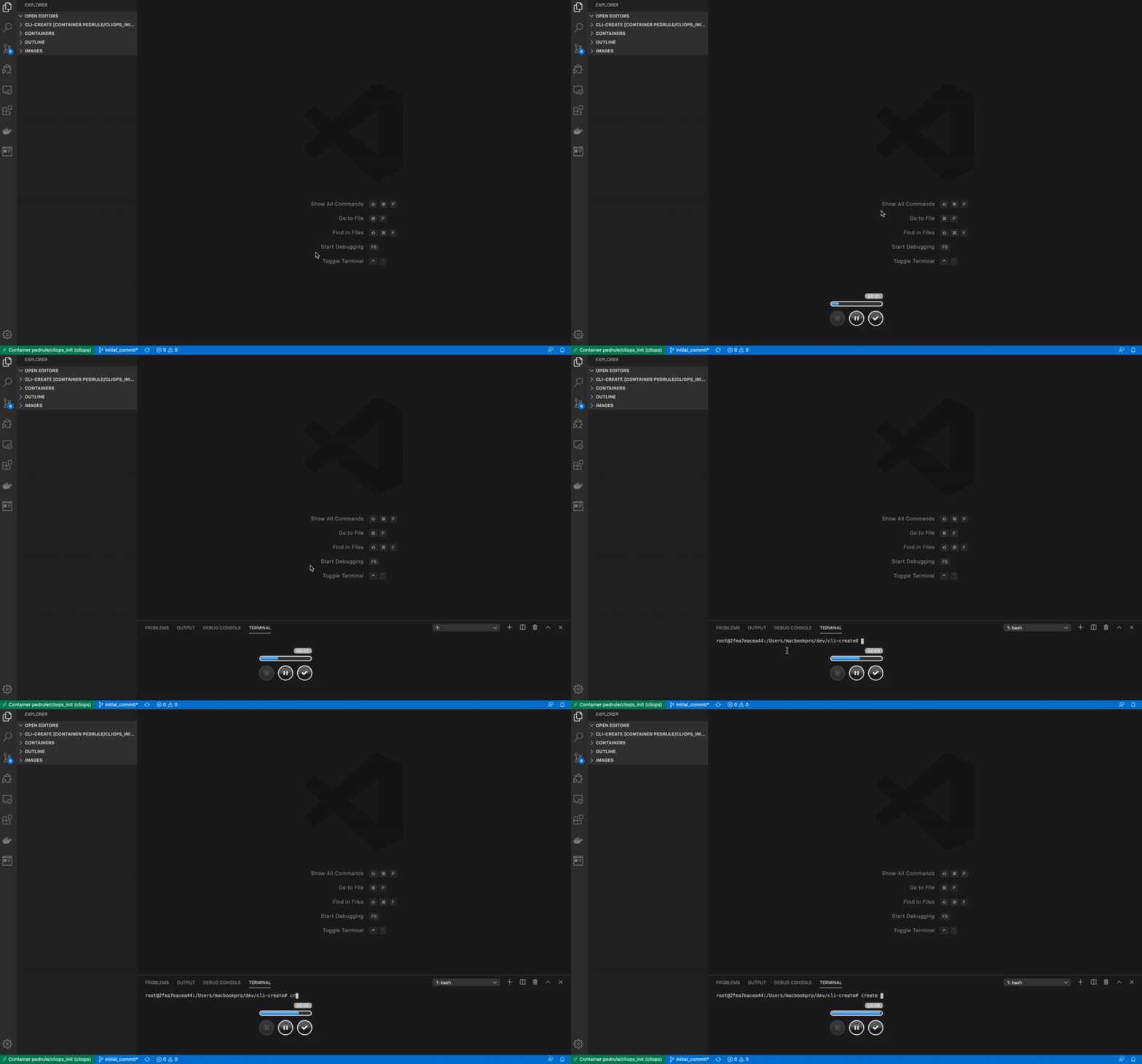
Our philosophy
Cliops is based on multi repo architecture.
We believe in the pros of multi repo architecture as the only way to have real powerful loosely coupled bricks of micro-services.
So, Cliops is based on. it offers a powerful solution to construct and solve the cons of multi repo architecture. Each microservice bricks is located in its folder and Cliops creates additionally for each project, a special folder named infra.
This infra service is the bare bone of any cliops project. Its only purpose is to create and manage the interaction between other services and store all relevant pieces of information on the scope of project.
Create a new project
In the cliops container, launch
create initialize
and give answers to each question of cli.
Pulling an existing project
In the cliops container, the master project of your multi repo application is the infra one. It has all relevant informations needed to pull all others. in your dedicated folder, you just have to pull the infra service git repository.
git pull <my-infra-repository>
Then again
create initialize
N.B. in a future release, you will just have to prompt:
create initialize <git url of infra project>
This time, Cliops should not require any information from the user because it will find all relevant needed pieces of information by reading cliops.config.json file in infra service.
Presentation of the multi-repo stack
We choose to give all necessary to run a true multi-repo architecture with loosely coupled services.
When you create a new service, a special repository is initialized with name infra.
Infra repository
The infra repository contains all relevant information about project stack, there is inside of it:
cliops.config.json file:
this file is the core config file of the whole project.
| property | type | default |
|---|---|---|
| name | string | "" |
| bffs | Object | {[key: string]: Service} |
| front | Object | {type: react or angular, name: string, git: GitService, webcompos: WebcompoService[]} |
| infra | Object | {name: string, type: infra, group: string, dockerRegistry: {url: string, userName: string, token: string, git: Git Service}} |
| cicdVariables | Object[] | {key: string, value: string}[] |
| remoteDevServer | Object | {[key: string]: {server: { username: string, url: string, token: string}, targetPath: string}} |
All information on this file allows us to retrieve all repositories whatever where they are stocked (you can one project in Github, another one in bitbucket and the last one in GitLab in the same project without any problem).
docker-compose[-remoteName][-dev].yml:
docker-compose manifest files give strongly coupled layer between services in the project's context and in the environnment context (prod, dev, remote dev).
It creates several services depending on its type:
-
BFF: backend service is registered in the docker-compose file as follow
<name of project>: image: <name of project>_<name of service> container_name: <name of service> labels: - traefik.enable=true - traefik.docker.network=traefik - traefik.port=8080 - traefik.backend=bff - 'traefik.frontend.rule=Host:localhost;PathPrefixStrip:/api/<name of service>' expose: - 8080 networks: traefik: null <name of service>: null depends_on: - pg-<name of service> environment: DB_PASSWORD: $PG_<name of service>_PASSWORD DB_USER: $PG_<name of service>_LOGIN DB_NAME: $PG_<name of service>_DB DB_HOST: pg-<name of service> ports: - '5959:5959' - '8080:8080' entrypoint: 'yarn start:dev' volumes: - type: bind source: $PWD/package.json target: $PWD/package.json - type: bind source: >- $PWD/dev/src/authenticatedRoutes.ts target: $PWD/dev/src/authenticatedRoutes.ts - type: bind source: $PWD/dev/migrations/scripts target: $PWD/dev/migrations/scripts - type: bind source: $PWD/dev/src/services target: $PWD/dev/src/services - type: bind source: $PWD/dev/test target: $PWD/dev/testeach backend microservice is associated with it own postgresSQL database
pg-<name of service>: image: 'postgres:9.6.12-alpine' container_name: pg_<name of service> environment: POSTGRES_PASSWORD: $PG_<name of service>_PASSWORD POSTGRES_USER: $PG_<name of service>_LOGIN POSTGRES_DB: $PG_<name of service>_DB expose: - 5432 networks: <name of service>: null postgres: null -
pgadmin:
Finally, to allow developers to inspect micro-service databases, a pgadmin container is added to docker stack:pg-admin: image: fenglc/pgadmin4 ports: - '5050:5050' networks: Postgres: null -
front: front service is composed of two containers
- build container:
<name of project>-front-<type of front>-build: image: <name of project>_<type of front> container_name: <name of project>-front-<type of front>-build entrypoint: '/bin/sh -c "while sleep 1000; do :; done"' working_dir: $PWD ports: - '9229:9229' - '3000:3000' volumes: - type: bind source: /var/run/docker.sock target: /var/run/docker.sock - type: bind source: $PWD/front/src target: $PWD/src - type: bind source: $PWD/front/package.json target: $PWD/package.json - type: bind source: $PWD/front/tsconfig.json target: $PWD/tsconfig.json - type: bind source: $PWD/front/.vscode target: $PWD/.vscode - type: bind source: $PWD/front/.npmrc target: $PWD/.npmrc - type: volume source: front target: $PWD/dist - type: bind source: $PWD/front/public target: $PWD/publicthis service has a special volume named front which is bound on dist folder
type: volume source: front target: $PWD/dist- serve container:
<name of project>-front-<type of front>-serve: image: <name of project>_<type of front> container_name: <name of project>-front-<type of front>-serve labels: - traefik.enable=true - traefik.docker.network=traefik - traefik.port=8080 - traefik.backend=infra-front-react-serve - 'traefik.frontend.rule=Host:localhost;PathPrefixStrip:/' expose: - 80 networks: traefik: null command: es-dev-server --app-index $PWD/dist/index.html -p 80 -h 0.0.0.0 working_dir: $PWD/dist volumes: - type: volume source: front target: $PWD/distthis container serves dist data bound in front volume by build containers. it uses es-dev-server which is an express node server enhanced by features which made able to detects what kind of bundles it needs to render.
Others Docker-compose files
each time developer adds a new server to make remote dev-in-container, Infra creates a new docker-compose file with settings personalized to this environment.
To launch the stack, the user has to prompt:
create up
To launch the stack on a remote server, the user has to prompt:
create upRemote --remote=<remote server name>
additionally, when the developer uses these command lines, commands create a Traefik service and a private local ( or remotely local ) npm registry.
To stop the stack:
create down
To stop the stack remotely:
create downRemote --remote=<remote server name>
Our Base images services
coming soon
We provide base images you can freely use if you want to create easily and quickly your first micro-service architecture.
backend microservice
our backend base image is based on node.js, Typescript and mocha. It is an express server connected with its own PostgreSQL database. it is an image ready to use.
When creating with Cliops, you can create as many services you want when using
create initialize
There is a vscode configuration to make it easy to debug code or tests. You can choose to add a new service to n existing project by running in your cliops container,
create add
and then answers add a new BFF in the prompter.
frontend framework
micro frontend
Images
coming soon
backend microservice
frontend framework
micro frontend
Dev-in-container
how to do
Dev in a remote container
Many reasons make the choice to do remote devs in a container a very good one.
- First, it allows us to save local compute power by running costly processes remotely.
- Second, when you are in a restrictive network area, if docker lan is blocked by corporate proxy, you can find an easy to do solution, by running your dev-in-container in a remote server.
CICD
Presentation
multi-repo
Presentation
Pro and cons of multi-repo
Solution brung by cliops to solve multi-repo's cons
microservice and multi repo solution to developers.
Tag summary
Content type
Image
Digest
sha256:90379f53e…
Size
524.7 MB
Last updated
about 1 year ago
docker pull pedrule/cliops