philw07/gantry-crane
A Docker 🐳 to MQTT bridge 🌉 to integrate your containers with your home automation system.
1.6K
philw07/gantry-crane repository overview

gantry-crane




A Docker to MQTT bridge which publishes information about your containers for other software to consume and allows to control them.
Comes with a built-in Home Assistant integration to monitor and control your containers right within Home Assistant.
Getting started
It's recommended to run this app using docker. Note that it's required to mount the docker socket into the container.
Using docker
docker run -d --name gantry-crane --restart=always -v /var/run/docker.sock:/var/run/docker.sock -e MQTT_HOST=localhost philw07/gantry-crane:latest
or
docker run -d --name gantry-crane --restart=always -v /var/run/docker.sock:/var/run/docker.sock -e MQTT_HOST=localhost ghcr.io/philw07/gantry-crane:latest
Using docker-compose
version: "3.5"

services:
  gantry-crane:
    image: philw07/gantry-crane:latest # or ghcr.io/philw07/gantry-crane:latest
    container_name: gantry-crane
    restart: always
    volumes:
      - /var/run/docker.sock:/var/run/docker.sock
    environment:
      - MQTT_HOST=localhost
Configuration
The recommended way it to use environment variables for configuration.
Alternatively, a gantry-crane.toml file can be used (refer to gantry-crane.example.toml),
in which case the location of the file should be passed as argument --config path/to/gantry-crane.toml.
| Environment variable | Default value | Description |
|---|---|---|
POLL_INTERVAL | 60 | Interval in which all containers will be polled for their current status and updated on MQTT (in seconds). |
FILTER_BY_LABEL | false | Select which containers should be monitored. |
MQTT_HOST | localhost | The host running the MQTT broker. |
MQTT_PORT | 1883 | The port the MQTT broker listens to. |
MQTT_USERNAME | None | MQTT username, only needed if the broker requires authentication. |
MQTT_PASSWORD | None | MQTT password, only needed if the broker requires authentication. |
MQTT_WEBSOCKET | false | Use MQTT over WebSockets. |
MQTT_TLS_ENCRYPTION | false | Enable or disable tls encryption. |
MQTT_CA_CERTIFICATE | None | Path to certificate authority file in PEM format. |
MQTT_CLIENT_CERTIFICATE | None | Path to client certificate file in PEM format. |
MQTT_CLIENT_KEY | None | Path to client key file in PEM format. |
MQTT_CLIENT_ID | gantry-crane | MQTT client ID, should only be changed if two instances connect to the same broker. |
MQTT_BASE_TOPIC | gantry-crane | Base topic under which all information is published. Should only be changed if two instances connect to the same broker. |
HOMEASSISTANT_ACTIVE | false | Set to true to enable the Home Assistant integration. |
HOMEASSISTANT_BASE_TOPIC | homeassistant | Must match the discovery prefix set in Home Assistant. |
HOMEASSISTANT_NODE_ID | gantry-crane | The node id used for Home Assistant MQTT discovery. Should only be changed if two instances connect to the same broker. |
Select containers to monitor
By default, gantry-crane bridges all containers to MQTT. This might not be desirable, especially if you have a large amount of containers.
If you enable the FILTER_BY_LABEL setting, you can select which containers should be monitored by giving them the label gantry-crane.enable=true.
This can be done via docker or docker-compose.
Monitoring containers via MQTT
Information about each container is published in JSON format on a subtopic of the configured base topic.
If the base topic is gantry-crane and a container is named my_container, the following is an example payload that would be published on the topic gantry-crane/my_container.
{
  "name": "my_container",
  "image": "philw07/gantry-crane:latest",
  "state": "running",
  "health": "unknown",
  "cpu_percentage": 0.9,
  "mem_percentage": 0.08,
  "mem_mb": 12.51,
  "net_rx_mb": 9.92,
  "net_tx_mb": 9.55,
  "block_rx_mb": 10.89,
  "block_tx_mb": 8.31
}
Controlling containers via MQTT
Containers can be controlled by publishing a non-retained message on the subtopic set for a container.
For the example above, the topic would be gantry-crane/my_container/set.
The following actions are available.
| Payload | Description |
|---|---|
start | Start the container. |
stop | Stop the container. |
restart | Restart the container. |
pause | Pause the container. |
unpause | Unpause the container. |
recreate | Recreate the container. The old container will be deleted and a new one created with the same configuration. |
pull_recreate | Pull the latest version of the image used for the container and then recreate the container using the new image. |
Home Assistant integration
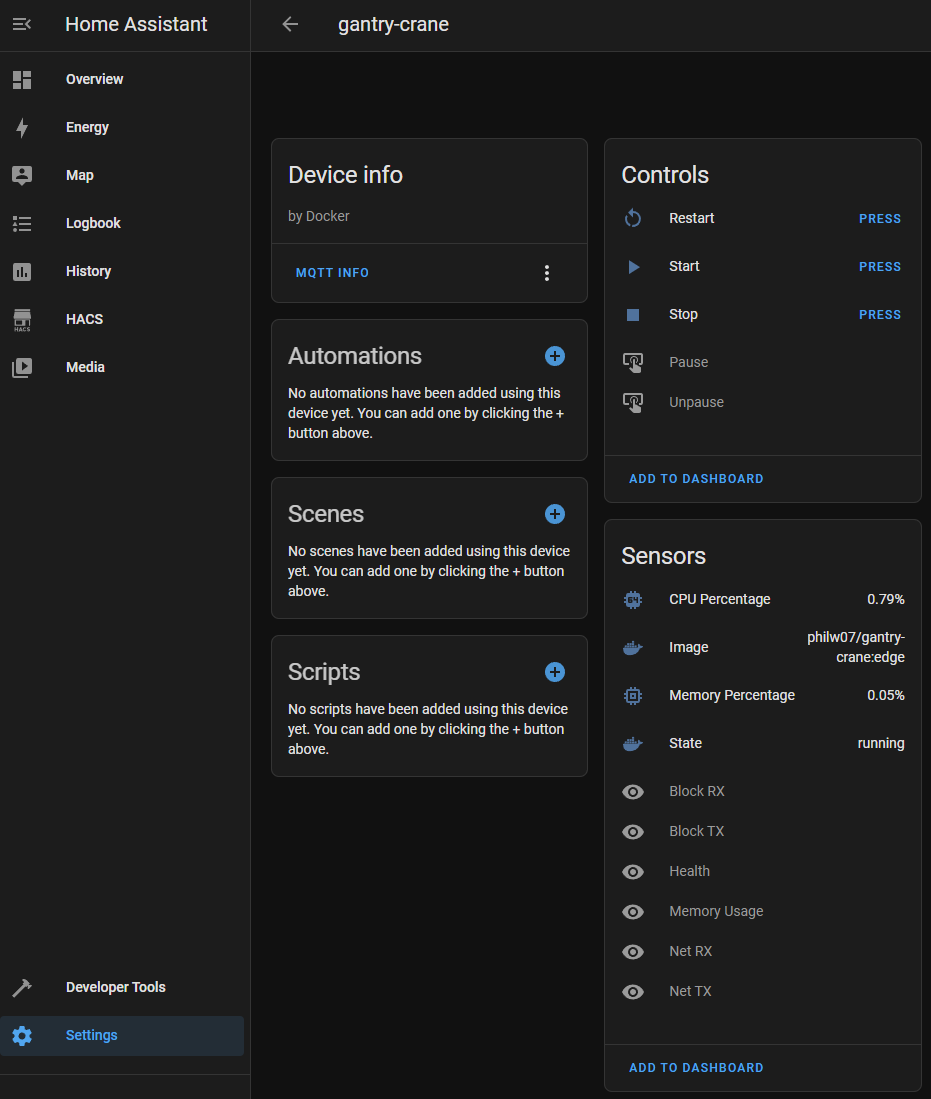
When enabling the Home Assistant integration, by setting HOMEASSISTANT_ACTIVE to true, gantry-crane will publish MQTT discovery topics which Home Assistant will pick up automatically and add each container as a device with several entities (sensors and buttons).
Some entities are disabled by default and can be enabled via the Home Assistant UI.
The sensors and buttons can be used in automations or scenes, e.g. to start/stop containers at a specific time.
Cleaning up
After stopping gantry-crane, the MQTT messages will be retained. That means your container data will still be available on the MQTT broker and in Home Assistant if the integration is active.
To clean up all traces, you can run gantry-crane with the --clean flag and it will delete all retained messages.
Make sure to run it with the same configuration, otherwise it might not delete everything.
Using docker
docker run --rm -v /var/run/docker.sock:/var/run/docker.sock -e MQTT_HOST=localhost philw07/gantry-crane:latest --clean
Make sure to omit --restart=always.
Using docker-compose
version: "3.5"

services:
  gantry-crane:
    image: philw07/gantry-crane:latest
    container_name: gantry-crane
    # restart: always # Make sure to comment out or remove
    volumes:
      - /var/run/docker.sock:/var/run/docker.sock
    environment:
      - MQTT_HOST=localhost
    command: --clean
Tag summary
Content type
Image
Digest
sha256:894eb0ed4…
Size
32.4 MB
Last updated
almost 4 years ago
docker pull philw07/gantry-crane