plexobject/api-mock-service
Mocking Distributed Micro services with Record/Play, Templates and OpenAPI Specifications
7.8K
plexobject/api-mock-service repository overview
api-mock-service
Mocking Distributed Micro services and Contract/Fuzz testing with Record/Play, Templates, OpenAPI Specifications and Stochastic test client
Problems with Testing
Testing methodologies such as unit-testing, integration-testing, functional-testing, chaos/contract testing/game days, etc. are a key part of software development lifecycle for building reliable and robust software systems. However, these testing methodologies pose several problems such as:
- Tests require regular maintenance same as the code, however tests often don't receive the same attention and code rot is common with the tests. This makes the tests brittle that often break with the changes and tests become difficult to understand.
- The size of tests also pose a challenge as the code grows, which further adds development cost of syncing tests with the code updates.
- Integration/functional tests further add risks when testing for hard to reproduce conditions with real services. Also, real services keep their own state, which could be updated externally so regression testing can't be reliably performed.
- You may need to inject failures, time delays, network failures or timeouts for chaos testing/game days, which require special tooling and development effort.
- The functional/load tests also need to check for non-functional requirements when building distributed systems such as concurrency, performance, scalability and failures. This requires not only testing for robust server side code but also testing for clients/sdks that can handle various error conditions.
- Testing for backward and forward compatibility is hard as different clients may be using a subset of functionality. This requires solid support for contract based testing from consumer's and producer's perspectives.
Facilitate testing with the api-mock-service
The api-mock-service helps with the integration/functional/contract/chaos testing by mocking dependent services and injecting failures in the implementation. It allows testing both the server side and client side code with the property-based/generative/fuzzing/stochastic testing techniques. The property-based/generative techniques reduce the size of test suites by automatically generating test input data using fuzz-data generators.
Use-Cases
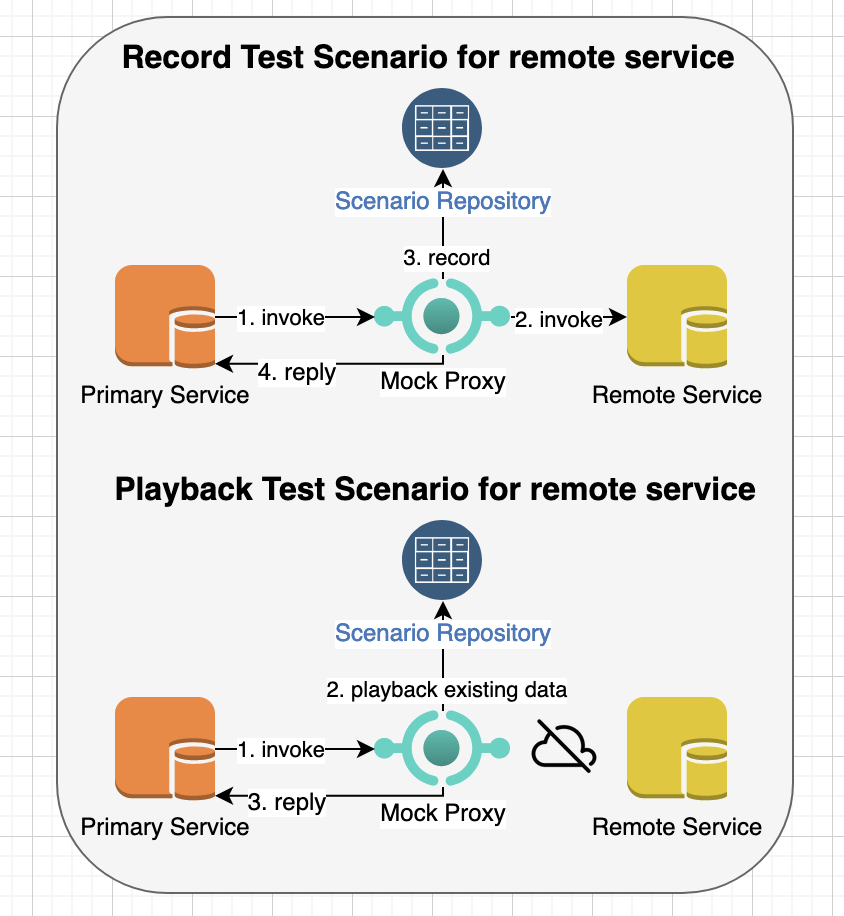
- As a service owner, I need to mock remote dependent service(s) by capturing/recording request/responses through an HTTP proxy so that I can play it back when testing the remote service(s) without connecting with them.
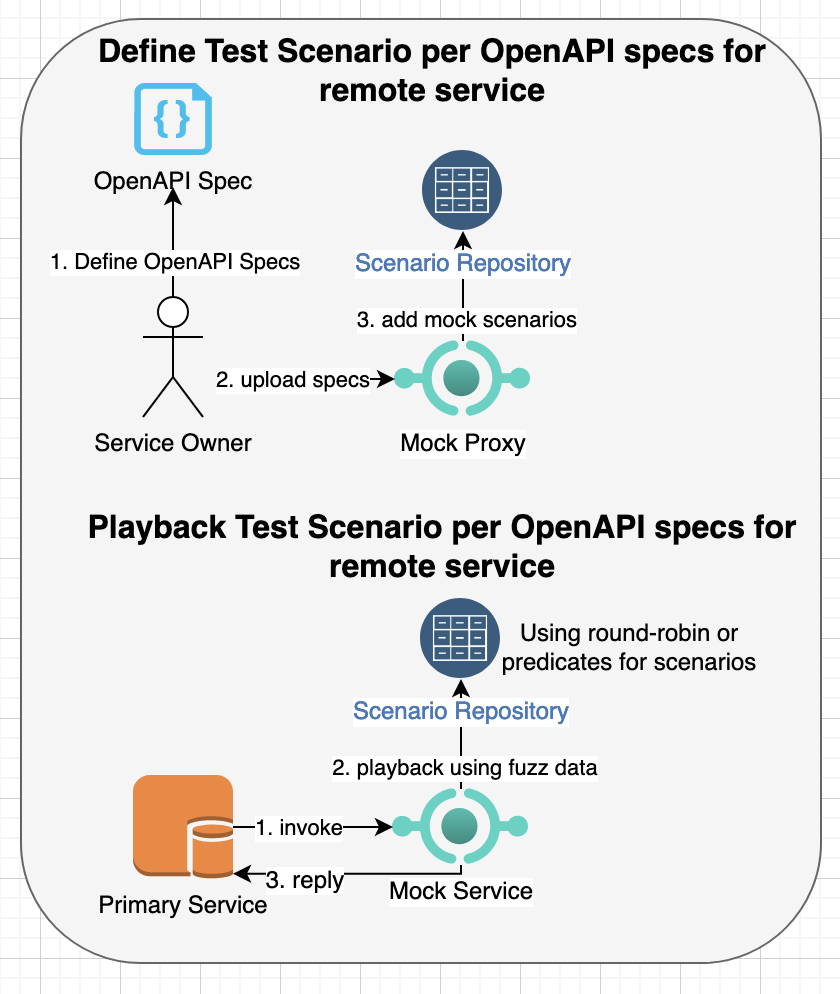
- As a service owner, I need to mock remote dependent service(s) based on a open-api/swagger specifications so that my service client can test all service behavior per specifications for the remote service(s) even when remote service is not fully implemented or accessible.
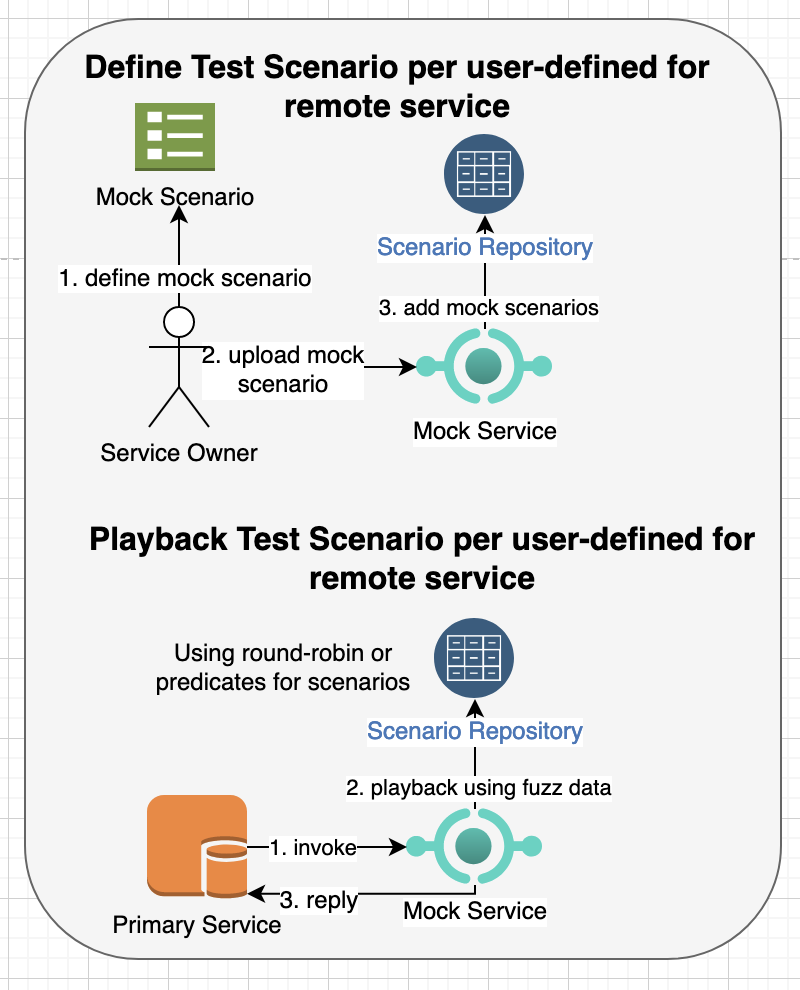
- As a service owner, I need to mock remote dependent service(s) based on a mock scenario defined in a template so that my service client can test service behavior per expected request/response in the template even when remote service is not fully implemented or accessible.
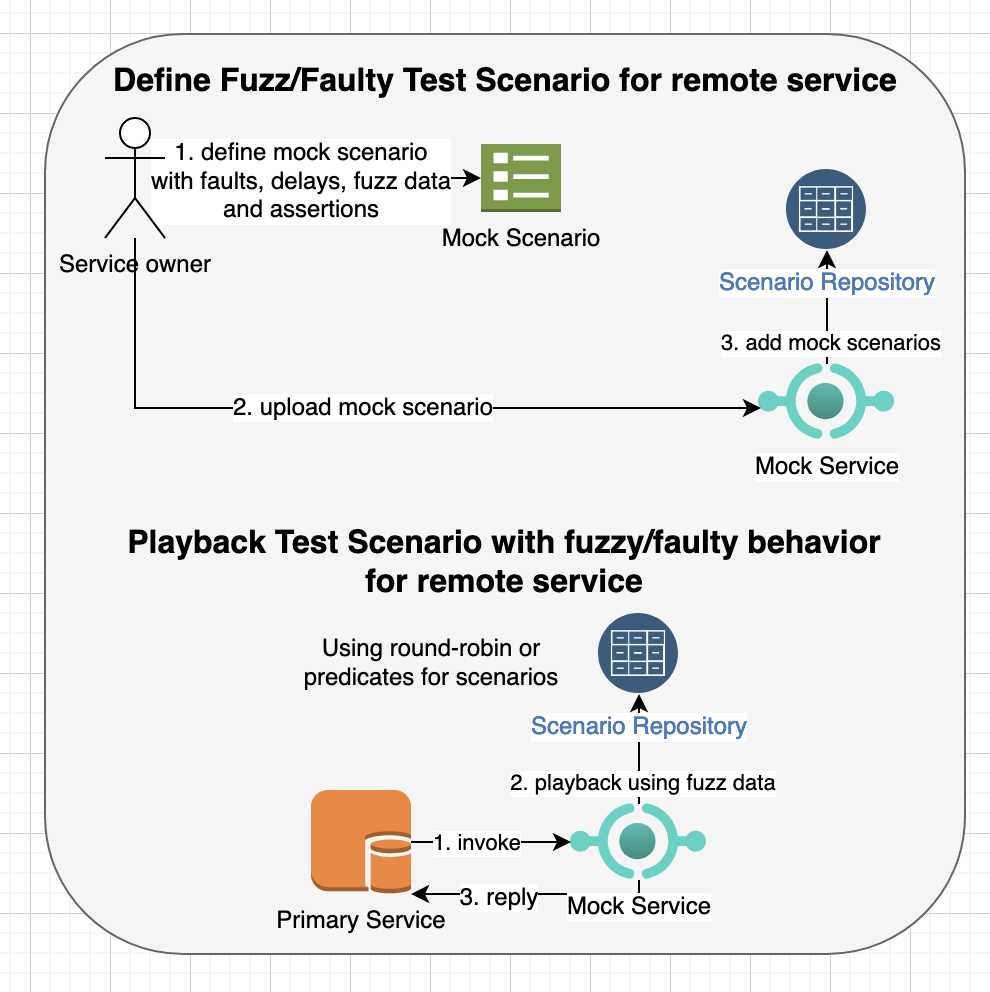
- As a service owner, I need to inject various response behavior and faults to the output of a remote service so that I can build a robust client that prevents cascading failures and is more resilient to unexpected faults.
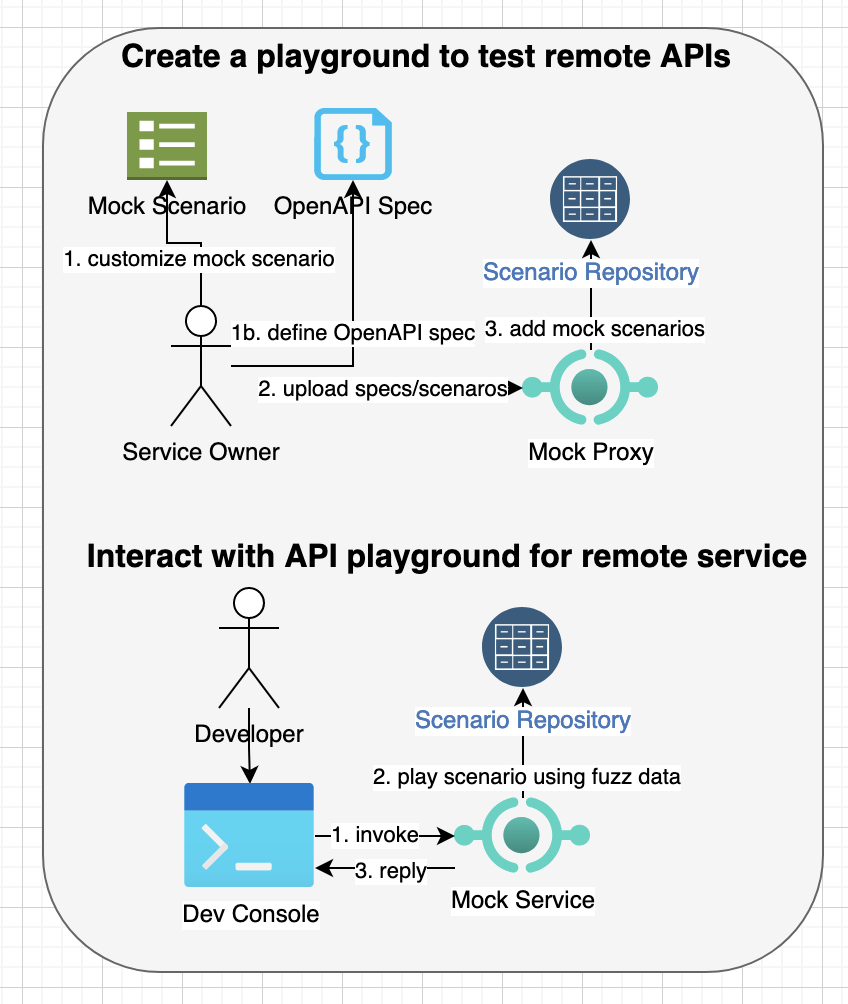
- As a developer, I need a playground to try out remote service APIs and learn how the behave with different test data scenarios so that I can understand the API behavior better while referring to the API specs.
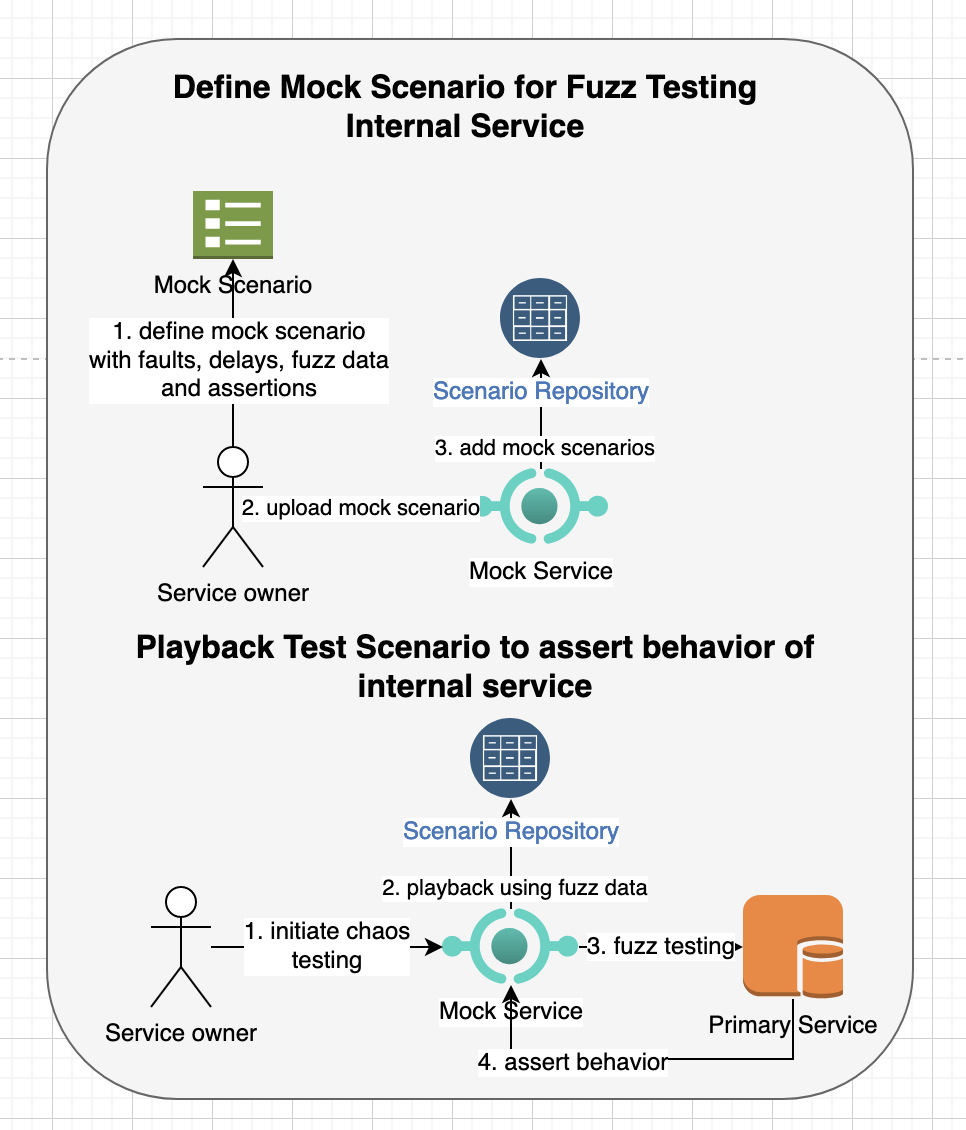
- As a service owner, I need to define test cases with faulty or fuzz responses to test my own service so that I can predict how it will behave with various input data and assert the service response based on expected behavior.
Features
API mock service for REST/HTTP based services with following features:
- Record API request/response by working as a HTTP proxy server (native http/https or via API) between client and remote service.
- Playback API response that were previously recorded based on request parameters.
- Define API behavior manually by specifying request parameters and response contents using static data or dynamic data based on GO templating language.
- Generate API behavior from open standards such as Open API/Swagger and automatically create constraints and regex based on the specification.
- Customize API behavior using a GO template language so that users can generate dynamic contents based on input parameters or other configuration.
- Generate large responses using the template language with dynamic loops so that you can test performance of your system.
- Define multiple test scenarios for the API based on different input parameters or simulating various error cases that are difficult to reproduce with real services.
- Store API request/responses locally as files so that it’s easy to port stubbed request/responses to any machine.
- Allow users to define API request/response with various formats such as XML/JSON/YAML and upload them to the mock service.
- Support test fixtures that can be uploaded to the mock service and can be used to generate mock responses.
- Define a collection of helper methods to generate different kind of random data such as UDID, dates, URI, Regex, text and numeric data.
- Ability to playback all test scenarios or a specific scenario and change API behavior dynamically with different input parameters.
- Support multiple mock scenarios for the same API that can be selected either using round-robin order, custom predicates based on parameters or based on scenario name.
- Inject error conditions and artificial delays so that you can test how your system handles error conditions that are difficult to reproduce or use for game days/contract/chaos testing.
- Generate client requests for a remote API for contract, chaos and stochastic testing where a set of requests are sent with a dynamic data generated based on regex or other constraints.
- Create a playground for testing APIs interactively so that users can learn the APIs quickly.
- Support contract based testing from both consumer and producer sides.
- Chain group tests and execute them in a specific order so that output of a one test scenario can be used as an input to next test scenarios.
This service is based on an older mock-service https://github.com/bhatti/PlexMockServices, I wrote a while ago. As, it's written in GO, you can either download GO runtime environment or use Docker to install it locally. If you haven't installed docker, you can download the community version from https://docs.docker.com/engine/installation/ or find installer for your OS on https://docs.docker.com/get-docker/.
docker build -t api-mock-service .
docker run -p 8000:8080 -p 8081:8081 -e HTTP_PORT=8080 -e PROXY_PORT=8081 -e DATA_DIR=/tmp/mocks \
	-e ASSET_DIR=/tmp/assets api-mock-service
or pull an image from docker hub (https://hub.docker.com/r/plexobject/api-mock-service), e.g.
docker pull plexobject/api-mock-service:latest
docker run -p 8000:8080 -p 8081:8081 -e HTTP_PORT=8080 -e PROXY_PORT=8081 -e DATA_DIR=/tmp/mocks \
	-e ASSET_DIR=/tmp/assets plexobject/api-mock-service:latest
Alternatively, you can run it locally with GO environment, e.g.,
make && ./out/bin/api-mock-service
For full command line options, execute api-mock-service -h that will show you command line options such as:
./out/bin/api-mock-service -h
Starts mock service

Usage:
  api-mock-service [flags]
  api-mock-service [command]

Available Commands:
  completion  Generate the autocompletion script for the specified shell
  contract    Executes contract client
  help        Help about any command
  version     Version will output the current build information

Flags:
      --assetDir string   asset dir to store static assets/fixtures
      --config string     config file
      --dataDir string    data dir to store mock scenarios
  -h, --help              help for api-mock-service
      --httpPort int      HTTP port to listen
      --proxyPort int     Proxy port to listen

Use "api-mock-service [command] --help" for more information about a command.
API Docs
See Swagger API docs at https://petstore.swagger.io?url=https://raw.githubusercontent.com/bhatti/api-mock-service/main/docs/swagger.yaml
Recording a Mock Scenario via HTTP/HTTPS Proxy
Once you have the API mock service running, the mock service will start two ports on startup, first port (default 8080) will be used to record/play mock scenarios, updating templates or uploading OpenAPIs. The second port (default 8081) will setup an HTTP/HTTPS proxy server that you can point to record your scenarios, e.g.
export http_proxy="http://localhost:8081"
export https_proxy="http://localhost:8081"

curl -k -v -H "Authorization: Bearer sk_test_xxxx" https://api.stripe.com/v1/customers/cus_xxx/cash_balance
Above curl command will automatically record all requests and responses and create mock scenario to play it back. For example, if you call the same
API again, it will return a local response instead of contacting the server. You can customize the proxy behavior for record by adding X-Mock-Record: true header to your request.
Recording a Mock Scenario via API
Alternatively, you can use invoke an internal API as a pass through to invoke a remote API so that you can automatically record API behavior and play it back later, e.g.
curl -H "X-Mock-Url: https://api.stripe.com/v1/customers/cus_**/cash_balance" \
	-H "Authorization: Bearer sk_test_***" http://localhost:8080/_proxy
In above example, the curl command is passing the URL of real service as an HTTP header X-Mock-Url. In addition, you can pass
other authorization headers as needed.
Viewing the Recorded Mock Scenario
The API mock-service will store the request/response in a YAML file under a data directory that you can specify. For example, you may see a file under:
default_mocks_data/v1/customers/cus_***/cash_balance/GET/recorded-scenario-***.scr
Note: the sensitive authentication or customer keys are masked in above example but you will see following contents in the captured data file:
method: GET
name: recorded-v1-customers-cus
path: /v1/customers/cus_**/cash_balance
description: recorded at 2022-10-29 04:26:17.24776 +0000 UTC
group: v1_customers_cus_xx_cash_balance
predicate: {{NthRequest 2}}
request:
  match_query_params: {}
  match_headers:
    Content-Type: ""
  match_contents: '{}'
  path_params: {}
  query_params: {}
  headers:
    Accept: '*/*'
    Authorization: Bearer sk_test_xxx
    User-Agent: curl/7.65.2
    X-Mock-Url: https://api.stripe.com/v1/customers/cus_/cash_balance
  contents: ""
response:
  headers:
    Access-Control-Allow-Credentials:
      - "true"
    Access-Control-Allow-Methods:
      - GET, POST, HEAD, OPTIONS, DELETE
    Access-Control-Allow-Origin:
      - '*'
    Access-Control-Expose-Headers:
      - Request-Id, Stripe-Manage-Version, X-Stripe-External-Auth-Required, X-Stripe-Privileged-Session-Required
    Access-Control-Max-Age:
      - "300"
    Cache-Control:
      - no-cache, no-store
    Content-Length:
      - "168"
    Content-Type:
      - application/json
    Date:
      - Mon, 12 Dec 2022 01:21:45 GMT
    Request-Id:
      - req_xxx
    Server:
      - nginx
    Strict-Transport-Security:
      - max-age=63072000; includeSubDomains; preload
    Stripe-Version:
      - "2018-09-06"
  contents: |-
    {
      "object": "cash_balance",
      "available": null,
      "customer": "cus_xxx",
      "livemode": false,
      "settings": {
        "reconciliation_mode": "automatic"
      }
    }
  contents_file: ""
  status_code: 200
  match_headers: {}
  match_contents: '{"customer":"(__string__\\w+_\\w+)","livemode":"(__boolean__(false|true))","object":"(__string__\\w+_\\w+)","settings.reconciliation_mode":"(__string__\\w+)"}'
  assertions: []
wait_before_reply: 0s
Above example defines a mock scenario for testing /v1/customers/cus_**/cash_balance path. A test scenario includes:
Predicate
- This is a boolean condition if you need to enable or disable a scenario test based on dynamic parameters or request count.
Group
- This specifies the group for related test scenarios.
Request Matching Parameters:
You can define match parameters based on:
- URL Query Parameters
- URL Request Headers
- Request Body
You can use these parameters so that test scenario is executed only when the parameters match, e.g.
    match_query_params:
      name: [a-z0-9]{1,50}
    match_headers:
      Content-Type: "application/json"
The matching request parameters will be used to select the mock scenario to execute and you can use regular expressions to validate,
e.g. above example will be matched if content-type is application/json and it will validate that name query parameter is alphanumeric from 1-50 size.
Request Parameters:
The request parameters show the contents captured from the record/play so that you can use and customize to define matching parameters.
- URL Query Parameters
- URL Request Headers
- Request Body
Response Properties
The response properties will include:
- Response Headers
- Response Body statically defined or loaded from a test fixture
- Response can also be loaded from a test fixture file
- Status Code
- Matching header and contents
- Assertions You can copy recorded scenario to another folder and use templates to customize it and then upload it for playback.
The matching header and contents use match_headers and match_contents similar to request to validate response in case you want to test response from a real service for chaos testing.
Similarly, assertions defines a set of predicates to test against response from a real service:
    assertions:
        - VariableGE contents.id 10
        - VariableContains contents.title illo
        - VariableContains headers.Pragma no-cache
Above example will check API response and verify that id property contains 10, title contains illo and result headers include Pragma: no-cache header.
Playback the Mock API Scenario
You can playback the recorded response from above example as follows:
% curl http://localhost:8080/v1/customers/cus_***/cash_balance
Which will return captured response such as:
{
  "object": "cash_balance",
  "available": null,
  "customer": "cus_***",
  "livemode": false,
  "settings": {
    "reconciliation_mode": "automatic"
  }
}
Though, you can customize your template with dynamic properties or conditional logic but you can also send HTTP headers
for X-Mock-Response-Status to override HTTP status to return or X-Mock-Wait-Before-Reply to add artificial latency using duration syntax.
Debug Headers from Playback
The playback request will return mock-headers to indicate the selected mock scenario, path and request count, e.g.
X-Mock-Path: /v1/jobs/{jobId}/state
X-Mock-Request-Count: 13
X-Mock-Scenario: setDefaultState-bfb86eb288c9abf2988822938ef6d4aa3bd654a15e77158b89f17b9319d6f4e4
Upload Mock API Scenario
You can customize the recorded scenario, e.g. you can add path variables to above API as follows:
method: GET
name: stripe-cash-balance
path: /v1/customers/:customer/cash_balance
predicate: {{NthRequest 2}}
group: my_group
request:
  match_headers:
    Authorization: Bearer sk_test_[0-9a-fA-F]{10}$
response:
  headers:
    Access-Control-Allow-Credentials:
      - "true"
    Access-Control-Allow-Methods:
      - GET, POST, HEAD, OPTIONS, DELETE
    Access-Control-Allow-Origin:
      - '*'
    Access-Control-Expose-Headers:
      - Request-Id, Stripe-Manage-Version, X-Stripe-External-Auth-Required, X-Stripe-Privileged-Session-Required
    Access-Control-Max-Age:
      - "300"
    Cache-Control:
      - no-cache, no-store
    Content-Type:
      - application/json
    Request-Id:
      - req_2
    Server:
      - nginx
    Strict-Transport-Security:
      - max-age=63072000; includeSubDomains; preload
    Stripe-Version:
      - "2018-09-06"
  content_type: application/json
  contents: |-
    {
      "object": "cash_balance",
      "available": null,
      "customer": {{.customer}}
      "livemode": false,
      "page": {{.page}}
      "pageSize": {{.pageSize}}
      "settings": {
        "reconciliation_mode": "automatic"
      }
    }
  status_code: 200
  match_headers: {}
  match_contents: '{"customer":"(__string__\\w+_\\w+)","livemode":"(__boolean__(false|true))","object":"(__string__\\w+_\\w+)","settings.reconciliation_mode":"(__string__\\w+)"}'
  assertions:
    - VariableContains contents.livemode false
    - VariableContains headers.Pragma no-cache
wait_before_reply: 1s
In above example, I assigned a name stripe-cash-balance to the mock scenario and changed API path to
/v1/customers/:customer/cash_balance so that it can capture customer-id as a path variable. I added a regular expression to
ensure that the HTTP request includes an Authorization header matching Bearer sk_test_[0-9a-fA-F]{10}$ and defined dynamic properties
such as {{.customer}}, {{.page}} and {{.pageSize}} so that they will be replaced at runtime.
curl -H "Content-Type: application/yaml" --data-binary @fixtures/stripe-customer.yaml \
	http://localhost:8080/_scenarios
and then play it back as follows:
curl -v -H "Authorization: Bearer sk_test_0123456789" \
	"http://localhost:8080/v1/customers/123/cash_balance?page=2&pageSize=55"
and it will generate:
{
  "object": "cash_balance",
  "available": null,
  "customer": 123,
  "livemode": false,
  "page": 2,
  "pageSize": 55,
  "settings": {
    "reconciliation_mode": "automatic"
  }
}
As you can see, the values of customer, page and pageSize are dynamically updated. You can upload multiple mock scenarios for the same API and the mock API service will play it back sequentially. For example, you can upload another scenario for above API as follows:
method: GET
name: stripe-customer-failure
path: /v1/customers/:customer/cash_balance
predicate: {{NthRequest 2}}
group: my_group
request:
    match_headers:
        Authorization:
            - Bearer sk_test
response:
    headers:
        Stripe-Version:
            - "2018-09-06"
    content_type: application/json
    contents: My custom error
    status_code: 500
wait_before_reply: 1s
And then play it back:
curl -v "http://localhost:8080/v1/customers/123/cash_balance?page=2&pageSize=55"
which will return response with following error response
> GET /v1/customers/123/cash_balance?page=2&pageSize=55 HTTP/1.1
> Host: localhost:8080
> User-Agent: curl/7.65.2
> Accept: */*
> Authorization: Bearer sk_test_0123456789
>
* Mark bundle as not supporting multiuse
< HTTP/1.1 500 Internal Server Error
< Content-Type: application/json
< X-Mock-Request-Count: 1
< X-Mock-Scenario: stripe-customer-failure
< Stripe-Version: 2018-09-06
< Vary: Origin
< Date: Sat, 29 Oct 2022 17:29:15 GMT
< Content-Length: 15
Dynamic Templates with Mock API Scenarios
You can use loops and conditional primitives of template language (https://golangdocs.com/templates-in-golang) to generate dynamic responses as follows:
method: GET
name: get_devices
path: /devices
description: ""
predicate: ""
group: devices
request:
    match_headers:
      Content-Type: "application/json; charset=utf-8"
response:
    headers:
        "Server":
            - "SampleAPI"
        "Connection":
            - "keep-alive"
    content_type: application/json
    contents: >
     {
     "Devices": [
{{- range $val := Iterate .pageSize }}
      {
        "UUID": "{{SeededUUID $val}}",
        "Line": { {{SeededFileLine "lines.txt" $val}}, "Type": "Public", "IsManaged": false },
        "Amount": {{JSONFileProperty "props.yaml" "amount"}},
        "SerialNumber": "{{UUID}}",
        "MacAddress": "{{UUID}}",
        "Imei": "{{UUID}}",
        "AssetNumber": "{{RandString 20}}",
        "LocationGroupId": {
         "Id": {
           "Value": {{RandNumMax 1000}},
         },
         "Name": "{{SeededCity $val}}",
         "UUID": "{{UUID}}"
        },
        "DeviceFriendlyName": "Device for {{SeededName $val}}",
        "LastSeen": "{{Time}}",
        "Email": "{{RandEmail}}",
        "Phone": "{{RandPhone}}",
        "EnrollmentStatus": {{SeededBool $val}}
        "ComplianceStatus": {{RandRegex "^AC[0-9a-fA-F]{32}$"}}
        "Group": {{RandCity}},
        "Date": {{TimeFormat "3:04PM"}},
        "BatteryLevel": "{{RandNumMax 100}}%",
        "StrEnum": {{EnumString "ONE TWO THREE"}},
        "IntEnum": {{EnumInt 10 20 30}},
        "ProcessorArchitecture": {{RandNumMax 1000}},
        "TotalPhysicalMemory": {{RandNumMax 1000000}},
        "VirtualMemory": {{RandNumMax 1000000}},
        "AvailablePhysicalMemory": {{RandNumMax 1000000}},
        "CompromisedStatus": {{RandBool}},
        "Add": {{Add 2 1}},
        "Dict": {{Dict "one" 1 "two" 2 "three" 3}}
      }{{if LastIter $val $.PageSize}}{{else}},  {{end}}
{{ end }}
     ],
     "Page": {{.page}},
     "PageSize": {{.pageSize}},
     "Total": {{.pageSize}}
     }
    {{if NthRequest 10 }}
    status_code: {{EnumInt 500 501}}
    {{else}}
    status_code: {{EnumInt 200 400}}
    {{end}}
wait_before_reply: {{.page}}s
Above example includes a number of template primitives and custom functions to generate dynamic contents such as:
Loops
GO template support loops that can be used to generate multiple data entries in the response, e.g.
{{- range $val := Iterate .pageSize }}
Artificial Delays
You can specify artificial delay for the API request as follows:
wait_before_reply: {{.page}}s
Above example shows delay based on page number but you can use any parameter to customize this behavior.
Builtin functions
Go template allows custom functions that can provide customized behavior for generating test data, e.g.:
Add numbers
"Num": "{{Add 1 2}}",
Date/Time
  "LastSeen": "{{Time}}",
  "Date": {{Date}},
  "DateFormatted": {{TimeFormat "3:04PM"}},
  "LastSeen": "{{Time}}",
Comparison
  {{if EQ .MyVariable 10 }}
  {{if GE .MyVariable 10 }}
  {{if GT .MyVariable 10 }}
  {{if LE .MyVariable 10 }}
  {{if LT .MyVariable 10 }}
  {{if Nth .MyVariable 10 }}
Enums
  "StrEnum": {{EnumString "ONE TWO THREE"}},
  "IntEnum": {{EnumInt 10 20 30}},
Random Data
  "SerialNumber": "{{UUID}}",
  "AssetNumber": "{{RandString 20}}",
  "LastSeen": "{{Time}}",
  "Host": "{{RandHost}}",
  "Email": "{{RandEmail}}",
  "Phone": "{{RandPhone}}",
  "URL": "{{RandURL}}",
  "EnrollmentStatus": {{SeededBool $val}}
  "ComplianceStatus": {{RandRegex "^AC[0-9a-fA-F]{32}$"}}
  "City": {{RandCity}},
  "Country": {{RandCountry}},
  "CountryCode": {{RandCountryCode}},
  "Completed": {{RandBool}},
  "Date": {{TimeFormat "3:04PM"}},
  "BatteryLevel": "{{RandNumMax 100}}%",
  "Object": "{{RandDict}}",
  "IntHistory": {{RandIntArrayMinMax 1 10}},
  "StringHistory": {{RandStringArrayMinMax 1 10}},
  "FirstName": "{{SeededName 1 10}}",
  "LastName": "{{RandName}}",
  "Score": "{{RandNumMinMax 1 100}}",
  "Paragraph": "{{RandParagraph 1 10}}",
  "Word": "{{RandWord 1 1}}",
  "Sentence": "{{RandSentence 1 10}}",
  "Colony": "{{RandString}}",
Request count and Conditional Logic
{{if NthRequest 10 }}   -- for every 10th request
{{if GERequest 10 }}    -- if number of requests made to API so far are >= 10
{{if LTRequest 10 }}    -- if number of requests made to API so far are < 10
The template syntax allows you to define a conditional logic such as:
    {{if NthRequest 10 }}
    status_code: {{AnyInt 500 501}}
    {{else}}
    status_code: {{AnyInt 200 400}}
    {{end}}
In above example, the mock API will return HTTP status 500 or 501 for every 10th request and 200 or 400 for other requests. You can use conditional syntax to simulate different error status or customize response.
Loops
  {{- range $val := Iterate 10}}

     {{if LastIter $val 10}}{{else}},{{end}}
  {{ end }}
Variables
     {{if VariableContains "contents" "blah"}}
     {{if VariableEquals "contents" "blah"}}
     {{if VariableSizeEQ "contents" "blah"}}
     {{if VariableSizeGE "contents" "blah"}}
     {{if VariableSizeLE "con
Tag summary
Content type
Image
Digest
sha256:bd447f68f…
Size
17.7 MB
Last updated
about 2 months ago
docker pull plexobject/api-mock-service