plexobject/plexpass
A Secured Family-friendly Password Manager with Multi-factor.Authentication and Local Hosting
952
plexobject/plexpass repository overview
PlexPass - A Secured Family-friendly Password Manager with Multi-factor Authentication and Local Hosting. (https://github.com/bhatti/PlexPass).
1.0 Design Tenets and Features
The PlexPass is designed based on following tenets and features:
- End-to-End Encryption: All data is encrypted using strong cryptographic algorithms. The decryption key will be derived from the user’s master password.
- Zero-Knowledge Architecture: The password manager won’t have the ability to view the decrypted data unless explicitly instructed by the user.
- No Cloud: It allows using the password manager to be used as a local command-line tool or as a web server for local hosting without storing any data in the cloud.
- Great User Experience: It provides a great user-experience based on a command-line tool and a web-based responsive UI that can be accessed by local devices.
- Strong Master Password: It encourages users to create a robust and strong master password.
- Secure Password Generation: It allows users to generate strong, random passwords for users, reducing the temptation to reuse passwords.
- Password Strength Analyzer: It evaluates the strength of stored passwords and prompt users to change weak or repeated ones.
- Secure Import and Export: It allows users to import and export password vault data in a standardized, encrypted format so that users can backup and restore in case of application errors or device failures.
- Data Integrity Checks: It verifies the integrity of the stored data to ensure it hasn’t been tampered with.
- Version History: It stores encrypted previous versions of entries, allowing users to revert to older passwords or data if necessary.
- Open-Source: The PlexPass is open-source so that the community can inspect the code, which can lead to the identification and rectification of vulnerabilities.
- Regular Updates: It will be consistently updated to address known vulnerabilities and to stay aligned with best practices in cryptographic and security standards.
- Physical Security: It ensures the physical security of the device where the password manager is installed, since the device itself becomes a potential point of vulnerability.
- Data Breach Notifications: It allows uses to scan passwords with known breached password hashes (without compromising privacy) that may have been leaked in data breaches.
- Multi-Device and Sharing: As a family-friendly password manager, PlexPass allows sharing passwords safely to the nearby trusted devices without the risks associated with online storage.
- Clipboard Protection: It offers mechanisms like clearing the clipboard after a certain time to protect copied passwords.
- Tagging and Organization: It provides users with the ability to organize entries using tags, categories, or folders for a seamless user experience.
- Secure Notes: It stores encrypted notes and additional form-filled data.
- Search and Filter Options: It provides intuitive search and filter capabilities.
- Multi-Factor and Local Authentication: PlexPass supports MFA based on One-Time-Password (OTP), FIDO and WebAuthN for local authentication based on biometrics and multi-factor authentication based on hardware keys such as Yubikey.
2.0 Cryptography
2.1 Password Hashing
OWasp, IETF Best Practices and Sc00bz(security researcher) recommends following for the password hashing:
- Use Argon2 (winner of the 2015 Password Hashing Competition) with an iteration count of 2, and 1 degree of parallelism (if not available then use scrypt with cost parameter of (2^17), a minimum block size of 8, and a parallelization parameter of 1).
- For FIPS-140 compliance, it recommends PBKDF2 with work factor of 600,000+ and with an internal hash function of HMAC-SHA-256. Other settings include:
- PBKDF2-HMAC-SHA1: 1,300,000 iterations
- PBKDF2-HMAC-SHA256: 600,000 iterations
- PBKDF2-HMAC-SHA512: 210,000 iterations
- Consider using a pepper to provide additional defense in depth.
Many of the popular password managers fall short of these standards but PlexPass will support Argon2id with a memory cost of 64 MiB, iteration count of 3, and parallelism of 1; PBKDF2-HMAC-SHA256 with 650,000 iterations; and salt with pepper for enhanced security.
2.2 Encryption
PlexPass incorporates a robust encryption strategy that utilizes both symmetric and asymmetric encryption methodologies, in conjunction with envelope encryption, detailed as follows:
- Symmetric Encryption: Based on OWasp recommendations, the private account information are safeguarded with Symmetric key algorithm of AES (Advanced Encryption Standard) with GCM (Galois/Counter Mode) mode that provides confidentiality and authenticity and uses key size of 256 bits (AES-256) for the highest security. The Symmetric key is used for both the encryption and decryption of accounts and sensitive data.
- Asymmetric Encryption: PlexPass employs Elliptic Curve Cryptography (ECC) based Asymmetric key algorithm with SECP256k1 standard for encrypting Symmetric keys and sharing data with other users based on public key infrastructure (PKI). The public key is used for encrypting keys and shared data, while the private key is used for decryption. This allows users to share encrypted data without the need to exchange a secret key over the network.
- Envelope Encryption: PlexPass’s envelope encryption mechanism involves encrypting a Symmetric data encryption key (DEK) with a Asymmetric encryption key (KEK). The Symmetric DEK is responsible for securing the actual user data, while the Asymmetric KEK is used to encrypt and protect the DEK itself. The top-level KEK key is then encrypted with a Symmetric key derived from the master user password and a pepper key for the local device. This multi-tiered encryption system ensures that even if data were to be accessed without authorization, it would remain undecipherable without the corresponding KEK.
3.0 Data Storage and Network Communication
With Envelope Encryption strategy, PlexPass ensures a multi-layered protective barrier for user accounts and sensitive information. This security measure involves encrypting data with a unique Symmetric key, which is then further secured using a combination of the user’s master password and a device-specific pepper key. The pepper key is securely stored within Hardware Security Modules (HSMs), providing an additional layer of defense. To generate the user’s secret key, PlexPass relies on the master password in tandem with the device’s pepper key, while ensuring that the master password itself is never stored locally or on any cloud-based platforms. PlexPass allows a versatile range of access points, including command-line tools, REST API, and a user-friendly interface. Although PlexPass is primarily designed for local hosting, it guarantees secure browser-to-local-server communications through the implementation of TLS 1.3, reflecting the commitment to the highest standards of network security.
3.1 Data Encryption
Following diagram illustrates how data is encrypted with envelop encryption scheme:
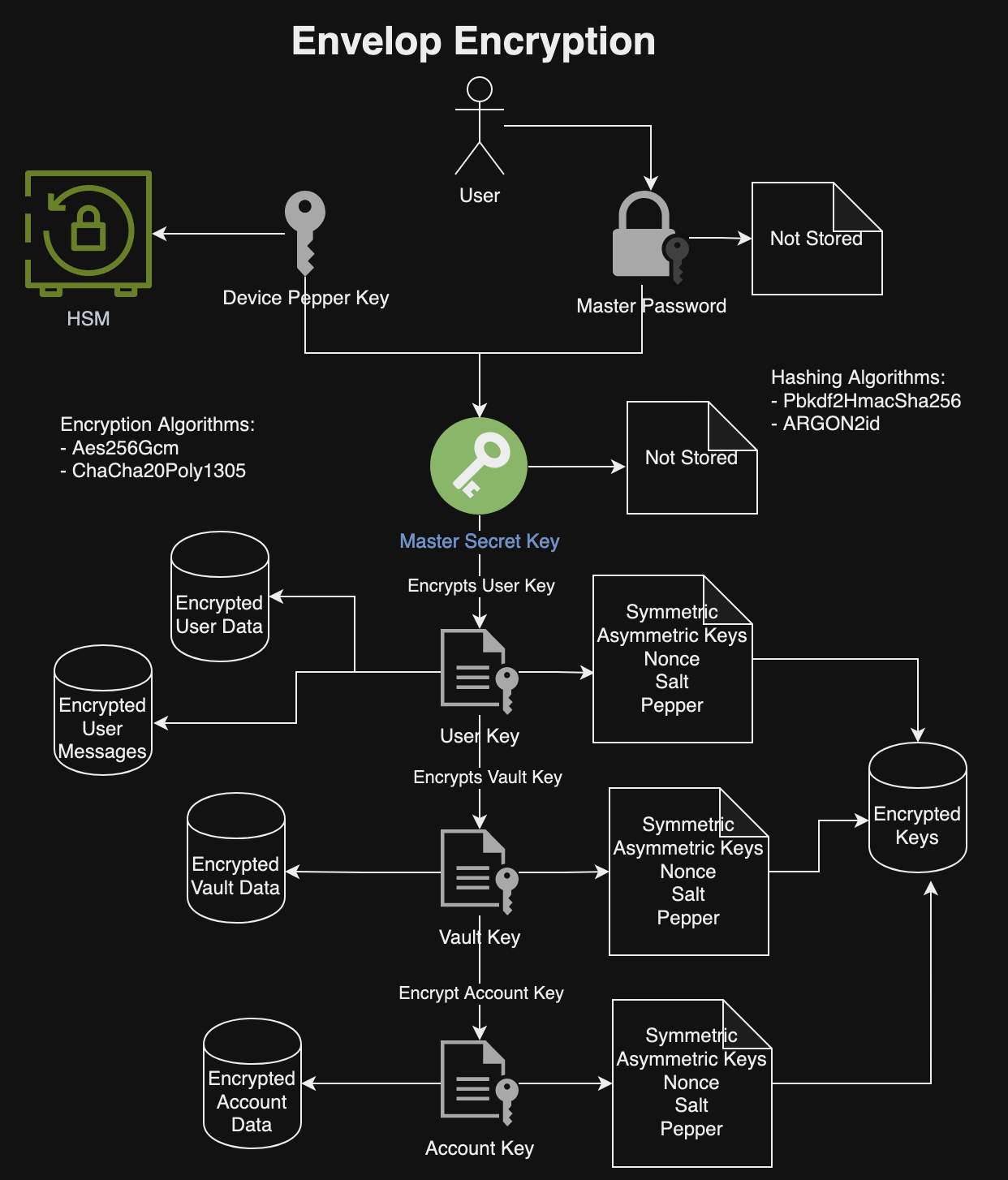
Envelop Encryption
The above diagram illustrates that a master secret key is derived from the combination of the user’s master password and a device-specific pepper key. The device pepper key is securely stored within HSM storage solutions, such as the MacOS Keychain, or as encrypted files on other platforms. Crucially, neither the master user password nor the secret key are stored on any local or cloud storage systems.
This master secret key plays a pivotal role in the encryption process: it encrypts the user’s private asymmetric key, which then encrypts the symmetric user key. The symmetric user key is utilized for the encryption of user data and messages. Furthermore, the user’s private key is responsible for encrypting the private key of each Vault, which in turn is used to encrypt the Vault’s symmetric key and the private keys of individual Accounts.
Symmetric keys are employed for the encryption and decryption of data, while asymmetric keys are used for encrypting and decrypting other encryption keys, as well as for facilitating the secure sharing of data between multiple users. This layered approach to encryption ensures robust security and privacy of the user data within the system.
4.0 Summary
The design principles and architectural framework outlined above showcase PlexPass’s advanced capabilities in password management, setting it apart from conventional cloud-based password managers. The key advantages of PlexPass include:
- End-to-End Encryption and Zero-Knowledge Architecture: By encrypting all data with strong algorithms and ensuring that decryption happens only on the user’s device, PlexPass provides a high level of security. The zero-knowledge architecture means that it assumes no trust when accessing secured user data.
- Local Data Storage and Management: With no reliance on cloud storage, PlexPass reduces the risk of data breaches and privacy concerns associated with cloud services.
- Advanced Cryptographic Techniques: PlexPass’s use of Argon2 for password hashing, AES-256 for symmetric encryption, and ECC for asymmetric encryption, coupled with envelope encryption, positions it at the forefront of modern cryptographic practices.
- User-Friendly Experience with Strong Security Practices: Despite its focus on security, PlexPass promises a great user experience through its command-line tool and web-based UI.
- Open Source with Regular Updates: PlexPass is open-source that allows for community scrutiny, which can lead to the early detection and rectification of vulnerabilities.
- Physical Security Considerations and Data Breach Alerts: PlexPass analyzes passwords for breaches, weak strength, similarity with other passwords and provides a dashboard for monitoring password security.
- Multi-Device and Secure Sharing Features: The ability to share passwords securely with nearby trusted devices without cloud risks, and the support for multi-device use, make it versatile and family-friendly.
- Strong Master Password and Password Generation: Encouraging strong master passwords and providing tools for generating robust passwords further enhance individual account security.
- Detailed Domain Model with Advanced Data Storage and Network Communication: PlexPass’s detailed model covers all aspects of password management and security, ensuring thorough protection at each level.
- Local Control and Privacy: With PlexPass, all data is stored locally, providing users with full control over their password data. This is particularly appealing for those who are concerned about privacy and don’t want their sensitive information stored on a cloud server.
- Customization and Flexibility: PlexPass can be customized to fit specific needs and preferences. Users who prefer to have more control over the configuration and security settings may find PlexPass more flexible than cloud-based solutions.
- Cost Control: Hosting your own password manager might have cost benefits, as you avoid ongoing subscription fees associated with many cloud-based password managers.
- Transparency and Trust: PlexPass is open-source, users can inspect the source code for any potential security issues, giving them a higher degree of trust in the application.
- Reduced Attack Surface: By not relying on cloud connectivity, offline managers are not susceptible to online attacks targeting cloud storage.
- Control over Data: Users have complete control over their data, including how it’s stored and backed up.
- Potentially Lower Risk of Service Shutdown: Since the data is stored locally, the user’s access to their passwords is not contingent on the continued operation of a third-party service.
- Multi-Factor and Local Authentication: PlexPass supports Multi-Factor Authentication based on One-Time-Passwords (OTP), FIDO, WebAuthN, and YubiKey.
Tag summary
Content type
Image
Digest
sha256:e5dcdea34…
Size
44.6 MB
Last updated
almost 3 years ago
docker pull plexobject/plexpass