pmsipilot/demoinstance
Web interface offering on-demand virtual machines instances with lifetime limits.
2.9K
pmsipilot/demoinstance repository overview
Project DemoInstance
DemoInstance is web interface offering on-demand virtual machines instances with lifetime limits.
Interface example
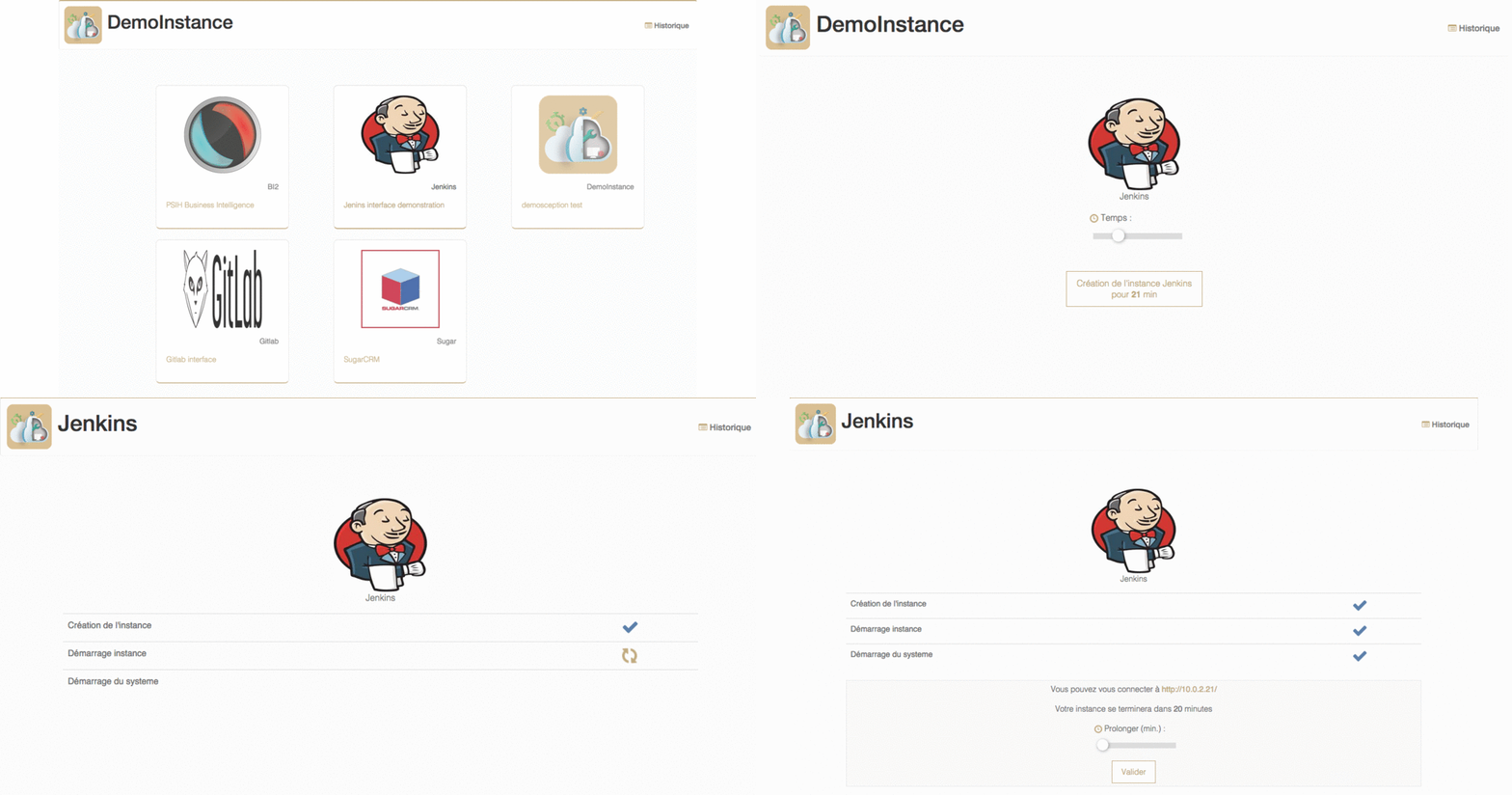
Dependencies


- Python 2.7
- PIP
- NodeJS & NPM
- An underlying database system:
- SQLite
- MySQL
Building and setting up
In order to use DemoInstance, you can:
- Build, configure and run demoinstance yourself
- Configure and use a production docker image
Install backend service
In order to install DemoInstance backend service:
$ git clone [email protected]:pmsipilot/demoinstance.git
$ cd demoinstance/backend/
$ sudo python2 ./setup.py install
Prepare frontend sources
In order to prepare frontend sources:
$ cd frontend
$ npm install
$ node_modules/gulp/bin/gulp.js
Set up web server
In this example, we'll be using the nginx webserver:
- Install nginx (according to your operating system documentation)
- Configure nginx virtualhost
- Restart nginx
Virtualhost example:
server {
       listen 8080;
       root /opt/demoinstance/frontend/;
       index index.html;
       location /api {
                proxy_pass http://127.0.0.1:8081;
       }
       location / {
                try_files $uri $uri/ =404;
       }
       location /instance_image/ {
                alias /etc/demoinstance/instance_image/;
                try_files $uri $uri/ =404;
       }
}
- In this example, the webserver is listening on port
8080, frontend files are stored in/opt/demoinstance/frontend, and backend is listening on port8081. - All
/apirequests must be passed to demoinstance backend service /instance_imagerequests points to/etc/demoinstance/instance_image/in this example.- Other requests are fulfilled with previously prepared frontend source code files.
Then, you must configure DemoInstance backend.
Configuration
DemoInstance have a single ini config file : config.ini In this file you have many section.
DEFAULT
[DEFAULT]
log_level=DEBUG
security_type=open
| Argument | Optional | Description |
|---|---|---|
| log_level | No | list of value here https://docs.python.org/2/library/logging.html#logging-levels |
| security_type | No | Values "open" (public), "email" (check email before access), "auth_ldap" or "auth_fake" (test only) |
| provider | No | Values "openstack" or "fake" (test only) |
| dev | Yes | Default to False, raise http exception |
[MAIL]
host=smtp.gmail.com
port=587
user=user
password=password
[email protected]
tls=yes
| Argument | Optional | Description |
|---|---|---|
| host | No | SMTP Host |
| port | Yes | SMTP Port default 25 |
| user | Yes | SMTP User |
| password | Yes | SMTP Password |
| from | Yes | From mail default demoinstance@localhost |
| tls | Yes | SMTP is tls default no |
AUTH_LDAP
If you use security_type = auth_ldap
[AUTH_LDAP]
host=ldap://ldapOrActiveDirectoyHostname
bind_user=cn=read,OU=Users,dc=mydomain,dc=local
bind_password=readpassword
search_base=OU=Users,dc=abc-objectif,dc=local
login_attribute=sAMAccountName
email_attribute=mail
| Argument | Optional | Description |
|---|---|---|
| host | No | Ldap Host |
| bind_user | Yes | Ldap user to read ldap |
| bind_password | Yes | Ldap password |
| search_base | Yes | Limit valid user with this branch |
| login_attribute | Yes | Ldap attribute to use to login |
| email_attribute | Yes | Ldap attribute of email |
| admin | Yes | List of admin login separate by coma |
PROV_OPENSTACK
If you use provider = openstack
[PROV_OPENSTACK]
user=user
password=password
tenant=project
url=http://srv-openstack:5000/v2.0
region=regionOne
| Argument | Optional | Description |
|---|---|---|
| user | No | openstack user |
| password | No | openstack password |
| tenant | No | openstack tenant |
| url | No | openstack keystone api url |
| region | Yes | openstack region |
| network | Yes | openstack network id |
HTTP
[HTTP]
port=8080
| Argument | Optional | Description |
|---|---|---|
| port | No | interface/api tcp port |
DATABASE
[DATABASE]
connection:mysql://root@localhost:3306/demo
| Argument | Optional | Description |
|---|---|---|
| connection | No | SQLAlchemy connection string of database |
Only tested with MySQL and SQLite
IMAGE
[IMAGE] section is the template of any [IMAGE_].
You can define in this section variable shared with all [IMAGE_]. The [IMAGE] section do not define a runnable image, only section with [IMAGE_ImageName] format define runnable image.
Parameter in this section depends on which provider you are using. Moreover some parameters are used by DemoInstance itself
config
| Argument | Optional | Description |
|---|---|---|
| name | No | Name of instance like "My cool app" |
| desc | No | Little descrition like "This app is so cooooooool" |
| info | No | info display after the creation like : "Login/Password are<br />test/test"" |
| time_default | No | Default instance life time in minute |
| time_max=80 | Yes | Max instance time life (activate time selection for user) |
| check_url | No | url to call to check if app is ready (%ip% is a placeholder with instance address) |
| soft_url | No | url of the app to redirect the user |
| max_instance | No | max number of instance |
| img | Yes | url of picture. Can be in /instance_image or external link |
| pool | yes | (int) Pre start N instance, default 0 |
Openstack image parameter
If you use provider = openstack you must / can add this parameter to your image configuration
| Argument | Optional | Description |
|---|---|---|
| image_id | No | Openstack image id or name |
| flavor_id | No | Openstack flavor id or name |
| prefix | No | Openstack prefix name |
| user_data | yes | nova userdata to inject in the instance |
| meta | yes | Add meta to instance |
example
Example with only one instance:
[IMAGE]

[IMAGE_MYAPP]
name=MyAPP
desc=My first app
info=Login/Password are<br />test/test
img=/instance_image/example.png
image_id=MonImage1
flavor_id=m1.tiny
time_default=20
prefix=myapp_
check_url=http://%ip%/ok
soft_url=http://%ip%/
max_instance=10
pool=2
meta=disk=ssd,ram=ECC
Example with three instances
[IMAGE]
flavor_id=1

[IMAGE_MYAPP1]
name=MyAPP
desc=My first app
...

[IMAGE_MYAPP2]
name=MyNewAPP
desc=My second app
...


[IMAGE_MYAPP3]
name=MyLastAPP
desc=My last app
flavor_id=2
...
In this example just [IMAGE_MYAPP3] run with flavor_id=2 and other image run with flavor_id=1 defined in [IMAGE]
Ini format Tips
Sometimes, you need a value to be on multi-line. To do that you can write your key:parameter like this:
user_data:#cloud-config
    password: mypassword
    chpasswd: { expire: False }
    ssh_pwauth: True
This is defined here : http://tools.ietf.org/html/rfc822.html on LONG HEADER FIELDS section
Run Backend
/usr/local/bin/demoinstance -c /etc/demoinstance/config.ini
Run w/ Docker
There is also a Docker Production-ready image: https://hub.docker.com/r/pmsipilot/demoinstance/
docker run -v /path/to/config/and/instance_image:/etc/demoinstance/ -i pmsipilot/demoinstance
/etc/demoinstance/must contain:config.inifileinstance_imagefolder with instance images
Init script
Redhat/Centos
Template for Centos is avaible in ressources/rhel-init-demoinstance.
Just link file to /etc/init.d.
ln -s /where/is/your/project /etc/init.d/demoinstance
Don't forget to add config file in /etc/sysconfig/demoinstance
cat <EOF /etc/sysconfig/demoinstance
# PID file
PIDFILE=/tmp/test.pid
# Log file
LOGFILE=/tmp/log.log
# Process's user
USER=demoinstance
# Demoinstance folder
DEMO_DIR=/opt/demoinstance
EOF
Debian/Ubuntu
If you want this you can do it and make me a PR
Contribute
If you want to contribute you're welcome. Just create issues or make some PR.
Dev env
The development environment is built w/ Docker on top of the production-ready image, with docker-compose
docker-compose up
A supervisord process will listen for changes in frontend files, and changes to backend source code will be directly applied.
Run test
To run test just run this command on with an URL od demoinstance run with test/samples/config/config-fake.ini
python test.py -u -f -U http://127.0.0.1:8080
Add auth system
To add a new auth system is really simple, just add a class in Demo/auth directory which is son of DemoAuth and just add 2 functions with this prototype :
    def __init__(self, config):
        pass

    #Must return email if ok or False
    def check_auth(self, user, password):
        pass
init parameter is just "config" which is a dictionnary of your config section.
Config section name must be your filename (without '.py') uppercase and your class name must be a transformation of your filename like this : 'auth_ldap.py => AuthLdap'
Add a new provider
To add a new provider, write a class in Demo/provider which herit from DemoProv.
Tag summary
Content type
Image
Digest
sha256:23ed45bf9…
Size
303.3 MB
Last updated
about 2 months ago
docker pull pmsipilot/demoinstance