prologic/remark-lint
Docker image for remark-lint (Markdown style linter)
100K+
prologic/remark-lint repository overview







remark plugins to lint Markdown.
Another linter? Yes. Ensuring the Markdown you (and contributors) write is of great quality will provide better rendering in all the different markdown parsers, and makes sure less refactoring is needed afterwards.
What is quality? That’s up to you, but there are sensible presets.
remark-lint is built on remark, a powerful Markdown processor
powered by plugins (such as these).
Table of Contents
- Install
- CLI
- API
- Configuring remark-lint
- Using remark to fix your Markdown
- Integrations
- Rules
- List of Presets
- List of External Rules
- Security
- Related
- Contribute
- License
Install
npm:
npm install remark-lint
CLI
Use remark-lint with remark-cli through a
preset.
npm install --save remark-cli remark-preset-lint-recommended
Then, configure remark in your package.json:
  // ...
  "scripts": {
    "lint-md": "remark ."
  },
  // ...
  "remarkConfig": {
    "plugins": ["remark-preset-lint-recommended"]
  }
  // ...
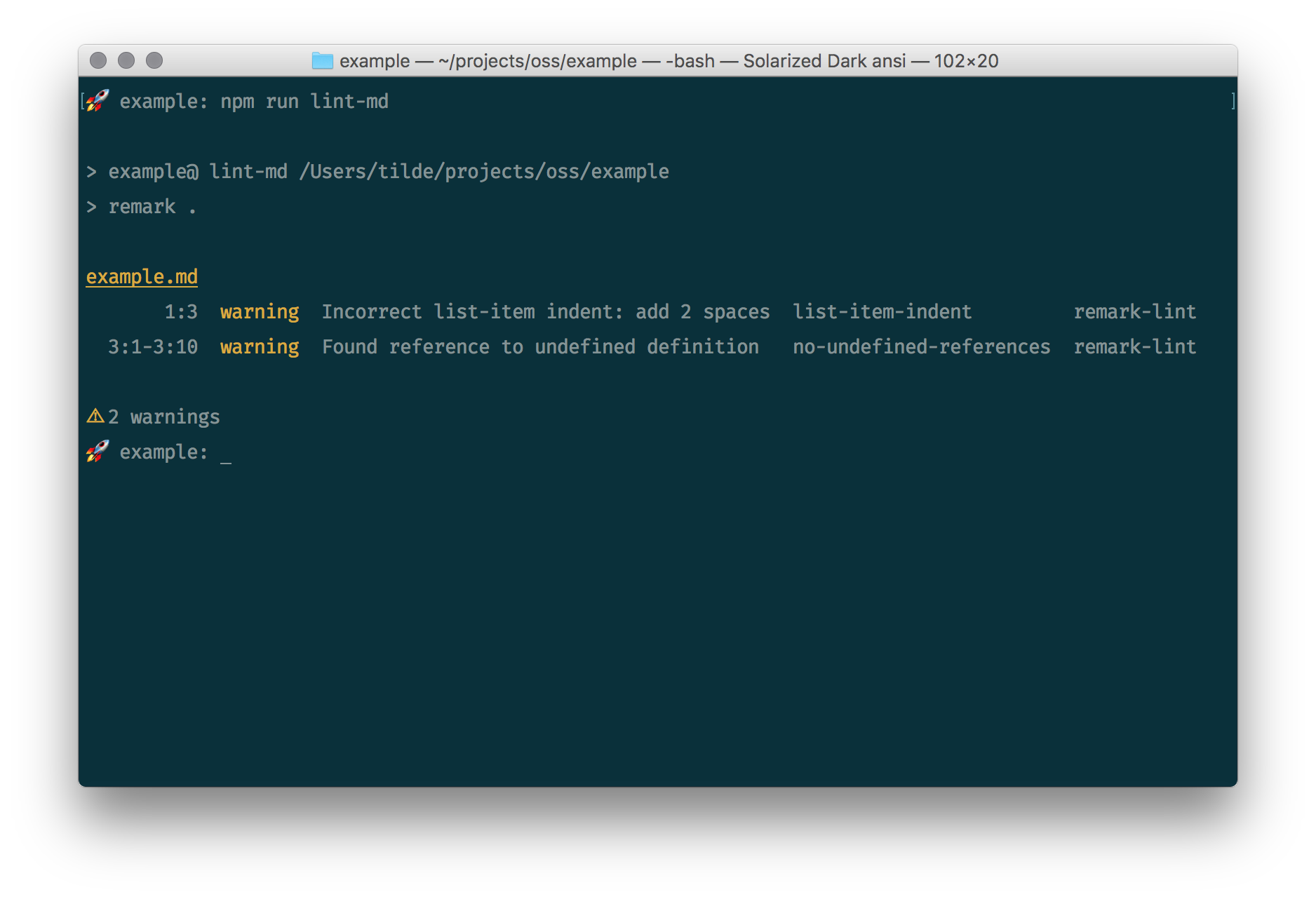
Let’s say there’s an example.md that looks as follows:
* Hello

[World][]
Now, running our lint-md script with npm run lint-md yields:
example.md
       1:3  warning  Incorrect list-item indent: add 2 spaces  list-item-indent
  3:1-3:10  warning  Found reference to undefined definition   no-undefined-references
⚠ 2 warnings
See doc/rules.md for what those warnings are (and how to turn them
off).
API
Use remark-lint together with remark:
npm install remark remark-preset-lint-markdown-style-guide
Let’s say example.js looks as follows:
var report = require('vfile-reporter')
var remark = require('remark')
var styleGuide = require('remark-preset-lint-markdown-style-guide')

var file = remark()
  .use(styleGuide)
  .processSync('_Hello world_')

console.log(report(file))
Now, running node example.js yields:
  1:1-1:14  warning  Emphasis should use `*` as a marker  emphasis-marker  remark-lint

⚠ 1 warning
Configuring remark-lint
remark-lint is a remark plugin and when used on the CLI supports
configuration through its configuration files.
An example .remarkrc file could look as follows:
{
  "plugins": [
    "remark-preset-lint-recommended",
    ["remark-lint-list-item-indent", false]
  ]
}
The preset turns on remark-lint-list-item-indent, but setting a plugin to
false later turns it off again.
Using our example.md from before:
* Hello

[World][]
Now, running npm run lint-md yields:
example.md
   3:1-3:10  warning  Found reference to undefined definition   no-undefined-references  remark-lint

⚠ 2 warnings
You can also provide configuration comments to turn a rule on or off inside a
file.
Note that you cannot change a setting, such as maximum-line-length, just
whether messages are shown or not.
Read more about configuration comments in
remark-message-controls documentation.
The following file will warn twice for the duplicate headings:
# Hello

## Hello

### Hello
The following file will warn once (the second heading is ignored, but the third is re-enabled):
# Hello

<!--lint disable no-duplicate-headings-->

## Hello

<!--lint enable no-duplicate-headings-->

### Hello
Note: You’ll need the blank lines between comments and other nodes!
Using remark to fix your Markdown
remark-stringify can format markdown syntax.
It ensures a single style is used: list items use one type of bullet (*, -,
+), emphasis (* or _) and importance (__ or **) use a standard marker,
table fences are aligned, and more.
Example
If you require('remark'), remark-stringify is included
unless an output format other than markdown (such as HTML) is defined.
Say we have the following file, example.js, showing how formatting rules can
be used:
var report = require('vfile-reporter');
var remark = require('remark');
var emphasisMarker = require('remark-lint-emphasis-marker');
var strongMarker = require('remark-lint-strong-marker');

remark()
  .use(emphasisMarker, '*')
  .use(strongMarker, '*')
  // ^ two `remark-lint` rules.
  .use({
    settings: {emphasis: '*', strong: '*'}
    // ^ `remark-stringify` settings.
  })
  .process('_Hello_, __world__!', function (err, file) {
    console.error(report(err || file));
    console.log(String(file));
  });
Now, running node example yields warnings and a formatted file:
    1:1-1:8  warning  Emphasis should use `*` as a marker  emphasis-marker  remark-lint
  1:10-1:19  warning  Strong should use `*` as a marker    strong-marker    remark-lint

⚠ 2 warnings
*Hello*, **world**!
Example
If you’re using remark-stringify explicitly, you can pass
options like any other plugin, like so:
var report = require('vfile-reporter');
var unified = require('unified');
var parse = require('remark-parse');
var stringify = require('remark-stringify');
var emphasisMarker = require('remark-lint-emphasis-marker');
var strongMarker = require('remark-lint-strong-marker');

unified()
  .use(parse)
  .use(emphasisMarker, '*')
  .use(strongMarker, '*')
  // ^ two `remark-lint` rules.
  .use(stringify, {emphasis: '*', strong: '*'})
  // ^ `remark-stringify` with settings.
  .process('_Hello_, __world__!', function (err, file) {
    console.error(report(err || file));
    console.log(String(file));
  });
Now, when running node example, this results in the same output as the
previous example.
Example
If you’re using remark-cli, remark-stringify is
included unless an output format other than markdown (such as HTML) is defined.
In this case you can configure remark-stringify settings using the -s, --settings flag or a "settings" property in remark
configuration files.
Say we have the following file, example.md:
_Hello_, __world__!
And our package.json looks as follows:
  // ...
  "remarkConfig": {
    "settings": {
      "emphasis": "*",
      "strong": "*"
    },
    "plugins": [
      "remark-lint-emphasis-marker",
      "remark-lint-strong-marker"
    ]
  }
  // ...
Now, running remark example.md yields warnings and a formatted file:
*Hello*, **world**!
example.md
    1:1-1:8  warning  Emphasis should use `*` as a marker  emphasis-marker  remark-lint
  1:10-1:19  warning  Strong should use `*` as a marker    strong-marker    remark-lint

⚠ 2 warnings
Note: running
remark example.md -oorremark example.md --outputoverwritesexample.mdand formats it. So, if you’d run that twice (the first pass lints and fixes the Markdown, the second pass checks it again), you’d see the outputexample.md: writtenas all warnings are now fixed.
Integrations
- linter-markdown (Atom) — use remark-lint from Atom
- linter-remark (Atom) — use all of remark from Atom
- SublimeLinter-contrib-remark-lint (Sublime) — use remark-lint from Sublime Text
- ale (Vim) — use remark-lint from Vim
- gulp-remark (Gulp) — use all of remark with Gulp
- grunt-remark (Grunt) — use all of remark with Grunt
- jest-runner-remark (Jest) - use all of remark with Jest
We’re interested in more integrations. Let us know if we can help.
Rules
doc/rules.md lists all available official rules.
List of Presets
Presets can be loaded just like other plugins.
remark-preset-lint-consistent — rules that enforce consistencyremark-preset-lint-markdown-style-guide — rules that enforce the markdown style guideremark-preset-lint-recommended — rules that prevent mistakes or syntaxes that do not work correctly across vendors
List of External Rules
External rules can be loaded just like normal rules.
remark-lint-alphabetize-lists — Ensure list items are in alphabetical orderremark-lint-appropriate-heading — Check that the top-level heading matches the directory nameremark-lint-blank-lines-1-0-2 — Ensure a specific number of lines between blocksremark-lint-books-links — Ensure links in lists of books follow a standard formatremark-lint-code — Lint fenced code blocks by corresponding language tags, currently supporting ESLintremark-lint-match-punctuation — Ensures punctuations are used in pairs if necessary.remark-lint-mdash-style — Ensure mdash style follows a standard formatremark-lint-no-chinese-punctuation-in-number — Ensures that Chinese punctuation will not be used in number, such as 1,000 or 12:34.remark-lint-no-dead-urls — Check that external links are aliveremark-lint-no-long-code — Ensures that each line in code block won't be too long.remark-lint-no-repeat-punctuation — Ensures that punctuation will not be used multiple times, such as"!!!"or"???".remark-lint-emoji-limit — Enforce a limit of emoji per paragraphremark-lint-no-empty-sections — Ensure every heading is followed by content (forming a section)remark-lint-heading-length — Ensure headings have the appropriate lengthremark-lint-heading-whitespace — Ensure headings parsing is not broken by accidental irregular whitespacesremark-lint-are-links-valid — Check if your links are reachable and/or uniqueremark-lint-spaces-around-number — Ensures there are spaces around number and Chinese.remark-lint-spaces-around-word — Ensures there are spaces around English word and Chinese.remark-lint-no-url-trailing-slash — Ensure that thehrefof links has no trailing slashremark-lint-write-good — Wrapper for write-good
Security
Use of remark-lint does not mutate the tree so there are no openings for
cross-site scripting (XSS) attacks.
Messages from linting rules may be hidden from user content though, causing
builds to fail or pass, or changing a report.
Related
remark-validate-links — Validate if links point to existing headings and files in markdown
Contribute
See contributing.md in remarkjs/.github for ways
to get started.
See support.md for ways to get help.
This project has a Code of Conduct. By interacting with this repository, organisation, or community you agree to abide by its terms.
License
Tag summary
Content type
Image
Digest
Size
39.8 MB
Last updated
over 6 years ago
docker pull prologic/remark-lint