promyze/hub
A beta self-hosted version of the Hub of best coding practices
5.1K
promyze/hub repository overview
Create GitLab application
This hub requires an Oauth2 connection with GitLab. You'll need to create an oauth2 application in your GitLab instance.
When creating the app, you'll need to:
- indicate the read_user permission
- indicate the following URI as an authorized callback URL:
<hour_hub_url>/api/auth/gitlab/callback.
In our example, assume our hub is deployed at the following http://hub.local, this is what we'll call HUB_URL.

Click on the button Save the application, and you'll get this screen:
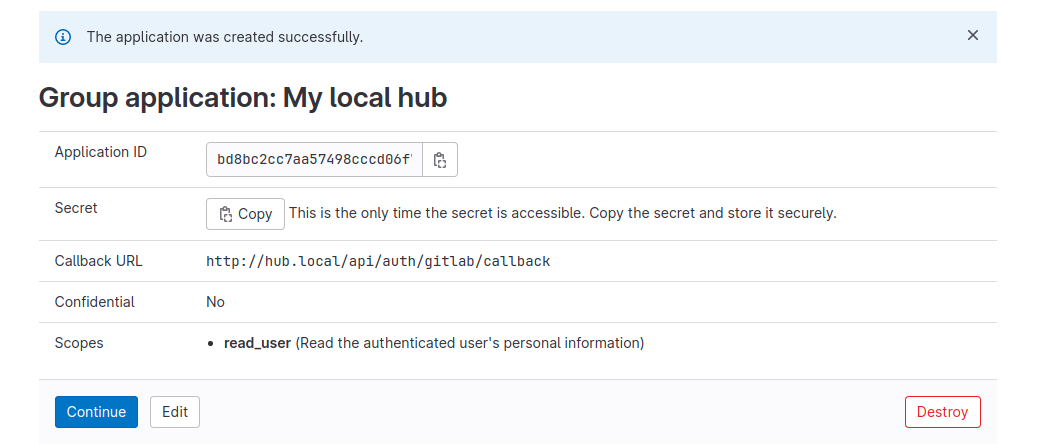
Note the following elements:
- The Application ID becomes your
GITLAB_APP_ID - The Secret value becomes your
GITLAB_APP_SECRET
Run the Hub
To run this image, the following variables are required:
MONGODB_URI=mongodb://mongodb:27017/promyze-hubMONGODB_DB=promyze-hub# Set a similar name as in the URIGITLAB_APP_ID=1234ABCGITLAB_APP_SECRET=97GVF7E0GITLAB_URL=https://gitlab.com# This is the root URL of your GitLab instanceHUB_URL=http://localhost:3001# The URL of the Hub once deployed and from which users will access it
Here is an example of how to run the Hub with Docker-Compose:
version: '3'

services:
  promyze-hub:
    image: promyze/hub
    ports:
      - "3001:3001"
    environment:
      - MONGODB_URI=mongodb://mongodb:27017/promyze-hub
      - MONGODB_DB=promyze-hub
      - GITLAB_APP_ID=ef436acc724f34cc29969b07fdb90f1c3ded6ec4e5b3fa12bd233870d23c27ea
      - GITLAB_APP_SECRET=b9fd01620667c9fce3900a94126242494fe06c85e6baa1875a04324431f81e39
      - GITLAB_URL=https://gitlab.com
      - HUB_URL=http://localhost:3001
  mongodb:
    image: mongo:4.4
    volumes:
      - ./db:/data/db
Note : You're free to adapt the 3001 exposed port on your machine, it depends on your target environment.
You can also edit the internal port used by Promyze inside the container. FYI, we use Nginx as a proxy.
You'll need to adapt the PORT environment variable, and port mapping options.
  ports:
      - "3001:3002"
    environment:
      - PORT=3002
Tag summary
Content type
Image
Digest
sha256:889b8ab89…
Size
248.9 MB
Last updated
over 3 years ago
docker pull promyze/hub