quickcorp/qcobjects
A framework to make micro-services and micro-frontends into an N-Tier architecture
500K+
quickcorp/qcobjects repository overview










QCObjects
Welcome to QCObjects. An Open-source framework that empowers full-stack developers to make micro-services and micro-frontends into an N-Tier architecture.
With QCObjects devlopers are also able to code front-end and back-end together using a common syntax in pure JavaScript. It is cross-browser, cross-platform and cross-frame.
Install it, make a textfield or a navigate home functionality, all in just one step.
This document is the Main Reference Documentation!
This repository and readme is hosted at https://qcobjects.dev
Check out the official page of QCObjects at https://qcobjects.com
This project adheres to the Contributor Covenant code of conduct. By participating, you are expected to uphold this code. Please report unacceptable behavior to [email protected].
Contributors are welcome!
You can contribute to QCObjects following the set of guidelines expressed in the file CONTRIBUTING.md
The meaning of the name QCObjects (Do not forget the Q)
Often, some people is confusing QCObjects name with CObjects (perhaps some day it changes, who knows...) but the Q has an important meaning: It means Quick! What the complete name QCObjects does mean is Quick Components and Objects, and that is why the Q, C, O letters are capitalized.
QCObjects Explainer Video
For those who have no time to read all of this today, here is a small video that explains what QCObjects is and what can be done with it.

Table of Contents
- QCObjects
- The meaning of the name QCObjects (Do not forget the Q)
- QCObjects Explainer Video
- Table of Contents
- Principals
- Main features
- Progressive Web Apps (PWA) Adopted Features
- Cross Browser Javascript Framework for MVC Patterns
- Install it, make a textfield or a navigate home functionality, all in just one step.
- Dynamic Components Architecture
- ECMA-262 Specification
- Copyright
- Demo
- DevBlog
- Fork
- Become a Sponsor
- Check out the QCObjects SDK
- Donate
- Installing
- Using QCObjects with Atom:
- Using QCObjects in Visual Studio Code:
- Installing with NPM:
- Installing the docker playground:
- One-Step Installation Script for Ubuntu 18.x
- One-Step Installation Script for RHEL8
- One-Step Installation Script for Raspberry PI Raspbian 9
- One-Step Installation Script for macOS
- Install and test QCObjects on Microsoft Windows OS
- QCObjects Multi-Cloud Installation
- Using the development version code in the straight way into HTML5:
- Using the CDN minified version code from jsDelivr CDN
- Using the latest non-minified version from jsDelivr CDN
- Using UNPKG CDN
- Using CDNJS
- Reference
- Essentials
- QC_Object
- ComplexStorageCache
- asyncLoad
- Class
- QC_Append, append method
- The _super_ method
- New
- InheritClass
- ClassFactory
- _Crypt
- GLOBAL
- CONFIG
- Processor
- waitUntil
- Package
- Import
- Export
- Cast
- Tag
- Ready
- Component Class
- Component HTML Tag
- Controller
- View
- VO
- Service
- serviceLoader
- JSONService
- ConfigService
- SourceJS
- SourceCSS
- Effect
- Timer
- List and Math Functions
- SDK
- The QCObjects HTTP2 Built-In Server
- Start serving your files with QCObjects
- Principals of an N-Tier or Multitier architecture
- Micro-services Principals
- Backend settings in config.json
- Backend routing
- The QCObjects Microservice Class and Package
- Generating a Self-Signed Certificate with QCObjects
- Working with a Letsencrypt HTTPS certificate, Certbot and QCObjects
- Essentials
- Quick Start Guide - Quick Start your PWA (Progressive Web App) - Quick Start your AMP (Accelerated Mobile Page)
- Start Coding
- Step 1: Start creating a main import file and name it like: cl.quickcorp.js. Put it into packages/js/ file directory
- Step 2: Then create some services inhereting classes into the file js/packages/cl.quickcorp.services.js :
- Step 3: Now it's time to create the components (cl.quickcorp.components.js)
- Step 4: Once you have done the above components declaration, you will now want to code your controllers (cl.quickcorp.controller.js)
- Step 5: To use into the HTML5 code you only need to do some settings between script tags:
- QCObjects CLI Tool
Principals
Here are the principals with QCObjects was made with:
- You should type in JavaScript to code a JavaScript application.
- Everything is an object.
- Every object has a definition.
- On the front-end side, any object can be stacked into the DOM or Virtual-DOM without the need to re-declare its definition.
- Every object has a body.
- A class should be the main definition of an object.
- A class should be easy typed as an object itself.
- Your code should be easily organised into packages.
- Your code should be possible to easily scafold your applications into a clean architecture.
- A component is an entity that has an object representation, and a tag declaration. The content of a component should be possible to be filled up remotely and locally. As a component is an object, it has a body as well, and the body of the component normally is an stacked instance of a DOM element.
- A component can be attached to the DOM or detached from it without affecting its functionality.
- A service call can be extended to scafold its functionality.
- You should be able to import a package remotely.
- You should be able to scafold your code and also controlling your savings on the server side by not doing unnecessary calls to remote sources. You should not need to repeat yourself coding this kind of controls.
- You should be able to code your N-Tier application in a single language or syntax.
- You should be able to apply any template you want to a component, it doesn't matter the what syntax or language the template was written with.
- If an HTML tag is already represented by a DOM object instance, you should not need to duplicate this instance definition in order to render its contents.
- Your HTML main page should be clean. But you should be able to bind what controls the tag behaviour without affecting the HTML syntax.
- The order of execution of your code should be easily understandable and readable from the code, and the rendering process of every component should have and execution control in as many layers you need.
- A layered pattern (like MVC or MVCC) should be present for every component. It doesn't matter if you define every layer or not.
- The behaviour of a component should not be determined by its rendering process.
- It is necessary a components stack that splits the DOM into a subjacent tree of attached elements. So now it exists and it is called The QCObjects Nested Components Stack.
- You should be able to extend a component instance. But you should be able to control its dynamic behaviour without affecting its initial declaration.
- You should be able to apply simultaneous visual effects and animations in an easy way to any DOM element instance.
- You should be able to control the visual effects and animations either from CSS or JavaScript without affecting the performance.
- You should be able to control the behaviour of your code Into-the-box and out-of-the-box and survive doing it.
Main features
- Built-In & custom templates for Progressive Web Apps (PWA) and Accelerated Mobile Pages (AMP)
- Revolutionary UI Effects
- Breakthrough backend micro-services
- The simplicity of a wonderful layout design
- Fully usable CLI tools
- Objects & Components driven architecture
- Front-end and back-end together in a full-stack environment
- Recursive routing for components
- Built-In nested components management
- Fully integrated MVC pattern (Model, View, Controller)
- Dynamic Data Objects
- Based on N-Tier Architecture concepts
Progressive Web Apps (PWA) Adopted Features
Prevent Render-blocking resources
To prevent Render-blocking resources, QCObjects has implemented the Package factory function.
On-Demand Resources Load
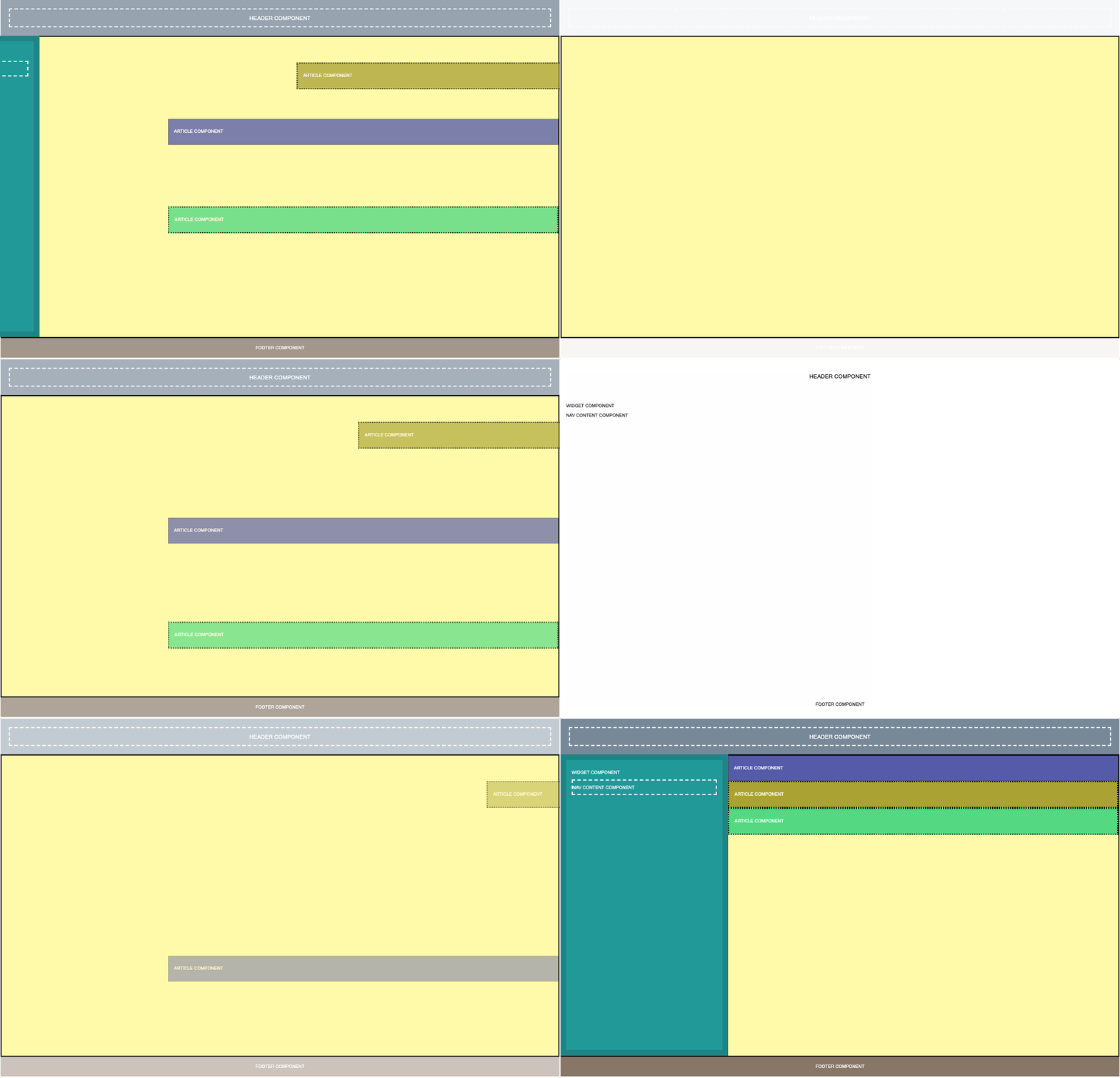
With a dynamic components driven architecture, QCObjects is rendering every visual resource that is inside of a component only when the component is building itself, and every component is connected to a tree called global.componentsStack that is actually pointing to every component instance and its subcomponents. Every time a component is rebuilt, visual resources are dynamically reloaded on-demand in the most efficient way, so you can forget all the nasty code that you were needing to controll the resource loading process with other frameworks.
Lazy-loading of images in components (use lazy-src instead of src attribute in img tag)
Since the version 2.1.251, QCObjects provide an easy way to lazy load the images, using the latest standard for browsers.
<img src="img/preloader.svg" lazy-src="img/myrealimage.png"/>
In the above code, a preloader (light-weight) image is used to be loaded in the first instance, and a lazy-src attribute is used to set the real image to show after lazy loading process. QCObjects will load all the declared tags inside a component in lazy mode if they have a lazy-src attribute, after the component is rebuilt or loaded. Also, QCObjects will use the Intersection Observer API (when available) to determine whether the lazy-src or src image is visually useful to be showed.
The effect of lazy loading is only high visible on the first time the PWA is loaded. The next time, the speed of loading will be significantly increased making more difficult to the human eye to see the result. However this feature makes a lot of difference in terms of user experience when the internet connection has low speed issues or the images are extremely large. This feature is a part of the recommended features for PWAs writen by Mozzila Developers Network in an article about Progressive loading. You can read that article here
If you don't want to use lazy loading for images, you can always keep the normal way of loading by not adding the lazy-src attribute to the tag and using the traditional src.
Cross Browser Javascript Framework for MVC Patterns
QCObjects is a javascript framework designed to make easier everything about the MVC patterns implementation into the pure javascript scope. You don't need to use typescript nor any transpiler to run QCObjects. It runs directly on the browser and it uses pure javascript with no extra dependencies of code. You can make your own components expressed in real native javascript objects or extend a native DOM object to use in your own way. You can also use QCObjects in conjunction with CSS3 frameworks like [Foundation] (https://foundation.zurb.com), [Bootstrap] (https://getbootstrap.com) and mobile javascript frameworks like [PhoneGap] (https://phonegap.com) and OnsenUI (https://onsen.io)
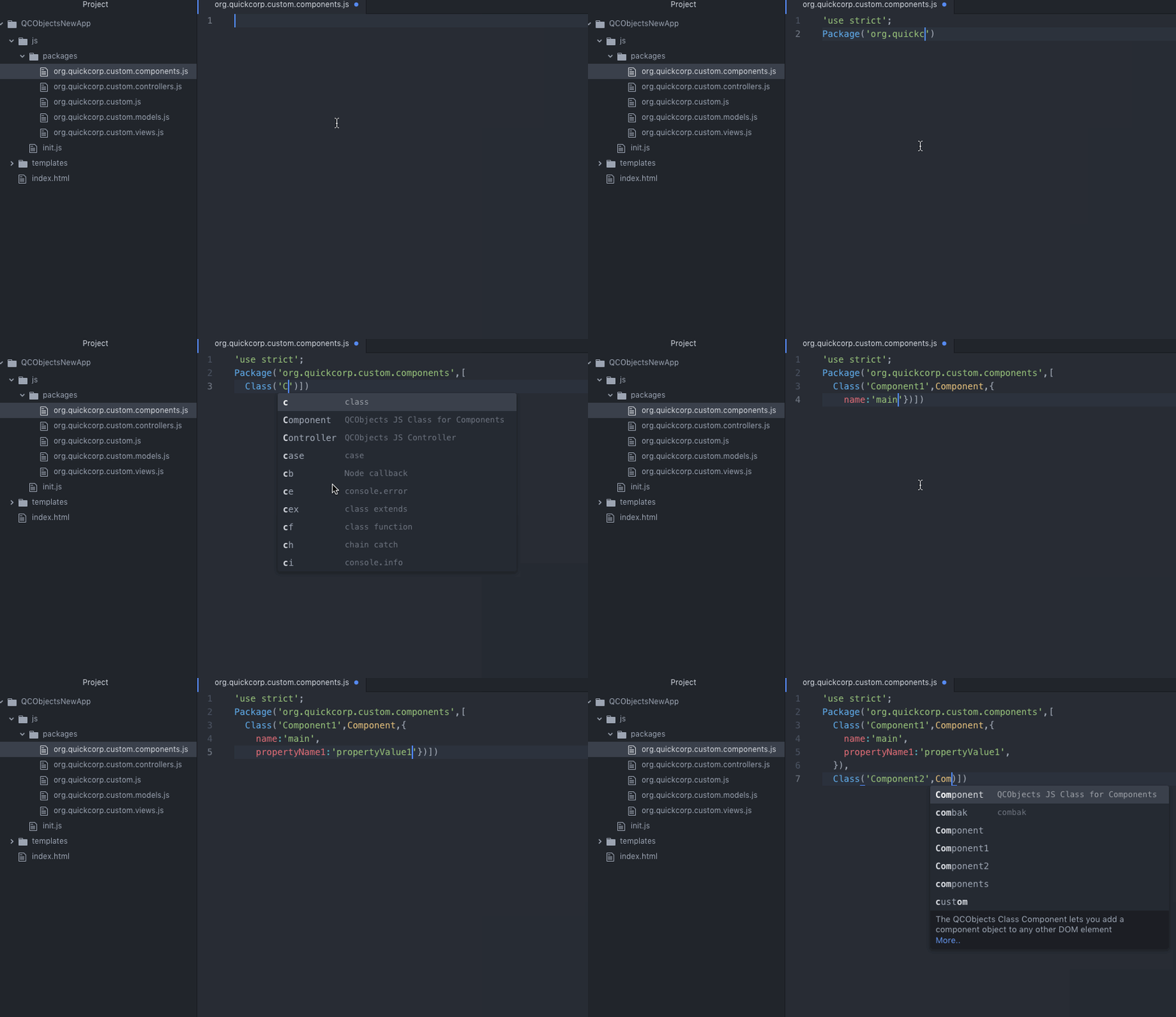
Install it, make a textfield or a navigate home functionality, all in just one step.
QCObjects in installable in your computer, it comes with a CLI Tool and commands to create your application template in one step. Navigate home without leaving the webpage and make a shadowed textfield in one step.
Dynamic Components Architecture
ECMA-262 Specification
See ECMAScript® 2020 Language Specification for reference
Copyright
Copyright (c) Jean Machuca and QuickCorp [email protected]
Demo
PWA Live Demo
Check out a live demo of pure QCObjects based frontend Progressive Web App here: PWA QCObjects
Demo Integrating with Foundation
Check out a demo using Foundation components here: Demo Using Foundation
Demo Integrating with Materializecss
Check out a demo using MaterializeCSS here: Demo Using Materializecss
Demo Using Raw CSS
Check out a demo using raw CSS: Demo Using Raw CSS
Example of QCObjects using and manipulating canvas objects
The following code shows how QCObjects can manipulate canvas objects directly and inside components
<!DOCTYPE html>
<html>
    <head>
    	<title>Demo</title>
    	<script type="text/javascript" src="https://cdn.qcobjects.dev/QCObjects.js"></script>
    	<script type="text/javascript">
    		var canvas1,canvas2,canvas3,container;
        CONFIG.set('relativeImportPath','src/');

    		/**
    		 * Main import sentence.
    		 */
    		Import('cl.quickcorp',function (){

    			/**
    			 * Super Container MyOwnBody
    			 */
	    		Class('MyOwnBody',HTMLBodyElement,{
	    			customAttr:'custom',
	    			body:document.body  // breakes default body element and replace with them
	    		});

	    		/**
	    		 * Another custom class definition
	    		 */
	    		Class('MyContainer',HTMLElement,{
	    			width:400,
	    			height:400,
	    			customAttr:'custom attr container'
	    		});


	    		/**
	    		 * Another custom class definition
	    		 */
	    		Class('canvas',HTMLCanvasElement,{
	    			customAttr:'custom'
	    		});

	    		/**
	    		 * Another custom class definition
	    		 */
	    		Class('MyCanvas2',HTMLCanvasElement,{});

	    		body = New(MyOwnBody); // binds to body
	    		body.css({backgroundColor:'#ccc'});

	    		container = Tag('container')[0].Cast(MyContainer); // cast any javascript dom object to QC_Object class
	    		container.css({backgroundColor:'red'}); // access binding in two directions to dom objects

	    		/**
	    		 * Instance a new custom canvas
	    		 */
	    		canvas1 = New(canvas,{
            width:100,
            height:100,
          });
	    		canvas2 = New(canvas,{
            width:200,
	    			height:100,
          });
	    		canvas3 = New(canvas,{
            width:300,
	    			height:50,
          });

	    		canvas1.css({backgroundColor:'#000000'}); // like jquery and another style access
          canvas1.body.style.backgroundColor='#000000'; // standard javascript style access
	    		canvas2.body.style.backgroundColor='#0044AA'; // standard javascript style access
	    		canvas3.body.style.backgroundColor='green'; // standard javascript style access

	    		canvas1.append(); //append canvas1 to body
	    		canvas2.attachIn('container'); // attach or append to specific tag containers
	    		container.append(canvas3); // append canvas3 to custom tag binding

//	    		canvas1.body.remove(); // remove canvas1 from dom
	    		body.append(canvas3); // append canvas3 to body

          // using components
          var c1 = New(Component,{'templateURI':'templatesample.html',cached:false});
          document.body.append(c1); // appends the c1 to the body


    		});

    	</script>
    </head>
    <body>
    	<container id="contentLoader" ></container>
    </body>
</html>
DevBlog
The Official DevBlog of QCObjects is hosted on Hashnode. The DevBlog is personally written by Jean Machuca, the author of QCObjects and and he is explaining in detail how are the best practices and giving the best tips and tricks to use the most advanced features of QCObjects.
Fork
Please fork this project or make a link to this project into your README.md file. Read the LICENSE.txt file before you use this code.
Become a Sponsor
If you want to become a sponsor for this wonderful project you can do it here
Check out the QCObjects SDK
You can check out the QCObjects SDK and follow the examples to make your own featured components
Donate
If you like this code please DONATE!

Installing
Using QCObjects with Atom:
> apm install qcobjects-syntax
https://atom.io/packages/qcobjects-syntax
Using QCObjects in Visual Studio Code:
https://marketplace.visualstudio.com/items?itemName=Quickcorp.QCObjects-vscode
Installing with NPM:
> npm install qcobjects-cli -g && npm install qcobjects --save

Installing the docker playground:
docker pull -a quickcorp/qcobjects-playground && docker
Tag summary
Content type
Image
Digest
sha256:f6fa5ff3e…
Size
720.5 MB
Last updated
over 3 years ago
docker pull quickcorp/qcobjects