qxorm/compose_qxorm_with_mariadb-db_mariadb
C++ backend with QxOrm library and MariaDB database
10K+
qxorm/compose_qxorm_with_mariadb-db_mariadb repository overview
C++ development environment with QxOrm library and MariaDB database
This Docker compose file builds a development environment to create web applications with very efficient C++ backend based on Qt framework and QxOrm library.
Project structure
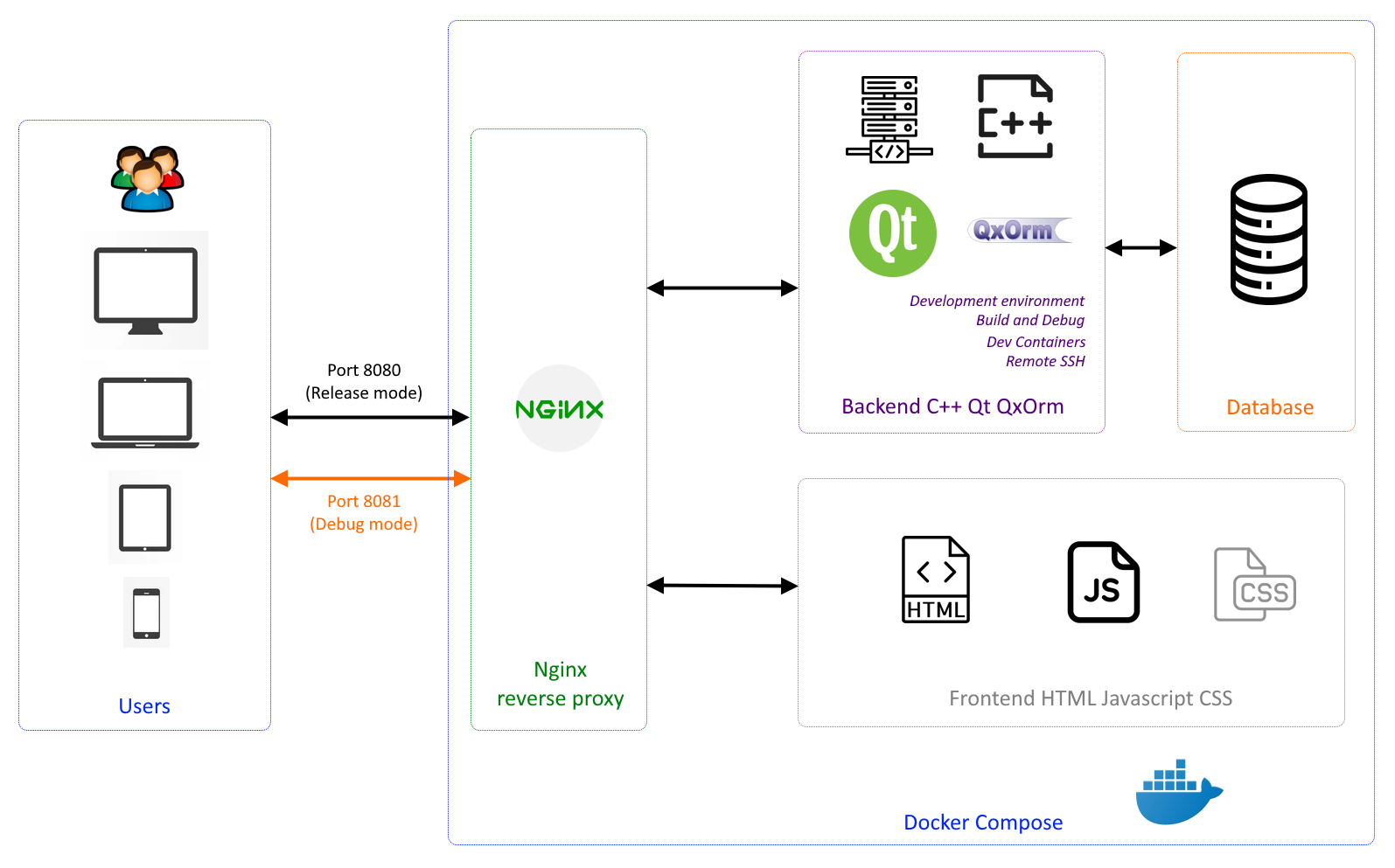
This Docker compose file defines an application with 4 services :
- nginx_reverse_proxy : based on latest nginx official image, this service is the entrypoint for the user to access to the application.
- frontend_html_js_css : this is where you can develop great UI using famous HTML/JS/CSS frameworks like Angular, React, etc...
- backend_qxorm : C++ backend based on Qt framework and QxOrm library.
- db_mariadb : MariaDB database to store application data.
Deploy with docker compose
cd <path_to_this_docker_compose_file>
docker compose up -d
[+] Running 8/8
 ✔ Network compose_qxorm_with_mariadb_compose_qxorm_with_mariadb_frontnet  Created                                                                                                                  0.1s
 ✔ Network compose_qxorm_with_mariadb_compose_qxorm_with_mariadb_backnet   Created                                                                                                                  0.0s
 ✔ Volume "compose_qxorm_with_mariadb_qxorm_backend_src"                   Created                                                                                                                  0.0s
 ✔ Volume "compose_qxorm_with_mariadb_mariadb_db_data"                     Created                                                                                                                  0.0s
 ✔ Container compose_qxorm_with_mariadb-db_mariadb-1                       Started                                                                                                                  1.7s
 ✔ Container compose_qxorm_with_mariadb-frontend_html_js_css-1             Started                                                                                                                  1.7s
 ✔ Container compose_qxorm_with_mariadb-backend_qxorm-1                    Started                                                                                                                  1.9s
 ✔ Container compose_qxorm_with_mariadb-nginx_reverse_proxy-1              Started                                                                                                                  1.2s
Expected result
Listing containers should show 4 containers running and the port mapping as below :
docker compose ps
NAME                                                IMAGE                                                          COMMAND                  SERVICE                CREATED              STATUS                        PORTS
compose_qxorm_with_mariadb-backend_qxorm-1          qxorm/compose_qxorm_with_mariadb-backend_qxorm:latest          "./entrypoint.sh ssh…"   backend_qxorm          About a minute ago   Up About a minute             9642-9643/tcp, 0.0.0.0:2222->22/tcp
compose_qxorm_with_mariadb-db_mariadb-1             qxorm/compose_qxorm_with_mariadb-db_mariadb:latest             "docker-entrypoint.s…"   db_mariadb             About a minute ago   Up About a minute             3306/tcp
compose_qxorm_with_mariadb-frontend_html_js_css-1   qxorm/compose_qxorm_with_mariadb-frontend_html_js_css:latest   "./entrypoint.sh"        frontend_html_js_css   About a minute ago   Up About a minute             80/tcp
compose_qxorm_with_mariadb-nginx_reverse_proxy-1    qxorm/compose_qxorm_with_mariadb-nginx_reverse_proxy:latest    "./entrypoint.sh"        nginx_reverse_proxy    About a minute ago   Up About a minute (healthy)   80/tcp, 0.0.0.0:8080-8081->8080-8081/tcp
Test application
Once Docker containers are running, on the host machine open a web-browser and go to :
http://localhost:8080
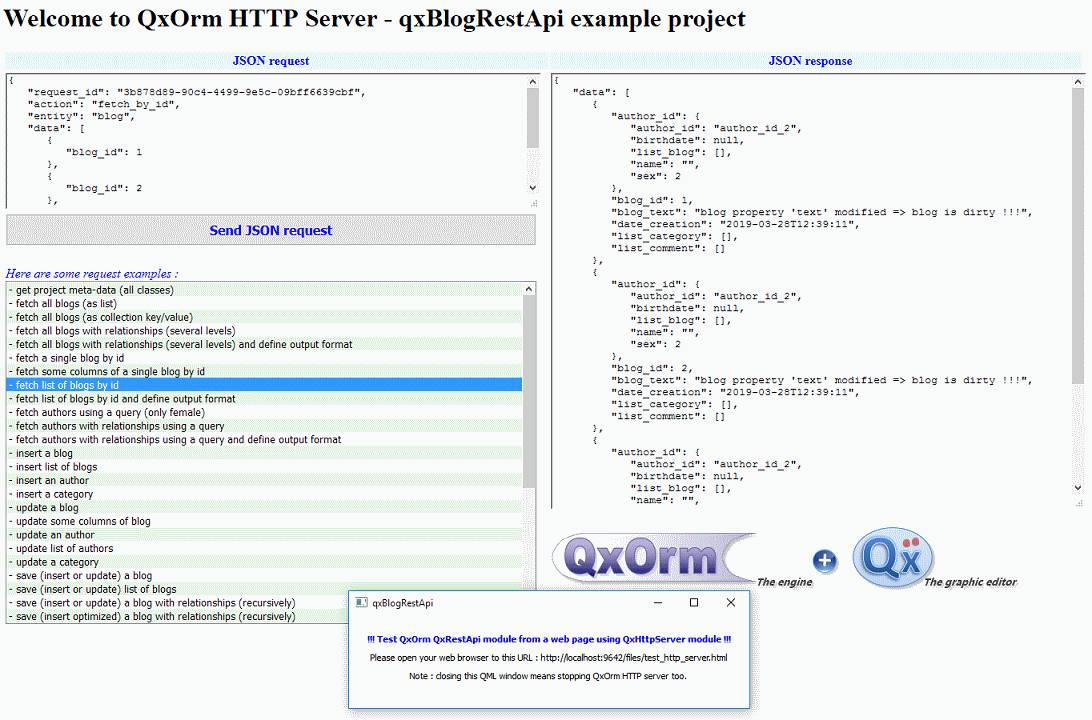
The sample application is qxBlogRestApi based on QxOrm library. You can select a pre-defined request to send to the C++ backend in JSON format, or you can write your own JSON request. The JSON API is explained in QxOrm documentation.
Build and debug C++ Qt QxOrm backend in container
The C++ Qt QxOrm backend is based on this Docker file. A full C++ development environment (to build and debug) is available, you can connect to this dev environment with Visual Studio Code. Visual Studio Code provides 2 extensions : Dev Containers extension and Remote SSH extension (choose one of them).
Connect to the container with VSCode 'Dev Containers' extension
To connect to the C++ development environment with the Dev Containers extension :
- On the host machine, open Visual Studio Code
- Install the Dev Containers extension
- Select workspace (open directory) : path to this docker compose file (which includes a sub-directory named '.devcontainer')
- Visual Studio Code detects automatically the '.devcontainer' sub-directory and provides the action 'Reopen in Container'
- Execute 'Reopen in Container' ==> a new Visual Studio Code instance is created, this new instance is connected to the running Docker container
Connect to the container with VSCode 'Remote SSH' extension
To connect to the C++ development environment with the Remote SSH extension :
- On the host machine, open Visual Studio Code
- Install the Remote SSH extension
- From the Remote SSH extension, execute :
ssh qxorm@localhost -p 2222
- When asked, enter password : qxorm
- A new Visual Studio Code instance is created, this new instance is connected to the running Docker container
- On the remote Visual Studio Code instance, select workspace (open directory) :
/home/qxorm/src/QxOrm/
Build and debug project in container
Once connected to the remote C++ development environment (with Dev Containers extension or Remote SSH extension) :
- Press 'CTRL+SHIFT+B' to build the project in debug mode
- Press 'F5' to execute the project in debug mode
After the application starts in DEBUG mode, on the host machine open a web-browser and go to :
http://localhost:8081
Stop and remove the containers
docker compose down
About QxOrm library
QxOrm library is a C++ library based on Qt framework, its main features are : ORM persistence, serialization, reflection, introspection, JSON API, HTTP web server. QxOrm library supports most common databases like SQLite, MySQL, PostgreSQL, Oracle, MS SQL Server, MongoDB, MariaDB. QxOrm library documentation : https://www.qxorm.com/qxorm_en/manual.html
About QxEntityEditor application
QxEntityEditor application (available on Windows, Linux and macOS) is a graphic editor for QxOrm library. QxEntityEditor provides a graphic way to manage the data model, and generates native source code for all environments. QxEntityEditor is based on plugins and provides many ways to import/export your data model :
- generate C++ persistent classes automatically (registered in QxOrm context).
- import existing database structure (using ODBC connection or native drivers) for SQLite, MySQL, PostgreSQL, Oracle and MS SQL Server databases.
- generate DDL SQL script automatically (database schema) for SQLite, MySQL, PostgreSQL, Oracle and MS SQL Server.

Authors
QxOrm is developed by Lionel Marty, a software development engineer since 2003.
License
QxOrm is a C++ library available under a dual license :
- GNU/GPLv3 license : open-source and free (to develop an open-source project or to evaluate QxOrm library) ;
- Proprietary license to distribute an application based on QxOrm library without any restrictions of GNU/GPLv3 license.
Tag summary
Content type
Image
Digest
sha256:91b5e1423…
Size
101.8 MB
Last updated
5 months ago
docker pull qxorm/compose_qxorm_with_mariadb-db_mariadb