railflow/railflow repository overview
Railflow Docker image
This image provides an easy and convenient way of using Railflow CLI tool without the need to install NodeJS and NPM tools.
What is Railflow CLI
Railflow NPM based CLI is meant to be a cross-platform stand-alone utility so that engineers can easily integrate their CICD systems or testing framework with TestRail.
Quick start
Pull the latest version of the Docker image
docker pull railflow/railflow:latest
Run
docker run -it -u $(id -u):$(id -g) -v $REPORT_FOLDER_PATH:$REPORT_FOLDER_PATH -w $REPORT_FOLDER_PATH railflow/railflow:latest railflow -k XXXXX-XXXXX-XXXXX-XXXXX -url https://sometestrailserver.io -u [email protected] -p mypassword -pr "Railflow Demo" -path Docker/Demo -f junit -r $REPORT_FOLDER_PATH/*.xml -tp "Docker Demo" -sm path
Where the REPORT_FOLDER_PATH is the environment variable holding the path to the folder containing report files, e.g. JUnit XML report files in the example above.
| Key | Description | Example |
|---|---|---|
| -k, --key | (online activation) License key. Can be set with RAILFLOW_LICENSE environment variable | -k XXXXX-XXXXX-XXXXX-XXXXX |
| -url, --url | TestRail instance URL | -url https://example.testrail.io |
| -u, --username | TestRail username. Can be set with RAILFLOW_TR_USER environment variable | -u test-username |
| -p, --password | TestRail password or API Key. Can be set with RAILFLOW_TR_PASSWORD environment variable | -p XtpHXiPLEODyhF |
| -pr, --project | TestRail project name | -pr "example project" |
| -path, --test-path | TestRail test cases path | -path "Section1/subsection2/ShoppingCart |
| -f, --format | Report format: 'pytest-railflow' (case insensitive) | -f junit |
| -r, --report-files | The file path(s) to the test report file(s) generated during the build. User can pass multiple values separated with spaces. Ant-style patterns such as **/reports/*.xml can be used. E.g. use target/reports/*.xml to capture all XML files in target/reports directory. | -r target/surefire-reports/*.xml target/failsafe-reports/*.xml |
| -tp, --test-plan | TestRail test plan Name | -tp "Shopping Cart Test Plan" |
| -sm, --search-mode | Specifies the test case lookup algorithm. name: search for test case matching the name within the entire test suite. If test case found, update the test case. If test case not found, create a new test case within specified -path path: search for test case matching the name within the specified -path. If test case found, update the test case. If test case not found, create a new test case within specified -path | -sm path |
Please see all available Railflow CLI options in the documentation
View Log
Get the last run docker CONTAINER ID with IMAGE name "railflow/railflow:latest".
docker ps -a
This will give a result like
CONTAINER ID   IMAGE                      COMMAND                  CREATED          STATUS                      PORTS     NAMES
fe555907164f   railflow/railflow:latest   "docker-entrypoint.s…"   16 minutes ago   Exited (0) 15 minutes ago             crazy_volhard
8b614eba1aa1   railflow/railflow:latest   "docker-entrypoint.s…"   22 minutes ago   Exited (0) 22 minutes ago             distracted_jennings
ea74ab1fcf57   railflow/railflow:latest   "docker-entrypoint.s…"   2 days ago       Exited (0) 2 days ago                 gifted_jackson
4277a7b175ae   railflow/railflow:latest   "docker-entrypoint.s…"   2 days ago       Exited (0) 2 days ago                 gallant_cori
Get the log for latest
docker logs -f fe555907164f
Test rail result URL is in the log.
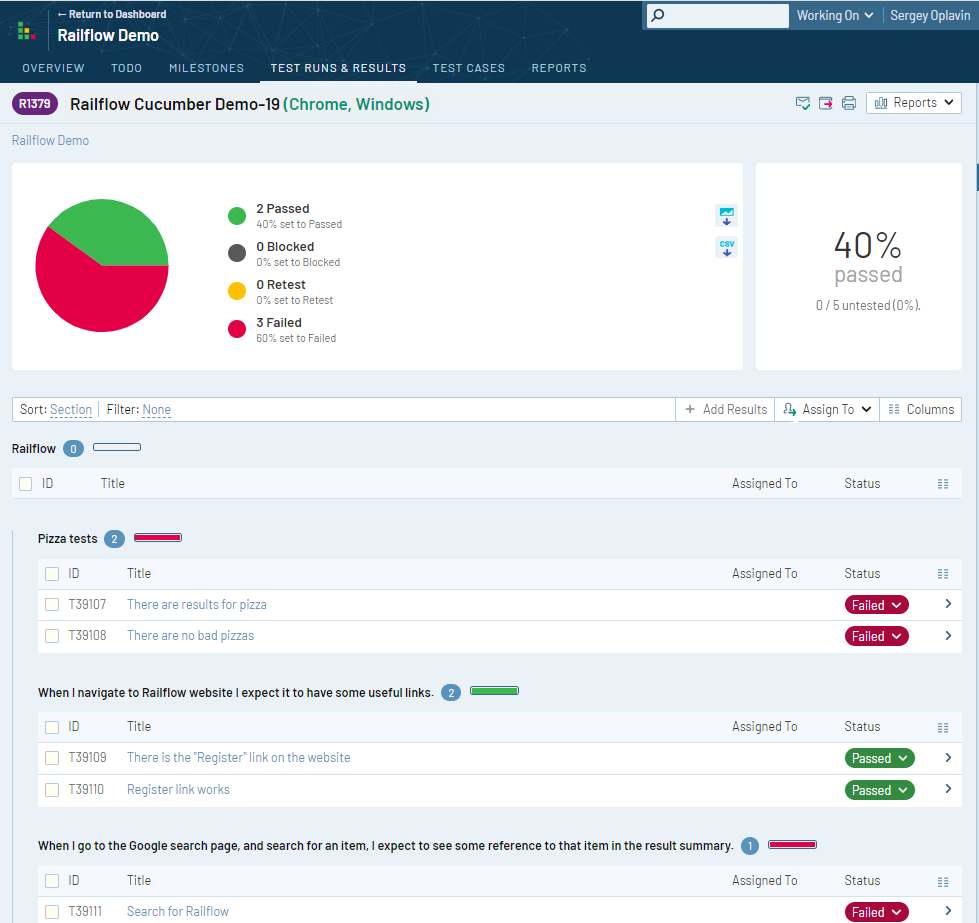
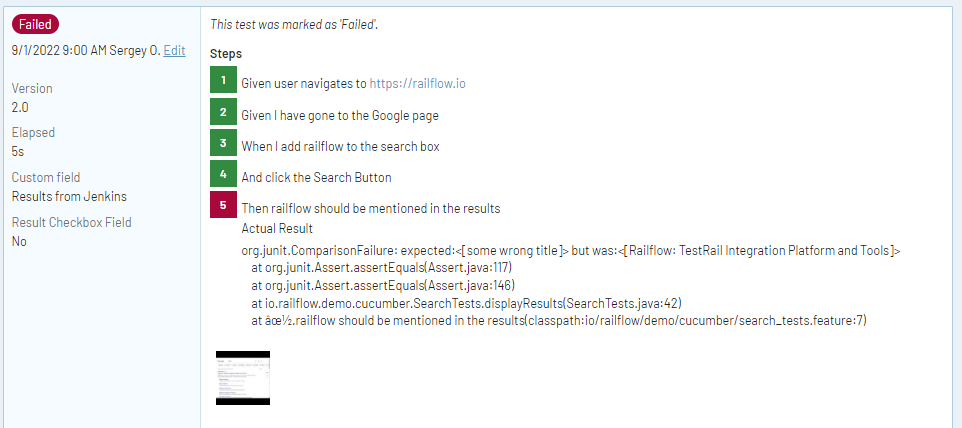
Results in TestRail
Test run
Test result details
Using Railflow Docker Image with Jenkins
Please see the instruction on how to use Raiflow Docker image together with Jenkins in our documentation on the Railflow website.
Tag summary
Content type
Image
Digest
sha256:1697aac5a…
Size
358.2 MB
Last updated
over 1 year ago
docker pull railflow/railflow