ray255ar/rclshark repository overview
Copied from https://github.com/Ar-Ray-code/rclshark
rclshark
Monitor the status of computers on a network using the DDS function of ROS2.

Requirements
- ROS2 foxy-core Installation
rclshark
rclshark is an IP address display system that takes advantage of the DDS publishing nature of the ros2 node to the local network, and can recognize any device with ROS2 installed. rclshark is also a service server, and has a function to report computer status using psutil.
See rclshark-smi for details.
Usage 1 : Run as ROS2 RUN
$ source /opt/ros/foxy/setup.bash
$ mkdir -p ~/ros2_ws/src
$ cd ~/ros2_ws/src
$ git clone --recursive https://github.com/Ar-Ray-code/rclshark.git
$ cd ~/ros2_ws/
$ colcon build --symlink-install
$ source ~/ros2_ws/install/local_setup.bash
$ ros2 run rclshark rclshark
Usage 2 : Back-end installation (systemd)
Installation (Startup Automatically)
In case of$ROS_DISTRO=foxy,
$ git clone https://github.com/Ar-Ray-code/rclshark.git
$ sudo bash rclshark/rclshark/install.bash foxy
If you want to enable rclshark immediately, run at CUI (= multi-user-target) $ sudo systemctl start rclshark.service.
uninstall
$ sudo bash ~/ros2_ws/src/rclshark/rclshark/install.bash uninstall
Usage 3 : Docker
$ docker pull ray255ar/rclshark:latest
RUN docker container
$ docker run -it --rm rclshark:local
Confirmation rclshark
Since rclshark is an application that uses the basic functions of ROS2, you can find it with the ros2 command.
## Confirmation rclshark 1
$ ros2 node list | grep ip_
> /ip_192.168.11.10_end
> /ip_192.168.11.22_end
## Confirmation rclshark 2
$ ros2 service list | grep endcb
> /ip_192.168.11.10_endcb
> /ip_192.168.11.22_endcb
Now you can safely forget your IP address.:wink:
rclshark-smi
You can use rclshark to check the hardware status of multiple computers. You don't even need to bother opening htop. Good for you! :blush:
IP addresses are sorted in ascending order and are dynamically added and removed. See Usage 2 for installing rclshark-smi. If you want to use only rclshark-smi, type sudo systemctl disable rclshark.service. to use only rclshark-smi.
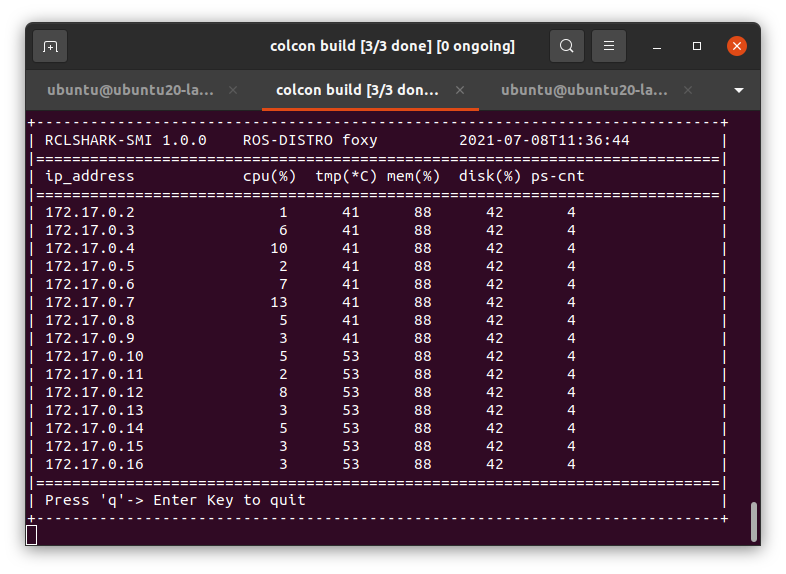
There are two ways to run.
Usage 1 : Run as ROS2 RUN
$ source /opt/ros/foxy/setup.bash
$ mkdir -p ~/ros2_ws/src
$ cd ~/ros2_ws/src
$ git clone --recursive https://github.com/Ar-Ray-code/rclshark.git
$ cd ~/ros2_ws/
$ colcon build --symlink-install
$ source ~/ros2_ws/install/local_setup.bash
$ ros2 run rclshark-smi rclshark_smi.py
Usage 2 : Run from /usr/local/bin/rclshark-smi
## Install
$ git clone https://github.com/Ar-Ray-code/rclshark.git
$ sudo bash rclshark/rclshark/install.bash foxy
$ sudo systemctl disable rclshark.service
## Run rclshark-smi
$ rclshark-smi
Operation method
- 'q'-> Enter : exit rclshark-smi
Known Problems (rclshark-smi) :disappointed:
- If the rclshark process started using Docker is interrupted, rclshark-smi will freeze. In that case, rclshark-smi will exit as the Timeout after 5 seconds. Keep in mind that the same event can also happen with non-Docker rclshark.
- We are considering releasing a lightweight version of rclshark-smi that does not involve sending or receiving messages.
About writer
- Ar-Ray : Japanese student.
- Blog (Japanese) : https://ar-ray.hatenablog.com/
- Twitter : https://twitter.com/Ray255Ar
Tag summary
Content type
Image
Digest
Size
256.9 MB
Last updated
about 5 years ago
docker pull ray255ar/rclshark:v1.0.2