raykimurayyz/nginx-rtmp
A self-hosted web interface for managing multiple RTMP inputs and relay destinations.
1.0K
raykimurayyz/nginx-rtmp repository overview
RTMP Relay Manager
A lightweight, self-hosted RTMP relay with a web interface. Send video from OBS, a PlayStation 4/5 or Xbox streaming setup, a camera, a hardware encoder, or any other RTMP-capable source, then relay it to multiple streaming platforms simultaneously.
Documentation and source: github.com/raykimurayyz/nginx-rtmp
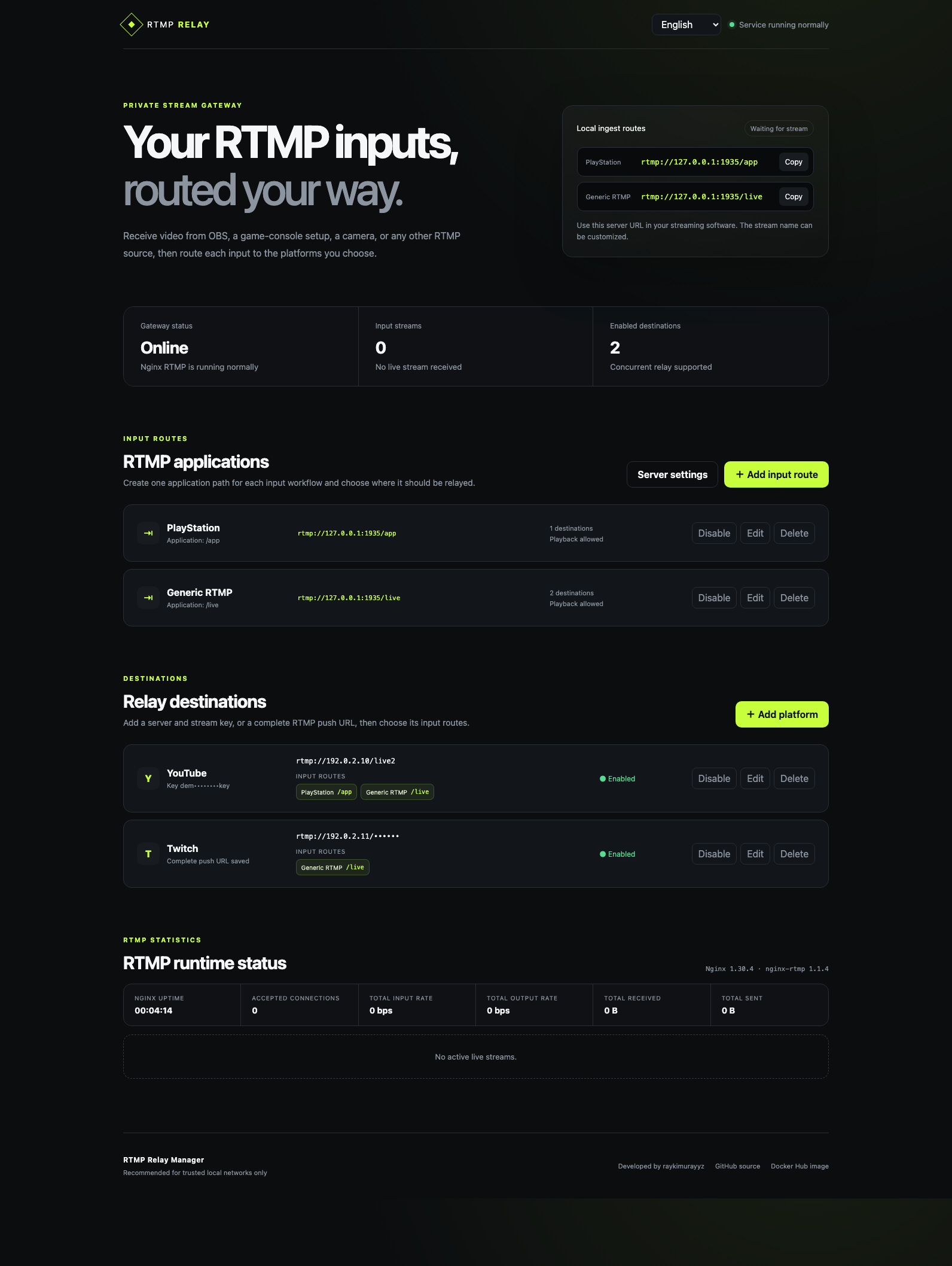
What you can do
- Manage multiple RTMP input applications, including the default
/appand/liveroutes. - Route each input independently to the destinations you select.
- Add, edit, enable, disable, and remove routes and platforms from a browser.
- Monitor live bitrate, transferred traffic, media metadata, and RTMP connections.
- Keep destination configuration when the container is replaced or upgraded.
- Use English, Japanese, or Simplified Chinese automatically based on browser preferences.
- Run without an external account or cloud control service.
Quick start
Create a Docker-managed volume and start the container:
docker volume create nginx-rtmp-data

docker run -d \
  --name nginx-rtmp \
  --restart unless-stopped \
  --security-opt no-new-privileges:true \
  --cap-drop ALL \
  --read-only \
  --tmpfs /tmp:rw,noexec,nosuid,size=64m \
  -p 1935:1935 \
  -p 8080:8080 \
  -v nginx-rtmp-data:/data \
  raykimurayyz/nginx-rtmp:latest
Open the management page:
http://YOUR_DOCKER_HOST:8080
Create or edit input routes, then add the server URL and stream key—or a complete RTMP push URL—supplied by each destination platform. Select which routes should relay to each destination.
Configure OBS or another publisher with the default generic route:
Server:     rtmp://YOUR_DOCKER_HOST:1935/live
Stream key: main
For a compatible PlayStation interception workflow, use rtmp://YOUR_DOCKER_HOST:1935/app. You can create additional application paths in the browser.
Start streaming. Each input is automatically relayed to its selected, enabled destinations.
Docker Compose
Create compose.yaml:
services:
  nginx-rtmp:
    image: raykimurayyz/nginx-rtmp:latest
    container_name: nginx-rtmp
    restart: unless-stopped
    ports:
      - "1935:1935"
      - "8080:8080"
    volumes:
      - nginx-rtmp-data:/data
    read_only: true
    tmpfs:
      - /tmp:rw,noexec,nosuid,size=64m
    security_opt:
      - no-new-privileges:true
    cap_drop:
      - ALL

volumes:
  nginx-rtmp-data:
Start it:
docker compose up -d
Check its status and logs:
docker compose ps
docker compose logs -f
Persistent configuration
The application stores input routes, server settings, destinations, and secrets in:
/data/config.json
Mount /data from a named volume as shown above. The volume exists independently of the container, so configuration remains available after the image or container is replaced. A backup of the previous valid configuration is kept at /data/config.json.backup, and older version 1 configurations are migrated automatically.
Do not run docker compose down -v unless you intentionally want to delete the saved configuration.
Stream keys are stored as plain text inside the volume because NGINX needs them to connect to destination platforms. Protect access to the Docker host and its volumes.
Upgrade
With Docker Compose:
docker compose pull
docker compose up -d
The existing nginx-rtmp-data volume is reused automatically.
For reproducible deployments, replace latest in your Compose file with a complete version tag such as v0.2.0.
Ports
| Port | Purpose |
|---|---|
1935/tcp | RTMP input from OBS, a game-console streaming setup, a camera, an encoder, or another RTMP-capable source |
8080/tcp | Web management interface and API |
The raw NGINX statistics endpoint listens only inside the container and is not published.
Image tags
latest— most recently published stable versionvX.Y.Z— immutable application release
Supported platforms
linux/amd64linux/arm64
Health check
The image includes a built-in HTTP health check. View the current state with:
docker inspect --format '{{.State.Health.Status}}' nginx-rtmp
Important usage notes
- This image supports plain
rtmp://destinations. RTMPS, SRT, transcoding, and platform-specific signing are not included. - If destinations are changed while a publisher is already connected, reconnect the input stream once to guarantee that the new configuration takes effect.
- An RTMP output connection does not guarantee that the destination platform has approved or publicly started the broadcast.
- There is intentionally no login page. Use the management interface only on a trusted private network and do not expose port
8080directly to the public internet.
Upstream components and license
The image builds verified, unmodified releases of NGINX and nginx-rtmp-module on Alpine Linux.
The original RTMP Relay Manager code is licensed under the MIT License. NGINX and nginx-rtmp-module retain their respective BSD 2-Clause licenses. The corresponding license texts are included in the image under /usr/share/licenses/.
For complete usage instructions, security details, development information, and third-party notices, visit:
Tag summary
Content type
Image
Digest
sha256:ca451cf75…
Size
22.4 MB
Last updated
23 days ago
docker pull raykimurayyz/nginx-rtmp