reboot8/imagebuf repository overview
ImageBuf


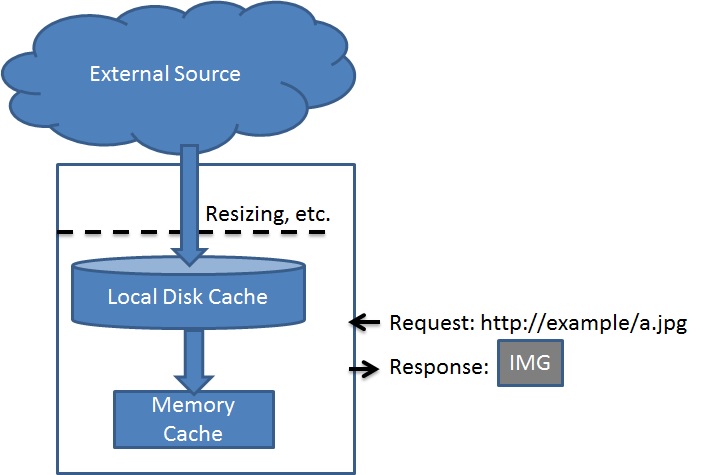
ImageBug accepts images from an external repository (e.g., amazon S3), caches it locally (both on hard drive and in memory), and serves it in memory. It acts as a transparent cache with the ability to make adjustments in between.
Why Using ImageBuf?
An example
As a father, I take a lot of photos of my daughter. I store them in Amazon S3 with full size. I then run ImageBuf on my tiny instance of Amazon EC2. When my daughter's WordPress requests an image, my ImageBuf will automatically download it from Amazon S3, resize it, and serve it back. The resized image will be cached.
I do not want to store every photo locally (in my EC2 instance) because it incures a cost, and will need some effort to maintain it. I do not want to store resized images in Amazon S3 either, due to the maintenance effort.
ImageBuf makes my photo sharing cheap and easy to maintain. Just drop the pics from my camera to Amazon S3, then I automatically get two URLs: a full-sized image through my S3 (https://s3.amazonaws.com/your_bucket/your_image.jpg), plus a resized image (http://your_domain/your_image.jpg).
Advantages over directly serving images Compared to directly serving from local storage, using ImageBuf has these advantages:
- Lower cost. External storages like Amazon S3 is typically cheaper than local storage systems like Amazon EBS. Also, as most images will be served from the in-memory cache, the disk IO operations will be significantly reduced while Amazon AWS charges for disk IO operations.
- Safe. Your server will not have write permissions to the external storage. You will not expose the address of your external server to the world.
- Easier to maintain. You do not need to worry about resizing your images for the web manually.
Usage
Use with docker
The easiest way of using ImageBus is to run it with docker. A minimum image (54MB) is published at DockerHub as reboot8/imagebuf
Here is a quick example to use it with docker-compose:
version: '3.4'

services:
  imagebuf-ellen:
    image: reboot8/imagebuf
    ports:
      - "8081:1337"
    environment:
      - PORT_NUMBER=1337
      - REMOTE_PATH=http://s3.amazonaws.com/ellen.wang
      - RESIZE_WIDTH=800
      - MEMORY_CACHE_SIZE=100MB
All parameters are controlled via envoriment variables:
| Variable | Required | Description |
|---|---|---|
| PORT_NUMBER | Yes | The port number that the web server will be hosted on. |
| REMOTE_PATH | Yes | The remote path |
| RESIZE_WIDTH | No | If resize is needed, the output width in pixles |
| RESIZE_HEIGHT | No | If resize is needed, the output width in pixles |
| LOG_FILE | No | Path to the log file. Defaults to stdout |
| MEMORY_CACHE_SIZE | No | The amount of memory that ImageBuf uses as a in-memory cache |
Note:
- It is recommended to set only one of RESIZE_WIDTH or RESIZE_HEIGHT, so that the ratio of the image can be kept.
- MEMORY_CACHE_SIZE can be in the format of 1024, 1000KB. 128MB, etc.
Run without docker
ImageBuf uses graphicsmagick for image resizing. If graphicsmagick is not installed correctly, resizing will be disabled. To install graphicsmagick on ubuntu, run:
sudo apt-get install graphicsmagick
For windows,install graphicsmagick and make sure you have the executable of gm on your PATH. Verify by running gm in your command line.
Run ImageBuf under node.js:
nodejs app.js OPTIONS

 Required Options:

    --portNumber [portNumber]     The port number that the web server will be hosted on.
    --remotePath [remote_path]

 Optional options

    --resizeWidth  [width]
    --resizeHeight [height]
    --logFile [Path]
    --memoryCacheSize [Size]     The amount of memory that ImageBuf uses as a in-memory cache.
                                 The format can be: 1024, 1000KB. 128MB, etc.Default: 0
Requirements on Node.js
ImageBuf requires node.js version 0.10 or later.
For all tested versions, click this icon: . Generally, the latest version of node.js will work.
Design
ImageBuf uses etag to help the caching of images.
Future work
ImageBuf is an active project. All suggestions and comments are very much appreciated.
Tag summary
Content type
Image
Digest
Size
49.9 MB
Last updated
over 7 years ago
docker pull reboot8/imagebuf