rtcamp/action-slack-notify repository overview
This action is a part of GitHub Actions Library created by rtCamp.
Slack Notify - GitHub Action

A GitHub Action to send a message to a Slack channel.
Screenshot

The Site and SSH Host details are only available if this action is run after Deploy WordPress GitHub action.
Usage
You can use this action after any other action. Here is an example setup of this action:
- Create a
.github/workflows/slack-notify.ymlfile in your GitHub repo. - Add the following code to the
slack-notify.ymlfile.
on: push
name: Slack Notification Demo
jobs:
  slackNotification:
    name: Slack Notification
    runs-on: ubuntu-latest
    steps:
    - uses: actions/checkout@v2
    - name: Slack Notification
      uses: rtCamp/action-slack-notify@v2
      env:
        SLACK_WEBHOOK: ${{ secrets.SLACK_WEBHOOK }}
- Create
SLACK_WEBHOOKsecret using GitHub Action's Secret. You can generate a Slack incoming webhook token from here.
Environment Variables
By default, action is designed to run with minimal configuration but you can alter Slack notification using following environment variables:
| Variable | Default | Purpose |
|---|---|---|
| SLACK_CHANNEL | Set during Slack webhook creation | Specify Slack channel in which message needs to be sent |
| SLACK_USERNAME | rtBot | Custom Slack Username sending the message. Does not need to be a "real" username. |
| SLACK_MSG_AUTHOR | $GITHUB_ACTOR (The person who triggered action). | GitHub username of the person who has triggered the action. In case you want to modify it, please specify corrent GitHub username. |
| SLACK_ICON |  | User/Bot icon shown with Slack message. It uses the URL supplied to this env variable to display the icon in slack message. |
| SLACK_ICON_EMOJI | - | User/Bot icon shown with Slack message, in case you do not wish to add a URL for slack icon as above, you can set slack emoji in this env variable. Example value: :bell: or any other valid slack emoji. |
| SLACK_COLOR | good (green) | You can pass ${{ job.status }} for automatic coloring or an RGB value like #efefef which would change color on left side vertical line of Slack message. |
| SLACK_LINK_NAMES | - | If set to true, enable mention in Slack message. |
| SLACK_MESSAGE | Generated from git commit message. | The main Slack message in attachment. It is advised not to override this. |
| SLACK_TITLE | Message | Title to use before main Slack message. |
| SLACK_FOOTER | Powered By rtCamp's GitHub Actions Library | Slack message footer. |
| MSG_MINIMAL | - | If set to true, removes: Ref, Event, Actions URL and Commit from the message. You can optionally whitelist any of these 4 removed values by passing it comma separated to the variable instead of true. (ex: MSG_MINIMAL: event or MSG_MINIMAL: ref,actions url, etc.) |
You can see the action block with all variables as below:
    - name: Slack Notification
      uses: rtCamp/action-slack-notify@v2
      env:
        SLACK_CHANNEL: general
        SLACK_COLOR: ${{ job.status }} # or a specific color like 'good' or '#ff00ff'
        SLACK_ICON: https://github.com/rtCamp.png?size=48
        SLACK_MESSAGE: 'Post Content :rocket:'
        SLACK_TITLE: Post Title
        SLACK_USERNAME: rtCamp
        SLACK_WEBHOOK: ${{ secrets.SLACK_WEBHOOK }}
Below screenshot help you visualize message part controlled by different variables:
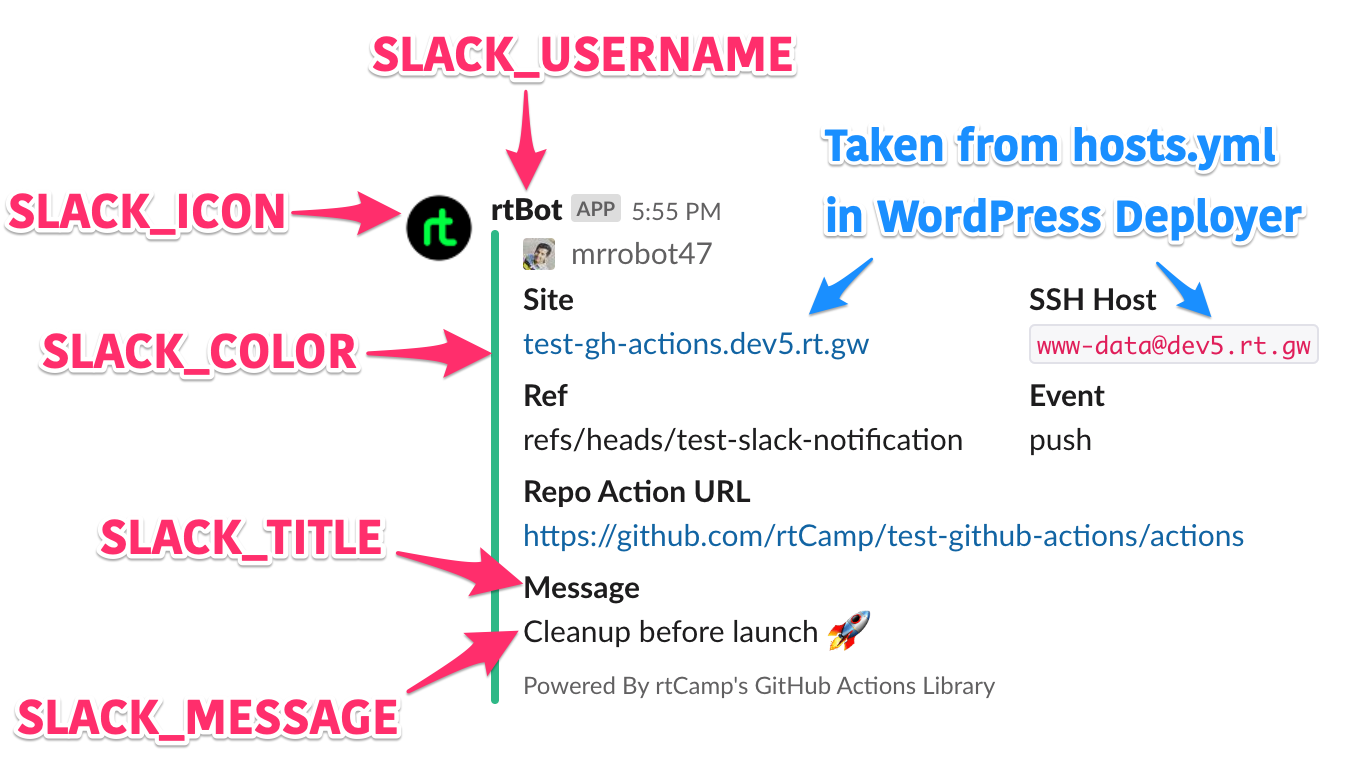
The Site and SSH Host details are only available if this action is run after Deploy WordPress GitHub action.
Hashicorp Vault (Optional)
This GitHub action supports Hashicorp Vault.
To enable Hashicorp Vault support, please define following GitHub secrets:
| Variable | Purpose | Example Vaule |
|---|---|---|
VAULT_ADDR | Vault server address | https://example.com:8200 |
VAULT_TOKEN | Vault token | s.gIX5MKov9TUp7iiIqhrP1HgN |
You will need to change secrets line in slack-notify.yml file to look like below.
on: push
name: Slack Notification Demo
jobs:
  slackNotification:
    name: Slack Notification
    runs-on: ubuntu-latest
    steps:
    - uses: actions/checkout@v2
    - name: Slack Notification
      uses: rtCamp/action-slack-notify@v2
      env:
        VAULT_ADDR: ${{ secrets.VAULT_ADDR }}
        VAULT_TOKEN: ${{ secrets.VAULT_TOKEN }}
GitHub action uses VAULT_TOKEN to connect to VAULT_ADDR to retrieve slack webhook from Vault.
In the Vault, the Slack webhook should be setup as field webhook on path secret/slack.
License
MIT © 2019 rtCamp
Does this interest you?

Tag summary
Content type
Image
Digest
Size
59.2 MB
Last updated
over 5 years ago
docker pull rtcamp/action-slack-notify:master