sandobserver/stackyard
A self-hosted homelab dashboard you actually want to look at.
4.0K
sandobserver/stackyard repository overview
Stackyard
A self-hosted homelab dashboard you actually want to look at.



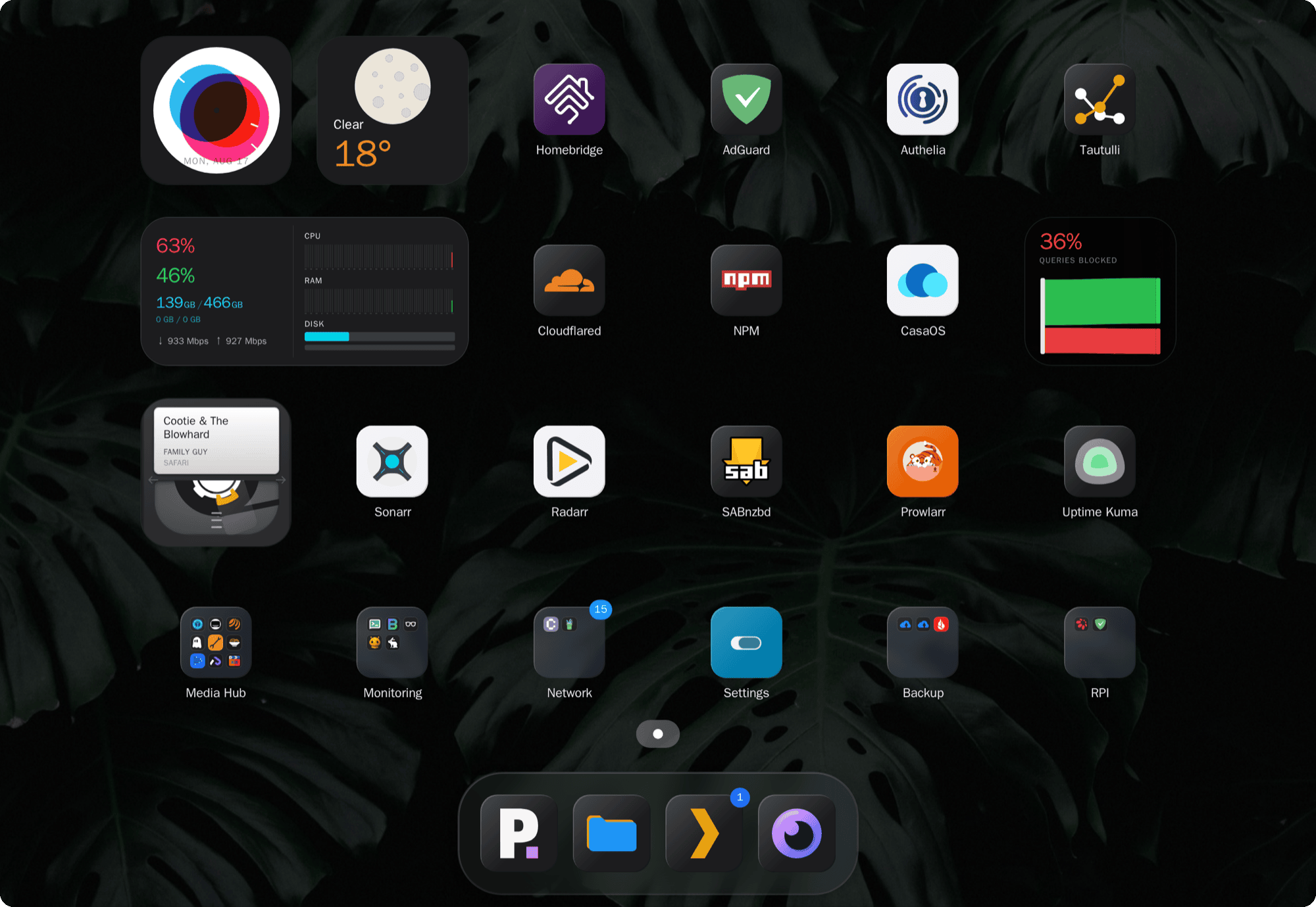
Try it: demo.sandobserver.com The first demo visit may take up to a minute due to Render's free-tier cold start.
Documentation: stackyard.sandobserver.com/docs
Source and issues: github.com/SandObserver/stackyard
Why Stackyard
- Attention goes where it's needed, not everywhere at once. A calm grid, no charts or counters. Health badges only appear when something's wrong.
- A glance should tell you more than a number would. Widgets are small visuals, not readouts.
- Anything can be a badge. Point Stackyard at any API and show what it reports as a live activity badge. One poll can carry several labelled values, each with its own colour and threshold. No custom widget, no code.
- Configured by clicking, not by editing files. Everything is set up in the web UI, with config import and export.
- No dependencies. Review it once and stop worrying about the supply chain.
- Six languages, right-to-left included. Contrast and screen-reader labels are covered by tests.
- Installs like an app. A mobile layout that opens in its own window from a home screen. No offline mode: every tile is live.
Widgets
Widgets and the services they read:
- Clock
- Now Playing: Plex, Jellyfin, Emby, Navidrome
- Weather: Open-Meteo (no API key required) or OpenWeather (free API key)
- DNS: AdGuard, Pi-hole, Technitium, NextDNS
- GitHub: contribution graph and pull requests
- Books: Audiobookshelf, Komga, Kavita
- System summary: CPU, memory, disk, throughput, uptime, and network speed from SpeedTest Tracker or MySpeed. Reports on this machine, or on a host running Glances, Beszel or the Unraid API
- Disk health: TrueNAS, Scrutiny
- Backup: Duplicati, Kopia
- Connections: Gluetun, Psiphon Conduit, Netbird, Plausible, Umami
- Dashboard switch: links to your other Stackyard dashboards
Each widget is documented at Widgets. Adding one is a folder, with no changes to the rest of the app; see Build your first widget.
Getting started
You need Docker.
services:
  stackyard:
    image: sandobserver/stackyard:latest
    container_name: stackyard
    restart: unless-stopped
    ports:
      - "8700:80"
    volumes:
      - ./data:/data
      - ./icons:/icons
docker compose up -d
Then open http://localhost:8700 and set everything up at /admin. Config and uploaded icons persist in ./data and ./icons.
On Unraid, install it from Community Apps.
The same image is on Docker Hub as sandobserver/stackyard. Prefer ghcr.io: it is the registry the release signature covers.
The repo's docker-compose.yml is the recommended version: it adds resource limits, dropped capabilities, and commented options for a reverse proxy, host access, and Docker health checks.
Full instructions, including building from source, are at Installation.
Documentation
- First setup
- Settings reference
- Badges
- Wallpaper and themes
- Widgets
- Build a widget
- Contributing
- Troubleshooting and Support
Security
Stackyard never returns stored secrets to the browser, guards the URLs you test in the admin UI against SSRF and pins the resolved IP, and bounds every upstream call so one slow service cannot hang the dashboard. Some features trade safety for convenience and are opt-in with warnings. Read Security before exposing Stackyard beyond your LAN.
Accessibility
Stackyard targets WCAG 2.2 level AA and is partially conformant. What is supported, the known limitations, and how this was assessed are in ACCESSIBILITY.md.
Contributing
Contributions are welcome, within the constraints that keep Stackyard small and auditable (one container, no backend dependencies, vanilla frontend). See Contributing. Participation is covered by the Code of Conduct. Who maintains Stackyard and how decisions are made is in GOVERNANCE.md.
Changelog
Notable changes are listed in CHANGELOG.md; per-release notes are on the GitHub Releases page.
License
Licensed under the Apache License 2.0. You are free to use, modify, fork, and build on Stackyard, including commercially. In return you must keep the existing copyright and attribution notices, and the license does not grant rights to the Stackyard name or logo: forks are welcome but must use their own name and not present themselves as the original project. See NOTICE.
Tag summary
Content type
Image
Digest
sha256:90e48c576…
Size
78.9 MB
Last updated
3 days ago
docker pull sandobserver/stackyard