satmaramani/code-review-agent
Quick Offline code review agent with local rules & optional Ollama + Phi4 LLM AI using Docker Image
718
satmaramani/code-review-agent repository overview
code-review-agent
Offline code review CLI with deterministic local rules and optional Ollama AI.
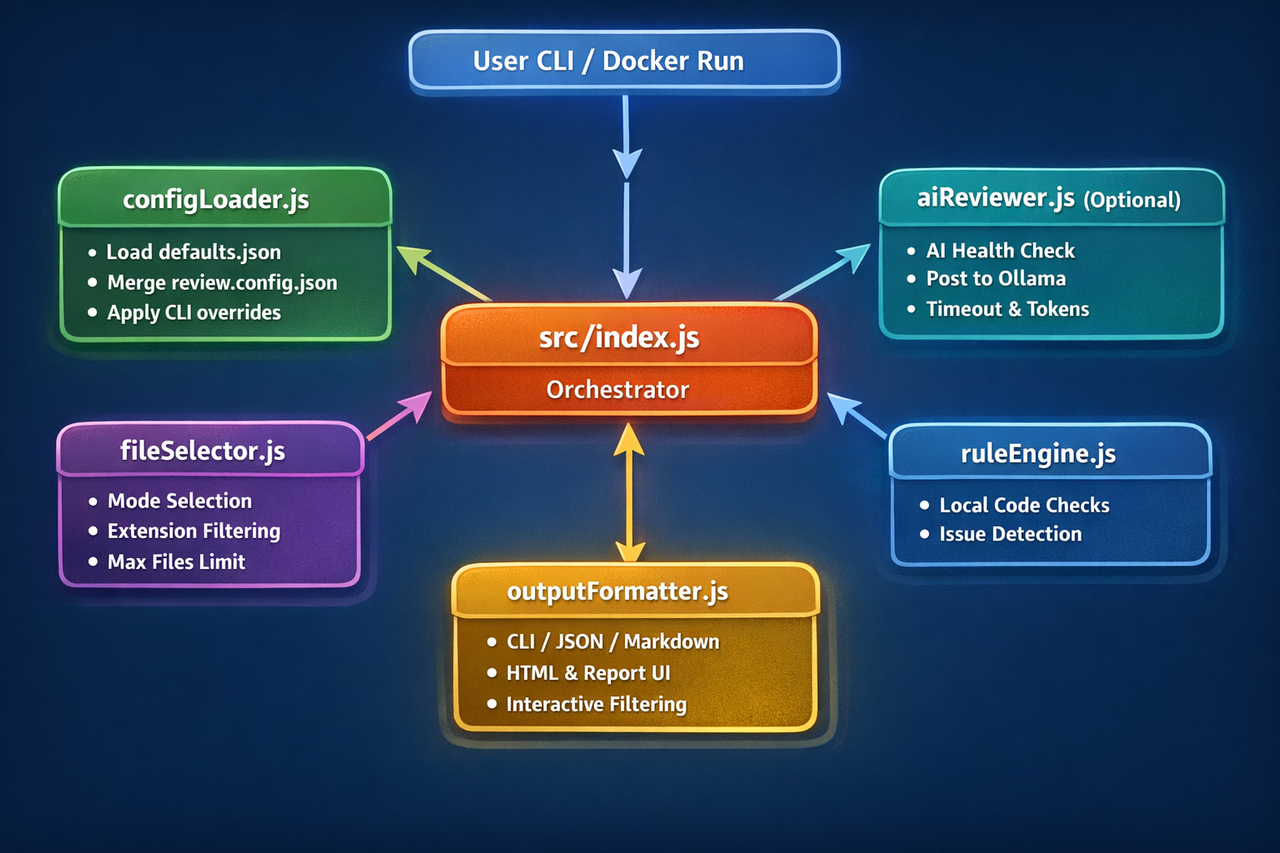
Architecture Diagram
What This Tool Does
- Reviews code using built-in local static rules (fast, offline).
- Optionally adds AI review via local Ollama.
- Generates
code-review-report.htmlandcommand-creator.html. - Runs with Docker.
Can It Review Any Tech Stack?
Yes. You can review any stack by selecting file extensions and folders.
- Default extensions: .js, .jsx, .ts, .tsx, .mjs, .cjs, .php, .py, .java, .cs, .go, .rs, .c, .h, .cpp, .cc, .cxx, .hpp, .hh, .kt, .kts, .swift, .dart, .rb, .scala, .groovy, .sh, .bash, .ps1, .r, .m, .mm
- Add your own extensions with repeatable
--ext - Example stacks you can target with
--ext: Java, C#, Python, PHP, Go, Rust, SQL, CSS, HTML, YAML, Terraform, and more
Note: built-in rules are generic/text and JavaScript-oriented naming/style checks in some cases, but scanning and report generation work for any text-based source files.
Quick Start (Most Important)
1) Pull image
docker pull satmaramani/code-review-agent:latest
2) Run from project folder (simplest)
PowerShell:
docker run --rm --name code-review-agent -v "${PWD}:/workspace" -w /workspace satmaramani/code-review-agent:latest
Windows CMD:
docker run --rm --name code-review-agent -v "%cd%:/workspace" -w /workspace satmaramani/code-review-agent:latest
After run, open:
./code-review-report.html./command-creator.html
Windows PowerShell path style:
.\code-review-report.html.\command-creator.html
Command Syntax (Template First)
Use this base in all examples:
docker run --rm --name code-review-agent -v "${PWD}:/workspace" -w /workspace satmaramani/code-review-agent:latest [OPTIONS]
Windows CMD base:
docker run --rm --name code-review-agent -v "%cd%:/workspace" -w /workspace satmaramani/code-review-agent:latest [OPTIONS]
Common placeholders:
<mode>:git-diff | staged | full-project<format>:cli | json | markdown | html<file-list>:file1,file2,file3<dir-list>:dir1,dir2,dir3<ext-list>:js ts py java cs ...- Path variable: use
${PWD}in PowerShell and%cd%in CMD
Basic to Advanced (Syntax Then Real Command)
1) Full project, no AI (fast)
Syntax:
... --mode full-project --no-ai --format html --out <report-file>
Example:
PowerShell
docker run --rm --name code-review-agent -v "${PWD}:/workspace" -w /workspace satmaramani/code-review-agent:latest --mode full-project --no-ai --format html --out code-review-report.html
Windows CMD
docker run --rm --name code-review-agent -v "%cd%:/workspace" -w /workspace satmaramani/code-review-agent:latest --mode full-project --no-ai --format html --out code-review-report.html
2) Default mode (git-diff)
Syntax:
... --format <format> --out <report-file>
Example:
PowerShell
docker run --rm --name code-review-agent -v "${PWD}:/workspace" -w /workspace satmaramani/code-review-agent:latest --format html --out code-review-report.html
Windows CMD
docker run --rm --name code-review-agent -v "%cd%:/workspace" -w /workspace satmaramani/code-review-agent:latest --format html --out code-review-report.html
3) Review only staged files
Syntax:
... --mode staged --format <format>
Example:
PowerShell
docker run --rm --name code-review-agent -v "${PWD}:/workspace" -w /workspace satmaramani/code-review-agent:latest --mode staged --format markdown
Windows CMD
docker run --rm --name code-review-agent -v "%cd%:/workspace" -w /workspace satmaramani/code-review-agent:latest --mode staged --format markdown
4) Single file
Syntax:
... --file <file-path> --format <format> [--no-ai]
Example:
PowerShell
docker run --rm --name code-review-agent -v "${PWD}:/workspace" -w /workspace satmaramani/code-review-agent:latest --file src/badAuth.js --no-ai --format markdown
Windows CMD
docker run --rm --name code-review-agent -v "%cd%:/workspace" -w /workspace satmaramani/code-review-agent:latest --file src/badAuth.js --no-ai --format markdown
5) Multiple files
Syntax:
... --file <file1,file2,file3> --format <format>
Example:
PowerShell
docker run --rm --name code-review-agent -v "${PWD}:/workspace" -w /workspace satmaramani/code-review-agent:latest --file src/a.js,src/b.ts,src/c.py --no-ai --format markdown
Windows CMD
docker run --rm --name code-review-agent -v "%cd%:/workspace" -w /workspace satmaramani/code-review-agent:latest --file src/a.js,src/b.ts,src/c.py --no-ai --format markdown
6) Single folder scope
Syntax:
... --dir <folder> --format <format> [--no-ai]
Example:
PowerShell
docker run --rm --name code-review-agent -v "${PWD}:/workspace" -w /workspace satmaramani/code-review-agent:latest --dir app/src/abcd --no-ai --format html --out code-review-report.html
Windows CMD
docker run --rm --name code-review-agent -v "%cd%:/workspace" -w /workspace satmaramani/code-review-agent:latest --dir app/src/abcd --no-ai --format html --out code-review-report.html
7) Multiple folders
Syntax:
... --dir <dir1,dir2,dir3> --format <format>
Example:
PowerShell
docker run --rm --name code-review-agent -v "${PWD}:/workspace" -w /workspace satmaramani/code-review-agent:latest --dir app/src,packages/core/src,services/api --no-ai --format html --out code-review-report.html
Windows CMD
docker run --rm --name code-review-agent -v "%cd%:/workspace" -w /workspace satmaramani/code-review-agent:latest --dir app/src,packages/core/src,services/api --no-ai --format html --out code-review-report.html
8) Include and exclude patterns
Syntax:
... --include <glob1,glob2> --exclude <glob1,glob2> --format <format>
Example:
PowerShell
docker run --rm --name code-review-agent -v "${PWD}:/workspace" -w /workspace satmaramani/code-review-agent:latest --include "src/**/*.ts,services/**/*.js" --exclude "**/*.test.ts,**/dist/**" --no-ai --format markdown
Windows CMD
docker run --rm --name code-review-agent -v "%cd%:/workspace" -w /workspace satmaramani/code-review-agent:latest --include "src/**/*.ts,services/**/*.js" --exclude "**/*.test.ts,**/dist/**" --no-ai --format markdown
9) Any stack with multiple extensions
Syntax:
... --mode full-project --ext <ext> --ext <ext> --ext <ext> ...
Example:
PowerShell
docker run --rm --name code-review-agent -v "${PWD}:/workspace" -w /workspace satmaramani/code-review-agent:latest --mode full-project --ext js --ext ts --ext php --ext css --ext java --ext cs --ext py --ext go --ext rs --no-ai --format html --out code-review-report.html
Windows CMD
docker run --rm --name code-review-agent -v "%cd%:/workspace" -w /workspace satmaramani/code-review-agent:latest --mode full-project --ext js --ext ts --ext php --ext css --ext java --ext cs --ext py --ext go --ext rs --no-ai --format html --out code-review-report.html
10) JSON output for CI/automation
Syntax:
... --mode <mode> --format json
Example:
PowerShell
docker run --rm --name code-review-agent -v "${PWD}:/workspace" -w /workspace satmaramani/code-review-agent:latest --mode git-diff --format json
Windows CMD
docker run --rm --name code-review-agent -v "%cd%:/workspace" -w /workspace satmaramani/code-review-agent:latest --mode git-diff --format json
11) CLI output for terminal-only usage
Syntax:
... --mode <mode> --format cli
Example:
PowerShell
docker run --rm --name code-review-agent -v "${PWD}:/workspace" -w /workspace satmaramani/code-review-agent:latest --mode full-project --no-ai --format cli
Windows CMD
docker run --rm --name code-review-agent -v "%cd%:/workspace" -w /workspace satmaramani/code-review-agent:latest --mode full-project --no-ai --format cli
12) AI-enabled full project
Syntax:
docker run --rm -e OLLAMA_BASE_URL=<ollama-url> -v "${PWD}:/workspace" -w /workspace satmaramani/code-review-agent:latest --mode full-project --format html --out <report-file>
Example:
PowerShell
docker run --rm --name code-review-agent -e OLLAMA_BASE_URL=http://host.docker.internal:11434 -v "${PWD}:/workspace" -w /workspace satmaramani/code-review-agent:latest --mode full-project --format html --out code-review-report.html
Windows CMD
docker run --rm --name code-review-agent -e OLLAMA_BASE_URL=http://host.docker.internal:11434 -v "%cd%:/workspace" -w /workspace satmaramani/code-review-agent:latest --mode full-project --format html --out code-review-report.html
13) AI-enabled single file + tuning
Syntax:
... --file <file> --format <format> --maxTokens <n> --timeoutMs <ms>
Example:
PowerShell
docker run --rm --name code-review-agent -e OLLAMA_BASE_URL=http://host.docker.internal:11434 -v "${PWD}:/workspace" -w /workspace satmaramani/code-review-agent:latest --file src/badAuth.js --format markdown --maxTokens 128 --timeoutMs 60000
Windows CMD
docker run --rm --name code-review-agent -e OLLAMA_BASE_URL=http://host.docker.internal:11434 -v "%cd%:/workspace" -w /workspace satmaramani/code-review-agent:latest --file src/badAuth.js --format markdown --maxTokens 128 --timeoutMs 60000
14) Performance smoke run
Syntax:
... --mode full-project --maxFiles <n> --no-ai --format <format>
Example:
PowerShell
docker run --rm --name code-review-agent -v "${PWD}:/workspace" -w /workspace satmaramani/code-review-agent:latest --mode full-project --maxFiles 10 --no-ai --format markdown
Windows CMD
docker run --rm --name code-review-agent -v "%cd%:/workspace" -w /workspace satmaramani/code-review-agent:latest --mode full-project --maxFiles 10 --no-ai --format markdown
15) Verbose troubleshooting
Syntax:
... --mode <mode> --format <format> --verbose
Example:
PowerShell
docker run --rm --name code-review-agent -v "${PWD}:/workspace" -w /workspace satmaramani/code-review-agent:latest --mode full-project --format markdown --verbose
Windows CMD
docker run --rm --name code-review-agent -v "%cd%:/workspace" -w /workspace satmaramani/code-review-agent:latest --mode full-project --format markdown --verbose
Optional Server Mode (Only if You Want Browser URLs)
Default mode generates files and exits. Use server mode only when you specifically want localhost links.
Server mode standard
Syntax:
docker run --rm --name code-review-agent -e SERVE=1 -p <host-port>:8787 -v "${PWD}:/workspace" -w /workspace satmaramani/code-review-agent:latest
Example:
PowerShell
docker run --rm --name code-review-agent -e SERVE=1 -p 8787:8787 -v "${PWD}:/workspace" -w /workspace satmaramani/code-review-agent:latest
Windows CMD
docker run --rm --name code-review-agent -e SERVE=1 -p 8787:8787 -v "%cd%:/workspace" -w /workspace satmaramani/code-review-agent:latest
Open:
http://localhost:8787/code-review-report.htmlhttp://localhost:8787/command-creator.html
If 8787 port is busy
Use any free host port (container port stays 8787).
Syntax:
... -e SERVE=1 -p <another-port>:8787 ...
Example:
PowerShell
docker run --rm --name code-review-agent -e SERVE=1 -p 8791:8787 -v "${PWD}:/workspace" -w /workspace satmaramani/code-review-agent:latest
Windows CMD
docker run --rm --name code-review-agent -e SERVE=1 -p 8791:8787 -v "%cd%:/workspace" -w /workspace satmaramani/code-review-agent:latest
Then open:
http://localhost:8791/code-review-report.htmlhttp://localhost:8791/command-creator.html
Ollama Setup (for AI mode)
ollama pull phi3:mini
ollama run phi3:mini
- Default URL:
http://localhost:11434 - Docker-to-host URL:
http://host.docker.internal:11434
Output Files
code-review-report.htmlcommand-creator.htmlreview.config.last-run.json
Location: your current project folder (same folder where you run the command).
Configuration Files
review.config.jsonreview.config.last-run.json
Core CLI Options
--mode git-diff|staged|full-project--format cli|json|markdown|html--out <file>--file <path[,path2]>--dir <folder[,folder2]>or--folder <folder[,folder2]>--include <glob[,glob2]>--exclude <glob[,glob2]>--ext <extension>(repeatable)--ext-js --ext-ts(shorthand)--maxFiles <n>--no-ai--maxTokens <n>--timeoutMs <n>--verbose--help--examples
Troubleshooting
- Container name conflict:
docker rm -f code-review-agent 2>$null
spawn git ENOENT:docker pull satmaramani/code-review-agent:latest- or use
--mode full-project
- Ollama not reachable in Docker:
- set
-e OLLAMA_BASE_URL=http://host.docker.internal:11434
- set
Visit My Portfolio
About the Author
- Online Portfolio / Resume
https://techysam.vercel.app/ - LinkedIn
https://www.linkedin.com/in/sampurna/ - YouTube Channel
https://www.youtube.com/@techysam-bl9mk/videos - Udemy Courses
https://www.udemy.com/courses/search/?src=ukw&q=sampurna+atmaramani - GitHub Repositories
https://github.com/satmaramani - Hugging Face AI Spaces
https://huggingface.co/techysam - NPM Packages
https://www.npmjs.com/~s.atmaramani - 200+ Medium Tech Blogs
https://medium.com/@s.atmaramani
Tag summary
Content type
Image
Digest
sha256:b6a4c593a…
Size
55.7 MB
Last updated
7 months ago
docker pull satmaramani/code-review-agent