schollz/kiki repository overview



kiki is an experimental social network.
How is kiki different from other social networks? The main difference is that the social network exists on your computer, all the time. This means kiki will work offline, and nobody will ever track you.
In kiki, you are part of the cloud. When you use kiki to post a private message to a friend, everyone in the network will store that message for you. Secure end-to-end encryption ensures that only your friend can read it, even though everyone has the message.
Note: This software is experimental at the moment. It uses end-to-end encryption so it should be secure, but the codebase has not been audited so do not post your bank statement.
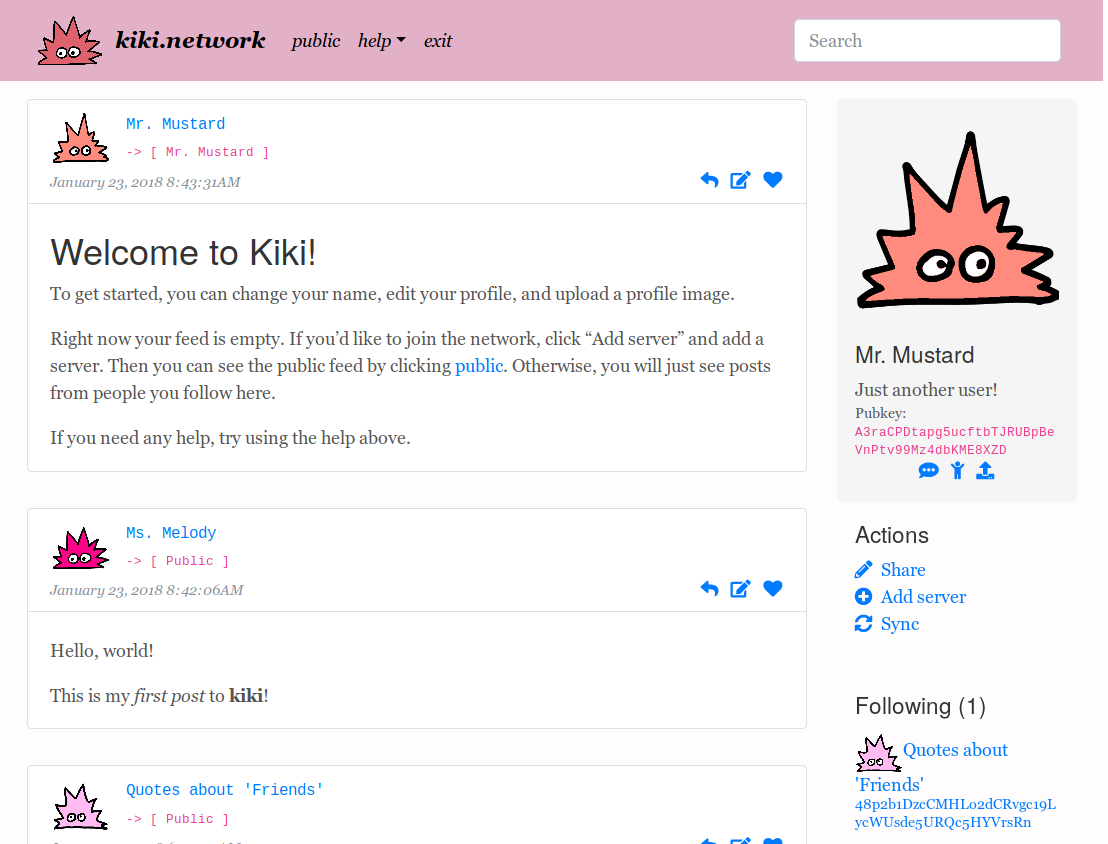
Screenshot
Why?
Widespread centralized social networks are becoming increasingly odious: Twitter abandoned "Do Not Track", LinkedIn ignores user settings and dissallows people accessing public content, while Facebook has become increasingly hostile towards insulating your internet. All these centralized networks use your information and track your activities for their profit. As a remedy, there has been a resurgence of privacy-aware open-source decentralized social networks, like Diaspora, Mastodon, and Patchwork. kiki is heavily inspired by Patchwork, but aims to improve some facets such as: simple federation, multi-computer logins, add in post editing/deletion and even profile deletion.
Features
- You can use kiki offline.
- You have all the data, all the time.
- You have total control of your posts - you can easily edit/delete posts and profiles.
- You can comment on posts so that only friends can see.
- Storage goes towards content rather than styling.
- Single binary (kiki), single settings file (kiki.json), and a setting database (kiki.db, an
sqlite3db). - Cross-platform, with binaries for every OS/architecture.
- Easily federated (just a command line flag to federate).
- Multi-machine use - just transfer your kiki.json settings file to each computer you want to use on.
Quickstart
The easiest way to get started is to download the latest release.
Or, you could use the latest Docker images:
docker pull schollz/kiki
mkdir /tmp/kiki # make a directory to hold data
docker run --user `id -u` --rm -it -p 8003:8003 -v /tmp/kiki:/data -t schollz/kiki
Or, if you have Go installed you can build from the source:
go get -u github.com/jteeuwen/go-bindata/...
go get github.com/schollz/kiki
cd $GOPATH/src/github.com/schollz/kiki
go-bindata static/... templates/...
go install -v
and then run:
kiki
This will start your local server instance and open up a browser to localhost:8003 so that you can interact with the network. Right now, to sync you can add another open server (currently the only available one is https://kiki.network, but you can make your own).
The 35 precepts
You will be able to understand the design and usage of kiki by reading the following 35 precepts.
Fundamentals
- Information in kiki is stored in letters.
- A letter is defined to have to (address of recipients), purpose, and a content, reply_to and first_id:
{
    "to":["recipient1"],
    "purpose":"share-text",
    "content":"<p>hello, world</p>",
    "reply_to":"",
    "first_id":""
}
- The purpose specifies how a letter is processed (e.g. whether the letter is an image to be shared, or the liking of a post, etc.).
- The content is the data, which depends on the purpose (e.g. its base64 data when sharing an image, or the ID of the post if liking, etc.).
- The to is a list of the public keys of the persons.
- A person is just a public-private keypair. Your personal keypair is one of two items not stored as a letter. The second item is the region keypair.
- Every instance of kiki belongs to a region. Everyone that belongs to a region has the region keypair that is used to validate identities.
- A region keypair is a public-private keypair that is shared by everyone.
- The first_id is empty to signal the server to generate a new ID for it as a SHA-256 SUM of purpose, content, recipients, and reply-to. When the first_id is not empty, it used to specify the ID of a letter that this letter is meant to replace. Thus, when two letters with the same first_id are found, the one with the newest timestamp is shown (this allows you to edit/delete).
- The reply_to is the ID of a letter that this leteter is in response to.
- Information is securely transfered in envelopes. An envelope contains a encrypted letter and the meta information about who it is from and where it is going:
 {
    "id": "495Q65YF6MJzPv7HA22hoEwHz1RCmuFTsWMEgccvGS4x",
    "timestamp": "2018-01-27T13:09:24.392807371Z",
    "sender": {
        "public": "6Awitgp9ZwkyeZ5g6fdDkENEm82issg..."
    },
    "signature": "AzB7YZaoqUQ3ZXinea4SbRvBVS...",
    "sealed_letter": "RTJ2Q0smLntqv9DmOMgQIeruNnQ...",
    "sealed_recipients": ["2Lw2JuwedqeYBCRetciKU9r7Ei..."],
 }
- The id of the letter is a SHA-256 sum of the letter contents.
- The timestamp is the current time when submitted to the datbase.
- The sender is the public key of their keychain. The signature is the encrypted public key of the sender that is encrypted by the private key of the region keypair. This verifies the authenticity of the sender.
- The sealed letter is the entire marshalled letter encrypted using the NaCl secret box symmetric cipher with a random passphrase.
- The random passphrase used to seal the letter is then encrypted using the public key of each recipient, in sealed recipients. Thus, only recipients can decipher the passphrase and unseal the envelope and obtain the contents of the letter.
Syncing
- Two instances of kiki are synced by exchanging envelopes that they do not have.
- Only instances in the same region can sync. Different regions are autonomous, federated instances of kiki.
- As kiki network grows, syncing envelopes will obey restrictions on storage - 5MB/person, unless they are a friend (50MB/person) or yourself (no limit). This setting is configurable.
- Letters whose purpose is an action are never privy to storage restrictions.
Purposes
- Currently there are two kinds of purposes - a share and an action.
- A share purpose is to share text/html, images (png/jpg), or keys.
- A action purpose is to create public information for constructing the social network.
- Currently available actions are: following, liking, assigning a profile name, assigning a profile, assigning a profile image, blocking someone, erasing a profile.
- Actions are made public in order to allow quantifying aspects of the social network to have reliable reputation and identity.
Access
- A envelope is sealed using public-private key encryption so that only intended recipients can open it. You are also a recipient of your own letters.
- . A public letter is one which is additionally sealed with the region keypair. Everyone on the network has this keypair and will be able to unseal the envelope.
- A letter for a friend is one that is sealed against the latest personal *friends keypair.
- A friend is someone that you follow, that also follows you.
- The friend keypair from each friend are shared upon making a friend.
- The friends keypair is just a keypair that is generated for each user on initiation, that allows friends to decrypt your messages.
- By unfriending, you generate a new friends keypair which is transmitted to your remaining friends. Your ex-friend will still see your old content, but not the new content.
- You can also send a letter addressed to specific people by specifying their public keys.
- You cannot edit someone elses letter because the sender is always authenticated.
The Feed
- Your feed is a representation of all the envelopes that are accessible to you (i.e. addressed to you, addressed to friends, or addressed to public).
- The representation of letters is most generally a website where shared images/text are aggregated in reverse-chronological order in a displayed feed. (Note: kiki is not a website - it is an infrastructure. Feel free to build your own display).
- You can also hide things from showing up in the feed by editing a post so that its content is empty (effectively deleting it).
- When editing content, only the latest edit is shown in the feed.
- All functions of kiki are accessible from the feed (e.g. sending letters of various purposes).
- Even though you have the majority of the envelopes on the network, you can only open ones you have access to.
Usage
Simple API for posting
The API for posting to kiki is very simple, making it easily extensible to other applications. Submiting a letter is a simple POST to localhost:8003/letter with the following JSON:
{
    "content":"Hello, world",
    "purpose":"share-text",
    "to":["public"]
}
For posting to yourself, just omit to, and for posting to friends you can change "public" to "friends". The server will convert the to to the public keys and add in the first_id.
Make new profiles
Its easy to make a new profile. Each kiki instance is stored in a folder, (default: $HOME/.kiki/default). For a new profile, just add the -alias some-profile flag:
kiki -alias some-profile
which will create a new profile in the $HOME/.kiki/some-profile folder. Just use the same command to reload it when you stop the program.
Make your own sync hub
Currently the only public syncing up is https://kiki.network. To make your own, just start up a new instance of kiki and reverse proxy to the external port (port 8004 by default). Other instances will be able to exchange with this server but will not be able to modify the user data (which is only accessible via the private port, 8003 by default).
Multi-computer user
Since everything on kiki is stored in a cloud, you can use kiki on multiple computers by just transfering your key file - kiki.json to another computer (by default at $HOME/.kiki/default/kiki.json). Once you re-connect to a hub, it will download and parse your entire feed and recapitulate everything you had before!
Since letters are bagged (and not appended to a log) you can have multiple instances out-of-sync without causing any problems.
Federation
By federating, you will have your network of kiki instances which can only communicate among themselves. Only people that have been given the region keys will be able to join this federated system.
To federate your own system simple run:
kiki -generate-region
This will generate a unique public-private keypair for you to use and a way to start kiki to utilize this region instead of the default, e.g.:
kiki -region-public 'X' -region-private 'Y'
Project
Status
kiki is in alpha status. You can use it, but breaking changes might still occur. kiki has rough edges, and is not yet suitable for non-technical users.
Contributing
Please contribute! Try kiki out, ask questions, submit PRs. Anything is welcome.
Reporting issues
Please report issues through our issue tracker.
Community
We use kiki for development and questions. For development, check out #kikidev and for general help checkout #kikihelp.
Code of Conduct
Please note that this project is released with a Contributor Code of Conduct. By participating in this project you agree to abide by its terms.
License
This project is under the MIT license.
The kiki mascot is Copyright 2018 Jessie Doyle and Cloud Supernova. All Rights Reserved.
Tag summary
Content type
Image
Digest
Size
213.2 MB
Last updated
almost 9 years ago
docker pull schollz/kiki