scikitplot/scikit-plots
Official Docker images for the machine learning viz scikit-plots (https://scikit-plots.github.io).
10K+
scikitplot/scikit-plots repository overview
🐳 Scikit-plots Docker Images Guide :
These containers are a quick way to run or try scikit-plots. The source is available on GitHub and this file hub.docker.com.md.
For building scikit-plots or extensions for scikit-plots, please see: the scikit-plots Build Dockerfiles. Check If Needed: CI Build Docker Images
🚦 Docker Images Update Schedule: 1st of month 00:11 UTC — starts 10 min after cleaner routine (00:01 UTC); purge completed last-day 23:00 UTC. 🚨
- scikitplot/scikit-plots:latest (runtime minimal)
- scikitplot/scikit-plots:latest-runtime (alias
latest==latest-runtime) - scikitplot/scikit-plots:latest-devel (runtime pre-installed)
📘 See Also:
the scikit-plots Env Manager.
🐋 Quickstart
🐋 Scikit-plots runtime|devel GitHub Container Registry
:
docker pull ghcr.io/scikit-plots/scikit-plots:latest-devel-python3.11
🐋 Scikit-plots runtime|devel Red Hat Quay Container Registry
:
# podman pull quay.io/scikit-plots/scikit-plots
docker pull quay.io/scikit-plots/scikit-plots:latest-devel-python3.11
🐋 Scikit-plots runtime|devel Docker Container Registry
:
docker pull scikitplot/scikit-plots:latest-devel-python3.11
# docker run -it --rm scikitplot/scikit-plots[:latest|:latest-runtime|:latest-devel] -i -c "scikitplot -V"
# docker run -it --rm -v "$(pwd):/work/notebooks:delegated" -p 8891:8891 scikitplot/scikit-plots:latest-devel
✅ Run with/without pull Onto Vscode or Browser as Jupyter Notebook (*-jupyter):
🛠️ How Docker resolves image names
Full Docker image references follow this structure:
[registry]/[namespace]/[repository]:[tag]
Command: scikitplot/scikit-plots
- Omits the registry, so Docker expands it to
docker.io/scikitplot/scikit-plots:latest.
Command: docker.io/scikitplot/scikit-plots
- Explicitly includes the registry, resolving to
docker.io/scikitplot/scikit-plots:latest.
Custom Registries: Disambiguating Docker Hub (docker.io) from alternative registries like:
🔧 Start a container, using the Python interpreter.
💡 How to Connect Running Container:
- (Recommended) Open Vscode and Attach to Running Container (Dev Containers)
- (Optionally) Open jupter notebook in browser, If configured
ip:host
Onto VS Code's Extension:
Run a Container with a Mounted Volume (Permanent External Folder Link)
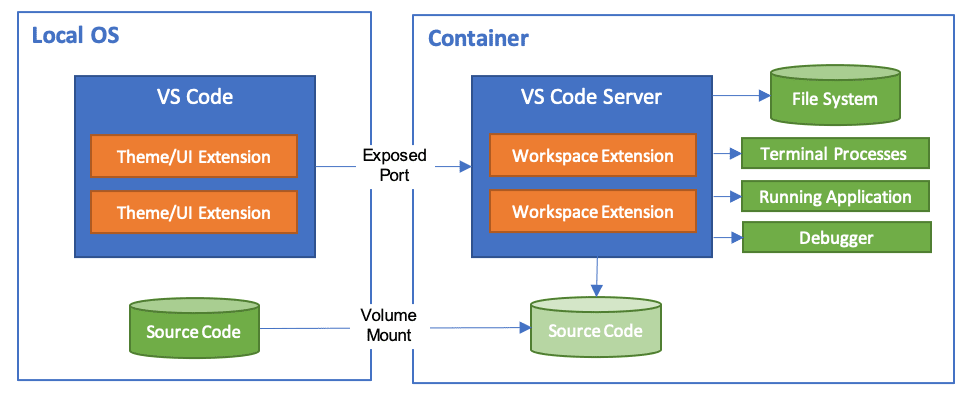
Other Examples
docker run -it -v "$(pwd):/work" python:3.11-slim -c bash
docker run -it -v "$(pwd):/work" mambaorg/micromamba:2.4.0 -c bash
docker run -it -v "$(pwd):/work" -p 8888:8888 jupyter/scipy-notebook:latest
🐳 Getting Started
🏷️ Base Image Tags
Images built are based on python:latest, jupyter/tensorflow-notebook:latest, etc.
1.xx-,latest-, andnightly-tags come with scikit-plots pre-installed. Versioned tags contain their version, thelatest-tags contain the latest release (excluding pre-releases like release candidates, alphas, and betas), and the nightly images come with the latest scikit-plots nightly Python package.
🏷️ Optional Features
-jupytertags include Jupyter and some scikit-plots tutorial notebooks.. They start a Jupyter notebook server on boot. Mount a volume to/work/notebooksto work on your own notebooks.
🐳 Running Containers
👉 latest (partial pre-installed (e.g., gcc, g++, micromamba))
run interactive shell (default entrypoint bash)
🚨 By using [bash] -ic "bash -i", you are explicitly forcing Bash's hand. The -i flag tells Bash: "I don't care how you were started, force yourself into interactive mode."
# docker run -it --rm scikitplot/scikit-plots:latest
docker run -it --rm scikitplot/scikit-plots:latest -ic "bash -i"
🛠️ (with/without interactive shell) See default os python env package list
docker run -it --rm scikitplot/scikit-plots:latest -ic "bash -ic 'which python && pip list'"
🛠️ (with/without interactive shell) See also pre-installed micromamba python env package list
docker run -it --rm scikitplot/scikit-plots:latest -ic "bash -ic 'micromamba info -e'"
docker run -it --rm scikitplot/scikit-plots:latest -ic "bash -ic 'which python && pip list'"
docker run -it --rm scikitplot/scikit-plots:latest -ic "bash -ic 'scikitplot -V'"
👉 latest-python3.11 alias (latest-runtime-python3.11) (partial pre-installed (e.g., gcc, g++, micromamba))
🏷️ fast-minimal (default entrypoint bash)
# docker run -it --rm scikitplot/scikit-plots:latest -ic "bash -c scikitplot -V"
docker run -it --rm scikitplot/scikit-plots:latest-python3.11 -ic "bash -i"
👉 latest-jupyter (full pre-installed (e.g., conda, mamba))
🏷️ pre-installed os/python packages (default entrypoint tini)
docker run -it --rm scikitplot/scikit-plots:latest-jupyter bash -ic "bash -i"
🛠️ See also pre-installed conda/mamba env:
docker run -it --rm scikitplot/scikit-plots:latest-jupyter bash -ic "bash -ic 'conda info -e'"
docker run -it --rm scikitplot/scikit-plots:latest-jupyter bash -ic "bash -ic 'which python && pip list'"
docker run -it --rm scikitplot/scikit-plots:latest-jupyter bash -ic "bash -ic 'scikitplot -V'"
🛠️ Update system packages (without interactive shell)
docker run -it --rm --user root scikitplot/scikit-plots:latest-jupyter bash -c "apt update"
Scikit-plots Drop-in volume-mount
| Shell | Path Handling Tips | CWD Syntax | Escape \$(), \ | Escape Newline (\n) |
|---|---|---|---|---|
| Linux/macOS | Native POSIX paths work as-is | ./, "$(pwd)", "$PWD", $(realpath ./), $(realpath ~/notebooks) | Standard POSIX | Use \ at end of line |
| WSL | Use Linux-style paths like /mnt/c/Users/... | ./, "$(pwd)", "$PWD", $(realpath ./), $(realpath ~/notebooks) | Standard POSIX | Use \ at end of line |
| PowerShell | Wrap paths in ", use env vars like $Env:VAR | ./, "$(pwd)", "${PWD}", "$PWD", "$PWD.Path" | Use backtick ` | Use backtick ` at end |
| CMD | Use full Windows paths like C:\Users\Me\... and quote them | ./, %cd% | Use ^ to escape special chars | Use ^ at end of line |
# PowerShell (man Resolve-Path `-v "$((Resolve-Path .).Path -replace '\\','/'):/work"`)
docker run -it -v "$(pwd):/work" scikitplot/scikit-plots:latest
# CMD (help cd)
docker run -it -v "%cd%:/work" scikitplot/scikit-plots:latest
✅ Cross-Compatible Docker Command path $(pwd)
- Git Bash: pwd -W returns C:/path
- WSL/POSIX: pwd -W fails, then pwd -P is used
⚠️ One-Line Command path for POSIX shells (Git Bash $(pwd -W), WSL/Linux/macOS $(pwd)) and PowerShell $(pwd):
# PowerShell `$(pwd)`
docker run -it --rm -v "$(pwd):/work/notebooks" -p 8891:8891 scikitplot/scikit-plots:latest
Mount the volume with :cached or :delegated (sometimes helps with sync lag)
- :cached Prioritizes container view of files, :delegated Prioritizes host view of files.
- Try :cached first if your container mostly reads code and rarely writes.
- If you actively build and write files inside container and want host to see changes fast, try :delegated.
# PowerShell `$(pwd)`
docker run -it -v "$(pwd):/work/notebooks:delegated" -p 8891:8891 scikitplot/scikit-plots:latest
# Optionally start jupyter notebook
docker run -it --rm -v "$(pwd):/work/notebooks" -p 8891:8891 scikitplot/scikit-plots:latest -ic "bash -ic 'jupyter notebook --notebook-dir=/work --ip=0.0.0.0 --no-browser --allow-root --port=8891'"
⚠️ ("\") Multi-Line Command path for POSIX shells (Git Bash $(pwd -W), WSL/Linux/macOS $(pwd)):
# Detect if using Git Bash (check if pwd -W works) - "$( (...) || ... )"
# Uses $(...) for command substitution, not $(()) which is arithmetic.
# Inner parentheses (...) group the logic in a subshell (a separate environment) run and capture output.
docker run -it --rm \
  -p 8888:8888 \
  scikitplot/scikit-plots:latest-jupyter
Run a Jupyter notebook server with your own notebook directory (assumed here to be ~/notebooks). To use it, navigate to localhost:8888 in your browser.
⚠️ For Development scikit-plots (Cloned and Mounted project folder)
See: Contributing Guidelines to scikit-plots
# bash docker/scripts/git_add_safe_dirs.sh  # add safe directories for git
git config --global --add safe.directory '*'
## Git hooks manager Initialize, Ensures code meets quality standards before it
## Triggered when running `git commit ...;` if all checks pass, the commit proceeds, allowing you to push the changes.
pre-commit install
✍️ Ready for Development...
install-the-development-version-of-scikit-plots
See Also:
Tag summary
Content type
Image
Digest
sha256:011cf18d1…
Size
1.2 GB
Last updated
11 days ago
docker pull scikitplot/scikit-plots:latest-runtime-python3.10