scisoftware/openldap-proxy
The OpenLDAP proxy server design aims to unify access to various LDAP data sources.
617
scisoftware/openldap-proxy repository overview
OpenLDAP Proxy
This document provides a comprehensive guide to configuring and maintaining an OpenLDAP server running in proxy (back-meta) mode, integrating with Active Directory, the local mdb database, and other LDAP sources. The idea is not new; it's described, among others, in the article Use LDAP Proxy to integrate multiple LDAP servers. This article and other sources served as the basis for implementing the basic functionality of the image.
About OpenLDAP
OpenLDAP is an open-source, community-developed directory software package that implements the Lightweight Directory Access Protocol (LDAP). More information about this product can be found at https://www.openldap.org/.
1. Solution Overview and Architecture
1.1. Project goal
The OpenLDAP proxy server design aims to unify access to various LDAP data sources (such as Active Directory, a local MDB, or other LDAP-S servers) for client applications. This allows for centralized authentication and authorization and presents a consistent view of the directory, regardless of its internal structure.
1.2. Architecture diagram
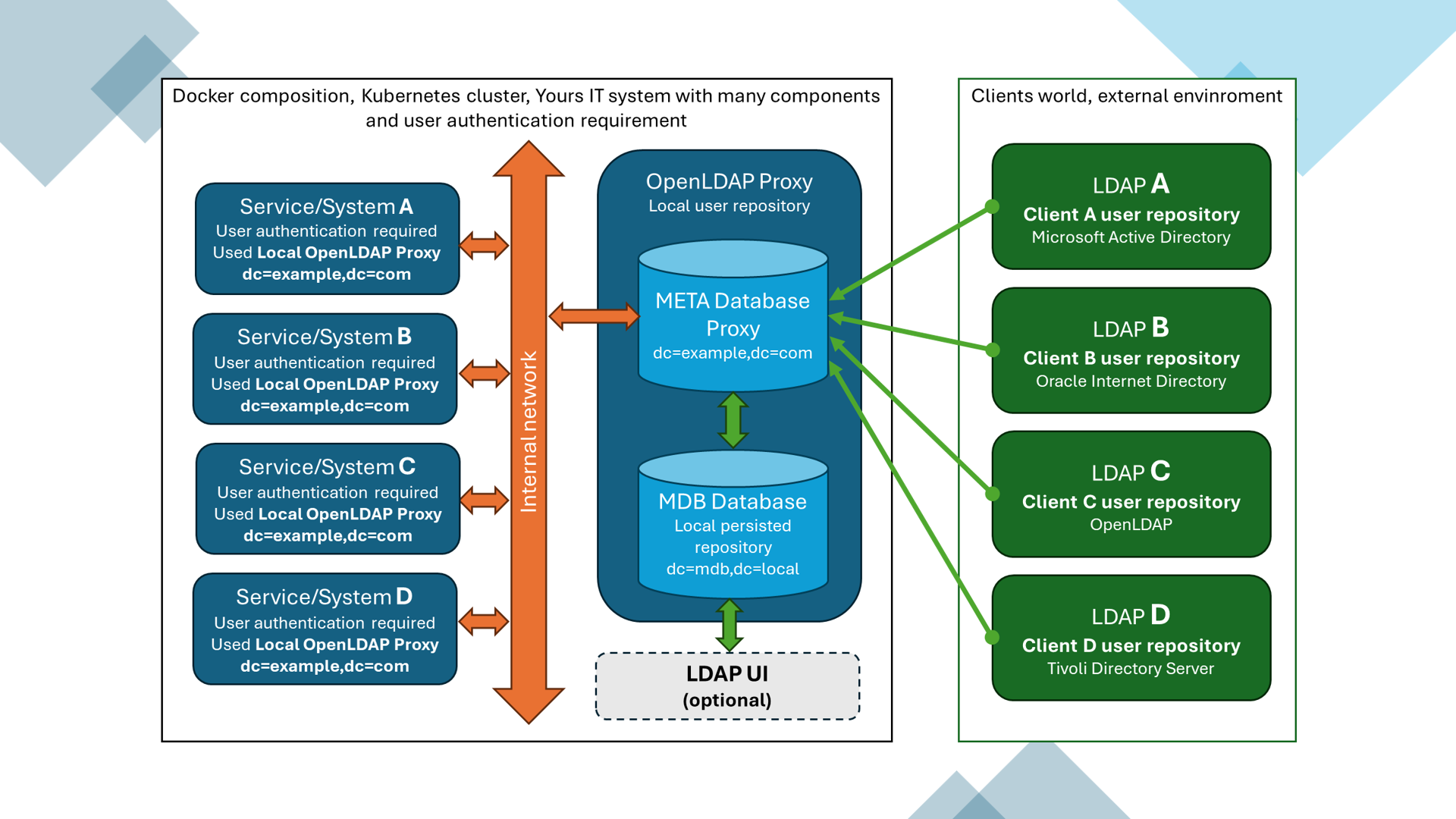
1.3. Software versions
- OpenLDAP: OpenLDAP: slapd 2.6.7+dfsg-1~exp1ubuntu8.2 (Dec 9 2024 02:50:18) Ubuntu Developers
- Container operating system: ubuntu:latest
org.opencontainers.image.version=24.04 - AD Domain Controllers: Windows Server 2016
- Tools: Apache Directory Studio,
ldapsearch,ldapadd,ldapmodify,ping,telnet
2. Starting the OpenLDAP Proxy Server
GitHub project is available.
We run the openldap-proxy container with the OpenLDAP server as a Docker compose, defined in the docker-compose.yml file, or directly from the command line. Below are some example commands:
- Example container launch as a compose:
docker compose -f docker-compose.yml --env-file ldap-conf.env up -d
- Example container launch without compositing (Linux):
docker run --name openldap-proxy -p 389:389 -p 636:636 \
 --env LDAP_ORG_DC="docker" \
 --env LDAP_LOCAL_OLC_SUFFIX=dc=docker,dc=openldap \
 --env LDAP_BASED_OLC_SUFFIX=dc=scisoftware,dc=pl \
 --env LDAP_ROOT_CN=manager \
 --env LDAP_LOCAL_ROOT_DN=cn=manager,dc=docker,dc=openldap \
 --env LDAP_BASED_ROOT_DN=cn=manager,dc=scisoftware,dc=pl \
 --env LDAP_ROOT_PASSWD_PLAINTEXT=secret \
 --env SERVER_DEBUG=-1 \
 --env LDAP_OLC_ACCESS="by anonymous auth by * none" \
 --volume slapd_proxy_database:/var/lib/openldap \
 --volume slapd_proxy_config:/etc/openldap/slapd.d \
 --detach scisoftware/openldap-proxy:latest
- Example of running a container without composition (Windows Cmd):
docker run --name openldap-proxy -p 389:389 -p 636:636 ^
 --env LDAP_ORG_DC="docker" ^
 --env LDAP_LOCAL_OLC_SUFFIX=dc=docker,dc=openldap ^
 --env LDAP_BASED_OLC_SUFFIX=dc=scisoftware,dc=pl ^
 --env LDAP_ROOT_CN=manager ^
 --env LDAP_LOCAL_ROOT_DN=cn=manager,dc=docker,dc=openldap ^
 --env LDAP_BASED_ROOT_DN=cn=manager,dc=scisoftware,dc=pl ^
 --env LDAP_ROOT_PASSWD_PLAINTEXT=secret ^
 --env SERVER_DEBUG=-1 ^
 --env LDAP_OLC_ACCESS="by anonymous auth by * none" ^
 --volume slapd_proxy_database:/var/lib/openldap ^
 --volume slapd_proxy_config:/etc/openldap/slapd.d ^
 --detach scisoftware/openldap-proxy:latest
Tag summary
Content type
Image
Digest
sha256:c743e71b7…
Size
144.5 MB
Last updated
about 1 year ago
docker pull scisoftware/openldap-proxy