scottibyte/incus-mobile-server
Incus mobile admin gateway with secure dashboard, Android client, role-based controls, audit logging
701
scottibyte/incus-mobile-server repository overview
ScottiBYTE Incus Mobile Server
ScottiBYTE Incus Mobile Server is a self-hosted mobile administration gateway for Incus. It provides a secure web administration console and an Android client for monitoring and managing multiple Incus servers.
Android clients communicate with this server rather than connecting directly to Incus. Incus trust, credentials, authorization policy, and audit history remain centralized on the server.
Current Release
- Server: v1.7.0
- Android client: v0.8.0
- Mobile API compatibility: v1
- Container platform: Linux/AMD64
View the v1.7.0 release on GitHub
Server Administration Console
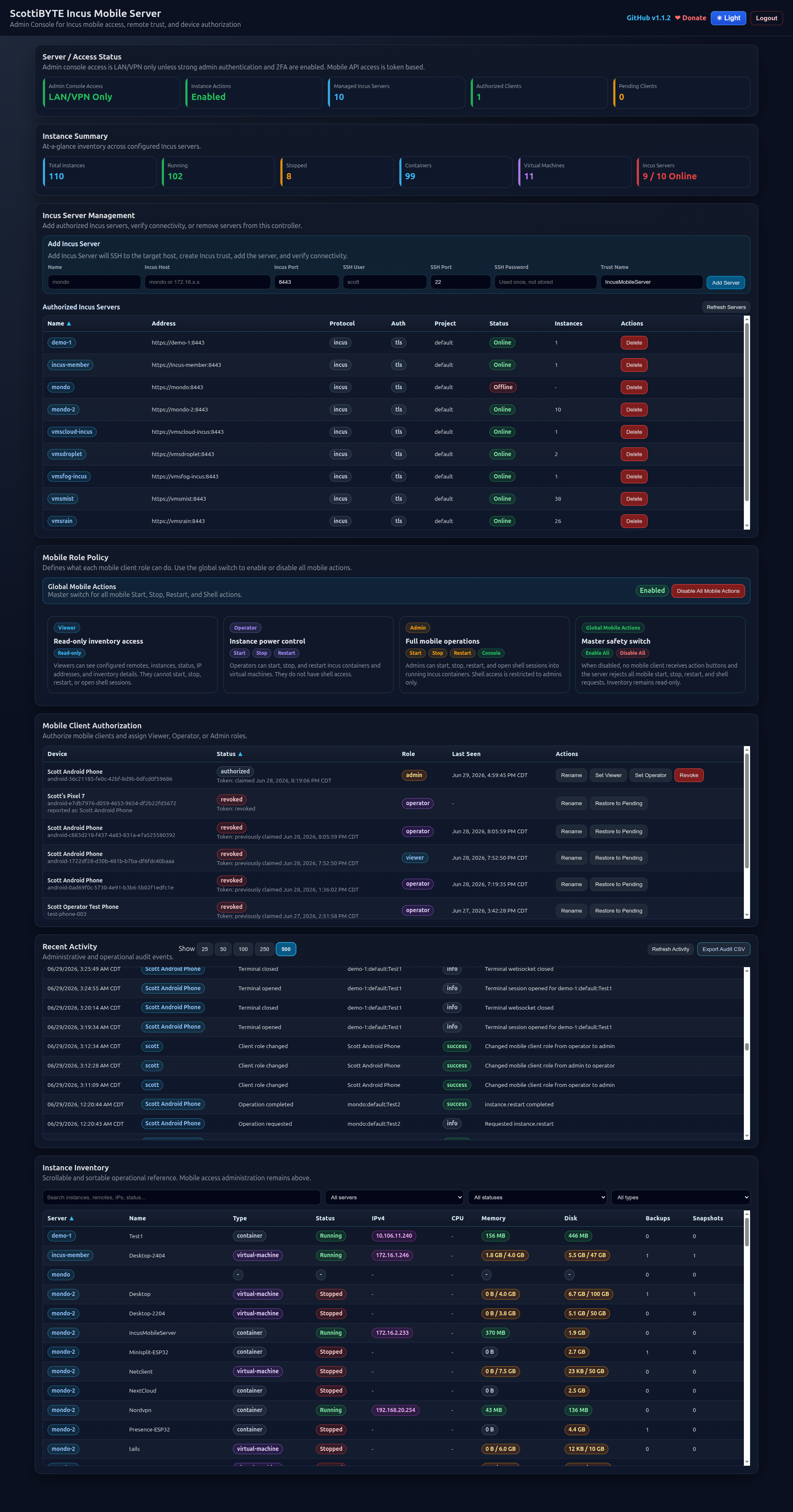
Highlights
Web administration
- Mandatory first-run administrator setup and 2FA enrollment
- Mobile client authorization and revocation
- Viewer, Operator, and Admin roles
- Global mobile-actions safety switch
- Incus server enrollment using SSH
- Password or private-key SSH authentication
- Incus trust establishment and connectivity verification
- Multi-server instance inventory
- Partial results when individual Incus servers are unavailable
- Online, Offline, No Quorum, and Inventory Error states
- Incus server version and daemon uptime
- Recent administrative and operational activity
- Adjustable audit-history length
- CSV audit export
- Local administrator credential-reset command
Android administration
- View all authorized Incus servers
- Display Incus version and daemon uptime
- View running and stopped instance totals
- Search instances across all servers
- View instance type, project, state, IPv4 address, CPU, memory, and disk details
- Start, stop, and restart authorized instances
- Admin-only container shell
- Snapshot creation and management
- Role-aware controls
- Global read-only mode when mobile actions are disabled
- Two-way client-name synchronization
- Rename a client from Android or the server dashboard
- Automatic migration from legacy default client names
- Android application-version reporting
Security and auditing
- Android clients never receive direct Incus credentials
- Mobile access uses individually authorized bearer tokens
- Stable device IDs remain the authoritative client identity
- Client display names can change without changing device identity
- Rename operations create audit events containing the old and new names
- Historical audit records retain the identity recorded when the event occurred
- Future activity uses the current canonical client name
- Role and action policy is enforced by the server
- Protected instances can be excluded from mobile operations
- Shell sessions and administrative actions are audited
Architecture
Android Client
    |
    | HTTPS and token-authenticated mobile API
    v
ScottiBYTE Incus Mobile Server
    |
    | Incus CLI, trusted Incus remotes, and SSH
    v
One or more Incus Servers
The container maintains its own persistent application database and Incus client configuration. Android devices do not require Incus certificates, SSH keys, or direct access to the Incus API.
Quick Start
Create a project directory:
mkdir -p ~/scottibyte-incus-mobile-server
cd ~/scottibyte-incus-mobile-server
mkdir -p docker-data
Create docker-compose.yml:
services:
  incus-mobile-server:
    image: scottibyte/incus-mobile-server:1.7.0
    container_name: scottibyte-incus-mobile-server
    restart: unless-stopped

    ports:
      - "3088:3088"

    environment:
      APP_NAME: "ScottiBYTE Incus Mobile Server"
      PORT: "3088"

      DATA_DIR: "/app/data"
      HOME: "/app/data"
      INCUS_CONF: "/app/data/incus-client"

      APP_TIME_ZONE: "America/Chicago"

      # UID and GID that will own persistent data.
      PUID: "1000"
      PGID: "1000"

      # Enable when operating behind a trusted reverse proxy.
      TRUST_PROXY: "true"

      # Networks permitted to access the web administration console.
      ADMIN_ALLOWED_CIDRS: >-
        127.0.0.1/32,
        10.0.0.0/8,
        172.16.0.0/12,
        192.168.0.0/16

      # Mobile-operation safety controls.
      MOBILE_ACTIONS_ENABLED: "true"
      MOBILE_TERMINAL_ENABLED: "true"
      MOBILE_TERMINAL_IDLE_TIMEOUT_MS: "900000"

      # Instances that mobile clients must not operate.
      MOBILE_PROTECTED_INSTANCES: "IncusMobileServer"

    volumes:
      - ./docker-data:/app/data

    # Optional: use local DNS resolvers.
    # dns:
    #   - 172.16.1.10
    #   - 172.16.1.11

    # Optional: provide static Incus server mappings.
    # extra_hosts:
    #   - "mondo:172.16.1.225"
    #   - "vmsmist:172.16.1.50"
    #   - "vmsrain:172.16.1.51"
Adjust PUID, PGID, time zone, allowed networks, and protected-instance names for your environment.
Start the server:
docker compose up -d
Open the administration console:
http://<docker-host>:3088/admin
Complete the first-run administrator setup and 2FA enrollment before adding Incus servers or authorizing mobile clients.
Persistent Data
Persistent application data is stored inside the container at:
/app/data
With the Compose example, it is stored on the Docker host at:
./docker-data
Persistent data includes:
- SQLite application database
- Administrator settings
- Mobile client authorizations
- Role assignments
- Operation-policy settings
- Audit history
- SSH key used by the Add Incus Server workflow
- Incus client configuration
- Trusted Incus remote certificates
The Incus CLI configuration is stored under:
/app/data/incus-client
Do not recreate the container without preserving /app/data.
Adding Incus Servers
The web console can establish Incus trust and add remote servers using SSH.
For each Incus server, provide:
- Display name
- Hostname or IP address
- Incus API port, normally
8443 - SSH username
- SSH port, normally
22 - SSH password or private key
- Optional private-key passphrase
- Incus trust name
Each target must have:
- Incus installed and initialized
- SSH reachable from the container
- Valid SSH credentials
- Incus API access from the container
- Firewall rules permitting SSH and Incus API traffic
The image includes the Incus CLI, OpenSSH client, and supporting tools needed by this workflow.
Name Resolution
Because the application runs inside Docker, the container must be able to resolve the Incus hostnames entered in the administration console.
Supported approaches include:
Use IP addresses
172.16.2.14
Configure local DNS
dns:
  - 172.16.1.10
  - 172.16.1.11
Configure static host mappings
extra_hosts:
  - "mondo:172.16.1.225"
  - "vmsmist:172.16.1.50"
Mobile Roles
| Role | Mobile access |
|---|---|
| Viewer | Read-only server and instance inventory |
| Operator | Viewer access plus start, stop, and restart |
| Admin | Operator access plus shell and snapshot management |
The global mobile-actions switch overrides individual roles. When disabled, mobile inventory remains available, but operational controls are hidden and corresponding API requests are rejected.
Android Client
Download the current Android application from the GitHub release:
ScottiBYTE Incus Mobile Android v0.8.0
Pairing
- Install the Android APK.
- Enter the URL of your ScottiBYTE Incus Mobile Server.
- Let the client submit its pairing request.
- Open the server administration console.
- Authorize the pending client.
- Assign Viewer, Operator, or Admin access.
- Refresh the Android client.
HTTPS is strongly recommended whenever the server is accessed outside a trusted local network.
Android server list

Android connection details

Incus Versions and Uptime
The server queries trusted Incus remotes for:
- Incus server version
- Incus daemon uptime
- Availability
- Instance inventory

Uptime represents the Incus daemon uptime reported by the Incus metrics endpoint. It is not necessarily the Linux host’s boot uptime.
Updating
To update a version-pinned deployment, change the image tag in docker-compose.yml, then run:
docker compose pull
docker compose up -d
To follow the newest published image automatically, use:
image: scottibyte/incus-mobile-server:latest
Version pinning is recommended when controlled upgrades and predictable rollback are important.
Backup
Back up the persistent data directory before upgrades:
cp -a docker-data docker-data.backup
For a live SQLite database, use a consistent database backup method rather than copying a database file while it is being written.
The most important persistent assets are:
mobile.dbincus-client/ssh/- Application settings and authorization data under
/app/data
Troubleshooting
Check container state:
docker compose ps
Check recent logs:
docker logs --tail 100 scottibyte-incus-mobile-server
Check the mobile health endpoint:
curl http://127.0.0.1:3088/api/mobile/health
Check the advertised Android release:
curl http://127.0.0.1:3088/api/mobile/android-version
If an Incus remote is unavailable, verify:
- Container DNS resolution
- Network routing
- TCP port
8443 - Incus remote trust
- Incus server status
- Cluster quorum, when applicable
Security Recommendations
- Put the service behind HTTPS for remote use.
- Restrict administration access with
ADMIN_ALLOWED_CIDRS. - Do not expose the administration console broadly without strong authentication.
- Complete and retain administrator 2FA enrollment.
- Authorize only known mobile devices.
- Revoke lost or replaced devices promptly.
- Use Viewer access unless operational control is required.
- Grant Admin only when shell and snapshot access are necessary.
- Disable global mobile actions when operational access is not needed.
- Protect infrastructure-critical instances with
MOBILE_PROTECTED_INSTANCES. - Back up
/app/datasecurely.
Links
License
See the project repository for current license and source information.
Tag summary
Content type
Image
Digest
sha256:d2a6843a4…
Size
250.9 MB
Last updated
about 1 month ago
docker pull scottibyte/incus-mobile-server