scottibyte/incusforge
IncusForge is an Incus custom Image Management Utility for local servers and simplestream servers.
436
scottibyte/incusforge repository overview
ScottiBYTE Incus Forge
Build • Publish • Distribute Incus Custom Images
🚀 Overview
ScottiBYTE Incus Forge is a lightweight Home Lab focused web application for publishing, managing, and distributing custom Incus images through SimpleStreams repositories.
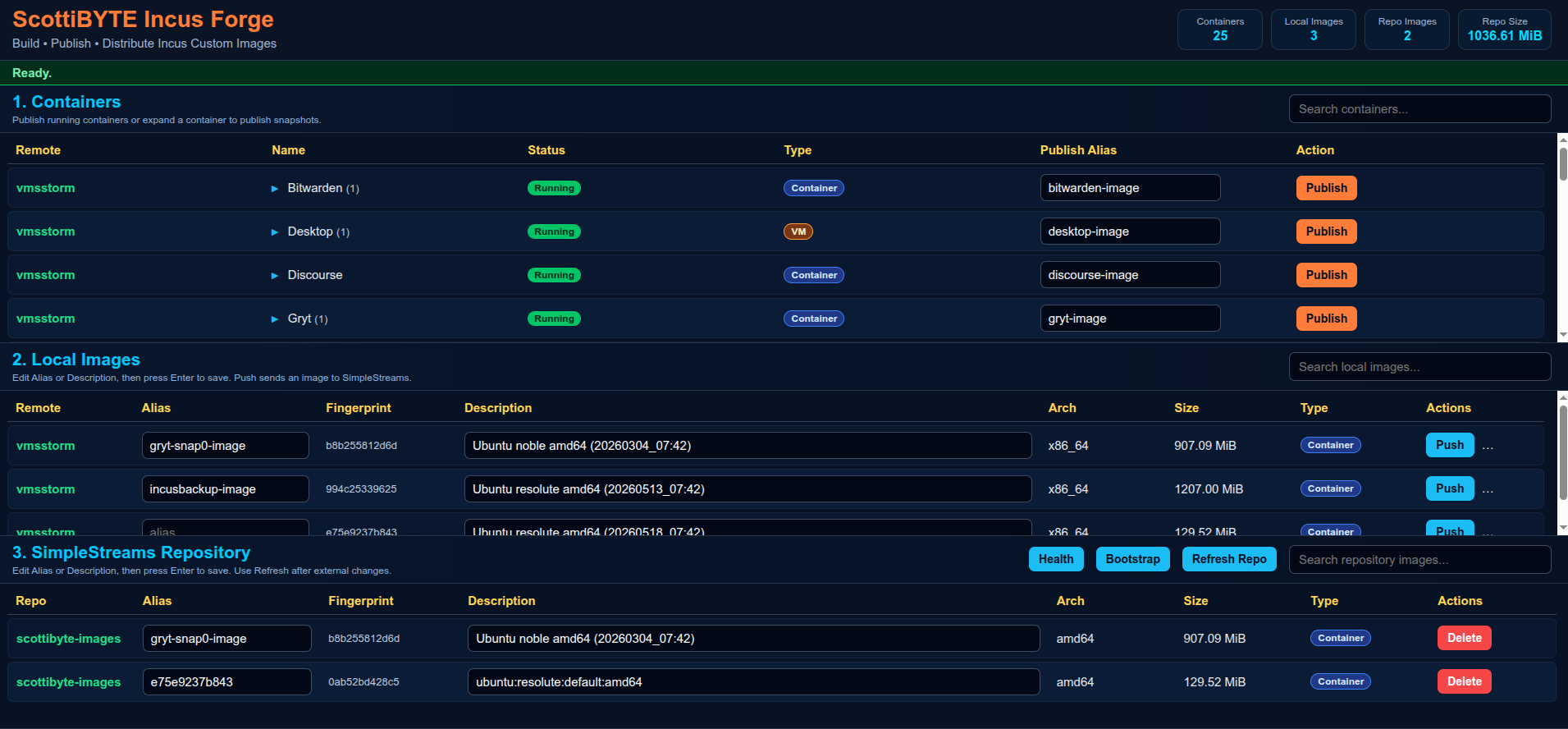
Incus Forge allows Home Labbers and administrators to:
- Publish running Incus containers as reusable images
- Publish snapshots directly from the UI
- Push images into SimpleStreams repositories
- Manage local Incus images
- Maintain centralized image repositories
- Distribute reusable Incus images across multiple environments
The platform is intentionally designed to remain:
- Lightweight
- Docker deployable
- Home Lab friendly
- Native Incus focused
- Understandable
- Minimal dependency
- Database free
✨ Features
Image Publishing
- Publish running containers
- Publish snapshots
- Snapshot expansion rows
- Custom image aliases
Repository Management
- Push images to SimpleStreams repositories
- Delete repository images
- Refresh repository metadata
- Repository health validation
- Repository bootstrap support
Dashboard Features
- Live statistics cards
- Container and VM badges
- Responsive layout
- Async publishing operations
- Lightweight interface design
Docker Support
- Full Docker deployment
- Portable configuration
- Native Incus client integration
- SSH based repository synchronization
Recommended deployment model:
| System | Purpose |
|---|---|
| IncusForge | Web UI and image management |
| IncusSimplestreams | SimpleStreams repository |
| Existing Incus Hosts | Source containers and VMs |
Benefits:
- Cleaner separation
- Easier upgrades
- Improved security
- Easier troubleshooting
- Better disaster recovery
- Simpler scaling
🚀 Quick Start
Create IncusForge Container
incus launch images:ubuntu/26.04 IncusForge
Enter shell:
incus shell IncusForge
🔐 Configure Incus Trust Relationships
From the IncusForge container:
incus remote add vmsstorm https://vmsstorm:8443
Accept the certificate.
Enter trust password or token.
Verify:
incus remote list
Example:
+-------------------+------------------------------------+
| NAME              | URL                                |
+-------------------+------------------------------------+
| vmsstorm          | https://vmsstorm:8443             |
| scottibyte-images | https://images.scottibyte.com     |
+-------------------+------------------------------------+
🔑 Configure SSH Access
Incus Forge synchronizes images to the SimpleStreams repository using SSH and rsync.
Generate SSH key if needed:
ssh-keygen -t ed25519
Copy key to repository server:
ssh-copy-id [email protected]
Verify access:
ssh [email protected] "hostname && whoami"
Expected:
IncusSimplestreams
scott
📦 Create IncusForge Project Directory
mkdir -p ~/incusforge

cd ~/incusforge
📦 Create config.json
nano config.json
Paste:
{
  "port": 3030,
  "simplestreams": {
    "name": "scottibyte",
    "publicUrl": "https://images.mydomain.com",
    "sshHost": "172.16.2.111",
    "sshUser": "scott",
    "webRoot": "/var/www/html",
    "imageDir": "/var/www/html/images",
    "streamsDir": "/var/www/html/streams"
  }
}
Save file.
🐳 Create docker-compose.yml
nano docker-compose.yml
Paste:
services:
  incusforge:
    image: scottibyte/incusforge:latest

    container_name: incusforge

    restart: unless-stopped

    ports:
      - "3030:3030"

    environment:
      PORT: "3030"
      HOME: /home/scott
      INCUS_CONF: /incus-client
      CONFIG_PATH: /app/config.json

    volumes:
      - ./config.json:/app/config.json:ro
      - ${HOME}/.config/incus:/incus-client:ro
      - ${HOME}/.ssh:/home/scott/.ssh:ro
Save file.
🚀 Start Incus Forge
docker compose up -d
Verify logs:
docker logs -f incusforge
Expected:
ScottiBYTE Incus Forge running on port 3030
Open browser:
http://YOUR-IP:3030
📦 Create SimpleStreams Repository Server
Create repository container:
incus launch images:ubuntu/26.04 IncusSimplestreams
Enter shell:
incus shell IncusSimplestreams
🛠 Create Bootstrap Script
nano bootstrap-simplestreams.sh
Paste:
#!/usr/bin/env bash
set -euo pipefail

WEB_ROOT="${WEB_ROOT:-/var/www/html}"
IMAGE_DIR="${IMAGE_DIR:-$WEB_ROOT/images}"
STREAMS_DIR="${STREAMS_DIR:-$WEB_ROOT/streams}"
REPO_USER="${REPO_USER:-$USER}"

echo "=== ScottiBYTE Incus Forge SimpleStreams Bootstrap ==="

echo "[1/8] Installing required packages..."
sudo apt update
sudo apt install -y nginx xz-utils python3 python3-yaml incus-extra openssh-server curl ca-certificates rsync jq

echo "[2/8] Enabling SSH..."
sudo systemctl enable --now ssh || sudo systemctl enable --now sshd

echo "[3/8] Enabling nginx..."
sudo systemctl enable --now nginx

echo "[4/8] Creating repository directories..."
sudo mkdir -p "$IMAGE_DIR"
sudo mkdir -p "$STREAMS_DIR/v1"

echo "[5/8] Setting ownership and permissions..."
sudo chown -R "$REPO_USER:$REPO_USER" "$WEB_ROOT"
sudo chmod -R 775 "$WEB_ROOT"

echo "[6/8] Creating metadata files..."

if [ ! -f "$STREAMS_DIR/v1/index.json" ]; then
cat > "$STREAMS_DIR/v1/index.json" <<'JSON'
{"index":{"images":{"datatype":"image-downloads","path":"streams/v1/images.json","products":[],"format":"products:1.0"}},"format":"index:1.0"}
JSON
fi

if [ ! -f "$STREAMS_DIR/v1/images.json" ]; then
cat > "$STREAMS_DIR/v1/images.json" <<'JSON'
{"content_id":"images","datatype":"image-downloads","format":"products:1.0","products":{}}
JSON
fi

echo "[7/8] Validating repository..."
command -v incus-simplestreams >/dev/null
command -v xz >/dev/null
command -v nginx >/dev/null

echo "[8/8] Bootstrap complete."

echo
echo "Repository ready."
echo
echo "Next step:"
echo "ssh-copy-id $REPO_USER@<repository-ip>"
Save file.
🚀 Run Bootstrap Script
chmod +x bootstrap-simplestreams.sh

REPO_USER=scott WEB_ROOT=/var/www/html ./bootstrap-simplestreams.sh
🌐 Verify Repository Access
Open browser:
http://YOUR-REPOSITORY-IP/images
Verify metadata:
curl http://YOUR-REPOSITORY-IP/streams/v1/index.json
🌐 Add SimpleStreams Repository To Incus
incus remote add scottibyte-images \
https://images.scottibyte.com \
--protocol=simplestreams
Verify:
incus remote list
🛠 Publishing Workflow
Publish Container
- Expand container row
- Enter image alias
- Click Publish
Publish Snapshot
- Expand container snapshots
- Enter snapshot image alias
- Click Publish Snapshot
Push Image To Repository
- Locate image in Local Images
- Click Push
- Repository metadata updates automatically
Verify Published Images
incus image list scottibyte-images:
🔒 Security Model
- Incus trust relationships use native Incus certificates
- SSH synchronization uses standard user SSH keys
- No database exposure
- No direct repository write APIs
- Native Linux file permissions
- Repository synchronization isolated through SSH
🛠 Troubleshooting
Missing xz
Error:
xz: executable file not found
Fix:
sudo apt install xz-utils
Verify Incus Access
docker exec -it incusforge bash

incus remote list
Verify SSH Access
View Docker Logs
docker logs -f incusforge
Verify Published Images
incus image list scottibyte-images:
🧭 Future Roadmap
Planned Features
- Multiple repository profiles
- Repository selection drop-down
- Repository authentication profiles
- Background task queue
- Remote repository synchronization
- Repository replication
- Job history
- Enhanced async progress indicators
❤️ Support The Project
If you find Incus Forge useful:
- Subscribe to the ScottiBYTE YouTube channel
- Join the community discussions
- Share feedback and ideas
- Open issues and feature requests
Community Support
Need help with Incus Forge, Docker deployment, Incus profile management, container creation, or ScottiBYTE utilities?
Join the ScottiBYTE Rocket.Chat community:
New users can start in #general. From there, you can find other ScottiBYTE project channels and community discussions.
For bugs and feature requests, please continue to use GitHub Issues. For quick questions and community discussion, use Rocket.Chat.
Tag summary
Content type
Image
Digest
sha256:9428e8166…
Size
377.5 MB
Last updated
4 months ago
docker pull scottibyte/incusforge