scottibyte/multiview-server
Self-hosted RTSP/HLS server for MultiView Android TV, Fire TV clients & Android phones.
1.4K
scottibyte/multiview-server repository overview
ScottiBYTE MultiView Server
Self-hosted RTSP camera gateway and HLS server for ScottiBYTE MultiView Android TV, Fire TV, phone, and tablet clients.
Docker Image
Pull the latest image:
docker pull scottibyte/multiview-server:latest
Pull a specific version:
docker pull scottibyte/multiview-server:1.3.1
Latest Release: v1.3.1
v1.3.1 improves camera-stream reliability by automatically detecting and recovering stalled FFmpeg publishers.
Added
- Added a per-camera publisher health watchdog.
- MediaMTX output paths are probed directly instead of relying only on FFmpeg process status.
- Unhealthy camera streams are restarted individually without restarting MultiView Server, MediaMTX, or unaffected cameras.
- Added consecutive-failure detection to avoid reacting to brief stream interruptions.
- Added per-camera restart cooldowns to prevent restart loops.
- Added limited health-probe concurrency to avoid overloading the server while checking multiple cameras.
Fixed
- Fixed camera streams remaining unavailable when FFmpeg stayed alive after losing its MediaMTX publishing connection.
- Fixed stalled FFmpeg publishers that ignored
SIGTERMnever being escalated toSIGKILL. - Fixed
ChildProcess.killedbeing treated as confirmation that FFmpeg had exited. - Improved automatic recovery from intermittent RTSP publisher failures.
Overview
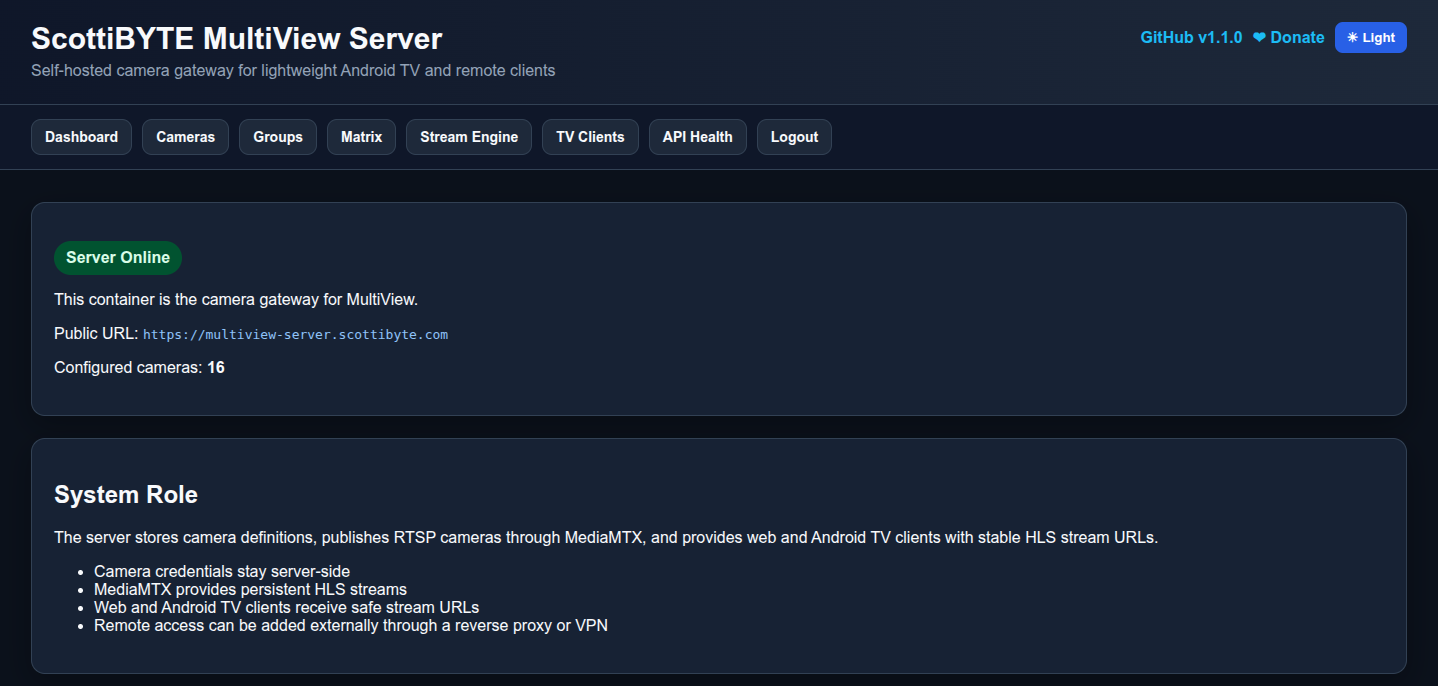
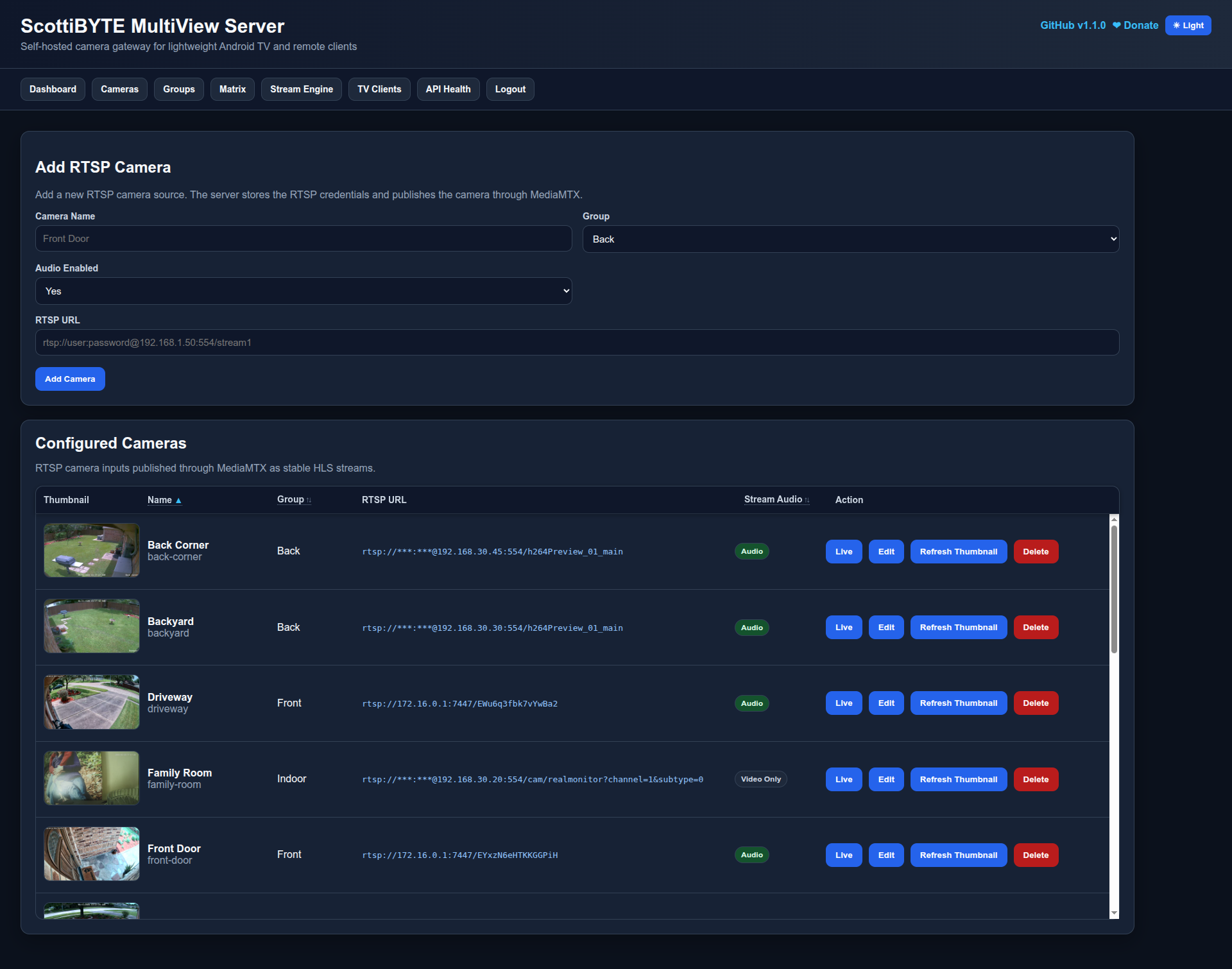
ScottiBYTE MultiView Server provides a secure web interface for configuring RTSP cameras, organizing cameras into groups, publishing HLS streams through MediaMTX, and managing authorized ScottiBYTE MultiView clients.
The server acts as the central gateway for the ScottiBYTE MultiView ecosystem. Android TV, Fire TV, phone, and tablet clients securely pair with the server and receive only the approved camera catalog and playback URLs. Camera usernames and passwords never leave the server.
Beginning with v1.2.0, enabled camera streams are published automatically using container-managed FFmpeg publishers. No additional stream publisher configuration is required outside the server container.
v1.3.0 expanded the platform with Remote Client Management, allowing administrators to authorize, rename, and revoke Android TV, Fire TV, phone, and tablet clients from a single management page.
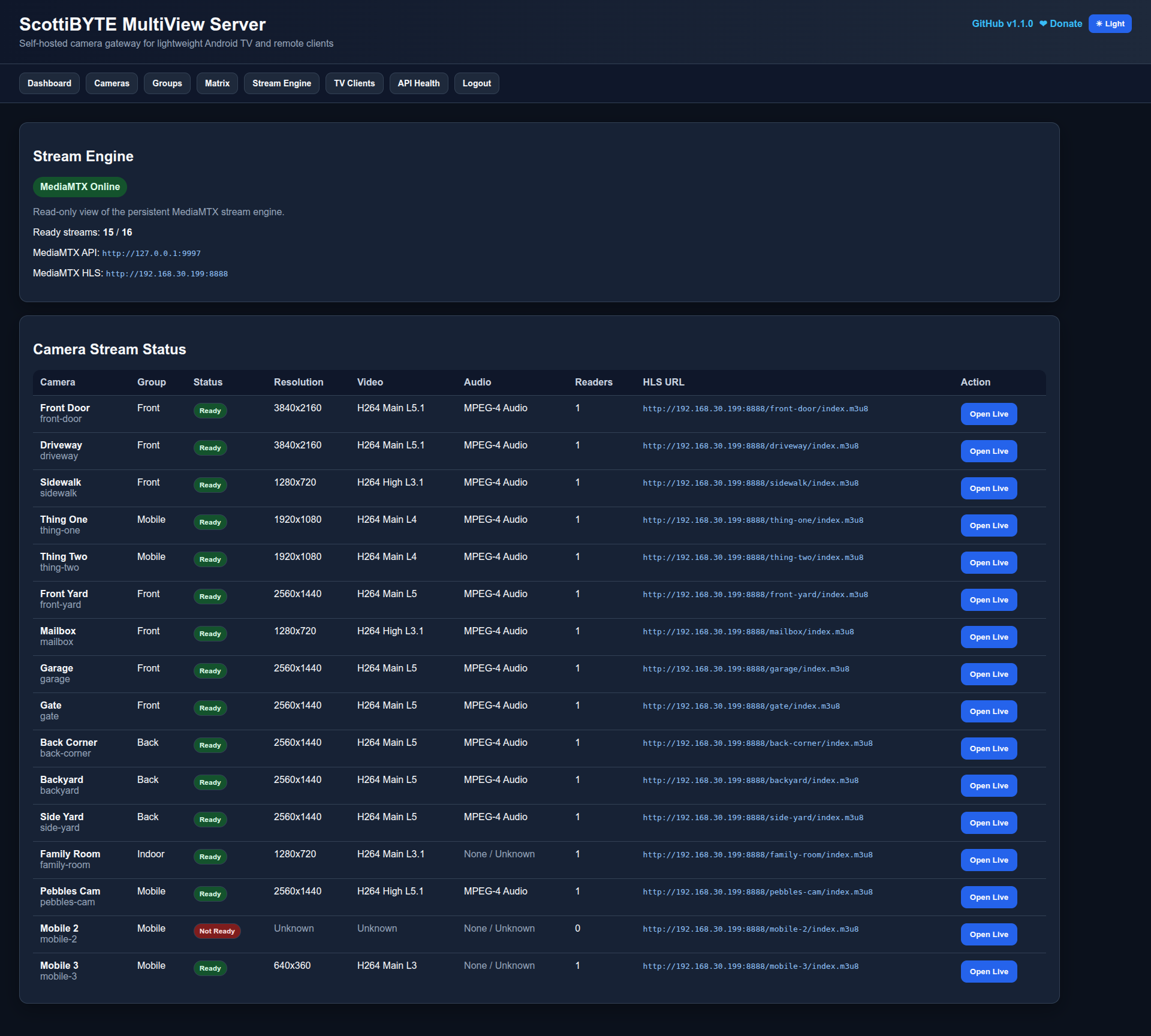
v1.3.1 adds automatic stream-health monitoring and per-camera recovery. MultiView Server now checks the actual stream published through MediaMTX rather than relying only on whether an FFmpeg process is running. If a publisher becomes stalled or loses its MediaMTX connection, only the affected camera publisher is restarted.
MediaMTX remains an integral part of the solution. MultiView Server publishes camera streams into MediaMTX, which provides the HLS playback endpoints consumed by all ScottiBYTE MultiView clients.
ScottiBYTE Clients
ScottiBYTE MultiView Android TV / Fire TV
Designed for televisions and streaming devices.
Features include:
- Multiple simultaneous live cameras
- Full-screen viewing
- Remote-control navigation
- Drag-and-drop camera ordering
- Continuous live monitoring
Repository:
https://github.com/ScottiBYTE/multiview-android-tv
ScottiBYTE MultiView Mobile
Designed for Android phones and tablets.
Features include:
- Touch-first interface
- Camera thumbnails
- One-tap inline live preview
- Full-screen landscape player
- Pinch-to-zoom
- Swipe between cameras
- Custom camera ordering
Repository:
https://github.com/ScottiBYTE/multiview-android-mobile
Screenshots
Dashboard
Cameras
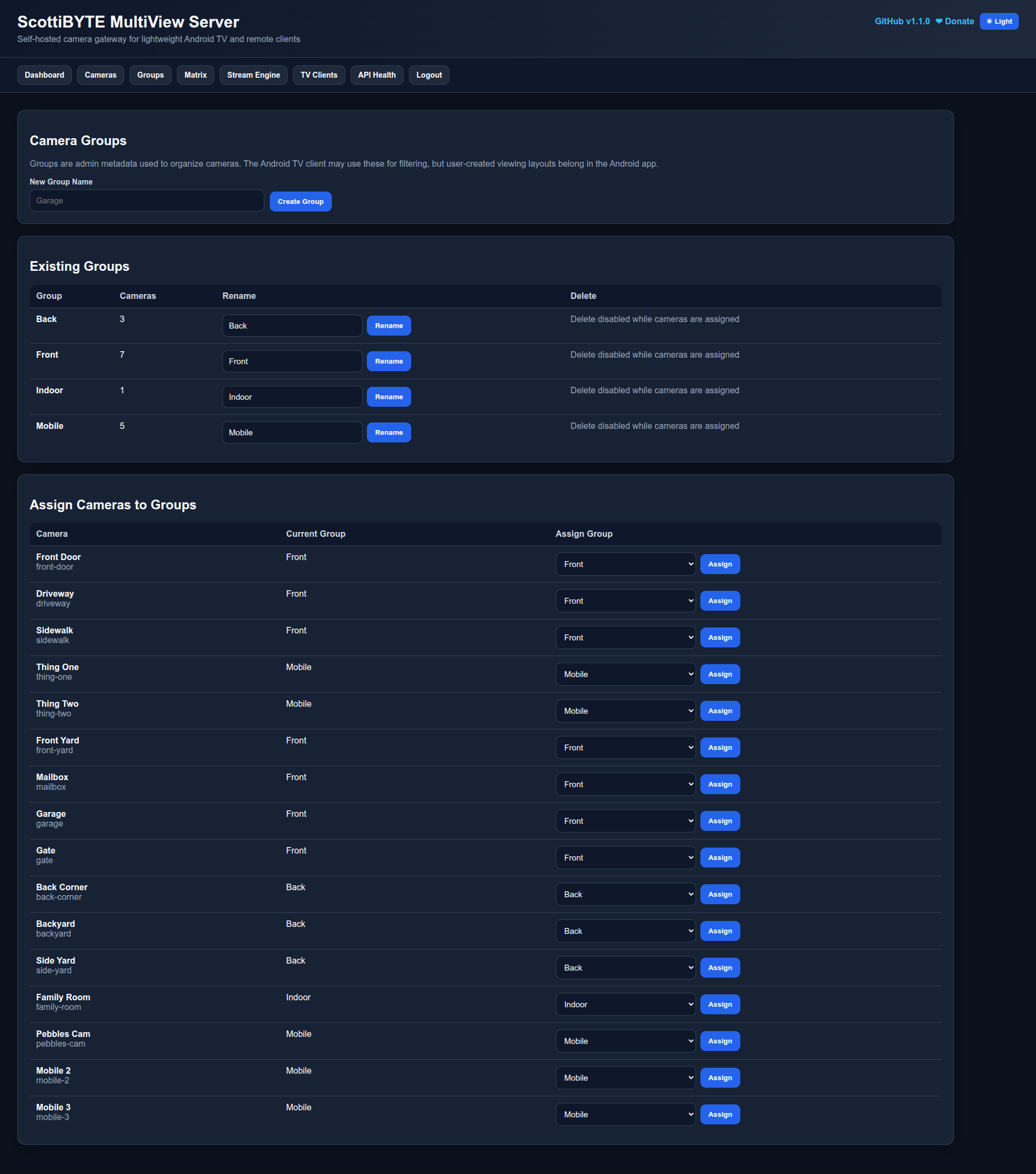
Groups
Stream Engine
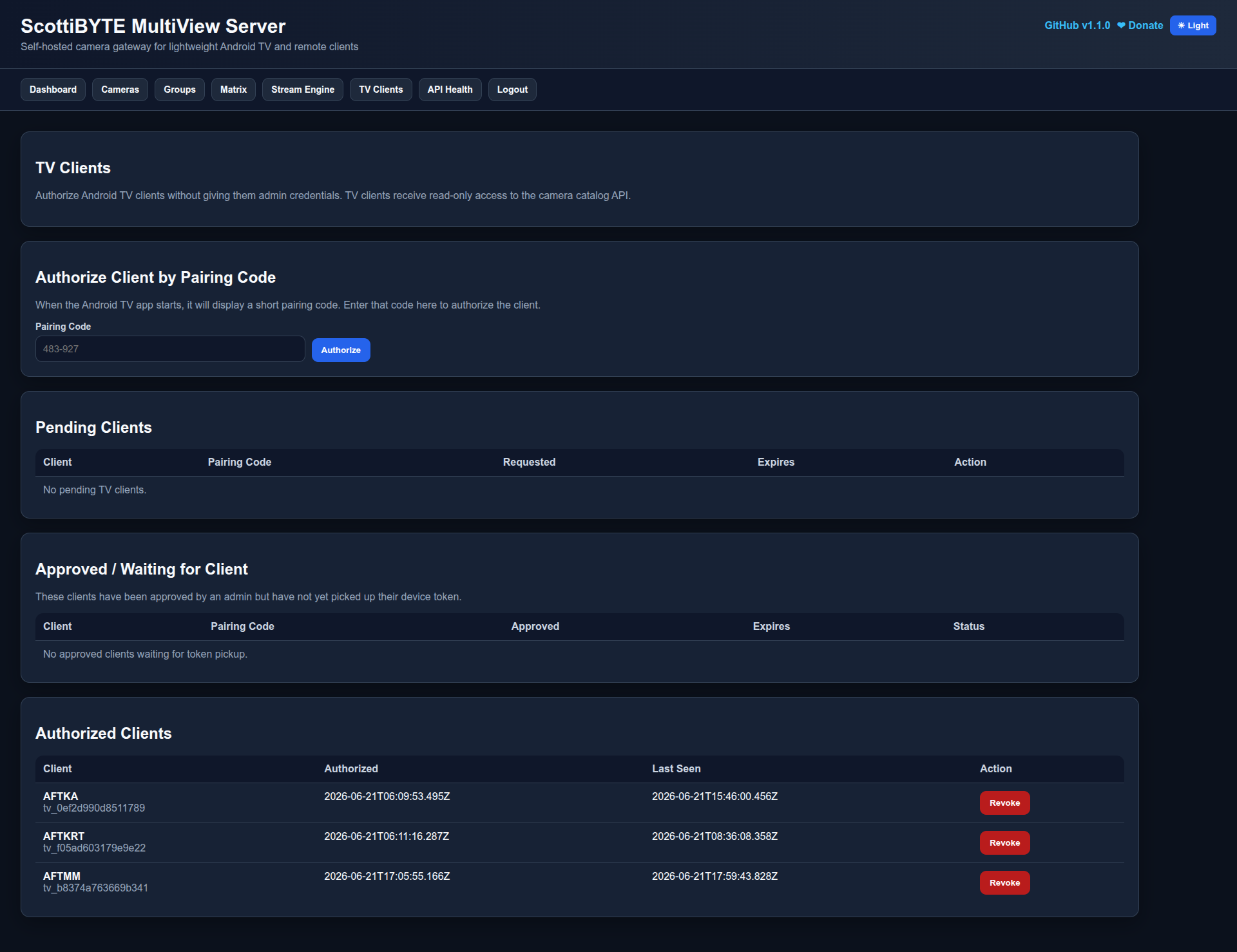
Remote Clients
Features
- Web-based RTSP camera configuration
- Container-managed FFmpeg stream publishers
- Automatic camera stream publishing
- Automatic per-camera stream-health monitoring
- Direct MediaMTX output-path health checks
- Automatic recovery of stalled FFmpeg publishers
- Individual stream recovery without restarting unaffected cameras
- Consecutive-failure detection to prevent unnecessary restarts
- Per-camera restart cooldowns
- Limited health-probe concurrency
- Automatic publisher restart when camera settings are updated
- MediaMTX-backed HLS publishing
- Camera groups
- First-run administrator setup
- Secure Remote Client pairing
- Remote Client management
- Rename authorized clients
- Revoke authorized clients
- Remove pending authorization requests
- Read-only client camera catalog API
- Dashboard, camera list, groups, matrix, stream engine, Remote Clients, and API Health pages
- Automatic thumbnail refresh
- Light and dark mode
- Self-contained Docker image
- Docker-friendly deployment
Quick Start
Clone the GitHub repository:
git clone https://github.com/ScottiBYTE/multiview-server.git
cd multiview-server
Create the environment file:
cp .env.example .env
nano .env
Example .env:
TZ=America/Chicago

MULTIVIEW_PUBLIC_URL=http://SERVER-IP:8080

MEDIAMTX_API_BASE=http://127.0.0.1:9997
MEDIAMTX_HLS_BASE=http://SERVER-IP:8888
Start the server stack:
docker compose up -d
Open the web UI:
http://SERVER-IP:8080
Create the administrator account, add cameras, organize them into groups, and authorize your ScottiBYTE MultiView clients.
Automatic Stream Recovery
MultiView Server continuously monitors the MediaMTX output path for every enabled camera.
The health monitor:
- Waits for the server and initial publishers to finish starting.
- Probes the published MediaMTX stream for each enabled camera.
- Requires multiple consecutive failures before taking action.
- Restarts only the failed camera publisher.
- Sends
SIGTERMfirst for a clean shutdown. - Escalates to
SIGKILLwhen a stalled FFmpeg process does not exit. - Leaves MediaMTX, the MultiView Server container, and unaffected camera streams running.
- Uses per-camera cooldowns to prevent repeated restart loops.
- Limits concurrent health probes to avoid unnecessary server load.
This protects against a failure state where the camera remains online and its RTSP stream is still accessible, but the FFmpeg publisher has stopped delivering video to MediaMTX.
Basic Verification
Confirm the containers are running:
docker ps --format "table {{.Names}}\t{{.Status}}\t{{.Image}}"
Confirm FFmpeg publishers are running:
docker exec -it multiview-server sh -lc 'pgrep -a ffmpeg'
Confirm the stream-health watchdog started:
docker logs multiview-server 2>&1 | grep -i watchdog
Expected output includes:
Starting publisher watchdog: interval=30000ms, failureThreshold=3
Confirm MediaMTX sees published streams:
curl -s http://127.0.0.1:9997/v3/paths/list
Test an RTSP stream published through MediaMTX:
ffprobe \
  -v error \
  -rtsp_transport tcp \
  -select_streams v:0 \
  -show_entries stream=codec_name,width,height \
  -of default=noprint_wrappers=1 \
  rtsp://127.0.0.1:8554/CAMERA-ID
Test an HLS stream:
curl -i -L http://SERVER-IP:8888/CAMERA-ID/index.m3u8
Check for publisher-health failures or automatic recoveries:
docker logs --since 10m multiview-server 2>&1 \
  | grep -iE \
    'health check failed|restarting unhealthy|health restored|ignored SIGTERM|SIGKILL'
No output indicates that no stream-health failures were detected during that period.
Remote Client Pairing
- Install either the ScottiBYTE MultiView Android TV / Fire TV client or the ScottiBYTE MultiView Mobile app.
- Enter the MultiView Server URL.
- The client displays a pairing code.
- Open the Remote Clients page.
- Authorize the pending pairing request.
- Optionally rename the client for easier identification.
- The client automatically downloads the approved camera catalog.
Security Model
ScottiBYTE MultiView is designed so camera credentials remain on the self-hosted server.
- RTSP camera usernames and passwords are stored only on the server.
- Android TV, Fire TV, phone, and tablet clients never receive raw RTSP credentials.
- Every client must be paired and authorized from the Remote Clients page.
- Authorized clients receive read-only access to the camera catalog and HLS playback URLs.
- Client access can be renamed or revoked at any time.
Updating
Pull the newest image:
docker compose pull
Recreate the containers:
docker compose up -d
Confirm the running version:
docker exec multiview-server \
  grep -n 'APP_VERSION' /app/server.js
GitHub
https://github.com/ScottiBYTE/multiview-server
Community
Join the ScottiBYTE Rocket.Chat community:
https://go.rocket.chat/invite?host=chat.scottibyte.com&path=invite%2FaCh2oW
Tag summary
Content type
Image
Digest
sha256:715174340…
Size
526.7 MB
Last updated
3 months ago
docker pull scottibyte/multiview-server