sdhawan/open-elevation repository overview
Open-Elevation - Remake
↓ Read install instructions below ↓
A free and open-source elevation API by Jorl17. The original is available at: https://github.com/Jorl17/open-elevation. Thanks for your work.
Open-Elevation is a free and open-source alternative to the Google Elevation API and similar offerings.
This service came out of the need to have a hosted, easy to use and easy to setup elevation API. While there are some alternatives out there, none of them work out of the box, and seem to point to dead datasets. Open-Elevation is easy to setup, has its own docker image and provides scripts for you to easily acquire whatever datasets you want.
Open-Elevation API Doc for details and ustage
doc/api.md
Changes to the original version:
- changing TIFF file locations - to working one - for SRTM 250m data in download script
- changing create-dataset.sh to work again
- fixing download scripts
News:
-
added a preinstall documentation for dependencies
-
adding service file for linux (e.g. autostart)
SRTM 90M from https://geoservice.dlr.de/
- adding Doc for using SRTM 90m data from https://geoservice.dlr.de/web/dataguide/tdm90/
- adding java downloader for data from https://geoservice.dlr.de/
- adding JavaProject to download and xxtract all files and put it to the right place
Bugs:
- SRTM 90M TanDEM data are 40 to high. Issue: here
How to install:
It testet the install procedure on a fresh Ubuntu 18.10.
Fist of all clone this repository to your favourite location. (Use a permanent place for it where it won't be deletet)
Default 250m files (after procedure ca. 20GB)
-
Make sure your system is up-to-date
sudo apt-get update sudo apt-get upgrade -y -
Install GDAL used for the GeoTIFFs
sudo apt update sudo apt install gdal-bin python-gdal // Add libgal-dev sudo apt-get install libgdal-dev //Create system vars export CPLUS_INCLUDE_PATH=/usr/include/gdal export C_INCLUDE_PATH=/usr/include/gdal sudo apt install python3-rtree -
Install pip dependencies
pip -r requirements.txt -
Download and progress GeoTIFFs
## open terminal and cd to your open-elevation dir ## //mark scripts as executable sudo chmod +x download-srtm-data.sh create-tiles.sh create-dataset.sh //Execute ./create-dataset.shThe script is downloading and progressing it now automatically
- this can take some time - up to 2 hours*
-
Optional Adding Service to your computer (e.g. autostart)
sudo mv <<PATH-TO-SERVICE-FILE>> /etc/systemd/system/open-elevation.service //Enable Autostart systemctl enable open-elevation //Following Commands can be used sudo service open-elevation start | stop | restart -
Your server is now running reachable at 0.0.0.0:10000. Congratulation
To change the ip edit the last line in **server.py**. You can choose ip and port whatever your want

Test it:
```
http://0.0.0.0:10000/api/v1/lookup?locations=48.179138,10.703618
```
90m TanDEM added myselfe (ca. 100GB)
Following step 1 to 3 from above
Than:
- Install open-jre
sudo apt-get install open-jre
-
Create an account at https://sso.eoc.dlr.de/cas/login
-
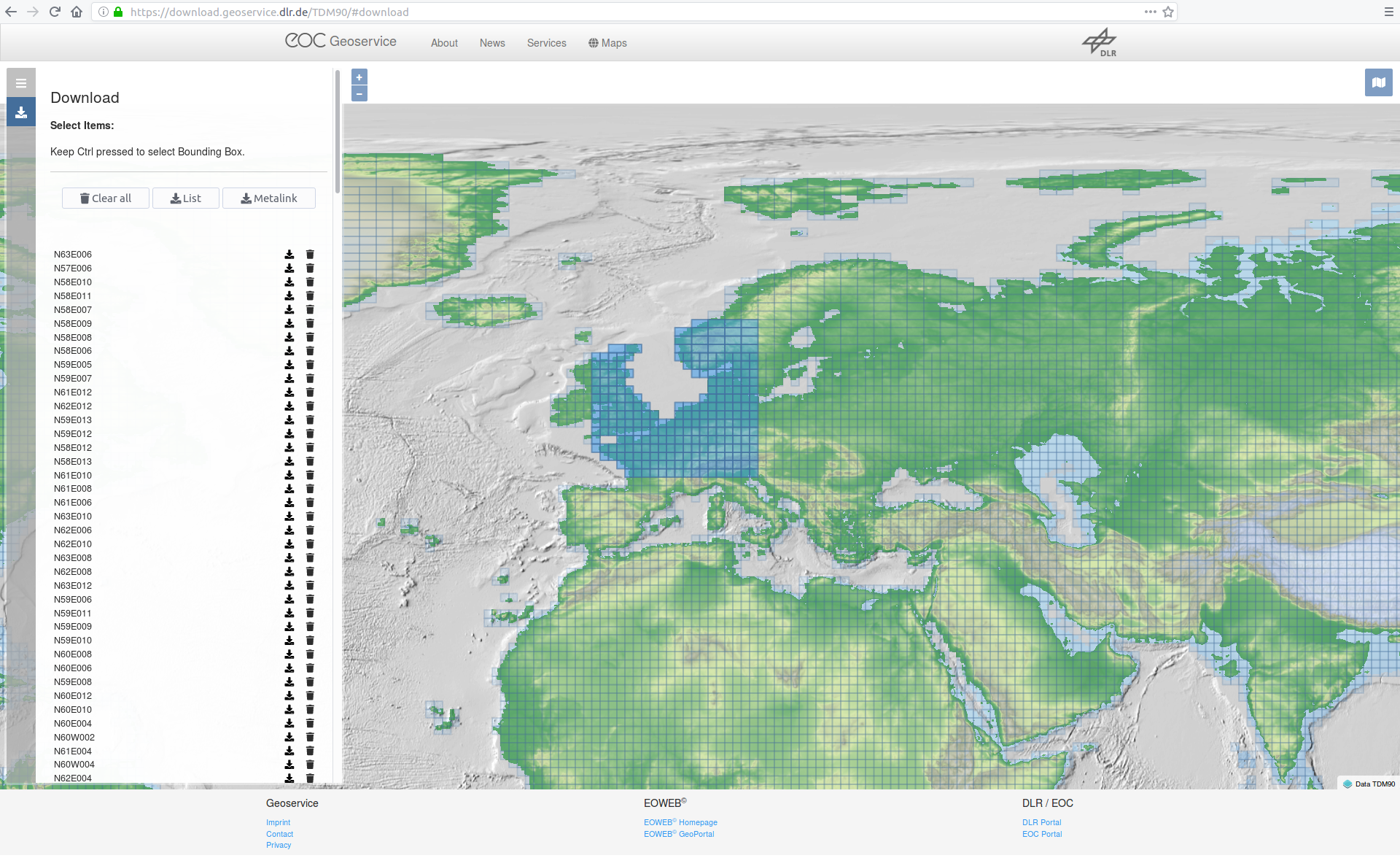
Generate a download the list of your needed locations at https://download.geoservice.dlr.de/TDM90/
You can zoom out and use CTL to drag multiple rectangles
-
Start the TanDEM90mDownloader.jar in your directory using this args:
java -jar <<YOUR-JAR-FILE>> -i=<urllist.txt> -o=<outputDir(normaly datadir> -u=<USERNAME(Email) -p=<PASSWD> *Optional number of Threads (default is 4)* -n=4 Example: java -jar C:\TanDEM90mDownloader.jar -i=C:\urllist.txt -o=C:\data [email protected] -p=xyz1234The program than automatically download the zips, extract them and copy the DEM data to your output dir and deletes the zip after that to save storage.
-
Optional As 5. above
-
Your server is now running reachable at 0.0.0.0:10000. Congratulation
To change the ip edit the last line in **server.py**. You can choose ip and port whatever your want
Test it:
```
http://0.0.0.0:10000/api/v1/lookup?locations=48.179138,10.703618
```
! WARNING !
Files from https://geoservice.dlr.de/ 30M are a little bit larger than the original files.
Infos from https://geoservice.dlr.de/web/dataguide/tdm90/ (2019.02.01).
| Key | Value |
|---|---|
| Number of DEM products | 19389 |
| Size of the global data set, zipped (including all annotations) | 253 GB |
| Size of the global data set, unzipped (including all annotations) | 534 GB |
| Size of all DEM raster files (unzipped, without annotations or meta data) | 93.8 GB |
OpenDEM Europe 1arc-sec
No java downloader yet!
Files manually downloadable at: https://opendem.info/opendemeu_download_4258.html
Install using docker (oringal not tested)
You can freely host your own instance of Open-Elevation. There are two main options: Docker or native. We recommend using docker to ensure that your environment matches the development environment
Clone the repository
First things first, clone the repository and cd onto its directory
git clone http://github.com/Jorl17/open-elevation
cd open-elevation
Using Docker
An image of Open-Elevation is available at DockerHub. You can use this image as the basis for your Open-Elevation installation.
The Docker image roots itself at /code/ and expects that all GeoTIFF datafiles be located at /code/data/, which you should mount using a volume.
Prerequisites: Getting the dataset
Open-Elevation doesn't come with any data of its own, but it offers a set of scripts to get the whole SRTM 250m dataset.
Whole World
If you wish to host the whole world, just run
mkdir data # Create the target folder for the dataset
docker run -t -i -v $(pwd)/data:/code/data openelevation/open-elevation /code/create-dataset.sh
The above command should have downloaded the entire SRTM dataset and split it into multiple smaller files in the data directory. Be aware that this directory may be over 20 GB in size after the process is completed!
Custom Data
If you don't want to use the whole world, you can provide your own dataset in GeoTIFF format, compatible with the SRTM dataset. Simply drop the files for the regions you desire in the data directory. You are advised to split these files in smaller chunks so as to make Open-Elevation less memory-hungry (the largest file has to fit in memory). The create-tiles.sh is capable of doing this, and you can see it working in create-dataset.sh. Since you are using docker, you should always run the commands within the container. For example:
docker run -t -i -v $(pwd)/data:/code/data openelevation/open-elevation /code/create-tiles.sh /code/data/SRTM_NE_250m.tif 10 10
The above example command splits SRTM_NE_250m.tif into 10 by 10 files inside the /code/data directory, which is mapped to $(pwd)/data.
Running the Server
Now that you've got your data, you're ready to run Open-Elevation! Simply run
docker run -t -i -v $(pwd)/data:/code/data -p 8080:8080 openelevation/open-elevation
This command:
- Maps
$(pwd)/data(your data directory) to/code/datawithin the container - Exposes port 8080 to forward to the container's port 8080
- Runs the default command, which is the server at port 8080
You should now be able to go to https://localhost:8080 for all your open-route needs.
Problems
Have you found any problems? Open an issue or submit your own pull request!
Tag summary
Content type
Image
Digest
Size
555.5 MB
Last updated
over 7 years ago
docker pull sdhawan/open-elevation