seaverd/nodejs-poolcontroller
This is a docker build of tagyoureit/nodejs-poolController.
2.7K
seaverd/nodejs-poolcontroller repository overview
Important note-downgrade from the latest version of node to use dependencies in this project. A new version of this app is currently under development.
nodejs-poolController - Version 5.3.3



5.3.3
- #134
5.3.1
- #132
5.3.0
- Fix for #106
- Fix for "Error 60" messages
- Improved caching of files on browsers. Thanks @arrmo! Now files will be loaded once in the browser and kept in cache instead of reloaded each time.
- Improved handling of sessions and graceful closing of the HTTP(s) servers.
License
nodejs-poolController. An application to control pool equipment. Copyright (C) 2016, 2017. Russell Goldin, tagyoureit. [email protected]
This program is free software: you can redistribute it and/or modify it under the terms of the GNU Affero General Public License as published by the Free Software Foundation, either version 3 of the License, or (at your option) any later version.
This program is distributed in the hope that it will be useful, but WITHOUT ANY WARRANTY; without even the implied warranty of MERCHANTABILITY or FITNESS FOR A PARTICULAR PURPOSE. See the GNU Affero General Public License for more details.
You should have received a copy of the GNU Affero General Public License along with this program. If not, see http://www.gnu.org/licenses/.
What is nodejs-poolController
nodejs-poolController is an application to communicate and control your Pentair compatible pool equipment.
Want to include a low cost controller for your pool? Want a web interface for your system? Want to turn your pumps on remotely? Want to have your home automation system talk to your pool? Want to control your pumps or chlorinator without a pool controller?
Controllers: Intellitouch, EasyTouch, Intermatic, SunTouch, IntellicomII Pumps: Intelliflow, older models Chlorinator: Intellichlor, Aqua-Rite and OEM brands Home Automation: ISY. (Soon to include Siri, Echo, more?)
Plug-ins / Extensions / Contributions
Extend nodejs-Poolcontroller with these additional integration points
- outputSocketToConsoleExample A sample included with the code to demonstrate correct usage.
- Homebridge/Siri by @leftyfl1p
- SmartThings by @bsileo, @johnny2678, @donkarnag, @arrmo
- Another SmartThings Controller by @dhop90
- ISY included with this app. Original credit to @blueman2, enhancements by @mayermd
- ISY Polyglot NodeServer created by @brianmtreese
- MQTT created by @crsherman.
- Hubitat by @bsileo
Installation Instructions
This code requires a physical RS485 adapter to work.
If you don't know anything about NodeJS, these directions might be helpful.
- Install Nodejs. (https://nodejs.org/en/download/)
- Update NPM (https://docs.npmjs.com/getting-started/installing-node).
- Download the latest code release
OR
clone with
git clone [email protected]:tagyoureit/nodejs-poolController.git - Unzip into nodejs-poolController.
- Run 'npm install' in the new folder (where package.json exists). This will automatically install all the dependencies (serial-port, express, sockets.io, etc).
- Run the app by calling 'npm start'* (again, in the root directory). It should now run properly.
- to run with a specific configuration, run
node index.js argwhere arg is the name of your current config file. egnpm start configCustomized.json. By default, the app will loadconfig.json.
- to run with a specific configuration, run
Upgrade instructions
Universal notes
- For precaution, make a backup copy of your
config.jsonor customized configuration file. New in the 5.0.0 release is that the app will automatically upgrade this file.
Git clone method - Harder way, but you can create PR's and help with development
git clone [email protected]:tagyoureit/nodejs-poolController.git(clone the repo if you are starting fresh)1.Will update when there is a new Dev branch.git checkout 5.0.0(switch to 5.0.0 branch - Development branch only)git pull(anytime you want to grab the latest code)npm update(update dependencies)
Download method - Easier way
- Download the latest release from the release page or branch page big
Clone or download vbutton - Unzip and overwrite your existing directory*. See note above about
config.jsonfile.
Support
For support you can open a github issue, for discussions, designs, and clarifications, we recommend you join our Gitter Chat room.
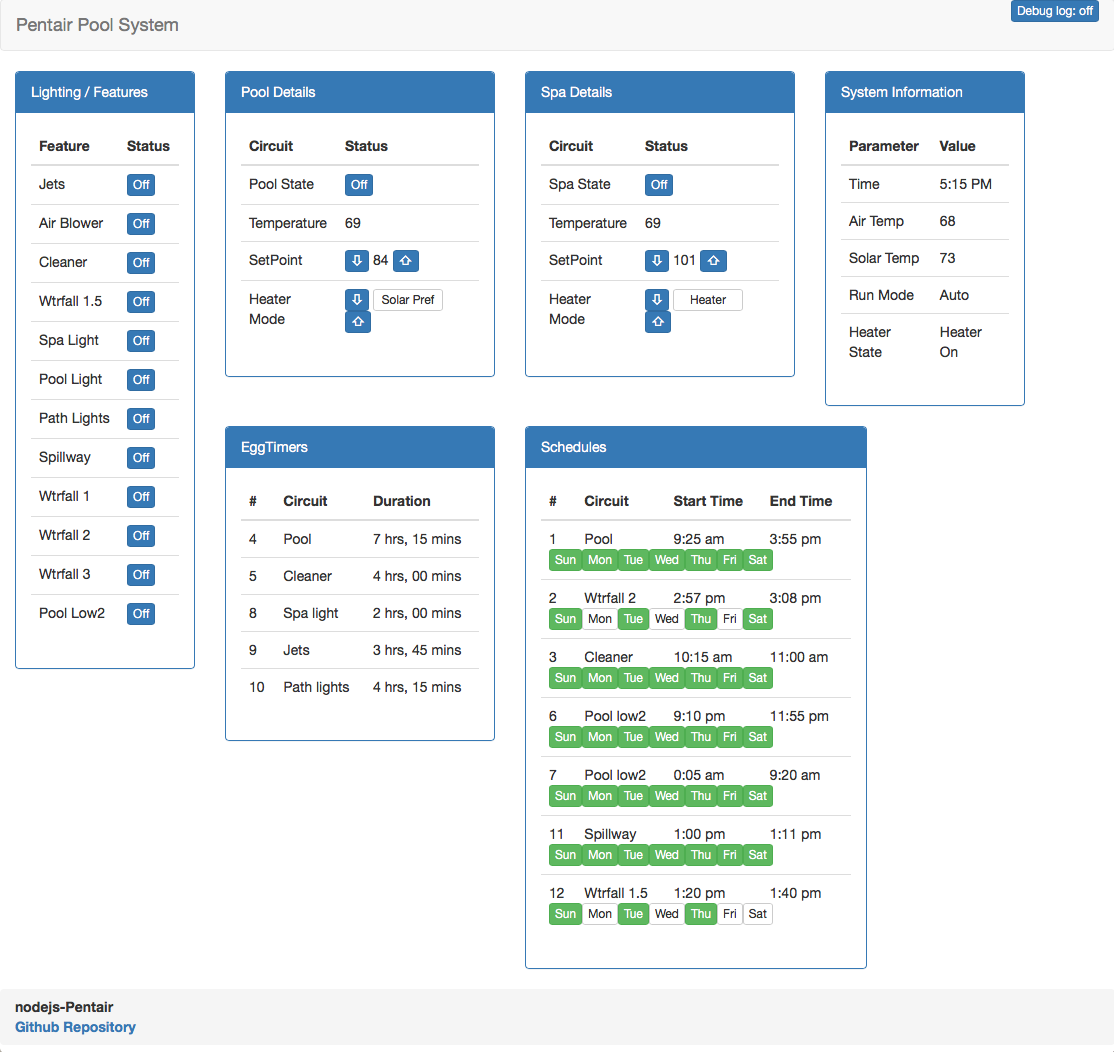
Web Interfaces
- A slick Bootstrap interface by @arrmo. Set variable:
"expressDir": "/bootstrap" - A boring, basic, functional interface. Set variable:
"expressDir": "/public"To choose, set theexpressDirvariable in the 'config.json'. Load both interfaces fromhttp://localhost:3000/index.html
Useful URL's included with the boring, basic, functional interface
Control standalone pumps:See #150.http://_your_machine_name_:3000/pump.html- Listen for specific messages:
http://_your_machine_name_:3000/debug.html - Send a message on the serial bus:
http://<server>:3000/public/send_packet.html
Technical notes:
The web UI will dynamically load as the information is received from the app. Yes, Socket.io, we love you! Full loading may take 20-30 seconds depending on your equipment setup.
REST Interface & Socket.IO
You can also call REST URI's like:
- Get circuit status: /circuit/# to get the status of circuit '#'
- Toggle circuit status: /circuit/#/toggle to get the toggle circuit '#'
Get system status: /statusDepricated.- Get schedules: /schedule
- Get pump status: /pump
- Get all equipment as one JSON: /all
- Set spa heat setpoint: /spaheat/setpoint/#
- Set spa heat mode: /spaheat/mode/# (0=off, 1=heater, 2=solar pref, 3=solar only)
- Set pool heat setpoint: /poolheat/setpoint/#
- Set pool heat mode: /poolheat/mode/# (0=off, 1=heater, 2=solar pref, 3=solar only)
- Run pumps in stand-alone mode
- Cancel delay: /cancelDelay
APIs
You can use Sockets.IO (see the "basic UI" example). Valid sockets:
General
| Direction | Socket | API | Description |
|---|---|---|---|
| To app | echo(equipment) | no api | test socket |
| To client | echo | outputs the incoming echo (for testing) | |
| To app | search(mode, src, dest, action) | Searches for specific packets that match all four bytes and outputs to the socket searchResults | |
| To client | searchResults | outputs packets that match the search socket | |
| To app | sendPacket(packet) | Send a packet as an array of values [xx,yy,zz...] to the bus. Pump and Controller packets should start with [DEST, SRC,...]. Chlorinator packets should start with [16,2...] | |
| To client | all | outputs an object with all equipment in one JSON | |
| To app | all | /all | sends all information in one socket |
| To client | time | /time | |
| To app | setDateTime(hour, min, dow*, day, mon, yy, dst) | /datetime/set/time/{hour}/{min}/{dow}/{day}/{mon}/{year}/{dst} | |
| To app | updateVersionNotification(bool) | true = do not send the updateAvailable socket until the next version is available. false = send updateAvailable everytime. | |
| To client | updateAvailable | outputs an object with current running version vs latest published release on GitHub (local is the running app, remote is the GitHub version) | |
| To client | valve | outputs an object with the valve information | |
| To client | UOM | outputs the unit of measure (C or F) |
Circuits
| Direction | Socket | API | Description |
|---|---|---|---|
| To client | circuit | outputs an object of circuits and their status | |
| To app | /circuit | outputs an object of circuits and their status | |
| To app | circuit/{#} | /circuit | outputs an object of a single circuit and its status |
| To app | toggleCircuit(equipment) | /circuit/{#}/toggle | toggles the circuit (as a circuit number) |
| To app | /circuit/{#}/set/{0/1} | set the circuit (as a circuit number) to 1 (on) or 0 (off) | |
| To app | cancelDelay | /cancelDelay | Cancel and current circuit (valves/heater cool down?) delay. |
Temperatures and Heat
| Direction | Socket | API | Description |
|---|---|---|---|
| To client | temperature | outputs an object with the temperatures, heat and set point information | |
| To app | /temperature | outputs an object with the temperatures, heat and set point information | |
| To app | setSpaSetPoint(spasetpoint) | /spaheat/setpoint/{#} | Change the spa to setpoint (degrees) |
| To app | incrementSpaSetPoint(degrees) | /spaheat/increment/{degrees} | Increment the spa by [optional] degrees; default=1 |
| To app | decrementSpaSetPoint(degrees) | /spaheat/decrement/{degrees} | Decrement the spa by [optional] degrees; default=1 |
| To app | spaheatmode(spaheatmode) | /spaheat/mode/{mode} | Change the spa heat mode (integer 0=off, 1=heater, 2=solar pref, 3=solar only) |
| To app | setPoolSetPoint(poolsetpoint) | /poolheat/setpoint/{degrees} | Change the pool to setpoint (degrees) |
| To app | incrementPoolSetPoint(degrees) | /poolheat/increment/{degrees} | Increment the pool by [optional] degrees; default=1 |
| To app | decrementPoolSetPoint(degrees) | /poolheat/decrement/{degrees} | Decrement the pool by [optional] degrees; default=1 |
| To app | poolheatmode(poolheatmode) | /poolheat/mode/{mode} | Change the pool heat mode (integer 0=off, 1=heater, 2=solar pref, 3=solar only) |
Chlorinator and Intellichem
(Note: As of 5.3 the Chlorinator API's will route the commands either through the Intellitouch/Intellicom or directly to the chlorinator depending upon your setup)
| Direction | Socket | API | Description |
|---|---|---|---|
| To app | setchlorinator(poolLevel, spaLevel, superChlorinateHours) | /chlorinator/{level}/spa/{level}/superChlorinateHours/{hours} | sets the level of output for chlorinator (spa/superchlorinate can be omitted) |
| To app | /chlorinator/pool/{level} | sets the pool output % | |
| To app | /chlorinator/spa/{level} | sets the spa output % | |
| To app | /chlorinator/pool/{level}/spa/{level} | sets the pool & spa output % | |
| To app | /chlorinator/superChlorinateHours/{hours} | sets the hours for super chlorination | |
| To client | chlorinator | outputs an object with the chlorinator information | |
| To app | /chlorinator | outputs an object with the chlorinator information | |
| To app | intellichem | /intellichem | outputs an object with the intellichem information |
Pumps
| Direction | Socket | API | Description |
|---|---|---|---|
| To client | pump | outputs an object with the pump information | |
| To app | /pump | requests an object with the pump information | |
| To app | setPumpCommand(action, pump, program, rpm, duration) | action=off,run, save, saverun; pump=1 or 2, program = 1 to 4, rpm = 450-3450, duration in minutes (or null for indefinite); leave parameters as null for any values that are not relevant. For example, to run program 4 on pump 1, call setPumpCommand('run',1,4,null,null) | |
| To app | setPumpType(pump, type) | /pumpCommand/pump/{pump}/type/{type} | Set [pump] to [type] (one of VS,VF,VSF,None) |
Standalone pump controllers or Easytouch (Not Intellitouch)
| Direction | Socket | API | Description |
|---|---|---|---|
| To app | /pumpCommand/off/pump/{pump} | Turns {pump} off | |
| To app | /pumpCommand/run/pump/{pump} | Runs {pump} indefinitely | |
| To app | /pumpCommand/run/pump/{pump}/duration/{duration} | Runs {pump} for a duration | |
| To app | /pumpCommand/run/pump/{pump}/program/{program} | Runs {pump} {program} indefinitely | |
| To app | /pumpCommand/run/pump/{pump}/program/{program}/duration/{duration} | Runs {pump} {program} for a {duration} | |
| To app | /pumpCommand/run/pump/{pump}/rpm/{rpm} | Runs {pump} at {rpm} indefinitely | |
| To app | /pumpCommand/run/pump/{pump}/rpm/{rpm}/duration/{duration} | Runs {pump} at {rpm} for a {duration} | |
| To app | /pumpCommand/save/pump/{pump}/program/{program}/rpm/{rpm} | Saves {pump} {external program} as {rpm} | |
| To app | /pumpCommand/saverun/pump/{pump}/program/{program}/rpm/{rpm} | Saves {external program} as {rpm}, then runs {pump} {program} indefinitely | |
| To app | /pumpCommand/saverun/pump/{pump}/program/{program}/rpm/{rpm}/duration/{duration} | Saves {external program} as {rpm}, then runs {pump} {program} for {duration} | |
| To app | /pumpCommand/run/pump/{pump}/gpm/{gpm} | Runs {pump} at {gpm} indefinitely | |
| To app | /pumpCommand/run/pump/{pump}/gpm/{gpm}/duration/{duration} | Runs {pump} at {gpm} for a {duration} | |
| To app | /pumpCommand/save/pump/{pump}/program/{program}/gpm/{gpm} | Saves {pump} {external program} as {gpm} | |
| To app | /pumpCommand/saverun/pump/{pump}/program/{program}/gpm/{gpm} | Saves {external program} as {gpm}, then runs {pump} {program} indefinitely | |
| To app | /pumpCommand/saverun/pump/{pump}/program/{program}/gpm/{gpm}/duration/{duration} | Saves {external program} as {gpm}, then runs {pump} {program} for {duration} |
Schedules
| Direction | Socket | API | Description |
|---|---|---|---|
| To client | schedule | /schedule | outputs an object with the schedule information |
| To app | setSchedule(id, circuit, starthh, startmm, endhh, endmm, dow*) | set the schedule on the controller for the particular schedule ID. dow= day of week as expressed as [0=Sunday, 1=Monday, 2=Tuesday, 4=Wednesday, 8=Thursday, 16=Friday, 32=Saturday] or a combination thereof [3=Monday+Tuesday]. To set a schedule set a valid start and end time (hh:mm). To set an egg timer, set the start time to 25:00 and the endtime to the duration (hh:mm) you want the egg timer to run. | |
| To app | toggleScheduleDay(id,dow) | /schedule/toggle/id/{id}/day/{day} | Toggle the day of schedule [id]. [dow] can be expressed as a single day (three letters, eg Sun; full name, eg Sunday; or dow as described in setSchedule. |
| To app | deleteScheduleOrEggTimer(id) | /schedule/delete/id/{id}/day/{day} | Delete the [id] with the corresponding schedule |
| To app | setScheduleStartOrEndTime(id,sOE,hour,min) | /schedule/set/id/{id}/startOrEnd/{sOE}/hour/{hour}/min/{min} | Edit schedule with [id]. sOE=start or end. hour in 24h notation 0-23. min 0-59. |
| To app | setScheduleCircuit(id,circuit) | /schedule/set/id/{id}/circuit/{circuit} | Assign [circuit] (as id of circuit) to schedule [id] |
| To app | setEggTimer(id,circuit,hour,min) | /eggtimer/set/id/{id}/circuit/{circuit}/hour/{hour}/min/{min} | Assign egg timer to schedule with [id], [circuit] as circuit id, and hour 0-23 and min 0-59. |
Config.JSON
The poolController app runs on a configuration file. As noted in the Install Instructions, you can launch from a custom file or use the default name of config.json.
New as of 4.1.33, the app will not come with config.json. This makes upgrading easy because the app will not overwrite your existing settings if you use the default name.
First launch
When you first launch the app, or launch the app specifying a configuration file that does not exist, it will be created from a template. The template is sysDefault.json and this file should NOT be modified directly.
Subsequent launches and upgrades
Every time the app runs, or the code is upgraded, the app will check the specified configuration file against the sysDefaults.json file and add any new keys.
Summary
- Any edits are retained (eg you change logConfigMessages=1, but it is logConfigMessages=0 in the template, the value will not be changed in the configuration file). The only exception is the
versionkey which will be updated to the latest value. - New keys are automatically added with default values.
- Old keys will output a warning, but will not be deleted*.
Example Messages
In the logs, you will see
Keys that can be deleted:
20:49:15.181 INFO Potential expired/deprecated keys in
	file: config_local.json
	key: Hi I am an extra key:0
Keys that are automatically added:
20:50:55.718 INFO New keys copied
	from: sysDefault.json
	  to: config.json
	key: poolController.log.logApi:0
Only output changes in config.json
If you want to only see what would be changed, or if you want the app to also delete keys, you can run an npm script.
npm run configTester %config.json% [overwriteFile or outputToScreen]
where %config.json% is the path to your configuration file. Defaults to config.json and
[overwriteFile or outputToScreen], if present, will write the entire changed file to the file (with deletes) or output the contents to the screen.
See below for descriptions
{
    "equipment": {
        "controller": {
            "intellicom": {
                "installed": 0,
                "friendlyName": ""
            },
            "intellitouch": {
                "installed": 1,
                "friendlyName": "",
                "numberOfCircuits": 20,
                "numberOfPumps": 2,
                "numberOfCustomNames": 10
            },
            "virtual": {
                "pumpController": "default",
                "chlorinatorController": "default"
            },
            "id": {
                "productName": "",
                "productNumber": "",
                "manufacturer": "",
                "description": ""
            },
            "circuitFriendlyNames": {
                "1": "",
                "2": "",
                "3": "",
                "4": "",
                "5": "",
                "6": "",
                "7": "",
                "8": "",
                "9": "",
                "10": "",
                "11": "",
                "12": "",
                "13": "",
                "14": "",
                "15": "",
                "16": "",
                "17": "",
                "18": "",
                "19": "",
                "20": ""
            }
        },
        "chlorinator": {
            "installed": 1,
            "desiredOutput": {
                "pool": -1,
                "spa": -1
            },
            "friendlyName": "",
            "id": {
                "productName": "",
                "productNumber": "",
                "manufacturer": "",
                "description": ""
            }
        },
        "pump": {
            "1": {
                "type": "VS",
                "externalProgram": {
                    "1": -1,
                    "2": -1,
                    "3": -1,
                    "4": -1
                },
                "friendlyName": ""
            },
            "2": {
                "type": "VS",
                "externalProgram": {
                    "1": -1,
                    "2": -1,
                    "3": -1,
                    "4": -1
                },
                "friendlyName": ""
            }
        }
    },
    "poolController": {
        "appAddress": 33,
        "http": {
            "enabled": 1,
            "expressPort": 3000,
            "redirectToHttps": 0,
            "expressAuth": 0,
            "expressAuthFile": "/users.htpasswd"
        },
        "https": {
            "enabled": 1,
            "expressPort": 3001,
            "expressAuth": 0,
            "expressAuthFile": "/users.htpasswd",
            "expressKeyFile": "/data/server.key",
            "expressCertFile": "/data/server.crt"
        },
        "network": {
            "rs485Port": "/dev/ttyUSB0",
            "netConnect": 0,
            "netHost": "raspberrypi",
            "netPort": 9801,
            "inactivityRetry": 10
        },
        "notifications": {
            "version": {
                "remote": {
                    "version": "4.0.0",
                    "tag_name": "v4.0.0",
                    "dismissUntilNextRemoteVersionBump": false
                }
            }
        },
        "log": {
            "logLevel": "info",
            "socketLogLevel": "info",
            "fileLog": {
                "enable": 0,
                "fileLogLevel": "silly",
                "fileName": "output.log"
            },
            "logPumpMessages": 0,
            "logDuplicateMessages": 0,
            "logConsoleNotDecoded": 0,
            "logConfigMessages": 0,
            "logMessageDecoding": 0,
            "logChlorinator": 0,
            "logIntellichem": 0,
            "logPacketWrites": 0,
            "logPumpTimers": 0,
            "logReload": 0,
            "logApi": 0
        },
        "database": {
            "influx": {
                "enabled": 0,
                "host": "localhost",
                "port": 8086,
                "database": "pool"
            }
        }
    },
    "integrations": {
        "socketISY": 0,
        "outputSocketToConsoleExample": 0
    },
 "socketISY": {
        "username": "blank",
        "password": "blank",
        "ipaddr": "127.0.0.1",
        "port": 12345,
        "Variables": {
            "chlorinator": {
                "saltPPM": 16
            },
            "pump": {
                "1": {
                    "watts": 25,
                    "rpm": 24,
                    "currentprogram": 13,
                    "program1rpm": 10,
                    "program2rpm": 11,
                    "program3rpm": 12,
                    "program4rpm": 13,
                    "power": 14,
                    "timer": 15
                }
            },
            "circuit": {
                "1": {
                    "status": 8
                },
                "2": {
                    "status": 3
                },
                "3": {
                    "status": 2
                }
            },
            "temperatures": {
                "poolTemp": 17,
                "spaTemp": 18,
                "airTemp": 19,
                "spaSetPoint": 20
            }
Tag summary
Content type
Image
Digest
Size
305.4 MB
Last updated
over 6 years ago
docker pull seaverd/nodejs-poolcontroller