shellharbor/watchdog
One-shot Bash watchdog for services, disks, TLS, DNS, alerts, and remediation.
649
shellharbor/watchdog repository overview
Watchdog
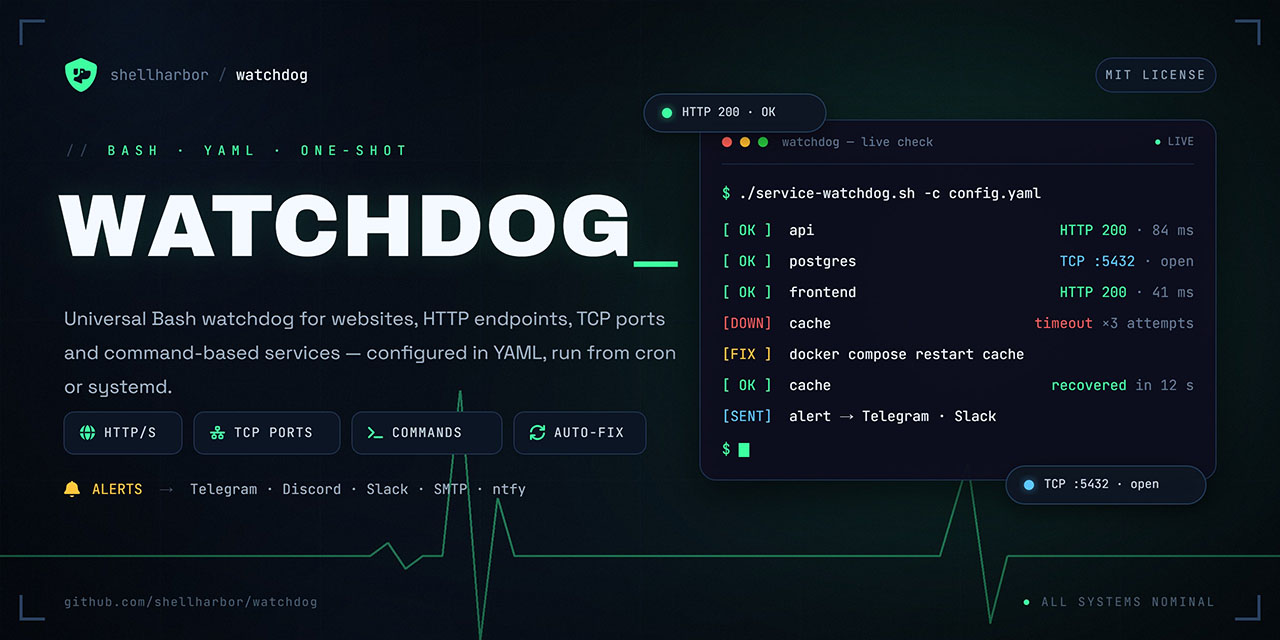
A secure, one-shot Bash watchdog for services, infrastructure, and operational automation.
Watchdog runs one monitoring cycle, reports the result, performs configured recovery actions when appropriate, and exits. It is designed to be invoked by cron, systemd timers, Docker Compose, Kubernetes CronJobs, or another external scheduler — not kept alive as a long-running daemon.
What it monitors
- HTTP and HTTPS endpoints, including headers, content type, JSON assertions, mTLS, and proxies
- TCP services
- Arbitrary commands executed as direct argv arrays — no
evalorbash -c - DNS records and ICMP/Ping availability
- TLS certificate expiry
- Disk-space thresholds
- Liveness and readiness policies
- Dependencies between services
Operational features
- Failure, recovery, and escalation notifications
- Email, Telegram, Discord, Slack, ntfy, PagerDuty, Opsgenie, and custom webhooks
- Test notifications without intentionally breaking a service
- Cooldowns, exponential backoff, flapping protection, circuit breakers, and maintenance windows
- Remote HTTP remediation for Kubernetes and API-driven environments
- Prometheus textfile metrics, heartbeat metrics, history, reports, trends, and a static status page
- Parallel checks, templates, conditional checks, Docker Compose/systemd discovery, and federation mode
- JSON Schema support for YAML editor validation and autocomplete
Quick start
Create a minimal config.yaml:
settings:
  log_file: /var/lib/watchdog/watchdog.log
  state_directory: /var/lib/watchdog/state

services:
  - name: api
    check:
      type: http
      url: https://api.example.com/health
Prepare a writable state directory for the non-root container user:
mkdir -p state
sudo chown -R 10001:10001 state
Validate the configuration before running checks:
docker pull shellharbor/watchdog:1.7.8

docker run --rm \
  --read-only \
  --tmpfs /tmp:rw,noexec,nosuid,size=64m \
  --cap-drop ALL \
  --security-opt no-new-privileges:true \
  --volume "$PWD/config.yaml:/etc/watchdog/config.yaml:ro" \
  --volume "$PWD/state:/var/lib/watchdog" \
  shellharbor/watchdog:1.7.8 validate
Run one monitoring cycle:
docker run --rm \
  --read-only \
  --tmpfs /tmp:rw,noexec,nosuid,size=64m \
  --cap-drop ALL \
  --security-opt no-new-privileges:true \
  --volume "$PWD/config.yaml:/etc/watchdog/config.yaml:ro" \
  --volume "$PWD/state:/var/lib/watchdog" \
  shellharbor/watchdog:1.7.8
Docker Compose
services:
  watchdog:
    image: shellharbor/watchdog:1.7.8
    read_only: true
    tmpfs:
      - /tmp:rw,noexec,nosuid,size=64m
    cap_drop:
      - ALL
    security_opt:
      - no-new-privileges:true
    volumes:
      - ./config.yaml:/etc/watchdog/config.yaml:ro
      - ./state:/var/lib/watchdog
    env_file:
      - ./notification.env
Run validation:
docker compose run --rm watchdog validate
Run one cycle:
docker compose run --rm watchdog
Schedule it with the host cron daemon:
* * * * * cd /srv/watchdog && /usr/bin/docker compose run --rm --no-deps watchdog
Useful commands
# Validate configuration without checks, notifications, or state writes.
docker compose run --rm watchdog validate

# Show saved service state without performing checks.
docker compose run --rm watchdog status

# Send test notifications without changing Watchdog state.
docker compose run --rm watchdog notify-test --channel all
Exit codes:
0— all monitored services are healthy1— at least one service is unavailable or remediation was attempted2— configuration or runtime error
Secrets and notifications
Keep credentials outside YAML. Watchdog reads secrets exclusively through *_env fields.
# notification.env
WATCHDOG_SMTP_PASSWORD=replace-me
WATCHDOG_TG_BOT_TOKEN=replace-me
WATCHDOG_PAGERDUTY_ROUTING_KEY=replace-me
Mount or provide this file only through your platform’s protected secret mechanism. Never bake tokens, passwords, private keys, or webhook URLs into an image, command line, or committed configuration file.
Container security
The production image is designed for least-privilege execution:
- Runs as non-root UID/GID
10001 - Supports a read-only root filesystem
- Requires only a small writable
/tmpand a deliberately mounted state directory - Does not require privileged mode, host networking, host filesystem mounts, or a Docker socket
- Drops Linux capabilities and supports
no-new-privileges
The default image intentionally does not contain the Docker CLI. A separate -docker image variant exists only for carefully reviewed Docker remediation workflows; mounting /var/run/docker.sock grants powerful host control and should be avoided whenever remote HTTP remediation or platform-native automation is available.
Important container boundaries
Watchdog observes the container’s network and mounted filesystems:
127.0.0.1refers to the Watchdog container, not the Docker host.- Disk checks measure only filesystems mounted into the container.
- Host
systemctlactions are unavailable inside the container. - For Kubernetes, use the official Helm chart and remote HTTP remediation or Kubernetes-native automation.
Tags
Use a pinned release tag in production:
shellharbor/watchdog:1.7.8
Published releases also provide minor and major version tags where applicable. latest is intended for non-prerelease releases only. Docker-enabled variants use the -docker suffix, for example:
shellharbor/watchdog:1.7.8-docker
Documentation
- GitHub repository: https://github.com/shellharbor/watchdog
- Full configuration reference: https://github.com/shellharbor/watchdog#configuration
- Docker deployment guide: https://github.com/shellharbor/watchdog#run-watchdog-in-docker
- Kubernetes Helm chart: https://github.com/shellharbor/watchdog/tree/main/charts/watchdog
- Security policy: https://github.com/shellharbor/watchdog/security/policy
- License: MIT
Tag summary
Content type
Image
Digest
sha256:e352aa63a…
Size
44.1 MB
Last updated
25 days ago
docker pull shellharbor/watchdog