shibbirweb/on-air-record
Record a microphone around the clock and stream it live to browsers on your network
1.6K
shibbirweb/on-air-record repository overview
On Air Record
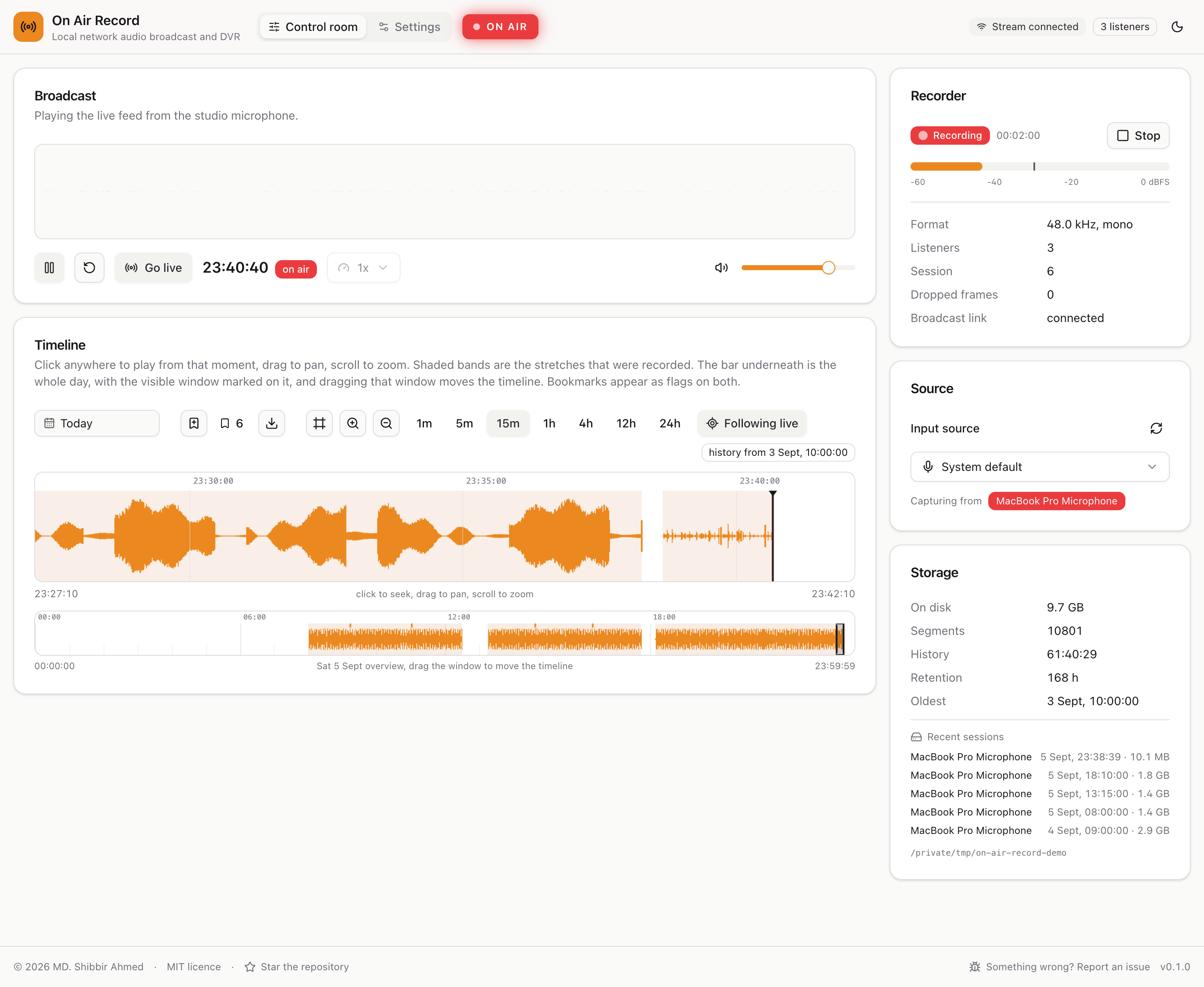
Records a microphone around the clock and broadcasts it live to every browser on your local network. Anyone on the network can listen live, or scrub back through the recordings on a CCTV style timeline, like a DVR for audio. One small service: no database, no web server, and logins only if you want them.
Linux hosts only. The container reaches the microphone through the host's sound devices in /dev/snd.
Docker Desktop on macOS and Windows runs containers in a virtual machine that has no sound hardware, so
there is nothing to pass through. On a Mac or a Windows PC, use
the installers
instead.
The same image, with the same tags, is on GitHub's registry as ghcr.io/shibbirweb/on-air-record, which
has no pull rate limit. Either works.
Quick start
Check the host can see a microphone first: ls -d /proc/asound/card*/pcm*c should print a line for it.
Then, in an empty folder:
curl -fsSLO https://raw.githubusercontent.com/shibbirweb/on-air-record/master/packaging/compose.yaml

# The group number that owns the sound devices, and your time zone
audio_gid="$(stat -c %g /dev/snd/timer)"
zone="$(timedatectl show -p Timezone --value 2>/dev/null || readlink -f /etc/localtime | sed 's|.*/zoneinfo/||')"
printf 'AUDIO_GID=%s\nTZ=%s\n' "$audio_gid" "$zone" > .env

docker compose up -d
Open http://<this machine's address>:8080, answer the question about logins, and pick the microphone on
the settings page.
To pull from Docker Hub rather than ghcr.io, change the image line in compose.yaml to
shibbirweb/on-air-record:latest.
Without Compose
docker run -d --name on-air-record --restart unless-stopped \
  -p 8080:8080 \
  --device /dev/snd \
  --group-add "$(stat -c %g /dev/snd/timer)" \
  -e TZ="$(timedatectl show -p Timezone --value 2>/dev/null || readlink -f /etc/localtime | sed 's|.*/zoneinfo/||')" \
  -v on-air-record_data:/data \
  --stop-timeout 30 \
  shibbirweb/on-air-record:latest
--stop-timeout 30 gives it time to close and index the recording in progress when it is stopped.
Tags
| Tag | What it is |
|---|---|
latest | The newest stable release. Use this unless you have a reason not to. |
beta | The newest release of any kind, beta or stable. |
0.8 | The newest release in a minor line, for fixes without new features. |
0.8.0, 0.8.0-beta.2 | One exact version, which never moves. |
Every tag is built for linux/amd64 and linux/arm64, which includes a Raspberry Pi running a 64 bit OS.
Following betas? Also set OAR_CHANNEL=beta in the container's environment, so its update notices name
the beta image.
Microphone access
Nearly every problem is a permission problem, and they all look the same from the web page: no microphones. The container needs three things:
| What it needs | Given by | |
|---|---|---|
| 1 | The device files inside the container | devices: /dev/snd, or --device /dev/snd |
| 2 | Permission to use devices at all | the same line; not a /dev/snd volume, which appears but cannot be opened |
| 3 | The group that owns the files | group_add: or --group-add with the group's number |
The group has to be a number: the name audio is looked up inside the container, where it is 29, while
the host's may be 63 or anything else. The commands above read it from the devices themselves. Your own
account does not need to be in the audio group, and the container never needs privileged or root.
The service tells you which one is missing. When it cannot reach the sound cards it says so in
docker compose logs and in the recorder panel, with the fix, such as:
The container is not in the group that owns /dev/snd (group 63). Set AUDIO_GID=63 in .env and run
docker compose up -d, or with docker run add --group-add 63.
A microphone plugged in after the container started needs docker compose restart. The setup guide has
a table of every symptom and its fix,
including SELinux, rootless Docker, and a muted input.
Data, time zone and port
- Recordings, settings and accounts live in
/data. The service runs as user 10001, so a folder of your own must be given to it first:sudo chown -R 10001:10001 /srv/on-air-record, then mount it with-v /srv/on-air-record:/data. On SELinux, add:Z. TZmust be your time zone, because recordings are filed by local calendar day. Without it every day is a UTC day.- The port: change the left side of
-p 8080:8080, or setOAR_PORTin.envwith the compose file. The service inside always listens on 8080.
Disk use is about 330 MB per hour of recording at full quality, or 110 MB at voice quality. The settings page works out how much history fits and deletes the oldest recordings to stay inside it.
Environment variables
Set these under environment: in compose.yaml, or with -e NAME=value on docker run:
| Variable | Default | What it does |
|---|---|---|
TZ | UTC | Your time zone, such as Europe/London. Recordings are filed by local calendar day. |
OAR_CHANNEL | beta in a beta image, stable otherwise | Which releases the update notices offer. Set beta when following the beta tag. |
OAR_LOG_LEVEL | info | error, warn, info, debug or trace. Use debug when reporting a problem. |
RUST_LOG | not set | A detailed logging filter that replaces OAR_LOG_LEVEL, such as on_air_record=debug. |
The image sets OAR_PORT=8080, OAR_HOST=0.0.0.0, OAR_DATA_DIR=/data and OAR_CONTAINER=docker; leave
them alone. In particular OAR_HOST=127.0.0.1 makes it unreachable through the port mapping while it
still reports healthy; to limit who can reach it, publish the port on one address, like
-p 127.0.0.1:8080:8080.
With the compose file, its .env holds AUDIO_GID (the group that owns /dev/snd), TZ, and
OAR_PORT, which there is only the port on the host; the service inside stays on 8080. The setup guide
lists every variable
with more detail.
Day to day
docker compose logs -f             # the log
docker compose ps                  # running, and healthy
docker compose pull && docker compose up -d                                 # update
docker exec on-air-record on-air-record auth reset-password [email protected] # forgotten admin password
The image checks its own health every 30 seconds. Healthy means the service is answering, not that it is recording. Admins are told in the app when a new version is out, with these same update commands.
Keep it on your network
Do not expose the port to the internet, even with logins switched on: it is a microphone that is always on, built for a local network. Use a VPN to reach it from elsewhere.
More
- Installation and setup, the full Docker section
- User guide, every screen of the app
- Source code and issues, MIT licensed
Tag summary
Content type
Image
Digest
sha256:f15236e13…
Size
32.7 MB
Last updated
14 days ago
docker pull shibbirweb/on-air-record