shivkumar56/propai
PropAI is an advanced, AI-powered platform revolutionizing the accommodation search process.
190
shivkumar56/propai repository overview
PropAI: Your Comprehensive Property Assistant
PropAI is an advanced, AI-powered platform revolutionizing the accommodation search process. Developed by Shivkumar Raghuwanshi, PropAI offers expert guidance across a wide spectrum of housing options through its specialized AI assistants.
- Docker Hub: https://hub.docker.com/r/shivkumar56/propai
- GitHub: https://github.com/Shivkumar-Raghuwanshi/PropAI
- Live Website: https://prop-ai-shivkumar-raghuwanshis-projects.vercel.app/
Watch the video by clicking on the thumbnail below:
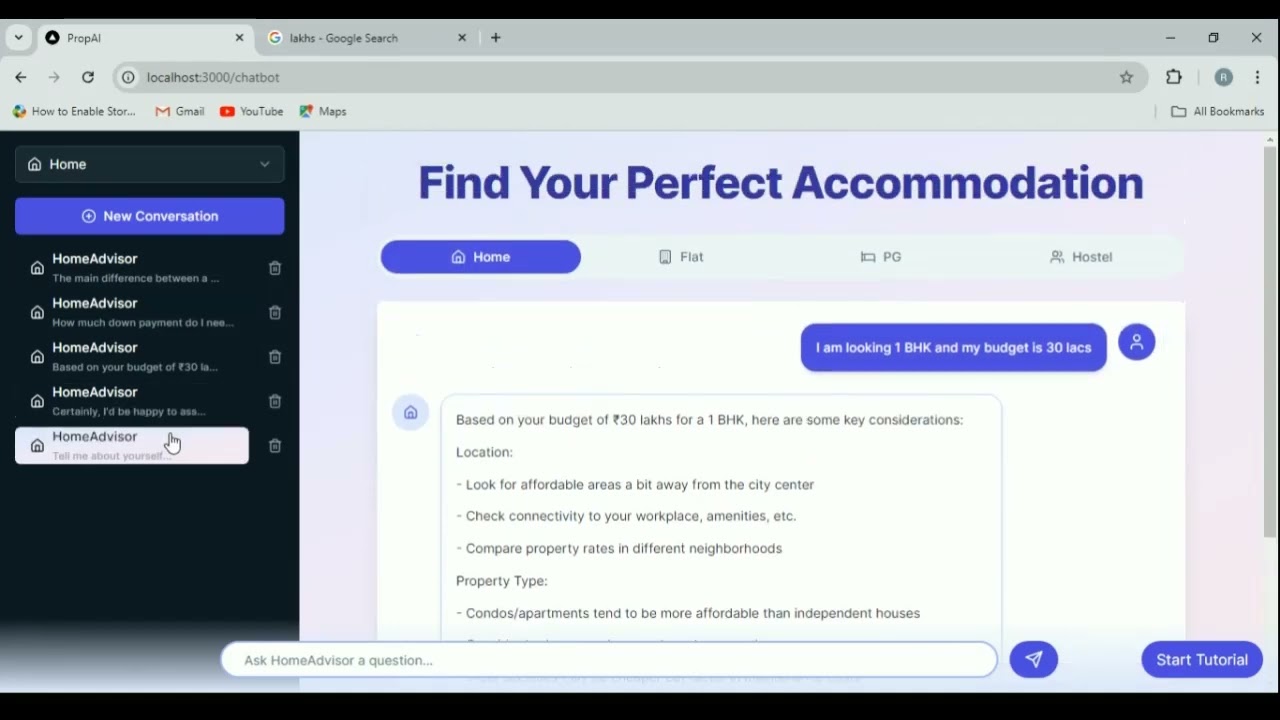
Table of Contents
- Features
- Tech Stack
- System Architecture
- Getting Started
- Usage
- [Containerization] (Docker)
- Deployment
- Contact
Features
PropAI incorporates four specialized AI assistants, each focusing on a different housing category:
1. HomeAdvisor
- Home Buying Expertise:
- Guidance on types of homes (single-family, multi-family, townhouses, condos)
- Explanation of the home buying process (mortgages, down payments, closing costs)
- Property evaluation assistance (location factors, school districts, property taxes)
- Financial Considerations:
- Analysis of long-term investment potential
- Advice on property taxes, insurance, utilities, and maintenance costs
- Legal Aspects:
- Information on property titles and deed types
- Guidance on homeowners' associations
2. FlatFinder
- Rental Assistance:
- Information on types of flats (studio, 1-bedroom, 2-bedroom, penthouse)
- Guidance on the rental process (applications, credit checks, lease agreements)
- Advice on rent considerations (monthly rent, utilities, rent control laws)
- Location and Amenities:
- Analysis of location considerations (proximity to work/school, public transport)
- Information on apartment and building amenities
- Tenant Rights:
- Education on tenant rights and responsibilities in different regions
3. PGPal
- PG Accommodation Guidance:
- Information on types of PG setups (single sharing, double sharing, triple sharing)
- Details on PG facilities (furnished/unfurnished rooms, meal plans, laundry services)
- Explanation of common house rules and regulations
- Cost and Safety:
- Breakdown of cost structures (rent, deposits, additional charges)
- Information on safety and security measures in PG accommodations
- Conflict Resolution:
- Tips for maintaining good relationships with PG owners and co-residents
- Guidance on conflict resolution between PG owners and tenants
4. HostelHelper
- Hostel Information:
- Details on types of hostels (youth hostels, student hostels, backpacker hostels)
- Information on hostel facilities (dorm rooms, private rooms, common areas)
- Guidance on booking processes and typical hostel policies
- Social Aspects:
- Information on social aspects of hostel living and community events
- Tips for first-time hostel stayers
- Long-term Options:
- Advice on long-term stay options in hostels
- Cost comparisons between hostels and other accommodation types
Tech Stack
PropAI leverages a modern and robust technology stack:
Frontend
- Next.js 14.2.5:
- React framework for building user interfaces
- Enables server-side rendering and generation of static websites
- TypeScript:
- Adds static typing to JavaScript
- Enhances code quality and developer productivity
- Tailwind CSS:
- Utility-first CSS framework
- Enables rapid UI development with pre-built classes
- Shadcn UI:
- React components built with Radix UI and Tailwind CSS
- Provides accessible and customizable UI components
Backend
- LangChain:
- Framework for developing applications powered by language models
- Facilitates the integration and fine-tuning of AI models
- Prisma ORM:
- Next-generation ORM for Node.js and TypeScript
- Simplifies database workflows and provides type-safe database access
- Supabase (PostgreSQL):
- Open-source Firebase alternative
- Provides a scalable PostgreSQL database with real-time capabilities
AI Integration
- Anthropic API:
- Enables integration of advanced AI capabilities
- Powers the core functionality of the AI assistants
Authentication & Authorization
- Clerk:
- Complete user management solution
- Handles sign-up, sign-in, and user profile management
Webhooks
- Svix:
- Webhook service for reliable event delivery
- Enables real-time updates and integrations
System Architecture
PropAI follows a modern, scalable web application architecture:
-
Frontend Layer:
- Next.js application serves as the user interface
- Implements server-side rendering for improved performance and SEO
- Utilizes React components for dynamic user interactions
-
API Layer:
- Next.js API routes handle backend logic
- Processes requests and manages communication between frontend and backend services
-
AI Integration Layer:
- LangChain integrates with the Anthropic API
- Manages conversations with AI assistants and processes natural language inputs
-
Database Layer:
- Prisma ORM manages database operations
- Interacts with the Supabase-hosted PostgreSQL database
-
Authentication Layer:
- Clerk handles user authentication and authorization
- Manages user sessions and access control
-
Webhook Layer:
- Svix manages webhook events for real-time updates
- Enables integrations with external services and event-driven architecture
Getting Started
Prerequisites
Before you begin, ensure you have the following installed:
- Node.js (v20 or later)
- npm (v10 or later)
- Git
You will also need accounts with the following services:
- Supabase
- Clerk
- Anthropic
Installation
- Clone the repository:
- git clone https://github.com/Shivkumar-Raghuwanshi/PropAI.git
- cd PropAI
- Install dependencies:
- npm install
Configuration
- Set up environment variables:
Create a
.envfile in the root directory and add the following variables:
- ANTHROPIC_API_KEY = your_anthropic_api_key
- NEXT_PUBLIC_CLERK_PUBLISHABLE_KEY=your_clerk_publishable_key
- CLERK_SECRET_KEY= your_clerk_secret_key
- NEXT_PUBLIC_CLERK_SIGN_IN_URL= /auth/sign-in
- NEXT_PUBLIC_CLERK_SIGN_UP_URL=/auth/sign-up
- NEXT_PUBLIC_CLERK_AFTER_SIGN_IN_URL=/chatbot
- NEXT_PUBLIC_CLERK_AFTER_SIGN_UP_URL=/
- DATABASE_URL=your_supabase_postgres_url
- DIRECT_URL = your_supabase_postgres_url
DATABASE_DOCKER_URL = postgresql://<username>:<password>@<host>:<port>/<database_name>- WEBHOOK_SECRET = your_webhook_secret
- Set up the database:
- npx prisma generate
- npx prisma migrate dev
Containerization (Docker)
The application is containerized using Docker for easy deployment and scalability. A Dockerfile is provided in the project root, containing instructions for building the Docker image.
If you want to run the project using Docker, you can pull the Docker image from Docker Hub and run it:
- docker pull shivkumar56/propai:latest
- docker run -d -p 3000:3000 shivkumar56/propai
Usage
Running the Application
- Start the development server:
- npm run dev
- Open http://localhost:3000 in your browser to use the application.
Deployment
[Provide instructions on how to deploy the application to production, including any necessary build steps or environment configurations]
Contributing
We welcome contributions to PropAI!
License
This project is licensed under the MIT License.
Contact
For any queries or support, please contact Shivkumar Raghuwanshi at [[email protected]].
Tag summary
Content type
Image
Digest
sha256:26e93e625…
Size
1.1 GB
Last updated
about 2 years ago
docker pull shivkumar56/propai