shymike/waka-relay
📊 A self-hosted app that relays WakaTime heartbeats to multiple instances
473
shymike/waka-relay repository overview
A self-hosted app that relays WakaTime heartbeats to multiple instances




Setup | Usage | How it works | Issues | PyPI Package
Features
- ✅ Multi-instance support
- ✅ Self-hosted
- ✅ Key authentication
- ✅ Invalid project warnings
- ✅ Highly configurable
- ✅ Fully relays WakaTime requests
Table of contents
Setup
Quick run
Python (>=3.8) is required for this installation type, please install it before continuing.
# Install the package
$ pip install waka-relay

# Then run the app
$ waka-relay
Uv
Using the uv package manager (this method does not require a venv on non Windows systems) and is usually the preferred option:
# Install the tool (system wide command)
$ uv tool install waka-relay

# Run it
$ waka-relay

# Run it (without installing the command)
$ uv tool run waka-relay
Python
Python (>=3.8) is required for this installation type, please install it before continuing.
# Clone the repository
$ git clone https://github.com/ImShyMike/waka-relay.git

# Move into the project's folder
$ cd waka-relay

# Install the dependencies
$ pip install -r requirements.txt

# Then run the app using python
$ python wakarelay/main.py

# Or use uvicorn directly (WARNING: this will ignore the host, port, and worker configuration)
$ uvicorn wakarelay.main:app
Using docker
Using the prebuilt image:
# Pull the docker image
$ docker pull shymike/waka-relay

# Then run the container
$ docker run -d \
  -p 25892:25892 \
  -v ~/.waka-relay.toml:/root/.waka-relay.toml \
  --name waka-relay \
  waka-relay
Or build the image yourself:
# Clone the repository
$ git clone https://github.com/ImShyMike/waka-relay.git

# Move into the project's folder
$ cd waka-relay

# First start by building the docker image
$ docker build --network host -t waka-relay .

# Then run the container
$ docker run -d \
  -p 25892:25892 \
  -v ~/.waka-relay.toml:/root/.waka-relay.toml \
  --name waka-relay \
  waka-relay
Usage
In your ~/.wakatime.cfg file, set the API url to the adress of the waka-relay server. (this example uses localhost)
[settings]
api_key = 39949664-5a5f-4c7d-95b2-44a864f67b6a
api_url = http://localhost:25892
(api_key must be a valid UUID, even if require_api_key is false)
How it works
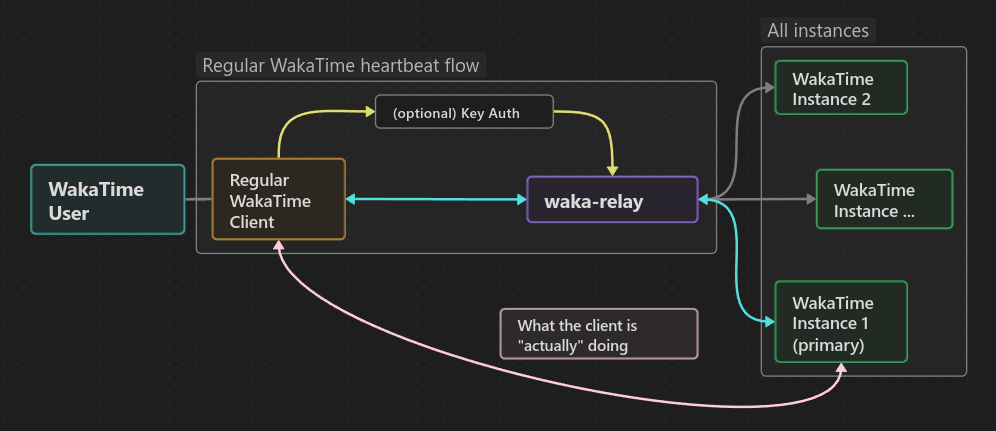
A "WakaTime instance" does not need to be the real WakaTime server, it can also be anything that implements the same protocol. (compatible backends)
Example config
The configuration file must be located either in ~/.waka-relay.toml or ./.waka-relay.toml (first config file found is used)
[relay]
workers = 2
timeout = 10
require_api_key = true
api_key = "39949664-5a5f-4c7d-95b2-44a864f67b6a"
debug = false

[relay.instances]
"https://api.wakatime.com/api/v1" = "WAKATIME API KEY"
For a full config example with an explanation check out the example config file.
Configuration options
| TOML key | Default value | Description |
|---|---|---|
host | "0.0.0.0" | Host for the webserver to listen on |
port | 25892 | Port for the webserver to run on |
workers | 1 | Worker process count for the webserver |
timeout | 25 | Timeout value for the relayed requests (in seconds) |
retries | 3 | Number of retries for failed requests |
time_text | "%TEXT% (Relayed)" | Text to display in the IDE (%TEXT% is replaced by what the api retuns) |
require_api_key | false | Whether or not to require an API key |
api_key | "" | The API key to use if require_api_key is true |
debug | false | Whether or not to enable debug logging |
Known compatible backends
This relay is know to be compatible with the following backend servers:
(all of the above servers were tested using the vscode extension)
Others may work, this is just a list of the ones that were tested and are compatible.
Issues
Please feel free to open an issue on the github if you come across a bug or crash as this project has not been fully tested and may have some bugs.
Star History
Tag summary
Content type
Image
Digest
sha256:4c97f0498…
Size
37.2 MB
Last updated
about 1 year ago
docker pull shymike/waka-relay