simeononsecurity/discord-stock-ticker
Add live stock & crypto prices to your discord sidebar. https://simeononsecurity.ch/
377
simeononsecurity/discord-stock-ticker repository overview
Github
Website
discord-stock-ticker
Live stock and crypto tickers for your discord server.
With these bots you can track prices of...
- Coins and Tokens on CoinGecko
- Marketcaps of Coins and Tokens on CoinGecko
- Stocks on Yahoo Finance
- Tokens on Pancakeswap
- Tokens on Dexlab
- Tokens on 1Inch
- NFT Collections on OpenSea, Solanart, and Solart
- Gas on Ethereum, Binance, and Polygon Chains
- Number of holders of a token on Ethereum and Binance Chains
🍾 100 public tickers with over 15k installs across 3k discord servers!
🛠️ Use theis project to host your own tickers, or .pay for custom tickers to be made.





Contents
- discord-stock-ticker
- Contents
- Preview
- Join the discord server
- Support this project
- Add free tickers to your servers
- Premium
- Self-Hosting
- Managing bots
- Stock and Crypto Price Tickers
- Stock and Crypto Price Tickerboards
- Crypto Market Cap
- Ethereum, BSC, and Polygon Gas Prices
- Ethereum, BSC, or Polygon Token Holders
- ETH/BSC/MATIC Token Price
- OpenSea/Solanart NFT Collection Floor Price
- Roles for colors
- Kubernetes
- Louie
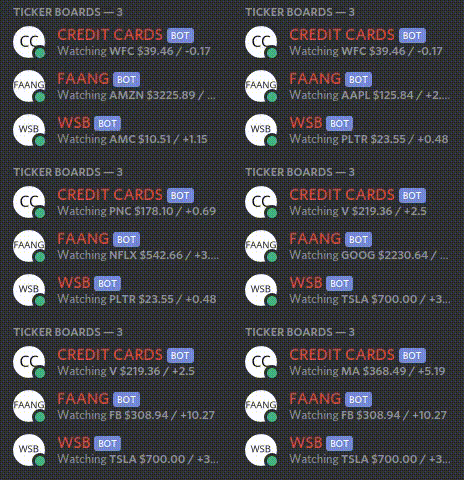
Preview




Join the discord server
Support this project


Love these bots? You can support this project by subscribing to the premium version, buying me a coffee, using my digital ocean referral link, or hiring me to write or host your discord bot!
Add free tickers to your servers
Stocks
bb | amc | nok | aapl | amzn | goog | ^gspc | ^dji | ^ixic | tsla | dkng | spy | amd | nio | gc=f | si=f | cl=f | pltr | pypl | sndl | rty=f | ^vix | arkk | msft | nflx | gme | dis | es=f | nq=f | ym=f | nvda | fb | btc | coin | ndaq | qqq |
Crypto
bitcoin | ethereum | bitcoin-cash | dogecoin | monero | litecoin | ripple | polkadot | cardano | chainlink | stellar | iota | reef-finance | algorand | tezos | ethereum-classic | ravencoin | binancecoin | ecomi | aave | uniswap | bittorrent-2 | tron | vechain | illuvium | cosmos | zilliqa | matic-network | basic-attention-token | shiba-inu | pancakeswap-token | solana | raydium | safemoon | ftx-token | enjincoin | decentraland | fantom | coti | hedera-hashgraph | sushi | kusama | eos | terra-luna | chia | theta-token | tether | smooth-love-potion | axie-infinity | harmony | cryptoblades | my-defi-pet | mist | weth | plant-vs-undead-token | cryptozoon | binance-usd | splinterlands | wax | coinary-token | avalanche-2 | cryptocars | binamon | wanaka-farm |
Gas Prices


Premium
If you are interested in a ticker that isnt on this list, you can host your own using the code here or pay to have them made for you.
Price per bot (paid monthly): $1
Price per bot (paid yearly): $10
If you are interested please see the contact info on my github page and send me a messgae via your platform of choice (discord perferred). For a live demo, join the support discord linked at the top or bottom of this page.
Self-Hosting
Click here to watch a quick video tutorial on how to self-host these bots on linux. There is also an in depth written format gist here. If you are familar with ansible, I have a playbook here.
Pull down the latest release for your OS here. Extract. Run.
wget https://github.com/rssnyder/discord-stock-ticker/releases/download/v2.0.0/discord-stock-ticker-v3.3.0-linux-amd64.tar.gz

tar zxf discord-stock-ticker-v3.3.0-linux-amd64.tar.gz

./discord-stock-ticker
Setting options
There are options you can set for the service using flags:
  -address="localhost:8080": address:port to bind http server to.
  -cache=false: enable cache for coingecko
  -db="": file to store tickers in
  -frequency=0: set frequency for all tickers
  -logLevel=0: defines the log level. 0=production builds. 1=dev builds.
  -redisAddress="localhost:6379": address:port for redis server.
  -redisDB=0: redis db to use
  -redisPassword="": redis password
Systemd (linux)
The script here (ran as root) will download and install a discord-stock-ticker service on your linux machine with an API avalible on port 8080 to manage bots.
wget https://github.com/rssnyder/discord-stock-ticker/releases/download/v3.3.0/discord-stock-ticker-v3.3.0-linux-amd64.tar.gz

tar zxf discord-stock-ticker-v3.3.0-linux-amd64.tar.gz

mkdir -p /etc/discord-stock-ticker

mv discord-stock-ticker /etc/discord-stock-ticker/

wget https://raw.githubusercontent.com/rssnyder/discord-stock-ticker/master/discord-stock-ticker.service

mv discord-stock-ticker.service /etc/systemd/system/

systemctl daemon-reload

systemctl start discord-stock-ticker.service
If you need to make modifications to the setting of the service, just edit the /etc/systemd/system/discord-stock-ticker.service file on the line with ExecStart=. An example walkthrough can be found in this issue. Be sure to run systemctl daemon-reload to pick up and changes.
Now that you have the service running, you can add bots using the API exposed on the addres and port that the service runs on (this address is shown when you start the service).
Managing bots
All bots are controlled via an API interface and follow the same api template for management:
Available methods:
GET     # show all currently running bots and their configuration
POST    # create a new bot
PATCH   # restart a running bot
DELETE  # delete a running bot
If you are new to using an API to manage things, there are several ways to make API calls:
- Curl. This is a command available on virtually all Linux distros. Replace anything between < and > with the appropriate information.
The generic format for a curl API call:
curl -X <method> -H "Content-type: application/json" -d <inline json or from file> <hostname>:<port>/<bot type>
GET is the default method for curl, so you may omit the method. Also since you're just retrieving your bots, you can omit the -d flag as well.
Get a listing of all your bots:
curl localhost:8080/<bot type>
Create a new bot: (In this example, the bot configuration is located in a file 'btc.json', in the folder bots/crypo)
curl -X POST -H "Content-type: application/json" -d @bots/crypto/btc.json localhost:8080/ticker
Instructions for restarting running bots and deleting bots are forthcoming.
- Powershell:
$Body = @{
  name = "bitcoin"
  crypto = $true
  discord_bot_token = "xxxxxxxxxxxxxxxxxxxxxxxxx"
}

$Parameters = @{
    Method = "POST"
    Uri =  "127.0.0.1:8080/ticker"
    Body = ($Body | ConvertTo-Json)
    ContentType = "application/json"
}

Invoke-RestMethod @Parameters
Stock and Crypto Price Tickers
bot type: ticker
Tracks stock or crypto prices. Uses Yahoo for stock or CoinGecko for crypto.
Bot Configuration (stock)
{
  "ticker": "pfg",                                  # string: symbol for the stock from yahoo finance
  "name": "2) PFG",                                 # string/OPTIONAL: overwrites display name of bot
  "color": true,                                    # bool/OPTIONAL: requires nickname
  "decorator": "@",                                 # string/OPTIONAL: what to show instead of arrows
  "currency": "aud",                                # string/OPTIONAL: alternative curreny
  "activity": "Hello;Its;Me",                       # string/OPTIONAL: list of strings to show in activity section
  "nickname": true,                                 # bool/OPTIONAL: display information in nickname vs activity
  "frequency": 10,                                  # int/OPTIONAL: seconds between refresh
  "twelve_data_key": "xxx",                         # string/OPTIONAL: use twelve data as source, pass in api key
  "discord_bot_token": "xxxxxxxxxxxxxxxxxxxxxxxx"   # string: dicord bot token
}
Bot Configuration (crypto)
{
  "name": "bitcoin",                                # string: name of the crypto from coingecko
  "crypto": true,                                   # bool: always true for crypto
  "ticker": "1) BTC",                               # string/OPTIONAL: overwrites display name of bot
  "color": true,                                    # bool/OPTIONAL: requires nickname
  "decorator": "@",                                 # string/OPTIONAL: what to show instead of arrows
  "currency": "aud",                                # string/OPTIONAL: alternative curreny
  "currency_symbol": "AUD",                         # string/OPTIONAL: alternative curreny symbol
  "pair": "binancecoin",                            # string/OPTIONAL: pair the coin with another coin, replaces activity section
  "pair_flip": true,                                # bool/OPTIONAL: show <pair>/<coin> rather than <coin>/<pair>
  "activity": "Hello;Its;Me",                       # string/OPTIONAL: list of strings to show in activity section
  "decimals": 3,                                    # int/OPTIONAL: set number of decimal places
  "nickname": true,                                 # bool/OPTIONAL: display information in nickname vs activity
  "frequency": 10,                                  # int/OPTIONAL: seconds between refresh
  "discord_bot_token": "xxxxxxxxxxxxxxxxxxxxxxxx"   # string: dicord bot token
}
Stock and Crypto Price Tickerboards
bot type: tickerboard
Tracks multiple stock or crypto prices. Uses Yahoo for stock or CoinGecko for crypto.
Bot Configuration (stock)
{
  "name": "Stocks",                                 # string: name of your board
  "items": ["PFG", "GME", "AMC"],                   # list of strings: symbols from yahoo finance to rotate through
  "header": "1. ",                                  # string/OPTIONAL: adds a header to the nickname to help sort bots
  "color": true,                                    # bool/OPTIONAL: requires nickname
  "arrows": true,                                   # bool/OPTIONAL: show arrows in ticker names
  "nickname": true,                                 # bool/OPTIONAL: display information in nickname vs activity
  "frequency": 10,                                  # int/OPTIONAL: seconds between refresh
  "discord_bot_token": "xxxxxxxxxxxxxxxxxxxxxxxx"   # string: dicord bot token
}
Bot Configuration (crypto)
{
  "name": "Cryptos",                                # string: name of your board
  "crypto": true,                                   # bool: always true for crypto
  "items": ["bitcoin", "ethereum", "dogecoin"],     # list of strings: names from coingecko to rotate through
  "header": "2. ",                                  # string/OPTIONAL: adds a header to the nickname to help sort bots
  "color": true,                                    # bool/OPTIONAL: requires nickname
  "arrows": true,                                   # bool/OPTIONAL: show arrows in ticker names
  "nickname": true,                                 # bool/OPTIONAL: display information in nickname vs activity
  "frequency": 10,                                  # int/OPTIONAL: seconds between refresh
  "discord_bot_token": "xxxxxxxxxxxxxxxxxxxxxxxx"   # string:
Tag summary
Content type
Image
Digest
sha256:2b1659346…
Size
491.3 MB
Last updated
over 3 years ago
docker pull simeononsecurity/discord-stock-ticker