simplic17y/disc-o-matic
A disc-ripping appliance with a web UI, made for Unraid and happy on any Docker host.
286
simplic17y/disc-o-matic repository overview
Disc-o-Matic
A disc ripper that lives on your server. Put a disc in the drive and Disc-o-Matic reads it, works out what it is, and backs it up or rips it, either straight away or when you say so. It runs in Docker and was made with Unraid in mind, but any Linux box with an optical drive will do.
I built it because I wanted more tailor-made features around MakeMKV and CD ripping. Both MakeMKV and (for example) A.R.M. offer automatic backups, but neither met my expectations. So I made this contraption.
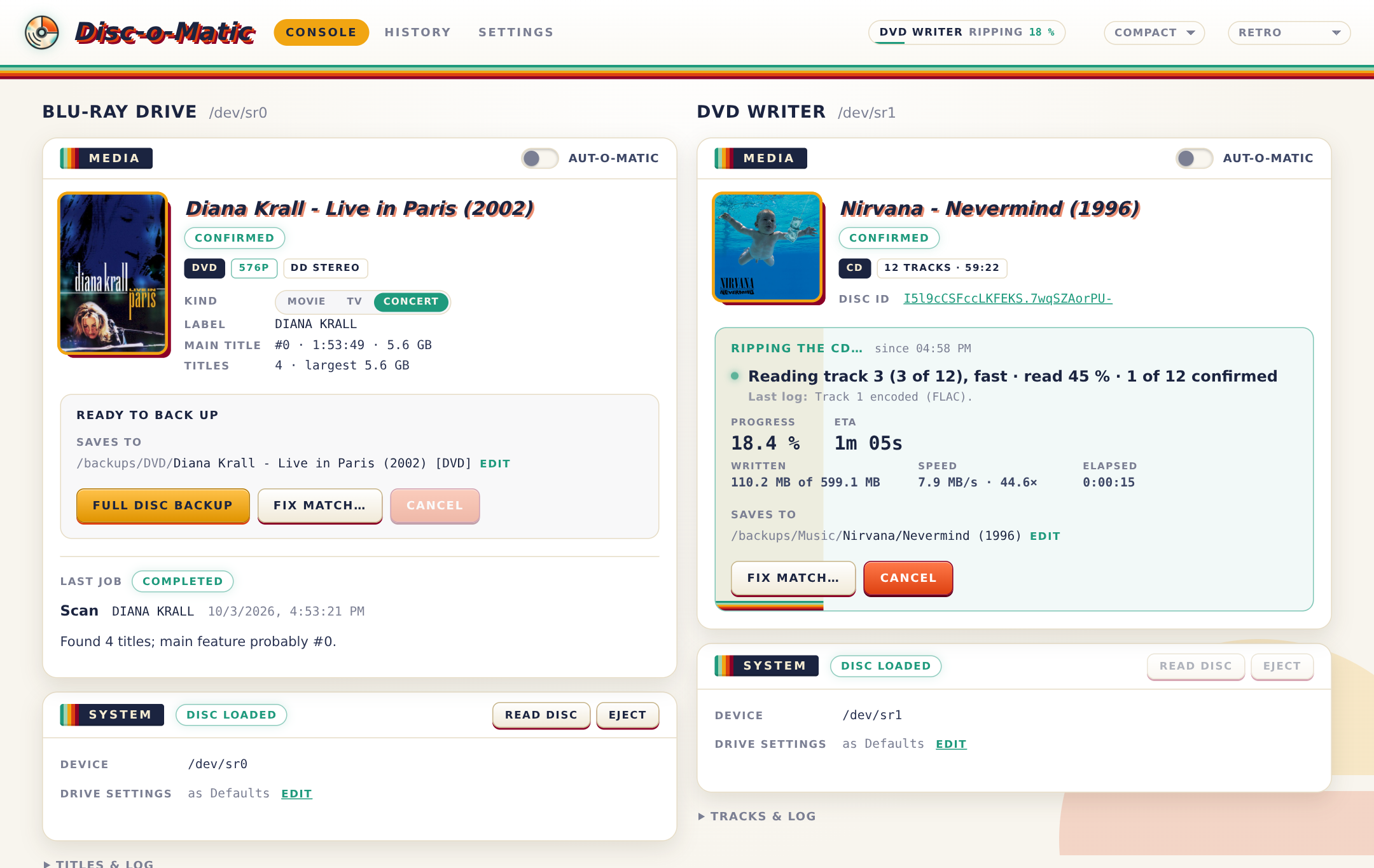
What it does (in short)
Movies, TV seasons and concerts on Blu-ray, UHD or DVD go through MakeMKV. You can keep a full backup of the disc or rip just the titles you want, and Disc-o-Matic looks the disc up so the files are named the way Plex, Jellyfin and Kodi like them.
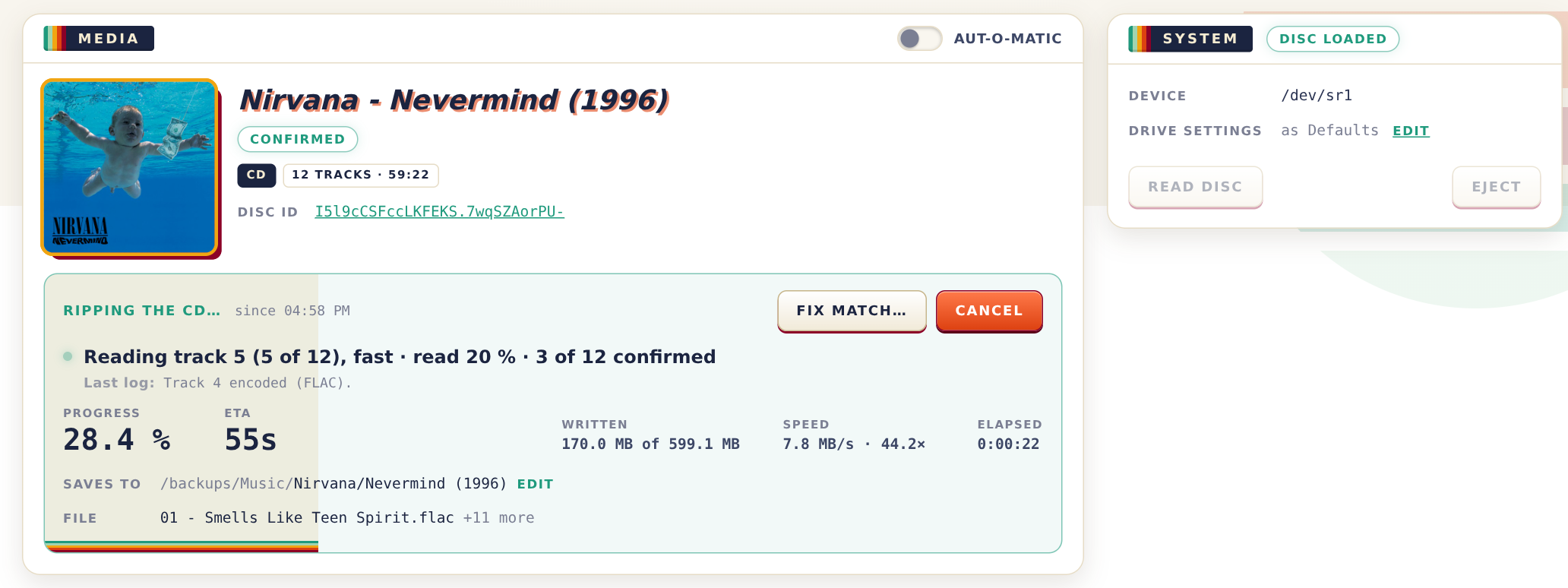
Music CDs are read and checked against AccurateRip and CTDB, to make sure each track is a perfect copy, then tagged from MusicBrainz and saved as FLAC (or MP3, Opus, etc.) with the cover art.
Data discs become ISO images, and a blank CD-R can be turned into an audio CD from any album in your backed-up library.
It can work fully automatically (except swapping discs...). Switch on Aut-o-matic mode, insert a disc, and after a short countdown it's backed up or ripped on its own. It can work with multiple drives independently and every rip comes with the metadata your media server needs.
Docker image: simplic17y/disc-o-matic.
Releases and what changed: releases.
Bugs and ideas: issues.
Have fun!
Install
Unraid. Search for Disc-o-Matic in Community Applications, or add the template by hand:
Docker → Add Container → Template, and paste
https://raw.githubusercontent.com/Disc-o-Matic/disc-o-matic/main/disc-o-matic.xml.
The drive goes in as two devices: its block device (/dev/sr0) and its SCSI generic device
(/dev/sgN), which MakeMKV needs. To find which sgN it is, run this on the server:
ls -l /sys/class/scsi_generic/*/device/block
Apply, then open port 8099. A second drive goes in the same way, with its own two devices.
Anywhere else with Docker. See compose.example.yaml, or:
docker run -d --name disc-o-matic -p 8099:8088 \
  --device /dev/sr0 --device /dev/sg2 \
  -v ./config:/config -v /srv/media/Backups:/backups \
  -e PUID=1000 -e PGID=1000 simplic17y/disc-o-matic:latest
On first start you'll see a setup checklist. It checks the drives, MakeMKV, your folders and the optional TMDB key, and tells you what to do about anything that isn't right yet.
About MakeMKV. The image includes MakeMKV, unmodified, under its own licence; by pulling the image you accept it. It's free while in beta, and the beta key is fetched and kept up to date for you (your own registration key, if you have one, goes in Settings → MakeMKV). MakeMKV gets past copy protection, so check that's legal where you live.
Features in detail
Blu-ray, UHD, DVD and HD DVD (MakeMKV)
- Full decrypted backups: a Blu-ray as its BDMV folder, a DVD as an ISO image.
- UHD with a LibreDrive-capable drive; MakeMKV's beta key fetched and kept current.
- MKV rips of chosen titles; the main feature is picked for you, and flagged when it's unclear.
- Rip MKVs later from a full backup, without the disc, in a section of its own that never holds up a drive.
- Recognition: TMDB for movies and TV (bring your own free API key), MusicBrainz for concerts; posters to choose from; a match can be fixed or entered by hand at any time.
- Naming for Plex, Jellyfin and Kodi: one folder per movie with several versions side by side
(
Alien (1979) - 2160p.mkv,- 1080p.mkv), TV episodes asSeason 01/Show - S01E05 - Title.mkv, extras inOther/. Templates for everything, with live examples, and a folder name can be typed by hand, even while the rip runs. - Track profiles: which audio and subtitle languages to keep, stereo duplicates and HD cores left out, LPCM saved as FLAC; picked per rip.
Music CDs (cdparanoia)
- Secure reading with the drive's read offset corrected; the offset for your drive model is suggested from AccurateRip's list.
- Every track checked against AccurateRip and CTDB, with a plain-language diagnosis when it doesn't match (another pressing, read errors, a wrong offset).
- Fast: a disc the databases know is read at full speed first, and only tracks they don't confirm are read again carefully. Tracks are encoded while the next one is read, and the drive is free (ejected, if you like) while the last checks and tagging finish.
- Scratched discs: retries per sector and per track, and a stopped rip resumes where it left off, in any drive.
- MusicBrainz disc ID, falling back to CD-TEXT and CD stubs; the tags Picard would write; ReplayGain; cover art from the Cover Art Archive, Deezer or iTunes; a playlist.
- FLAC (verified after encoding), MP3 or Opus; multi-disc albums in one folder; hidden tracks before track 1; silent filler tracks left out; an optional whole-disc FLAC + cue image.
- A standard rip log next to every album, with checksums and the result of each check.
Data discs and blanks
- Data discs copied sector by sector to an ISO image (GNU ddrescue), bad spots retried and reported.
- Burning: pick an album from your music folder and it's converted to CD audio and burnt disc-at-once (cdrdao), with CD-TEXT.
Around the jobs
- Several drives at once, each with its own section, name, read offset, Aut-o-matic switch and Blu-ray/DVD mode.
- Aut-o-matic: after a disc is read, the job starts after a countdown you can adjust or stop.
- Metadata with every backup and rip:
disc.json(the disc as read and its match), Kodi and Jellyfin NFO files (movie, TV show and episodes, album), poster and backdrop. - History of every job with its full log.
- Live progress and a finish chime.
- Setup checklist on first start and whenever something breaks.
- Multiple themes (Retro, Neon, Disc-o, CRT, Aqua, Hi-Fi, Jazz) and a compact layout.
- A REST API and live event stream behind the web UI.

Where files go
Everything lands under /backups unless you move it (Settings → Storage):
| What | Where |
|---|---|
| Blu-ray / UHD backup | Bluray/Alien (1979) [BluRay]/ (the disc's BDMV folder) |
| DVD backup | DVD/Alien (1979) [DVD]/Alien (1979) [DVD].iso |
| Movies (MKV) | MKV/Alien (1979)/Alien (1979) - 1080p.mkv |
| TV (MKV) | TV/Show (2008)/Season 01/Show (2008) - S01E05 - Title.mkv |
| Concerts (MKV) | Concerts/Artist - Title (Year)/ |
| Music CDs | Music/Artist/Album (Year)/01 - Title.flac |
| Data discs | ISO/LABEL.iso |
Point Music straight at your music library if you want new albums to show up there right away.
Settings
Almost everything is in the Settings page and takes effect immediately: what happens when a disc goes in, naming templates, folders, music formats and checks, and each drive's own settings. The container itself only needs a few variables:
| Variable | Default | |
|---|---|---|
PUID / PGID | 99 / 100 | who it runs as, and who owns the files (Unraid's nobody:users) |
UMASK | 000 | permissions of new files |
When something's off
troubleshooting.md covers the usual suspects: a drive that isn't found, MakeMKV not seeing it, "volume key unknown", UHD, permissions, CD check results and scratched discs. If that doesn't help, open an issue.
More screenshots: history, settings.
Thanks
MakeMKV (bundled, under its own licence), cdparanoia, FLAC, LAME, opus-tools, rsgain, GNU ddrescue, cdrdao, libdiscid and libcdio. Disc and album data from MusicBrainz and the Cover Art Archive; movie and TV data from TMDB (this product uses the TMDB API but is not endorsed or certified by TMDB). CD checks thanks to AccurateRip and CTDB. And of course thanks to YOU for interest and patience to read it to the end :)
Tag summary
Content type
Image
Digest
sha256:ee5be9737…
Size
174.7 MB
Last updated
about 2 hours ago
docker pull simplic17y/disc-o-matic